Edit Folders - RDM stops responding

First off, I am running Sonoma Beta, so that may be part of the issue.
------------------
When I click on an RDP connection (for example), the dashboard shows for that connection allowing me to edit that connection. When I right click a connection, I have all the options that come with that, but when I do the same thing for a folder, RDM just stops responding and I have to force quit.
So, I click on a connection and I can view the dashboard for that connection and I can right click the connection for all options.
When doing the exact same thing for a folder, i.e. clicking on the folder, trying to look at dashboard, or right clicking the folder, RDM stops responding and I have to force quit. Doesn't matter the folder. I just get the colorful spinning wheel and it never stops until I force quit.
I have not enabled my license yet, so I am using the free version. Maybe the free version doesn't allow this feature?
This works fine on my Windows laptop (with active license). I exported from my Windows machine and imported into my Mac.
I am just looking for some clarification, thank you!
All Comments (7)
Do you remember having this issue before the beta update?
This is definitely a bug, not only is this available for the Free version, in any case, this shouldn't hang anyway. When you relaunch RDM after force quitting it, do you get an error report from RDM? Did you send it? Also, could you reproduce the issue and, during the hang, could you generate a spindump and share it here. This can be generated from the Activity Monitor app: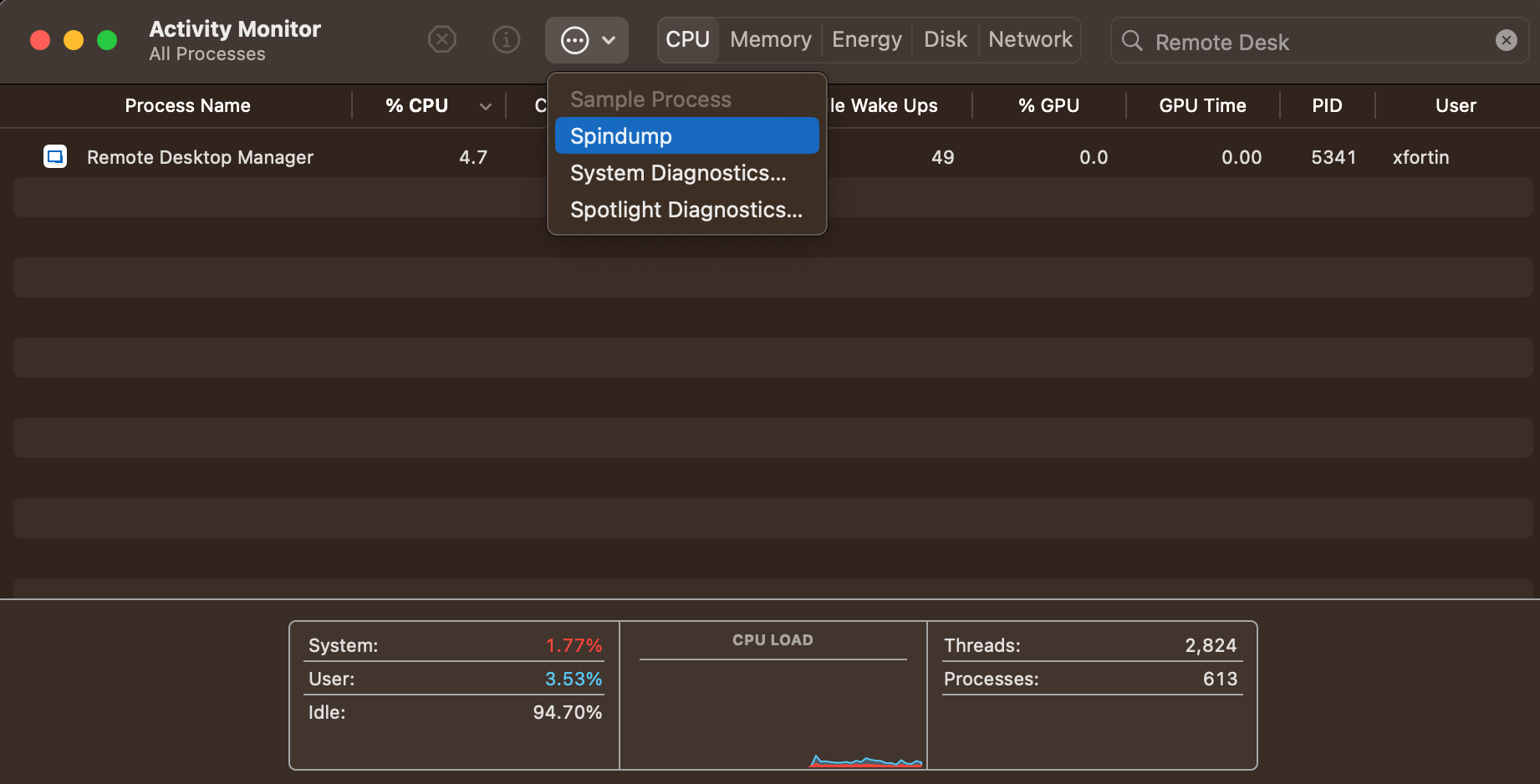
Best regards,
Xavier Fortin
Spindump.png
I only installed RDM after upgrading to Sonoma, so I don't know if it had the same behavior before, sorry.
I reproduced the issue and sent in an error report. I have also attached is the spindump.
Thank you for your assistance.
Spindump.txt
Thanks for this! We've received other reports of such hangs with macOS Sonoma, so I do believe this is most likely the reason for those hangs. We already have a ticket opened, so I will link it to this thread.
Best regards,
Xavier Fortin
Great, thank you!
Hi TimTam,
RDM Mac 2023.2.6.2 is available with a fix for this. Please, do tell us if the issue persists.
Best regards,
Xavier Fortin
Everything seems good now, thank you!
Glad to hear it!
Do not hesitate if you have any other issues.
Best regards,
Xavier Fortin