Upgrade to PS7 level module causes script to stop working properly

I wrote this script a while ago to handle our implementation of CyberArk. When I upgraded to the new PS7 based modules, it stopped working properly. It still sort of works, but not completely. I've got 3 separate credential entries for my admin account, and the first one does not get changed.
Import-Module Devolutions.Powershell, psPAS

function Set-MyRDMSessionPassword {
    [cmdletbinding()]
    param(
        [parameter(Mandatory, ParameterSetName = 'plain')]
        [string]$MyPlainPwd,


        [parameter(Mandatory, ParameterSetName = 'crypt')]
        [securestring]$MyPwd,


        [parameter(ValueFromPipelineByPropertyName)]
        [string]$UserName = $env:USERNAME,


        [parameter(ValueFromPipelineByPropertyName)]
        [string]$CredentialGroup = '_Credentials'  #this is just my credentials group in RDM
    )


    Begin {
        if ('ProcessWindowFinder' -as [type]) {
            Write-verbose -Message '[ProcessWindowFinder] is loaded'
        }
        else {
            Write-verbose -message 'Adding [ProcessWindowFinder] accelerator'
            Add-Type -TypeDefinition @'
using System;
using System.Runtime.InteropServices;


public class ProcessWindowFinder
{
    private delegate bool WindowDelegate(IntPtr hWnd, int lParam);

    [DllImport("user32.dll", SetLastError=true)]
    private static extern uint GetWindowThreadProcessId(IntPtr hWnd, out uint processId);

    [DllImport("user32.dll")]
    private static extern bool EnumDesktopWindows(IntPtr hDesktop, WindowDelegate lpfn, IntPtr lParam);

    public static bool FindByPID(uint pid)
    {
        bool found = false;
        ProcessWindowFinder.WindowDelegate filter = delegate(IntPtr hWnd, int lParam)
        {
            if(!found)
            {
                // test whether this window belongs to the target process
                // if we haven't already found a windows belonging to it
                uint _pid;
                GetWindowThreadProcessId(hWnd, out _pid);
                if(pid == _pid)
                    found = true;
            }

            return true;
        };
        EnumDesktopWindows(IntPtr.Zero, filter, IntPtr.Zero);

        return found;
    }
}
'@
        }


        $RDMPath = (Get-ItemProperty -Path registry::HKEY_LOCAL_MACHINE\SOFTWARE\RemoteDesktopManager -Name InstallationDirectory).InstallationDirectory
        $RDMFilePath = [System.IO.Path]::Combine($RDMPath, 'RemoteDesktopManager.exe')

        $GetMyRDMPID = {
            Get-Process -ProcessName RemoteDesktopManager -IncludeUserName -ErrorAction Stop|
            Where-Object UserName -match $UserName |
            Select-Object -ExpandProperty ID
        }
    }
    Process {
        try {
            $MyRDMProcess = & $GetMyRDMPID
        }
        catch {
            Start-Process -FilePath $RDMFilePath -WorkingDirectory $RDMPath
        }

        do {
            try {
                $MyRDMProcess = & $GetMyRDMPID
                $FoundWindow = [ProcessWindowFinder]::FindByPID($MyRDMProcess)
            }
            catch {
                Start-Sleep -Milliseconds 500
            }
        } until ($FoundWindow)
        Start-Sleep -seconds 1

        $MyRDMSessions = Get-RDMSession -GroupName $CredentialGroup | Where-Object name -match $UserName

        if ($PSCmdlet.ParameterSetName -eq 'plain') {
            $MyPwd = $MyPlainPwd | ConvertTo-SecureString -AsPlainText -Force
        }

        foreach ($Session in $MyRDMSessions) {
            Set-RDMSessionPassword -ID $Session.ID -Password $MyPwd -Refresh -SetSession
        }
        Update-RDMUI
        'Password Update attempt complete'
    }

}
In the old versions of the PS Module, it worked. Now, I get these errors that show up. And as I mentioned, if I wait long enough (typically 90 seconds), the first credential for my account is not updated, but the other two are.
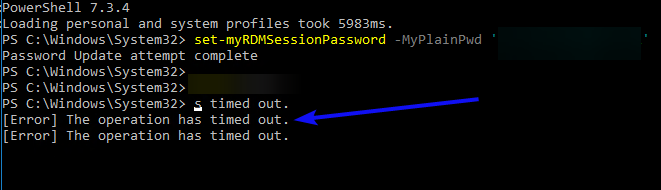
The picture points to the two that are updated with the green arrow, and the red arrow one is not updated.
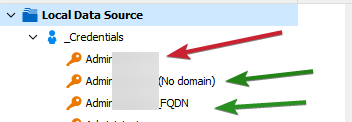
All 3 credentials start with my admin account name
Right now, I'm on the 2023.1.0.7 version of Devolutions.Powershell
Thanks!
David F.
All Comments (16)
Hi David,
Looking at your script, I don't see anything wrong.
The time out errors you receive are nothing to worry about, they are caused by calling Set-RDMSessionPassword with the -Refresh option and Update-RDMUI. More on that further down. You should have a total of 4 time out errors (3 from the set password and one from the ui update) but I only see 3. Unless one isn't showing, that would mean $MyRDMSessions possibly only has 2 values. Could you validate the new module is correctly fetching your 3 sessions?
Back to the time out errors. They only mean the PS module wasn't able to contact RDM to issue a refresh of the running application. If RDM isn't running or an incompatible version is, you'll get this error.
To speed up your script, you could remove the -Refresh option from your call to Set-RDMSessionPassword as the call to Update-RDMUI will do it in one go.
Let me know if this helps.
Regard
Jonathan Lafontaine
Ok.. I'll look at it again tomorrow. I do see 4 of the timeouts, I think I may have cut it off in the screenshot process. I'll catch the session group tomorrow, and turn off the -refresh.
I'll get the version info in the morning.
Thanks!
David F.