Upgrade to PS7 level module causes script to stop working properly

I wrote this script a while ago to handle our implementation of CyberArk. When I upgraded to the new PS7 based modules, it stopped working properly. It still sort of works, but not completely. I've got 3 separate credential entries for my admin account, and the first one does not get changed.
Import-Module Devolutions.Powershell, psPAS

function Set-MyRDMSessionPassword {
    [cmdletbinding()]
    param(
        [parameter(Mandatory, ParameterSetName = 'plain')]
        [string]$MyPlainPwd,


        [parameter(Mandatory, ParameterSetName = 'crypt')]
        [securestring]$MyPwd,


        [parameter(ValueFromPipelineByPropertyName)]
        [string]$UserName = $env:USERNAME,


        [parameter(ValueFromPipelineByPropertyName)]
        [string]$CredentialGroup = '_Credentials'  #this is just my credentials group in RDM
    )


    Begin {
        if ('ProcessWindowFinder' -as [type]) {
            Write-verbose -Message '[ProcessWindowFinder] is loaded'
        }
        else {
            Write-verbose -message 'Adding [ProcessWindowFinder] accelerator'
            Add-Type -TypeDefinition @'
using System;
using System.Runtime.InteropServices;


public class ProcessWindowFinder
{
    private delegate bool WindowDelegate(IntPtr hWnd, int lParam);

    [DllImport("user32.dll", SetLastError=true)]
    private static extern uint GetWindowThreadProcessId(IntPtr hWnd, out uint processId);

    [DllImport("user32.dll")]
    private static extern bool EnumDesktopWindows(IntPtr hDesktop, WindowDelegate lpfn, IntPtr lParam);

    public static bool FindByPID(uint pid)
    {
        bool found = false;
        ProcessWindowFinder.WindowDelegate filter = delegate(IntPtr hWnd, int lParam)
        {
            if(!found)
            {
                // test whether this window belongs to the target process
                // if we haven't already found a windows belonging to it
                uint _pid;
                GetWindowThreadProcessId(hWnd, out _pid);
                if(pid == _pid)
                    found = true;
            }

            return true;
        };
        EnumDesktopWindows(IntPtr.Zero, filter, IntPtr.Zero);

        return found;
    }
}
'@
        }


        $RDMPath = (Get-ItemProperty -Path registry::HKEY_LOCAL_MACHINE\SOFTWARE\RemoteDesktopManager -Name InstallationDirectory).InstallationDirectory
        $RDMFilePath = [System.IO.Path]::Combine($RDMPath, 'RemoteDesktopManager.exe')

        $GetMyRDMPID = {
            Get-Process -ProcessName RemoteDesktopManager -IncludeUserName -ErrorAction Stop|
            Where-Object UserName -match $UserName |
            Select-Object -ExpandProperty ID
        }
    }
    Process {
        try {
            $MyRDMProcess = & $GetMyRDMPID
        }
        catch {
            Start-Process -FilePath $RDMFilePath -WorkingDirectory $RDMPath
        }

        do {
            try {
                $MyRDMProcess = & $GetMyRDMPID
                $FoundWindow = [ProcessWindowFinder]::FindByPID($MyRDMProcess)
            }
            catch {
                Start-Sleep -Milliseconds 500
            }
        } until ($FoundWindow)
        Start-Sleep -seconds 1

        $MyRDMSessions = Get-RDMSession -GroupName $CredentialGroup | Where-Object name -match $UserName

        if ($PSCmdlet.ParameterSetName -eq 'plain') {
            $MyPwd = $MyPlainPwd | ConvertTo-SecureString -AsPlainText -Force
        }

        foreach ($Session in $MyRDMSessions) {
            Set-RDMSessionPassword -ID $Session.ID -Password $MyPwd -Refresh -SetSession
        }
        Update-RDMUI
        'Password Update attempt complete'
    }

}
In the old versions of the PS Module, it worked. Now, I get these errors that show up. And as I mentioned, if I wait long enough (typically 90 seconds), the first credential for my account is not updated, but the other two are. 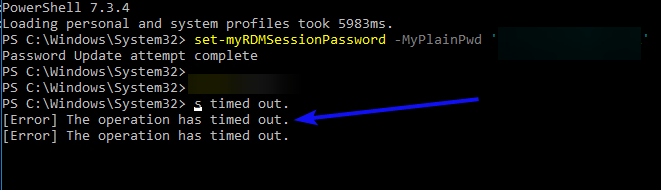
The picture points to the two that are updated with the green arrow, and the red arrow one is not updated.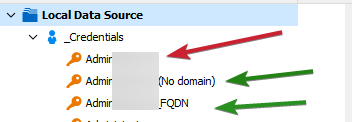
All 3 credentials start with my admin account name
Right now, I'm on the 2023.1.0.7 version of Devolutions.Powershell
Thanks!
David F.
75ae124d-3577-4406-adf4-e30165a8b8b2.png
d30d42a9-a6c2-454f-ae1d-930194cef859.png
All Comments (16)
Hi David,
Looking at your script, I don't see anything wrong.
The time out errors you receive are nothing to worry about, they are caused by calling Set-RDMSessionPassword with the -Refresh option and Update-RDMUI. More on that further down. You should have a total of 4 time out errors (3 from the set password and one from the ui update) but I only see 3. Unless one isn't showing, that would mean $MyRDMSessions possibly only has 2 values. Could you validate the new module is correctly fetching your 3 sessions?
Back to the time out errors. They only mean the PS module wasn't able to contact RDM to issue a refresh of the running application. If RDM isn't running or an incompatible version is, you'll get this error.
To speed up your script, you could remove the -Refresh option from your call to Set-RDMSessionPassword as the call to Update-RDMUI will do it in one go.
Let me know if this helps.
Regard
Jonathan Lafontaine
Ok.. I'll look at it again tomorrow. I do see 4 of the timeouts, I think I may have cut it off in the screenshot process. I'll catch the session group tomorrow, and turn off the -refresh.
I'll get the version info in the morning.
Thanks!
David F.
Ok, I am debugging my script right now.
The $MyRDMSessions does catch 4 sessions as I would expect and they are named (sanitized here)
- admin[user}
- admin{user} (no domain}
- admin{user}_fqdn
- test_admin{user}
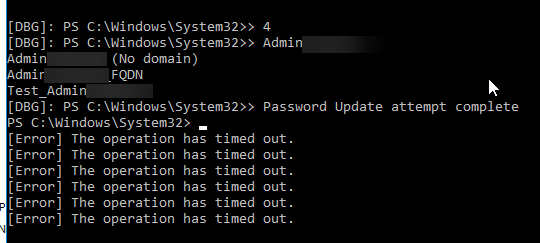
The script did the [error] messages first, and then jumped back up to write the Password Update attempt complete message from my script.
Although, this time, none of the entries had their password updated.
I cleared the breakpoints, closed RDM and reran the command from Invoke-History and it actually worked correctly this time. 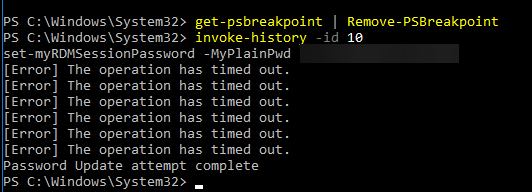
And I'm running 2023.1.23.0 64-bit.
I'll make the adjustments today about the refresh and update-rdmui.
Thanks,
David F.
c39513e2-5670-449b-a408-bd22d2fda28f.png
a10117f3-3492-4c15-bfe1-d1290b312cff.png
24946a59-08bd-405a-a45e-15c99e2b1e37.png
Which version of RDM are you running?
You mention closing RDM and running commands from history. Was RDM running while you executed the script the first time?
Jonathan Lafontaine
64 bit RDM on Windows, and no it was not. That's what the window detection does.. it looks for the existence of an RDM window and if it doesn't find it, then it launches it.
I closed RDM waited like 3 seconds and reran the script.
David F.
Any update?
I tried the script again (after taking out the -refresh) and that got rid of the timeout errors, but nothing was updated at all, even when I reran it.
David F.
Is your workflow like this?
Start script
Script starts RDM
Script update 4 passwords
You go to RDM and check the password value, but password is wrong
Restarting or manually refreshing RDM doesn't help.
Jonathan Lafontaine
I haven't restarted RDM and then checked.. I've always shut it down, reran the script and that launched it again.
I will try that in the morning and report back.
Thanks :-)
David F.
I checked it again this morning, and when I restarted RDM, the passwords did show correctly on all the entries.
David F.
Glad to know it worked this time around.
Let me know if it stops working.
Regards
Jonathan Lafontaine
Well, why am I having to start RDM twice? I can script that if I have to, but it used to work the first time every time.
David F.
What I think is happening is for some reasons, the PS module cannot communicate with RDM so your changes aren't visible.
You don't need to have RDM opened for the module to properly do its job. To avoid the need to restart RDM to see your changes, you could start RDM once at the end of your script.
Jonathan Lafontaine
Ah.. I thought RDM had to be loaded first.. I'll adjust that and change it. Do I need the update-RDMUI in that case? (I'm assuming I don't)
I'll report back in a few minutes.
David F.
Your assumption is correct, you don't need Update-RDMUI in that case.
Jonathan Lafontaine
That worked. Thank you very much. In case anyone else is interested:
Since RDM doesn't need to be launched first, I trimmed that part out, and added a check in case it's already running.
Import-Module Devolutions.Powershell

function Set-MyRDMSessionPassword {
    [cmdletbinding()]
    param(
        [parameter(Mandatory, ParameterSetName = 'plain')]
        [string]$MyPlainPwd,

        [parameter(Mandatory, ParameterSetName = 'crypt')]
        [securestring]$MyPwd,

        [parameter(ValueFromPipelineByPropertyName)]
        [string]$UserName = $env:USERNAME,

        [parameter(ValueFromPipelineByPropertyName)]
        [string]$CredentialGroup = '_Credentials'
    )

    Begin {

        $RDMPath = (Get-ItemProperty -Path registry::HKEY_LOCAL_MACHINE\SOFTWARE\RemoteDesktopManager -Name InstallationDirectory).InstallationDirectory
        $RDMFilePath = [System.IO.Path]::Combine($RDMPath, 'RemoteDesktopManager.exe')

        $GetMyRDMPID = {
            Get-Process -ProcessName RemoteDesktopManager -IncludeUserName -ErrorAction Stop|
            Where-Object UserName -match $UserName |
            Select-Object -ExpandProperty ID
        }
    }

    Process {
        $MyRDMSessions = Get-RDMSession -GroupName $CredentialGroup | Where-Object name -match $UserName

        if ($PSCmdlet.ParameterSetName -eq 'plain') {
            $MyPwd = $MyPlainPwd | ConvertTo-SecureString -AsPlainText -Force
        }

        foreach ($Session in $MyRDMSessions) {
            try {
                Set-RDMSessionPassword -ID $Session.ID -Password $MyPwd -SetSession
                'Updated session name {0}' -f $Session.Name
            }
            catch {
                Write-Warning -Message ('Failed to update session {0}' -f $Session.Name)
            }
        }
        'Password Update attempt complete'

        try {
            & $GetMyRDMPID
            'RDM Currently launched, attempting to update the UI, but you may need to close RDM and relaunch it'
            Update-RDMUI
        }
        catch {
            Start-Process -FilePath $RDMFilePath -WorkingDirectory $RDMPath
            'RDM Launched'
        }
    }
}My pleasure.
Glad you got it working!
Jonathan Lafontaine