Setting DataSource for PowerShell Module

Hi,
We're trying to make a script to automatically install the powershell module and connect to our SQL database (this is for an automatic integration with AutoTask we are developing for internal use). When we connect to our database everything works fine until we close the powershell session. When we open a new powershell session after the first session was closed, the datasource used by the devolutions.powershell module is reset to the one it was using before our script ran. Here you find the relevant piece of code from our script:
$password = 'XXXXXXXXXXXXXXXXXXX' | ConvertTo-SecureString -AsplainText -Force
$DS = New-RDMDataSource -SQLServer -Database "RDM" -Server "<ip-addres>" -Name "SQL data source AWS" -username <username> -password $password -SetDataSource
Set-RDMDataSource $DS
$DS = Get-RDMDataSource -Name "SQL data source AWS"
Set-RDMCurrentDatasource $DS
We would want it to keep using the "SQL data source AWS" datasource we set with our script in every powershell session we open.
Thanks in advance!
Ruben
All Comments (9)
Hello,
Thank you for contacting us on that matter.
Is the PowerShell session running in a specific user context?
A solution would be to set the default configuration files path to be able to reuse it every time the script is running. Please see Use an Override Configuration (Portable) to know how to modify this path.
Let us know if that helps.
Best regards,
Érica Poirier
Hi,
The PowerShell session would run on a linux (Debian) environment and would be called by the exec command form PHP. But we are experiencing the same problem when we try to do everything manually by calling a PowerShell session with the pwsh command in bash.
Remote Desktop Manager itself would not be installed on this machine, which path would we need to use in this case?
Greetings
Ruben
Hello,
Thank you for feedback.
The solution I provided is for a situation where the data source you have created on the previous PowerShell session no longer exists.
Could you please verify if the data sources previously created still exist with the Get-RDMDataSource cmdlet?
If you see a bunch of "SQL data source AWS" data sources, then you can delete all except one using the Remove-RDMDataSource cmdlet.
You should also see a data source named Local Data Source. You can also delete it.
Finally, if there is only one "SQL data source AWS" data source, then no need to create it again and by default, the PowerShell module will use this data source.
Let us know if that helps.
Best regards,
Érica Poirier
Hi,
When a new session is started only the "Local Data Source" data source is shown after running the Get-RDMDataSource cmdlet even though the "SQL data source AWS" datasource was there in the previous PowerShell session.
Greetings
Ruben
Hello,
Thank you for your feedback.
It seems that when you start PowerShell from PHP, it uses a new context every time.
As the Devolutions PowerShell module cannot find any configuration files, it automatically creates them and have the Local Data Source created by default.
A solution would be to override the default configuration using the method I sent you previously to a folder on you Linux machine you have appropriate permissions to create, update and delete files. Then, you create your data source only once. And every time you start PowerShell from PHP, you just have to set the the configuration file to use the ones in this folder.
For your information, we will update the article online so it will mention that this is for the Devolutions PowerShell module configuration files as well and not just RDM!
Let us know if that helps.
Best regards,
Érica Poirier
Hi,
We have made an empty RemoteDesktopManager.cfg file and used the commands below to set the override configuration file.
$override = Get-RDMPowerShellOverride
$override.OptionFilePath = "/AutoTask-RDM-scripts/RDM-Config/RemoteDesktopManager.cfg"
Set-RDMPowerShellOverride
Unfortunately this does not seem to fix the issue we're having. Our RDMLicense does stay saved when we open a new session but our database connection does not. (This was already the case before.)
Greetings
Ruben
Hello,
Thank you for your feedback.
Out of the override configuration file, is the user account you use to run the PowerShell script has a home folder? If so, RDM on Linux use ~./rdm folder to store the required configuration files, and as well as the Devolutions.PowerShell module even if RDM is not installed on this machine.
Could it be because this account doesn't have a home folder that you can retrieve the SQL data source when you open a new PowerShell session?
Best regards,
Érica Poirier
Hello,
The user account we are using has a home folder which contains the .rdm folder. In the .rdm folder are a lot of folders and some files (see screenshot below). I also tried setting the PowerShellOverride to the ~/.rdm folder but this also did not work. 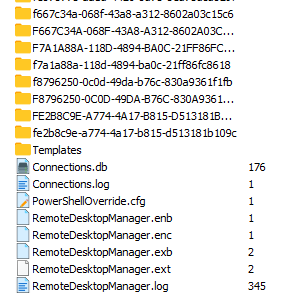
Best regards
Ruben
946750fb-f680-4a47-8334-9121ad5c6cee.png
Hello,
Thank you for your feedback.
We will try to reproduce this behaviour on a Linux Debian machine and we will keep you posted.
Best regards,
Érica Poirier