Export entries with permission and then import them to other database

We are setting up two new DVLS instances , one PROD and one TEST
We have set up all in TEST database with a structure and permissions set to this with Azure AD groups.
When i export entires and import this to the PROD database the permissions are gone. Is there a way to export and import and retaining the permissions that is set ?
Both instances uses the sam Azure AD and groups.
When importing i get this information but choosing "Keep configured permissions" still leaves the entry with no permissions set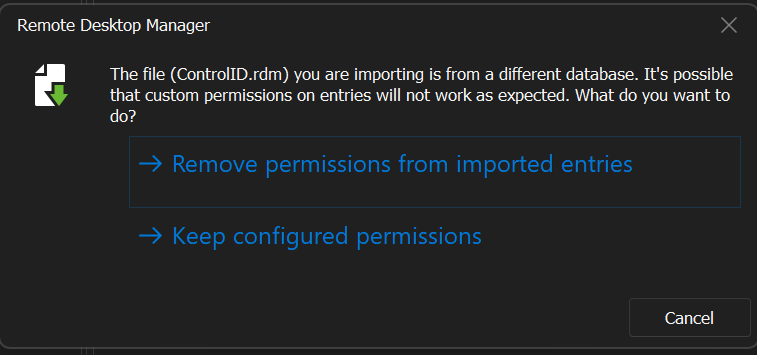
3e62f32a-1191-440e-aaaa-2f9da975cd31.png
All Comments (5)
Hello,
First, could you please confirm what version of Devolutions Server you are currently using, and if those versions are the same on both instances? Since 2022.3, the SID of the Azure groups, instead of the name of the groups, are used for the permissions, which may explain the behavior.
Could you also confirm that the AzureAD groups are already imported in the PROD instance? If they are not imported, it will not work.
Best regards,
Richard Boisvert
yes, the groups is imoprted before trying to import the entries.
both instanes run 2023.1.6.0
Hello,
I verified with the engineering team and the ID of the permissions if the ID of the group in Devolutions Server, it is now based on the SID. This means that you will not be able to keep the permissions from your test environment.
Since the keep permission is not working for you, I take it your test environment was not a copy of your prod environment - https://docs.devolutions.net/kb/devolutions-server/how-to-articles/create-server-staging-instance/ ? If that is the case, the only way to make it work would be to copy the group table in SQL, but it would break your existing permissions, so it is not an option.
Best regards,
Richard Boisvert
Ahh ok. Didn´t think of doing a copy of the database :) Worked fine by doing that and no problem at all doing that since it all a new set up.
One more thing though that i noticed.
We are using a lot of Groups to set premissions but when i look in the Administration page and User groups it only lists 10 groups, there is no next page or anything like that. I need to start typing in the "filter" to find other groups than the first 10 ones
Hello,
Glad to see that fixed your issue!
For the user groups, in the bottom left corner, you can select how many are displayed (10 by default), and in the bottom middle, you can change page:
Best regards,
Richard Boisvert
e85f2336-230c-4e00-8934-4da530dc56d8.png