Username changed in AD to lower-case -> not reflected in DPS -> assigning vaults via script fails
Username changed in AD to lower-case -> not reflected in DPS -> assigning vaults via script fails

hi,
we just noticed that changing usernames in AD are not reflected in DPS database.
Please let me know how we could update the DPS usernames to reflect the correct case.
We use the PowerShell module "Devolutions.PowerShell" to update the Vaults assigned to users (Set-DSVaultUsers) which does not work with users written in lowercase but having uppercase chars in the DPS database.
Previously we used the PowerShell module "Devolutions.Server" (also with an older DPS version back then) where it worked just fine (providing usernames in lowercase assigned vaults to usernames with uppercase chars).
Example:
username in AD: 'gpunktschmitz@example.org' which was originally 'GPunktschmitz@example.org' and changed manually in AD
username in DPS: 'GPunktschmitz@example.org'
KR
Guenther
All Comments (6)
Hello Guenther,
In the web interface of your Devolutions Server, could you go to Administration > Users, could you click on "Refresh all users information from AD" in the top right corner. If should refresh all the user info from AD, and then it should fix your issue.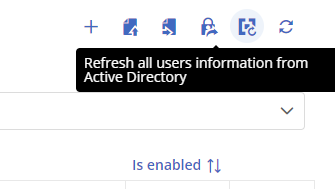
If it does not help, we can always run a SQL query, but I will first check with the engineering team to see to verify why the information is not updated.
Best regards,
Richard Boisvert
7ec2475c-92e5-40ed-b30b-8cb5093853f1.png
hi Richard,
This button does not exist - I was not involved in the installaion/setup process of DPS and don't know why this button does not exist.
But our "onboarding"-process is like the following: a user opens RDM for the first time -> a DPS-user with the same upn gets created in DPS-backend
Thus I assume there is no link to AD for DPS to update from?
But that's my wild guess.
I'd like to ask for the SQL query and verify with the person in charge if the "super-admin" sees this button.
KR
G.
Hello Guenther,
Could you confirm what version of Devolutions Server you are running? If the button does not exist, you are using version 2022.2 or below.
I will send you a SQL script via PM that will allow you to rename the user.
Best regards,
Richard Boisvert
hi Richard,
we are running DPS 2023.1.5.0
What options have to be enabled to have that button? maybe it is because it is set up to only "microsoft user" but not "domain user"?
KR
G.
Hello Guenther,
I apologize for the confusion earlier. I failed to realize that you were using AzureAD for authentication, as the option I mentioned is only available with domain authentication.
In this case, please utilize the SQL script that I sent to you via private message.
Best regards,
Richard Boisvert
Hello Guenther,
Alternatively, you could use the authentication migration if you are using the 2023.1 version of Devolutions Server (found under Administration > Users or Administration > Server Settings > Authentication). Select the source and destination to Microsoft, and you will be able to reimport the information for that user: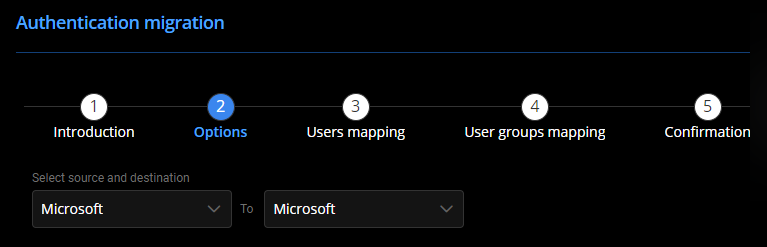
Best regards,
Richard Boisvert
015cd89e-7ea9-4a60-b6b1-6572a38ad053.png