DVLS: RDM Version Restriction after Update

After updating to 2023.1.10.0 all Users cannot connect anymore to our DVLS Server via RDM due a Version Restriction: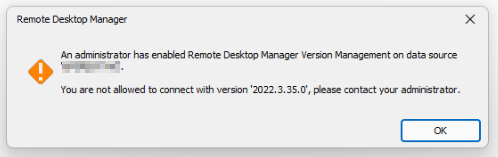
In Version Management, there are no restrictions set.
Ive also tried it to Set minimal and maximal version. Also the Option "Disable checks for updates" will be ignored.
Same when RDM is udpated to 2023.1.10.0
We have the Problem on both Servers in our DVLS Cluster.
For now, i just restored the DVLS Servers back to 2022.3.13.0
Any Inputs would be great.
Best Regards,
Andreas
image.png
All Comments (4)
Hello Andreas,
I'm sorry to hear about the difficulties you had. There is a minimal version set to 2023.1.0.0 built-in, even if you specify a previous version as minimal version, that version will be applied. But if I understand correctly, you even have the issue with an RDM 2023.1.10.0, am I right ? If it is the case, that's bad. RDM 2023.1.10.0 should be able to connect to DVLS. I will try to reproduce and let you know.
I'm sorry for the inconvenience,
Best regards,
François Dubois
Hello Andrea,
I tried to reproduce, without success. Just to confirm, you tried with DVLS 2023.1.3.0, correct ? If you try with RDM 2022.3.35.0 to access your DVLS server, it is normal to get the error since we force the minimal version to 2023.1.0.0 as I said. But if you try with RDM 2023.1.10.0 and you get that message, that's not normal, but I can't reproduce. Please let me know if you have the issue even with RDM 2023.1.10.0. If it is the case, could you send me what is your version management configuration (if you have something specific) ?
Best regards,
François Dubois
Hey Francois
Good to know.
Maybe it was a cache Problem. I will retry on another Machine and come back if the Problem still exists.
Thanks and sorry,
Andreas
Edit:
Since there is the newest Release hidden in Custom Installer Manager until an unknown amount of time, can you please give me an Instruction how to use RDI Files with the regular MSI Package?
We are only deploying via Packages (also on Test Servers) to get on all Systems the identical Configuration.
I think this Release Hiding Feature doesnt makes sense, when releasing Security Hotfixes or Bugfixes for previus Versions.
Thanks,
Andreas
Hello Andreas,
Regarding the RDI file, you will find the information on this online documentation page on how to create it.
https://help.remotedesktopmanager.com/installation_installerfilegeneration.html
Then, on step 4 and 5 of this online help page, when creating the Custom Installer package, it explains how to use the RDI file.
https://help.remotedesktopmanager.com/installation_custominstallermanager.html
Let me know if that helps.
Best regards,
Érica Poirier