Version 2023.1.3.0 (March 14th 2023)

Database upgrade required
If you are using RDM as the client, RDM 2023.1 is required for this DVLS version
NEW FEATURES
Core - Added support for global images
Core - An issue on an entry can now be reported to notify administrators
Core - Notifications can now be sent to devices running Workspace
PAM - Added a function to generate script headers of AnyIdentity Providers
PAM - Added a function to test PowerShell scripts of AnyIdentity Providers
PAM - AnyIdentity Providers can now be imported/exported
Web - Added System Dashboard to display services state
Web - Improved the dashboard to be customizable
Web - RDP session can now be launched through Web Client (via Devolutions Gateway)
Web - VPN/Gateway can now be edited in Web Interface
IMPROVEMENTS
Core - Added a new contact type Team/Department
Core - Added a new IT Asset data entry type
Core - Added a new vehicle data entry type
Core - Added a report to find connections with specific status
Core - Added a warning message if less than 10% of a license is available
Core - Added an Archived and Broken Entry status
Core - Added contact link support in Software/License entry
Core - Added many reports in the scheduled report list
Core - Added password generator button in certificate entry
Core - Added the possibility to assign a contact to the credit card owner
Core - Microsoft Authentication cache can now be deactivated
Core - User information from Microsoft users are now synchronized with DVLS users
Gateway - A reg file or a PowerShell Script can be downloaded to configure KDC proxy
PAM - Added a link to PAM Provider GitHub repository in AnyIdentity Templates
PAM - Added timeout setting for SSH local user provider
PAM - Renamed Custom Providers by AnyIdentity Providers
Web - Added custom fields edition
Web - Information on dashboard can now be clicked to see the specific information
Web - Moved DVLS license information under Administration → License
Web - Vaults can now be searched by description
FIXES
Core - Fixed an issue where authentication cache was used even if it was disabled
Core - Fixed an issue where copy password button was not available in the overview when it should
Core - Fixed an issue where message about http connection in system dashboard was displayed even if the connection was https
Core - Fixed an issue where scheduled AD synchronizer created incorrect folder names
Core - Fixed an issue where users were not logged in even if the credentials were valid
Core - Fixed issue where administrators were not able to use Launcher
Web - Minor UI fixes
Web - Several UI fixes
## CONSOLE RELEASE NOTES ##
NEW FEATURES
Added a new basic mode to install Devolutions Server
Recovery Kit can now be generated on demand
Recovery Kit can now be saved in Azure Key Vault
IMPROVEMENTS
Display release notes in HTML format
License Agreement is not displayed anymore, always available through an hyperlink
LTS version doesn't exist anymore, renamed by "stable"
Minor UI fixes
Recording server is now started with LocalSystem instead of LocalService
FIXES
Fixed an issue where activating encryption at rest failed
Fixed an issue where license type doesn't update in Web interface if license is entered through DVLS console
Érica Poirier
All Comments (3)
How does this feature work? RDP session can now be launched through Web Client
I just updated Devolutions Server. When I click on open session it says to open RDM, like it always did.
Hello,
The web RDP sessions can be launched directly from the web interface of your Devolutions Server, but it also required the Devolutions Gateway: https://devolutions.net/gateway/. It also requires an RDM or a Launcher license.
It can be installed side-by-side on your Devolutions Server for up to five concurrent sessions, or it needs a license for more sessions or to be installed on a different server.
Let us know if you would like more information.
Best regards,
Richard Boisvert
Hello,
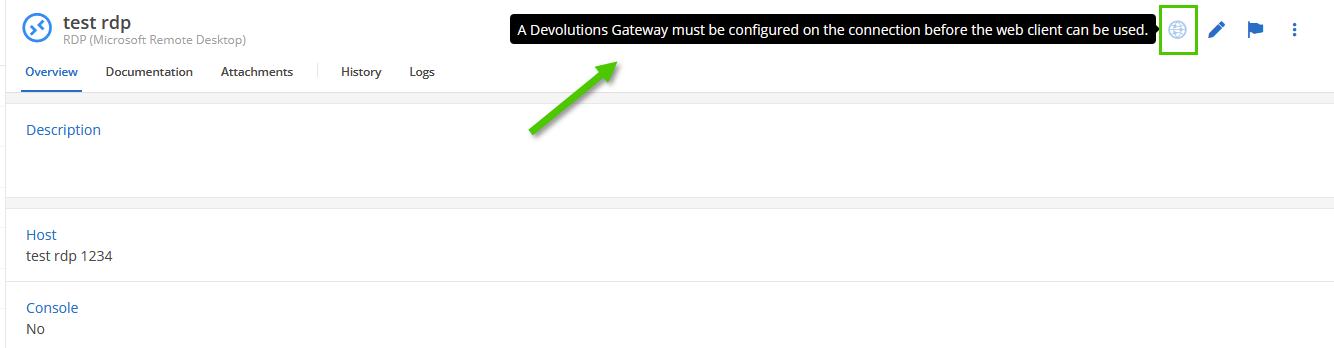
For your information, the latest DVLS version 2023.1.4 now displays the reason why the RDP session cannot be opened through web client.
Best regards,
Érica Poirier