PowerShell script for Password Hub export

Hello
I'm testing the exports from Password Hub using the scripts supplied but i got this error:
Get-HubVault : An error happen with the Hub context. (No Hub context found for the current session. Please ensure that
you run Connect-HubAccount to login, select a Hub context with Select-HubContext command, set a new Hub context with
Set-HubContext or import a Hub context from a file with Import-HubContext.)
Please, what is missing?
System Win 11 pro, execute also specifying the Version 7 in Powershell's command.
Thank you
Regards
All Comments (7)
Hello Samuele,
Just in case the issue is cause by an older version of the RDM module, can you run the following:
Update-Module -Name RemoteDesktopManager
Could you please make sure the following works?
Connect-HubAccount -Url https://yourhub.devolutions.app/ -ApplicationSecret [YOUR_APPLICATION_SECRET] -ApplicationKey [YOUR_APPLICATION_KEY]
If you need to create an application user, please go to Administration – Application Users - https://helphub.devolutions.net/hub_application_users.html
Best regards,
Richard Boisvert
Hello
The RDM is updated and this is the session management:
<# Register PSGallery if not #>
Register-PSRepository -Default -erroraction 'silentlycontinue'
<# Install Devolutions Password Hub PowerShell Module #>
Install-Module -Name RemoteDesktopManager
<# Connect #>
Connect-HubAccount -Url $url -ApplicationKey $appKey -ApplicationSecret $appSecret
<# Export #>
$entries;
$vaults = Get-HubVault <# Will get all vaults this application user have permission #>
The script has been downloaded by the Password Hub.
The application user is active:
I'm in the trial version, could be the cause?
The first exception raised is
Connect-HubAccount : The type initializer for 'Devolutions.Cryptography.Native' threw an exception.
At C:\Users\samuele.ghilardi\OneDrive - Datatex\Documents\Memo\POC\Password-manager\export-devolutions.ps1:22 char:1
+ Connect-HubAccount -Url $url -ApplicationKey $appKey -ApplicationSecr ...
+ ~~~~~~~~~~~~~~~~~~~~~~~~~~~~~~~~~~~~~~~~~~~~~~~~~~~~~~~~~~~~~~~~~~~~~
+ CategoryInfo : NotSpecified: (:) [Connect-HubAccount], TypeInitializationException
+ FullyQualifiedErrorId : System.TypeInitializationException,Devolutions.Hub.PowerShell.Cmdlets.Commands.ConnectHubAccount
Also executing the command Connect-HubAccount directly.
Thanks
Best Regards
Screenshot 2023-02-15 152919.png
Hello Samuele,
Being on the trial will not impact the script from running.
Could you confirm what version of the RDM PS module you are using by running Get-RDMInstance
Can you also confirm what version of PS 7 you are using? Get-Host | Select-Object Version
Using PS 7.3.2 with the RDM PS module 2022.3.1.4 (latest), I can connect without issue on my test instance.
Best regards,
Richard Boisvert
Hello
reinstalling PowerShell 7 resolved the execution of the script.
It has been exported 2 vaults, in one of two are missing the connection credentials.
The other seems complete.
Thanks
Regards
Hello Samuele,
Glad to hear reinstalling PowerShell 7 fixed the connection issue.
Are the credentials configured in the problematic vault? Are they linked credentials, configured directly in the session, or assigned via user specific settings?
Best regards,
Richard Boisvert
Hello
as example I'm attaching a screenshot with a credential and generated file (in which is missing),
Thank you
Regards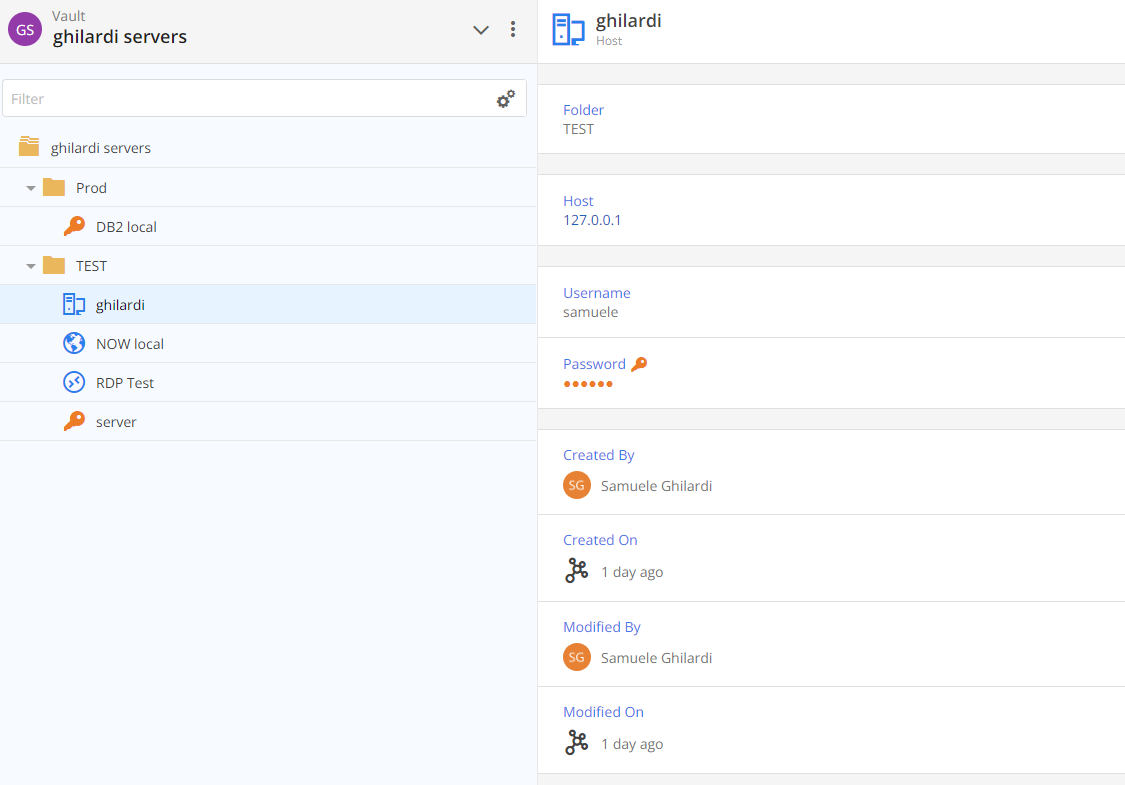
Screenshot 2023-02-15 164423.png
exported-entries-from-ghilardi servers.csv
Hello,
There seems to be an issue with a host entry and the following fields:
- Connection.HostUserName
- Connection.HostPassword
I will verify with the engineering team what could cause the issue.
Best regards,
Richard Boisvert