Would like a report for the accounts in various vaults that generates their current password length
Would like a report for the accounts in various vaults that generates their current password length
0 vote

Require a report to be generated from Devolutions that outlines the password length of accounts in various vaults.
All Comments (13)
Hello,
We already have a feature request to add the Password Analyzer report in DVLS Web Interface. This report is already available in RDM. Would it work for you ?
Best regards,
François Dubois
Hi François,
What Karl is asking is to be able check whether passwords stored in DVLS PAM meet the criteria specified by the associated password template that is assigned to an individual credential or vault/folder. The report currently available in DVLS seems to be limited to analyzing only the credentials stored in the regular/generic vaults, not the PAM vaults. In addition, its not whether the password is strong/weak that needs to be assessed, but instead whether it meets the criteria that is defined in the respective password template.
Please let me know if you would like further clarification.
Thanks
Joe Marriott
Hello Joe,
Thank you for clarification, I understand your need. You are right, we don't have a such report to get information on PAM credentials. I will create a feature request ticket and discuss that internally.
Best regards,
François Dubois
Hello Francois, any update on this one?
Hello,
Unfortunately, we didn't work on that in the last months. We are releasing a new version in a few days/weeks than I will have a look if we could work on that for the next release. I can't confirm you that it will be possible to add it on our roadmap, but I will try.
Best regards,
François Dubois
Hello Joe,
I had a discussion with colleagues and I would like to know more on your needs. I would like to understand why you need a such report because in a PAM, the password should be reset after use and the password will be regenerated based on a password template. So it means that all passwords should follow your password template. It means that all passwords should be strong and you should not have to validate it in a report.
I can understand in a few situations that you could need that report, The password reset is optional, you can set the password manually even if it is not a good practice so you could have password that doesn't respect the password template, it is true. But it should be an exception in a PAM. What is your situation to suspect password to not respect the password template ? Do you reset your password after use ? Do you set some passwords manually ? Is it because you changed your password template and you would like to reset all passwords to be sure that all passwords respect the template ? Let us know, it could help us to prioritize your request with all other requests received. Thank you.
Best regards,
François Dubois
Hi François,
Thank you for looking into this and discussing with your collegues. Some example scenarios for when this would report would be helpful include:
1) If an organization consolidates all their known credentials from other sources (or PAM solutions) into DVLS PAM without also resetting the password during the migration, it would useful to then run a report to identify which of the credentials require a password reset to allign with the complexity defined in the template.
2) When a credential gets created with an unsecure password (i.e a new service account in AD), then added to DVLS PAM, it could be flagged in a scheduled report as not aligning to the template. In the case of service accounts being used elsewhere there is often coordination required to reset the password, for example updating the runas account for an IIS application pool identity, so the check in / out workflow may not apply.
3) Sometimes an individual may manually set the password for their privelleged account stored in PAM to something that is conveninent to remember (or type). Being able to identify when this occurs would improve security.
Please let me know if you would like any further details.
Joe
Hello Joe,
Thank you for your reply. I understand that it could be useful in some situation. We have a ticket in our backlog, we will prioritize it and let you know when we have something to fill that need.
Best regards,
François Dubois
Hello François,
Circling back on the ability select a specific password template in the Entry Security Analyzer. Currently the report accomodates detecting whether passwords are weak/strong etc, but looking for a way to validate if they comply with password template set on credential/provider?
Please let me know if you would like any additional info.
Thanks
Joe
Hello Joe,
Unfortunately, I don't have an ETA available for that feature. I will raise the subject again though, and see what can be done to improve that and if we have enough work force to do that short/mid term.
Best regards,
François Dubois
Thank you François
We have an additional use case where we would like to show the account status as out of compliance if the password has not changed in the required period. I know that for PAM, most/all passwords would be changed by automation of several kinds, but the compliance team wants to trust and verify that all the automations are in place and working as expected.
Hello,
Thank you for your request. We already have a report where it is possible to view the password last update. I don't know if it is what your compliance team is looking for, but I think you could have a look to that report. Otherwise, I assume you would like to define what is required to be compliant, like password has to be reset in the last 30 days or something like that ?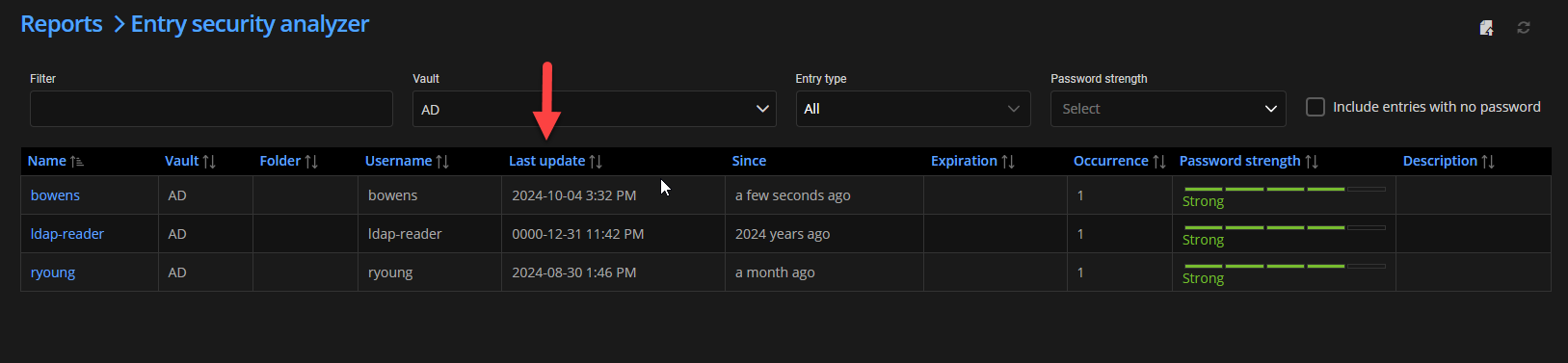
Best regards,
François Dubois
44379f37-096b-4a57-9789-3b5f1b4a98be.png