RDM application is slow

Hello
There have been multiple post regarding slow RDM on Linux, but it seems that it doesn't get resolved.
Our Linux users keep complaining that the application is slow to load after they completed the MFA-challenge.
When the application finally is done loading, it is workable, as long as you only want to consult entries.
If the linux user has to perform any modifications (move or edit for example), it is once again extremely slow.
After a click, they have to wait more then a minute.
When benchmarking against Windows, it is ridiculous what the difference in time is.
The fact that RDM is so slow is triggering a lot of our users to no longer use RDM, what is completely defeats the purpose why we introduced RDM.
Our Linux users are using version 2022.3.0.8 on Ubuntu 20.04 LTS & 22.04 LTS.
We use a MS SQL data source.
With kind regards,
Nick
All Comments (16)
Hi Nick,
Do you think you could give us more information about the data source your users have been using? What type of data source and how many entries it might have?
Nicolas Parr
Hello Nicolas
Sure, as said above, it's a MS SQL data source with 14 vaults + the User Vault.
For our Linux users, only 2 vaults are visible + User Vault.
I don't know how many entries they have in their User Vault, but one vault has about 25 entries.
The other vault, the one that they are using most of the time has a lot of entries (almost 11K, I know, only 8K recommended but we havn't found a solution to reduce that number yet).
Of all those entries, maybe half (or even less) of all these are visible for the Linux users.
For comparison, most Windows users have around 10K entries visable without any issues.
With kind regards,
Nick
Hi Nick,
Since there has been a couple of change in the version 2022.3.1.3 that we just released, can you tell me if these issues still occur?
Regards,
Gabriel Dubois
Hello Gabriel
I'll request our Linux user to update the client and test.
When I receive an update from them, I'll let you know.
With kind regards,
Nick
Hello
So after collecting some feedback of the Linux users, the overall impression seems that it might be even slower.
Ubuntu is often reporting the application as unresponsive and is asking to force quit the application.
Furthermore, after login, the application needs 3 minutes to be responsive (if Ubuntu hasn't decided by then that it is unresponsive and is requesting to close it), a sync needs one and a half minutes to complete and when trying to modify an entry, the users almost instantly receive the pop-up saying that RDM is unresponsive and asking to force quit the application.
A quote of one the users is "It's by now literally faster to open Ansible/VSCode and decrypt the secret than using RDM". I don't think that this can be acceptable. The goal of using RDM is to make work easier, not harder.
With kind regards,
Nick
Hello Nick,
I completely agree that this kind of slowness makes RDM unworkable. This issue is currently a high priority on our side.
Can you tell me what feature is used in this data source; a lot of sub connections?, a lot of variables in connection settings?, a lot of tags?, how many favorite entries do these users have?
Is the user vault faster than shared vaults? / Is the vault with about 25 entries is faster than the one with almost 11k entries? Or it is all the same speed?
Is it still slow in offline mode?
Regards,
Gabriel Dubois
Hello Gabriel
As far as I know, we don't have any sub connections.
There are a few tags, but I don't think that it are many. What do you quantify as many tags?
Could you elaborate what variables in the connection string you mean?
I've done some testing with our Linux users, and apparently one of them has switched to Windows because of the issue.
It works perfectly on Windows and only the initial load of the huge vault takes some time, but is a lot faster compared to Linux (still the same user, same privileges, same number of entries showing).
Those that are using on Linux have mixed experiences, it seems that only a few of the Linux users are experiencing a slower application after the update. Those users are part of the same team and is probably some software that is in conflict, maybe because of the single threaded behavior (see below). They are further investigating this.
Overall, the application works less "stuttery", but has still the speed of a snail compared to the Windows users.
The one I found that uses their personal vault, says that the personal vault is a lot faster compared to the shared vaults.
A few are using favorites. They have a maximum of 25 favorites.
What we noticed is, that when loading the vault, one of the CPU threads is at 100% utilization. We don't see that behavior on Windows. It seems that on Windows it works multi-threaded compared to Linux, or at least a lot more efficient. On Windows we don't see 100% core utilization. The loading of vaults are a lot more efficient. Even lower end devices (dual core i5) are not struggling. Our Linux users are using high-end laptops (most of them have Core i9 CPU's). I've asked them to monitor the CPU behavior when doing modifications.
I created a few test vaults with dummy entries and asked the Linux users to do some tests in these vaults. The smaller the vault, the faster it operates.
This makes sense to what was said before, but how could there be such a huge difference compared to Windows?
Size doesn't seem to affect Windows, only the number of active users at once in the same vault seems to be impacting modification operations.
A potential hypothesis that one of the Linux users had is that on Linux, all entries are fetched, no matter the privileges, and once in the application only the entries where one has permission on are showed. That doesn't seems logical to me, since the access of a user is on the database and not application.
I hope I was able to provide you with more insights to the slow Linux application, especially compared to Windows.
I'll keep you posted when I have collected the findings of the CPU behavior when performing modifications on Linux.
If there are any questions in the mean time, or additional information is desired, please let me know.
With kind regards,
Nick
Hello Nick,
Thank you for this good investigation and clarification! It help us a lot.
What do you quantify as many tags?
Is the majority of the entries associated with one or more tags?
Could you elaborate what variables in the connection string you mean?
Is a good part of your entries use text surrounded by $ (or %) in their settings? (Any variable in these lists)
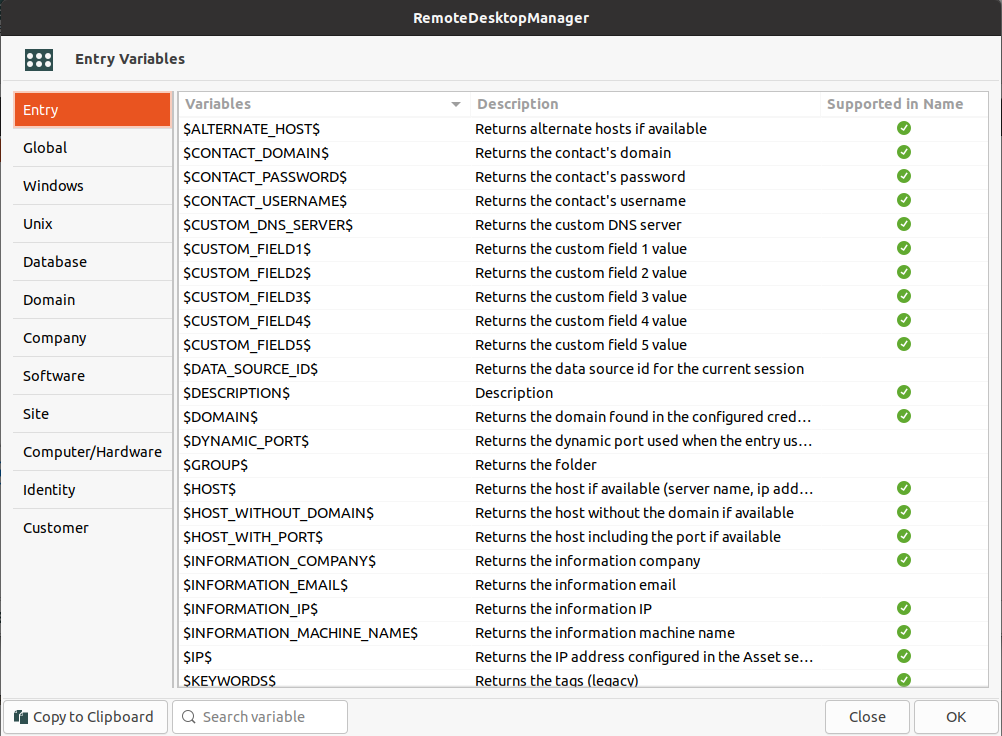
We continue to investigate with these informations.
Regards,
Gabriel Dubois
Screenshot from 2023-02-01 10-20-20.png
Screenshot from 2023-02-01 10-33-20.png
Hi Nick,
With RDM Windows, can you send me the result of the data source diagnostic?
You can find this in Help > Diagnostic in the Data Source tab.
Regards,
Gabriel Dubois
Hello Gabriel
I hope you had a great weekend.
Sure, it was a bit easier to send it via DM.
With kind regards,
Nick
Hello
A few users are reporting that in the latest version (2022.3.1.3) that the application is no longer willing to launch.
Below is the feedback they were able to receive.
$ remotedesktopmanager
(RemoteDesktopManager:17944): Gtk-CRITICAL **: 13:28:05.548: gtk_widget_grab_default: assertion 'gtk_widget_get_can_default (widget)' failed
(RemoteDesktopManager:17944): GLib-GObject-CRITICAL **: 13:28:28.507: g_object_remove_toggle_ref: assertion 'G_IS_OBJECT (object)' failed
Segmentation fault (core dumped)
They don't receive any feedback in the GUI.
The O.S. they are running is Ubuntu 22.04 LTS.
With kind regards,
Nick
Hello Nick,
We are not able to reproduce the crash but we are currently investigating.
Regards,
Gabriel Dubois
Hi Nick,
Could you tell us what windowing manager your users are running ?
And also if they try switching the windowing manager, is there any change with their ability to launch RDM ?
Regards,
David Ringuet
Hello David
Apperantly the user was using Wayland and switched to Xorg as X-server and the crash is no longer happening.
I've asked other what they are using. Some are able to use Wayland without issues, but most use Xorg and some GNOME.
With kind regards,
Nick
Hello, i am testing in PopOS and love it RDM, but its true that its slow in Linux, when i change between sessions RDS or edit entries, etc... and i have a strange error with the clipboard use, if i copy and paste between windows RDS sessions can i copy/paste, but between Linux host and RDS session not works ¿???
Hello virusbcn,
Could you show us a video of your clipboard problem? I don't seem to reproduce your issue.
Simon Duguay Létourneau