Entries Not Showing in Devolutions Password Manager

Brand new entries (just created - Website), are not showing in Workspace, nor are many other random accounts/credentials/websites, etc in my vault. Not sure if it is wide spread, but, when I hit the website, and look at my vault all of the entries are there where they should be.
Initial thought was it was just legacy type entries, however creating a new entry in Workspace, doesn't show in workspace either.
All Comments (10)
Hello,
Our apologies for the delay.
Could you please tell us what type of data source you have connected to the Workspace application (Devolutions Server, Hub Business, Hub Personal)? Also, are you using the mobile app or the desktop app (if so, which version?)? On what OS are you using the application?
Once we have that information, we will try to replicate the issue.
Best regards,
Richard Boisvert
Hub Personal, and using the desktop app. Version 2022.3.2 on Windows 11 x64.
Screenshot below is the App on the left, and the online (web app) vault on the right.
AppVsOnline.png
Hello,
Thank you for your swift reply!
While I have been unable to reproduce this issue on our end using a Hub Personal data source and the latest version of the workspace desktop application, I suspect that this might be a synchronization issue.
Would it be possible for you to use the "Refresh" button found at the bottom and see if your entries are loaded properly? If that is something you have already tried, would it be possible for you to log off from your Hub Personal in the Workspace application and then try to log in again to see if the issue remains?
Best regards,
James Lafleur
Hello,
Our Engineering Department has also informed me that they reworked the way the entries are shown in the tree. If the solutions mentioned in my last comment do not work for you, this improvement will most likely fix it.
A new version of the Workspace application should be released shortly after the holidays.
Best regards,
James Lafleur
I have tried refreshing, and closing out, and re-launching, nothing pulls the entries in.
Thanks for the response!
-Nick
Hi, there's a new version of Workspace available (2022.4.0.0) that should be fixing this issue.
Sébastien Aubin
Product manager - Password Management
FYI - If anyone has this happening in the future - I just had this happening now in 2025.. Workspace App and Web App not showing the same entries.
- Within the Workspace App I moved a couple of folders from one vault to another and all it did was create a new folder in the new vault and not move the items.
The existing vault entries are now gone... I can't find them - sad times.
*Edit
I found the entries - They're only visible on the web client, the app had moved them to the root vault to an 'unhealthy' state. To view the state, you have to click on the ellipsis for more options as it doesn't show anything in the Overview tab.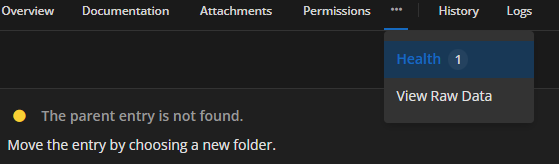
ae21ec36-d0bc-4157-928a-2ccbe307579a.png
Hello, we understand how frustrating it can be to encounter a bug in an app. To help us improve, we kindly encourage you to submit a detailed bug report instead of posting general criticisms. If you take a moment to explore our forum section, you'll see that we actively work to resolve issues and value user feedback. We appreciate your understanding and look forward to your constructive input.
Best regards,
Sébastien Aubin
Product manager - Password Management
Thanks - I've edited my post in hindsight. I was able to locate the entries although it wasn't inherently obvious. There does appear to be a disjoint on visibility from the Workspace App and the Web Client.
Hello, thank you for your feedback. You are correct that it is not very clear, and we will make sure to address this.
Sébastien Aubin
Product manager - Password Management