Better permissions granularity
0 vote

We were using the Online Database and now we have migrated to Password Vault.
I created different groups, with people being in 1 or many groups.
I created root folders in the vault, and configured the groups on those folders.
Some group have read, some have edit, etc. On the different folders. Sometimes subfolders.
I was very very surprised that I need to give the permission "observer" to ALL users to be able to open the vault, and that the "observer" permission give you access to ALL folders and ALL entries in the vault.
I was expecting to be able to give read permissions to root folders, and sub folders, etc, to specific groups, but seems like the permissions are only for the "sensistive" information (Ex: the password itself).
Support suggested to use multiple vaults, but then the search between the vaults, and the loading time and OAuth back and forth in the client is just ridiculous.
I would "Feature Request" to be able to invite user to a vault, and set the "Observer" permission per folder, and not per vault.
All Comments (19)
Hello,
In Hub Business, you can create multiple vaults, so we encourage users to create multiple vaults. Permissions are inherited and cumulative; you can't remove access to a resource once given. There's three layers of permissions, on the whole system, on the vault and on entries.
If you do not wish for your user to have read-access to the data in the vault, you should store those entries in another vault. Observer don't have access to the sensitive data nor the password data.
As for searching in multiple vaults, it supports only the name. In 2022.3, it will support searching in the whole entry, but it's an exhaustive operation.
I would "Feature Request" to be able to invite user to a vault, and set the "Observer" permission per folder, and not per vault.
So, if I understood correctly, you would like to allow users to be able to view a vault, but not necessarily have access to the entries in the vault itself. Is that correct?
N.B. Feel free to contact support about your issues with OAuth back and forth. I'm assuming you are talking about loggin/logout and it doesn't sound normal.
Thank you, have a good day!
Maxime Morin
Having multiple vault make no sense. You don't want to constantly having to navigate between vaults. It's like having multiple database. You should not need to have multiple vaults if the permission works correctly.
The Observer permission should NOT be set on the vault itself, but on the folders. This way, you could be granted access to a vault, and see nothing in it, until someone gives you a observer/contributor/owner permission on a folder. Like you would with folders on your PC.
I've never see that kind of security where having access to a database give you access to everything except the passwords, in any software I ever used...
so I am making that feature request :P
Hello,
Thank you for the feature request. We have a couple of ideas in mind to address your concern. We've added the investigation to our backlog.
Have a good day!
Maxime Morin
Hi Maxime,
this is something we struggle with as well. We really need this one:
"The Observer permission should NOT be set on the vault itself, but on the folders. This way, you could be granted access to a vault, and see nothing in it, until someone gives you a observer/contributor/owner permission on a folder. Like you would with folders on your PC."
With this feature, we can regulate the access more on the "need to know" principle.
So I don't know if helps to move up the priority of this feature knowing that other companies struggle with this as well :)
Hi,
Thank you for the additional input; it sure helps knowning other users need this feature.
Have a good day!
Maxime Morin
Hi,
I would add that the security model should allow removing permission at any point in the hierarchy by being able to overwrite the permission by disabling the inheritance.
Thanks,
Hello,
We are focusing on the vault visibility vs entry permissions for now. As it stands, with the current design, the extra mile to deny permissions is fairly costly in terms of performance. I've added a task to the backlog, but to be honest, no promises when we will get to do that feature.
Have a good day!
Maxime Morin
Hi,
I'm having the same problems, I can't figure out how to configure RBAC access to individual passwords/keys. I currently have this setup:
1 Vault (IT Vault)
3 groups (Sysadmins, Operations, IT Managers)
Everyone should access IT Vault, and IT manager group should CRUD everything, but I don't know how to share a single entry between groups or give access only to a single group.
The permissions works only for vault and not for entry or folder. Consider also that all these groups are managers / contributors and they can add / edit their entries but not entries created from other groups.
The main problem is that having 1000 passwords and a turnover of 10% I can't change all the passwords at every exit, but only those to which the user had access.
Is there also a report that shows me, on the administration side, which passwords a group / person has access to?
May you help me?
Hello,
From my understanding of your situation, this is what I would do:
IT Vault (Assign roles as follow):
Operations => Operator (Can't view passwords, but can use/launch sessions via RDM/Launcher)
IT Manager => Contributors (Can edit entries)
Sysadmins => Managers (Are they administrators already?)
In the vault :
You can add extra permissions on specific entries or folders.
You can't remove or deny permissions; they are cummulative only and always inherited (Entry + Parent Folders + Vault + System permissions).
Hopefully this helps,
Have a good day!
Maxime Morin
Hi, thanks for your quick reply.
Here the problem, everyone may contribute adding password / entries. For example sysadmins groups may add entries about Office 365 (Azure AD) and also Operations group may perform the same thing adding entries for Power Automate, Power BI and so on (always 365).
So both you have group A, B and C. There are entries only for group B and entries only for group C and entries for B, C. Since A is the manager, has access to both B and C.
If I figure out well, you suggest that group B and C must be set as Observer for vault and then give Contributor / Manager access to the single entry / password?
Mauro
Hi,
I can see two ways of doing it.
- A single vault with 3 main folders. (Folder A, folder B, folder C) At the vault level, as you suggested, everyone but Group A are observers. On the folders, you set the appropriated group to the appropriated role / permissions. You could create a folder for B+C if that make sense or set the appropriated rights on entries that are for both B+C. Keep in mind, there's a soft limit of 2 000 entries per vault. It's not enforced, but performance will be degrated.
- Split into 4 vaults. (A vault, B vault, C vault and a B+C vault) The B+C vault would be entries shared between your B and C group. This can enable you to scale better by having multiple vaults and finer control on permissions while hopefully going under the soft-limit for a single vault.
If you want us to look more into your current setup and how it could be improved / implemented, feel free to open a case and request for a live session with an agent.
Have a good day!
Maxime Morin
Hi,
We would like to go with the way # 1 but once we assign observers to everyone, they are able to see all entries ( not the passwords but only username, or server name for ex) and not only list the vault.
is there any way to limit the observers permission to be able to see only the vault and then specify the persmissions on subfolders as you have suggested on way # 1
Many thanks
Hello,
As it stands, there's no way to accomplish that. We are currently wokring on allowing view vault without view entries. It's expected with 2023.3 which is targetted for end of october.
Have a good day!
Maxime Morin
Hello,
As it stands, there's no way to accomplish that. We are currently wokring on allowing view vault without view entries. It's expected with 2023.3 which is targetted for end of october.
Have a good day!
I'm looking very much forward to the 2023.3 version, as I'm stuggling with the same issue as many of the above posters. When using batch edit from RDM I can actually disable the inheritance on permissions, but it has no effect at all it seems. Disabling inheritance would be super nice as well, but also allowing us to not set view entries on the vault would be a huge improvement. Can't wait! :-)
It is now possible to let users view only the entries they have access to with the Restricted role.
https://docs.devolutions.net/hub/web-interface/administration/management/vaults/restricted-access-vault/
Sébastien Duquette
HI Sebastien,
Thanks for the info. Maybe a small extra request on this one.
Would it be possible to have some sort of notification that you do not have the permission to view the content? Now it is just saying "nothing to show" of "no entries found" which is a bit confusing.
Users could think that there just aren't any entries in the vault instead of knowing that they just do not have access: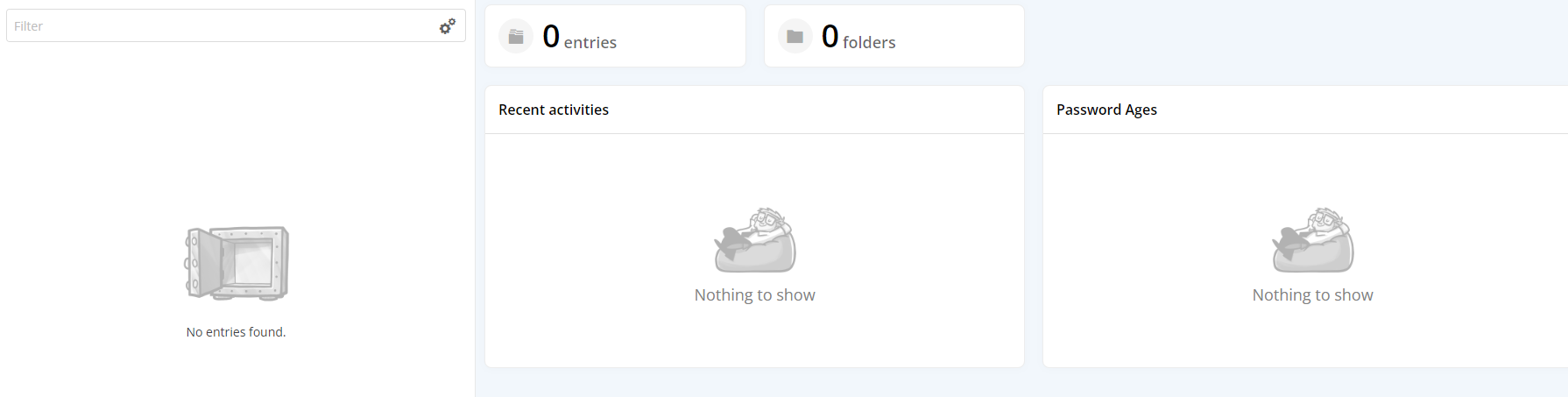
ee7e2380-c51d-4691-b3c6-b85bb810e934.png
Hi Iris,
I've added a task to our backlog to take a look at your suggestion.
Have a good day!
Maxime Morin
Do want to upvote some of this. Our issue is that we want to have users be able to Add/Edit, but not delete. I can't find any way to make that happen and it would be awesome. I understand it will be added to the backlog. Thanks!
Hello,
You should be able to give add and edit rights but not delete with a custom role. Are you not able to do that? The following screenshot is on an entry.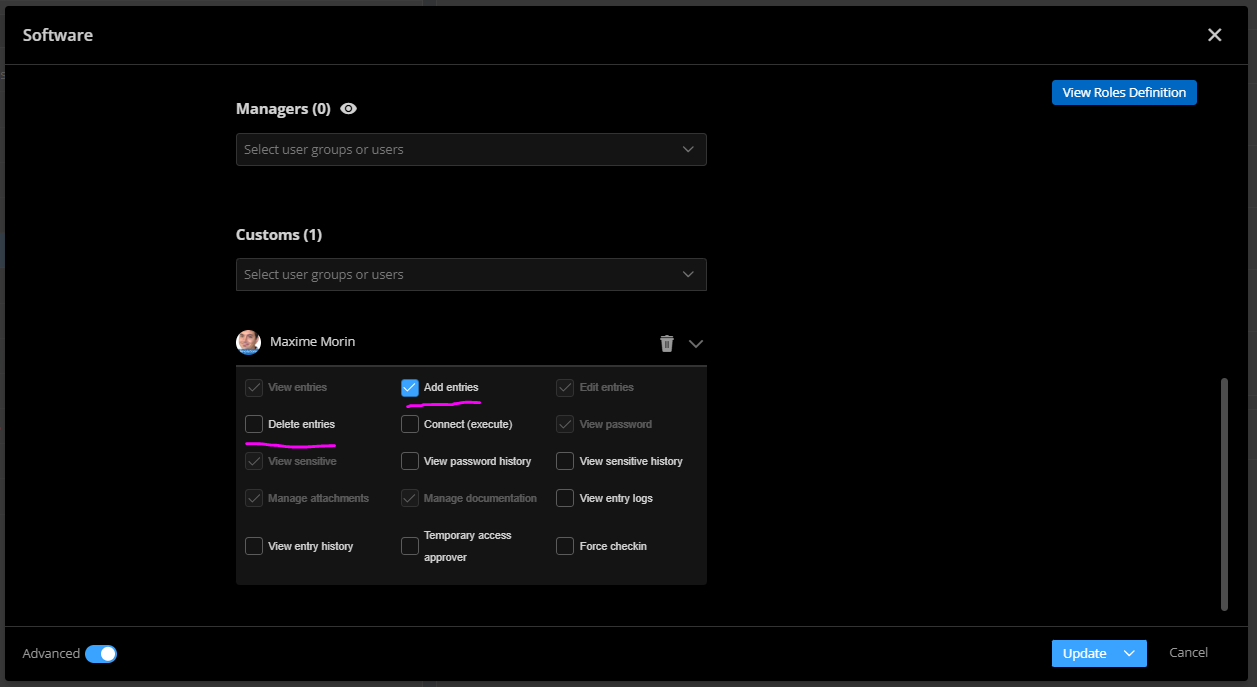
Have a good day!
Maxime Morin
6f50316c-1512-4690-ab8b-a5cb2568d280.png