Permission problem after DPS update

Hello
We got issues after updating DPS to version: 2022.2.9.0
We use AD to get groups and give access to vaults. This broke after
updating yesterday.
A lot of users can access the vaults but does not see any entries in
them.
We get the following error in the server log:
Message
NoMatchingPrincipalException - An error occurred while enumerating the
groups. The group could not be found.
at System.DirectoryServices.AccountManagement.AuthZSet.get_CurrentAsPrincipal()
at
System.DirectoryServices.AccountManagement.FindResultEnumerator`1.get_Current()
at
Devolutions.Server.ActiveDirectory.Microsoft.PrincipalReader.MsPrincipalGetGroupsByUser.GetGroupsByUser(UserPrincipal
userPrincipal, IEnumerable`1 groups, Stopwatch stopwatch)
Error reading authorization groups for the user
We temporarily solved the problem by adding all users manually on the
vaults. This works as a workaround for the moment but need to solve this ASAP.
The diagnostics-page can search and find all groups in AD so the
connection seems fine.
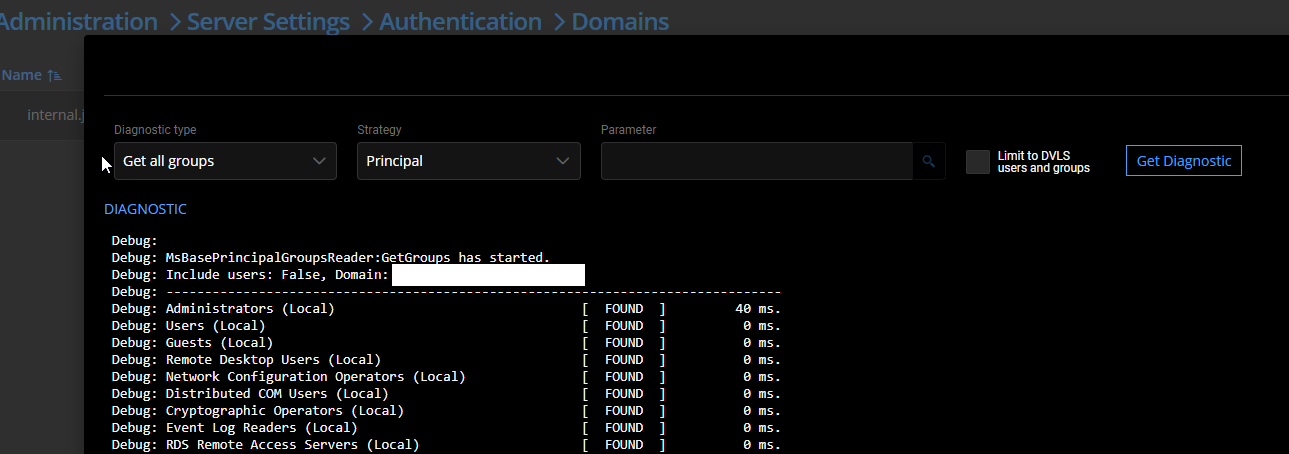
Please advice
asd.png
asd.jpg
All Comments (4)
Hi,
Do you know the DPS version you were using before the update?
Can you go in the diagnostic window and try the "Get groups by user" diagnostic type using the a username as the parameter?
If you get an error with the "principal" strategy, can you try "Directory entry token (legacy)" to see if it works
Regards,
David
David Savard
Not quite sure but i think it was 2022.1.13.0
The diagostics work just fine. Can see all users and users by group etc.
However if I look at Administration > User Groups and look at the same group we search for in the diagnostics-page. It does not give the same result, some of the users are missing in this view and I believe that the problem lies there.
Some of our users had no problems yesterday, and it is those users that are still viewed in the "User groups" page.
Hi.
The problem is solved now.
Solved by changing the setting
the server gets the group in Administration > Server Settings >
Authentication > Domain > Advanced Settings.
And then clearing the cache.
Hello Jakob,
Glad to hear the issue was resolved by changing the Get Groups by User policy, and thank you for sharing the solution.
Best regards,
Richard Boisvert