TOTP issue after reinstall

Hello
One of our Linux users had to reinstall RDM after a failed upgrade.
He installed RDM and configured the data source. A day later he can no longer open RDM.
The behaviour he is experiencing is that RDM is stating that his TOTP token is invalid. Reinstalling RDM doesn't help.
Is there somewhere a folder that saves the configuration that we can delete or is there an other remediation.
With kind regards,
Nick
All Comments (3)
Hello Nick,
Thank you for contacting us on that matter!
To disable the local configuration of RDM Linux, you will need to do the following:
1- Close the application
2- Head over to your home directory
3- Go in the ".rdm" folder
4- Locate the RemoteDesktopManagger.cfg file
5- Rename it "RemoteDesktopManagger.old".
6- Launch RDM once more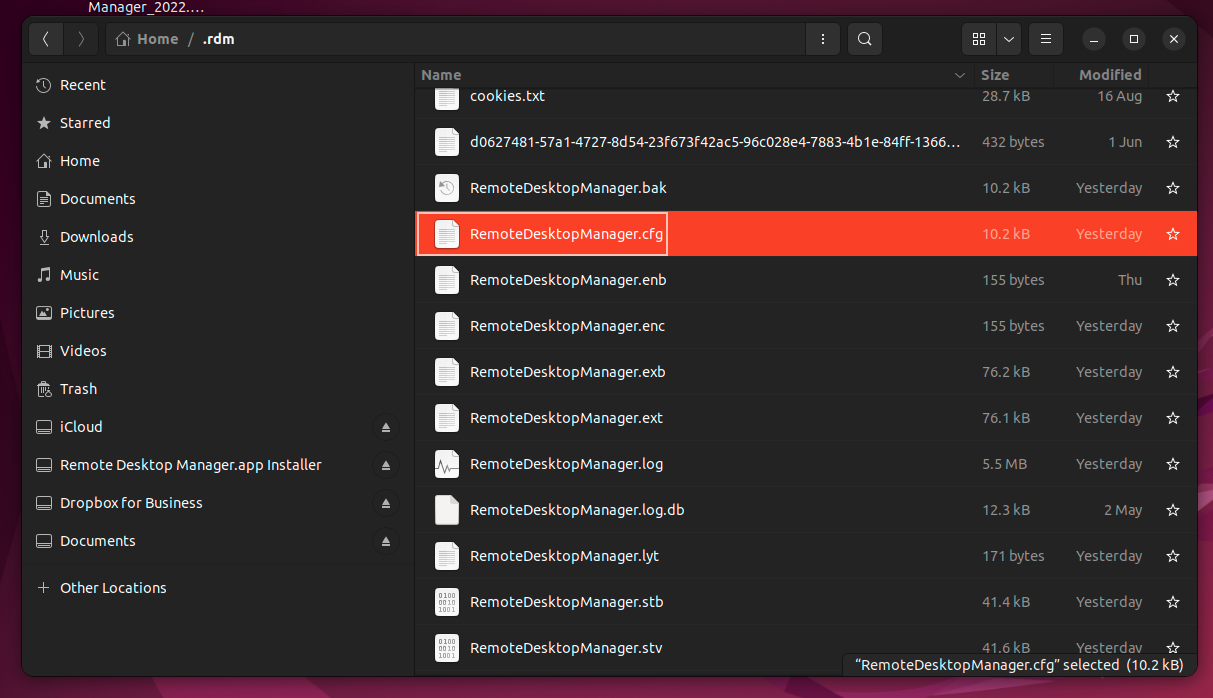
Let us know if that helps!
Best regards,
James Lafleur
ConfigurationFileLinux.png
Hello James
That seems to have resolved the issue. Thank you.
If it would happen again, I'll let you know.
With kind regards,
Nick
Hello Nick,
Glad to see that this works for you! Thank you for your feedback.
Best regards,
James Lafleur