Unable to add Azure AD user

Getting this error when adding a new user that is in Azure AD. This is the first user to be added since the upgrade to DPS 2022.2.6.0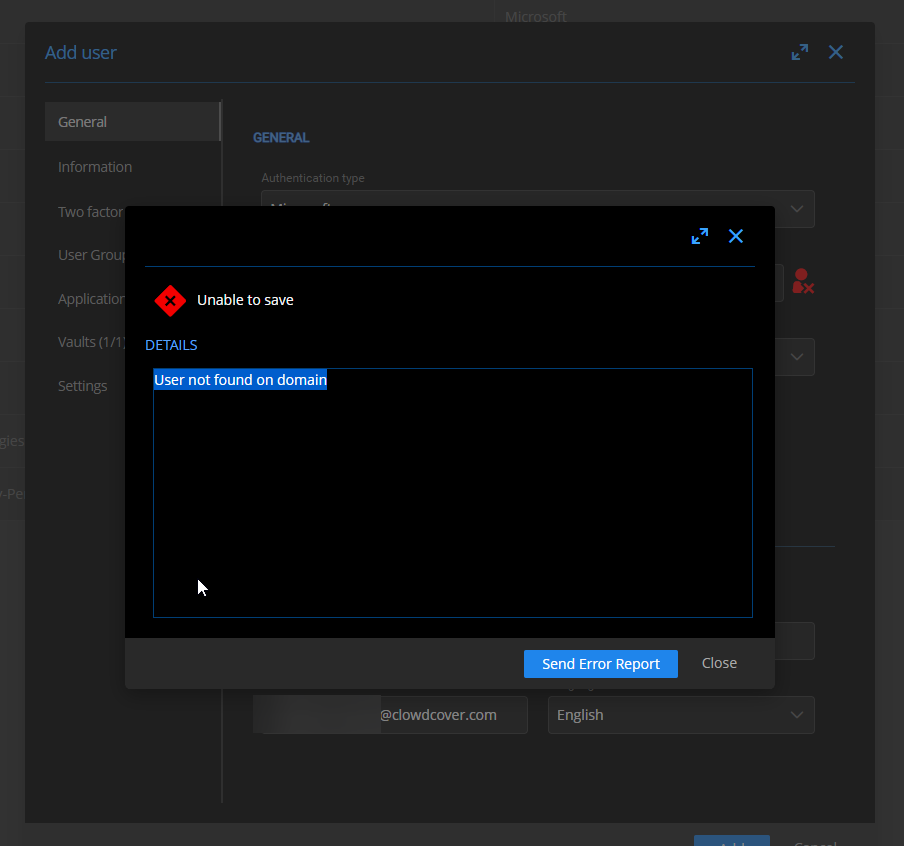
UqHCJMWbgp.png
All Comments (8)
Hello,
Thank you for reporting this issue.
How many users already exist in your DVLS instance? And what DVLS license are you using?
Have you tried to import the user account using the Import button on the top right corner of Administration - Users?
Or you have manually created the account by typing its username?
Best regards,
Érica Poirier
I tried using both the import which shows no users and manually adding it which generated this message.
Hello,
Thank you for your feedback.
Is the Scheduler Service running on the machine where DVLS is hosted? The Scheduler is required for the Azure authentication and must be properly installed in the Companions tab of the DVLS Console.
You can manually refresh the Azure cache in DVLS by following these steps.
- If the Scheduler service is running, please stop it in the Services.
- Go in Administration - Server Settings - Logging on the DVLS web UI and enable the Log debug information option.
- Go in Administration - Reset Server Cache and reset the Office365 cache.
- Go in Reports - Data Source Logs and monitor the logs until you get Update Azure cache end log entry. The process may take some time depending on number of groups and users in Azure AD and their relationship.
- If the delay between Update Azure cache start and Update Azure cache end logs is greater than 30 minutes, please update the refresh rate under Microsoft Authentication Users And User Group Cache in Administration - Server Settings - Authentication - Microsoft Authentication.
- Once completed, disable the Log debug information set on step 1.
- Start the Scheduler service.
Let me know if that helps.
Best regards,
Érica Poirier
Maybe I need to confirm Azure Permissions?
ServiceException
  - Code: Authorization_RequestDenied


    Message: Insufficient privileges to complete t	Scheduler	Error	ClowdCover - 00:0D:3A:11:0C:D8	ServiceException - Code:
  Authorization_RequestDenied


    Message: Insufficient privileges to complete the operation.


    Inner error:


    	AdditionalData:


    	date: 2022-08-01T21:35:35


    	request-id: f41a11f6-df0e-423a-b74c-c6bb83bf30aa


    	client-request-id: f41a11f6-df0e-423a-b74c-c6bb83bf30aa


    ClientRequestId: f41a11f6-df0e-423a-b74c-c6bb83bf30aa


       at
  Microsoft.Graph.HttpProvider.SendAsync(HttpRequestMessage request,
  HttpCompletionOption completionOption, CancellationToken
  cancellationToken)


       at Microsoft.Graph.BaseRequest.SendRequestAsync(Object
  serializableObject, CancellationToken cancellationToken, HttpCompletionOption
  completionOption)


       at
  Microsoft.Graph.BaseRequest.SendAsync[T](Object serializableObject,
  CancellationToken cancellationToken, HttpCompletionOption
  completionOption)


       at
  Microsoft.Graph.GraphServiceUsersCollectionRequest.GetAsync(CancellationToken
  cancellationToken)


       at
  Devolutions.Server.Managers.ADSync.AzureExtractor.GetAllAzureUsers()


Azure sync failed while getting all users. Running: 0.0601361 seconds.Yeah I am looking at the guide. There are things that are missing. Someone else setup this app registration. I am going to have to go through the whole thing again. Something doesn't look right now that I take a closer look. How it was working before is beyond me.
Hello,
Thank you for your feedback.
It could be either the Secret key that is expired or the permissions that are not properly granted in Azure.
You could start over by following these instructions to create a new Azure application.
https://kb.devolutions.net/kb_azure_portal_configuration_guide_microsoft_authentication.html
Or we can assist you during a support session. Then please open a ticket at service@devolutions.net with a reference to this topic and we will send you a link to book the session.
Best regards,
Érica Poirier
The right permissions were selected but the org was not granted rights. Only on the User sync. That is why existing users could auth but I couldn't add new ones. Granted the org access and it worked. Not sure how it just removed that access. It wasn't an expired key. Strange. Thanks for the help.
Hello,
Thank you for your feedback.
That's indeed odd the rights wasn't granted for the Azure application.
It's a great news that it's now working!
Best regards,
Érica Poirier