Pre Req Installer does not install IIS ASP.NET Core Module (ANCM)

Ran though the install but had to downloading the Hosting Module manually from microsoft and install it to get it to install.
All Comments (15)
Hi,
I assume that you installed the Devolutions Console 2022.2.3.0 (https://cdn.devolutions.net/download/Setup.DVLS.Console.2022.2.3.0.exe ) before installing the new version. When you installed the new instance, did you get a dialog similar to that with a red check on each component that are not installed ? 
When you have that, you can press "Install Prerequisites" and the component should be installed and a green check should be displayed.
Is it that you didn't get that dialog or you tried to install prerequisites and the ANCM didn't install ?
Also, could you tell us what is your OS, we could try a new installation on the same OS and see if we can reproduce the issue.
Sorry for inconveniences
Best regards,
François Dubois
Windows 2019 Server.
I was upgrading from 2022.1.13 to 2022.2.3.
I got the dialog to install the Prerequisites and I selected the install and it would go and run the install for the Prerequisites but that was the only one it did not install it did the websocket protocol but would not install the IIS ASP.NET Core Module (ANCM).
Hello,
Thank you, we will try to replicate the issue on our end.
Best regards,
Richard Boisvert
I spun up a new windows 2019 machine and ran the prereq and this is what happened.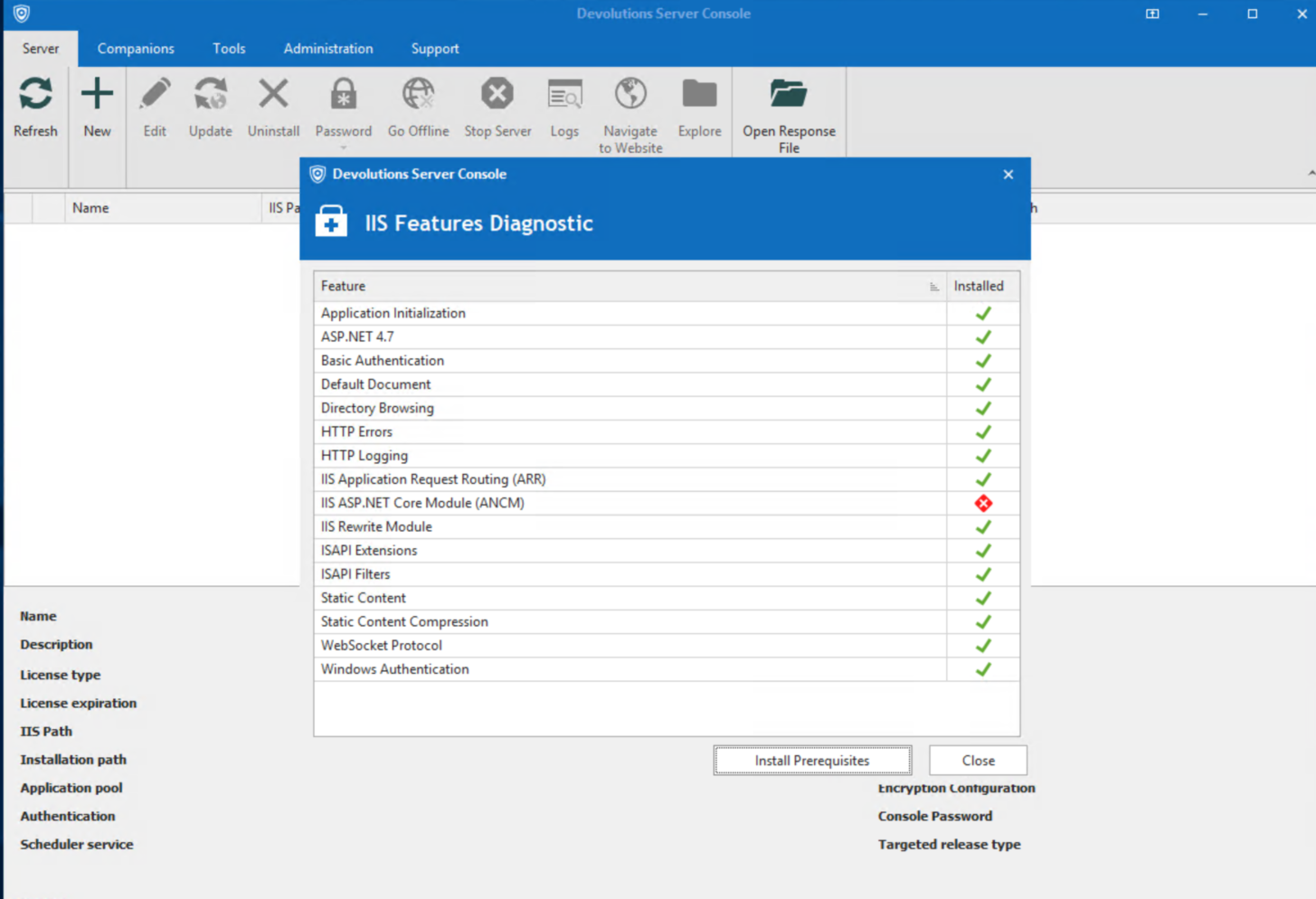
2022-06-23 14_56_01-Remote Desktop Manager [CL1DEVDEVOREC1].png
Hello,
I was able to replicate your issue on a new 2022 VM. I had to download the following and run the repair to make it work:
https://dotnet.microsoft.com/permalink/dotnetcore-current-windows-runtime-bundle-installer
I will open an internal ticket with the engineering team.
Best regards,
Richard Boisvert
Richard, interestingly enough, 2 years later, this is still happening. I'm trying to install latest Devolutions Server on Windows 2019. The ps1 file points you to 6.0.xx dotnet. When I downloaded the latest version it's fine.
Hello,
A fix has been done in version 2022.2.5.0. If you try to install a version newer than that, you should be OK. Is it what you have seen in your test ?
Best regards,
François Dubois
Francois, I downloaded the one from your website which is Version 2024.1.14.0.
Hello,
Great, and does it work with Devolutions Console 2024.1.x ?
Best regards,
François Dubois
For offline installs, if I download the prerequisites (the ones your website help files point you to) and install myself everything is fine. Within the included ps1 file, of the latest DVLS, it points you to the wrong versions (on at least one). That’s where I initially got lost.
Hello,
I just looked our latest version (2024.2.1.0), our script install version IIS ASP.NET Core Module (ANCM) 8.0.3 which is the good one.
Sorry if you got a version with a wrong version of prerequisite, but should be fine now.
Best regards,
François Dubois
Good morning, I'm getting the same issue trying to upgrade from 2025.2.22.0 to 2025.3.18.0 (latest Stable). I have updated the console, but the IIS diag fails and trying to install them runs for a minute or two, but doesn't solve the issue.
Thanks!
running the prereq script returned this, but the diag windows still shows ANCM error:
Web-Server already installed
Web-Http-Errors already installed
Web-Http-Logging already installed
Web-Static-Content already installed
Web-Default-Doc already installed
Web-Stat-Compression already installed
Web-Windows-Auth already installed
Web-WebSockets already installed
Split-Path : Cannot bind argument to parameter 'Path' because it is null.
At line:323 char:30
+ $scriptPath = Split-Path $MyInvocation.MyCommand.ScriptBlock.File
+ ~~~~~~~~~~~~~~~~~~~~~~~~~~~~~~~~~~~~~~~~
+ CategoryInfo : InvalidData: (:) [Split-Path], ParameterBindingValidationException
+ FullyQualifiedErrorId : ParameterArgumentValidationErrorNullNotAllowed,Microsoft.PowerShell.Commands.SplitPathCommand
URL Rewrite module is already installed
Time taken: 0 second(s)
Application Request Routing (ARR) module is already installed
Time taken: 0 second(s)
Installing IIS ASP.NET Core Module (ANCM)
Installation of IIS ASP.NET Core Module (ANCM) finished!
Time taken: 57 second(s)
Thank you for reporting this issue.
It does appear that there may be a problem. I will create an internal ticket so our team can investigate this further.
I will follow up here as soon as we have more information or a fix available.
Thank you
Marc-Andre Bouchard
Hello,
Thank you for being so patient!
I am pleased to inform you that the issue has been resolved in the latest Devolutions server version (2026.1.16.0):
https://docs.devolutions.net/server/getting-started/installation/upgrade-server
We also recommend that you first perform the update in a staging/test environment:
https://docs.devolutions.net/server/kb/how-to-articles/create-server-staging-instance
We also offer free upgrade sessions, during which we will update your Devolutions Server instance together. If you are interested in this, please send an email to service@devolutions.net
Best regards,
Maxim Robert