Connect to Remote Datasource

Disabled
Hi,
Using cmdlet "Get-RDMDataSource", I am able to retrieve only "Local Data Source".
I had installed ReomteDesktopManager on my local machine to create some powershell scripts.
Now, I want to add a functionality to connect to remote datasource so that users can use the script to do operations on datasource not located on their own machine.
Could you please assist how to do that?
Thanks!
All Comments (13)
Hello,
The cmdlet to create a new data source is New-RDMDatasource.
Depending on the data source type, the parameters are different. What data source type do you want to connect to?
Here is a sample to create a SQL data source with the RDM PowerShell module.
$DS = New-RDMDataSource -SQLServer -Database "YourDatabaseName" -IntegratedSecurity -Server "YourServerName" -Name "SQL data source" -SetDataSource
Set-RDMDataSource -DataSource $DS
Let me know if that helps.
Best regards,
Érica Poirier
Disabled
Hi Erica,
Thanks for the response.
Datasource type is RDBMS.
Could you please let me know how to connect to this?
Hello,
Thank you for your feedback.
In fact, many data source type are supported with RDM. Which one do you want to connect from the data source types describe in the following article?
https://help.remotedesktopmanager.com/datasource_types.html
Best regards,
Érica Poirier
Disabled
Hi Erica,
Thanks!
However I am looking for a powershell cmdlet for this.
I am able to add "Devolutions password server manually" but it needs local installation of Remote Desktop Manager.
Also I just need to add host and name while adding it manually.
Is it possible to connect to remote datasource using powershell without installing Remote Desktop Manager?
I used powershell cmdlet New-RDMDataSource -Hostname 'https://hostname/dps' -Name 'Devolution Password Server', but it asks for MySQL and Schema parameter as well. Could you please let me know how this can be achieved?
Hello,
What RDM and DVLS version are you using?
Sure the RDM PowerShell module can be installed without installing the full RDM application. Please see this topic about how to install the RDM PowerShell module.
https://kb.devolutions.net/kb_rdmpowershellcore.html
Let me know if that helps.
Best regards,
Érica Poirier
Hello,
i have followed above KB to create Datasource connection to DVLS which was succesful
Problem i have is that DS attribute IsConnected = False
If i use Set-RDMCurrentDatasource to point to this new DS - it opens up Web browser window asking for password
The same happens when i open new PS session and type for example GET-RDMDatasource
i need to automate run of multiple CSV Synchronizer session without any user interaction so how can i get around the web browser window opening ?
im testing this on the DVLS 2022.1.9 with the latest Powershell module
thanks
marek
Hello,
@marek what authentication method do you use to connect on DVLS with that new data source you have created?
Are you using only the RDM PowerShell module without having RDM installed on that machine? If so, have you register the PowerShell module with your RDM license?
To prevent getting web browser DVLS login prompt, you need to configure your data source to use an application key.
https://helpserver.devolutions.net/webinterface_applications.html
Please see this script on this forum's thread on how to configure a data source with an application key and secret.
https://forum.devolutions.net/topics/36325/a-working-connectrdmdatasource-that-connects-to-dvls-datasource-using-
Best regards,
Érica Poirier
HI @Erica,
i tried to use username and password authentication which is only available option when creating New-RDMDatasource -DVLS so it all got confusing for me.
I have RDM client installed on the machine where I use Powershell mainly because when configuring CSV importer, the CSV files are stored locally which makes the Importer configuration via GUI easier.
I have already registered PS with DVLS
Do i still need to use that function provided by your link in order to use APP key ? Is there an plan to implement this to PS module ?
Also would be possible to request support session to sort everything out in one shot as its been several days of struggle trying to find my way around the correct PS code ?
Marek
Hi Marek,
Thank you for your feedback.
The function in the link can be used to connect on DVLS using an Application key. In short, these are the most important lines to create a data source with PowerShell. The $appkey and $appsecret variables must be populated with the value of the created Application key in DVLS.
$ds = New-RDMDataSource -DVLS -Name $dsname -Server $dsurl -SetDatasource -WarningAction SilentlyContinue
Set-RDMDatasourceProperty $ds -Property "ScriptingTenantID" -Value $appkey
Set-RDMDatasourceProperty $ds -Property "ScriptingApplicationPassword" -Value $appsecret
Set-RDMDataSource $ds
Set-RDMCurrentDataSource $ds
Or you can create a DVLS data source in RDM and fill the Host parameter in the General and only the Tenant ID and the Password in the PowerShell tab.
If you need assistance, please send an email to service@devolutions.net and add a reference to this forum's thread.
Best regards,
Érica Poirier
Can I use the secretkey andf appkey to connect to my devolutions server? I am getting a 404 error
Hello,
You should be able to connect to your DVLS using an application key and its secret key.
Could you please post the error message you get?
Best regards,
Érica Poirier
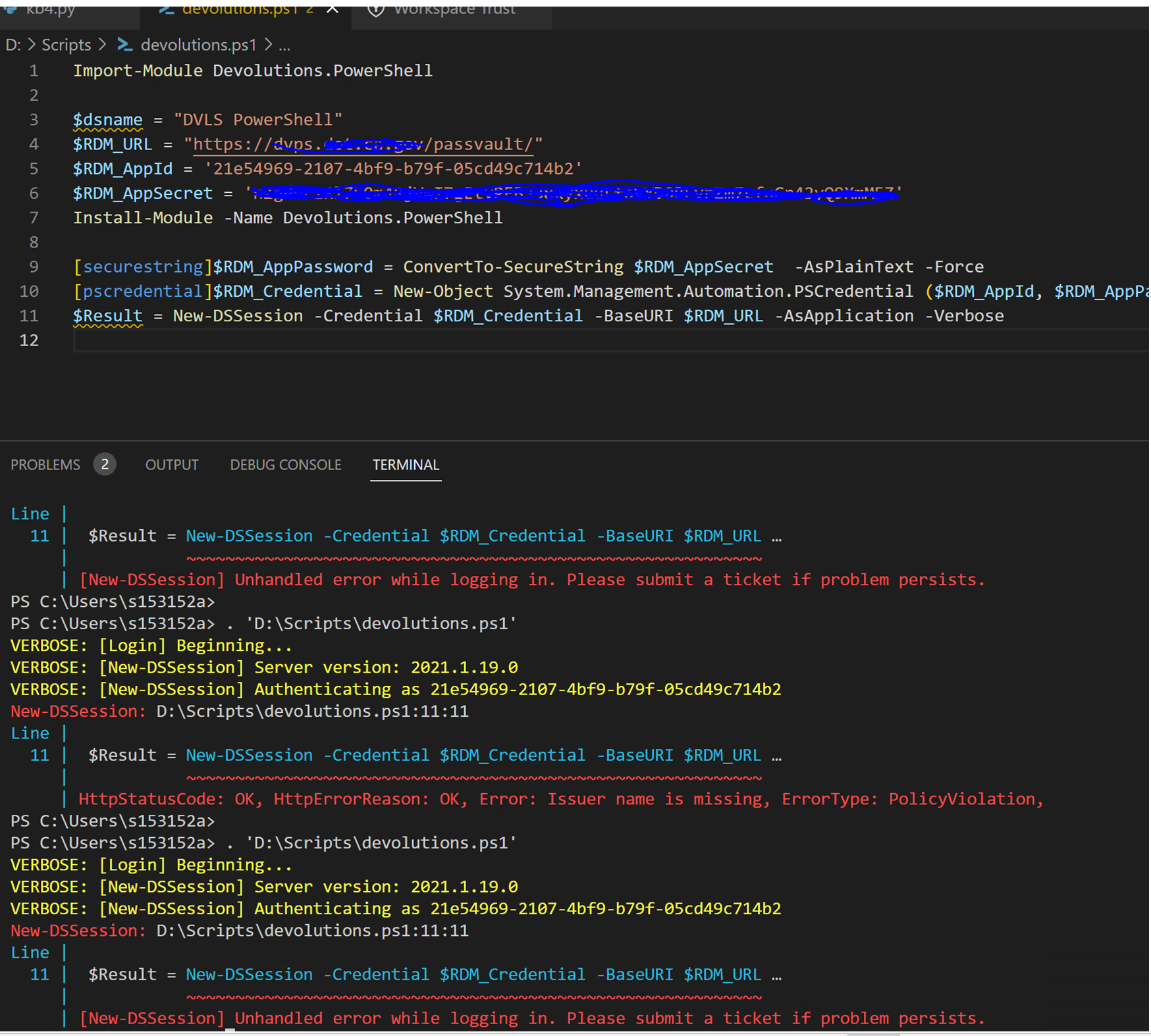
17bdc6b7-dd01-42dc-ae97-05b57b125ad6.png
Hello,
The error you get is because you are trying to connect on an older DVLS version using the latest Devolutions.PowerShell module. This module requires DVLS version 2023.1.x.
As mentioned in this other thread, with your DVLS version 2021.1.19, you need to use the older module available on GitHub.
Let us know if that helps.
Best regards,
Érica Poirier