Devolutions Gateway - Grayed out Install button after uninstall

DPS.Console 2021.2.13.0
Unistalled gateway succesfully and wanted to re-Install it again.
But Install is grayed out, Update buttons completes without issue, even while Gateway is not installed.
Unistall again even says gateway is not installed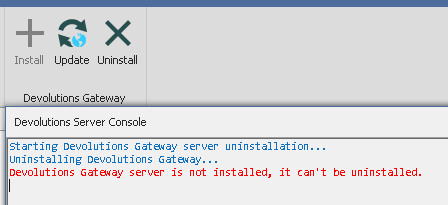
I did however have a cmd.exe shell opened with path "C:\Program Files\Devolutions\Gateway" opened during succesful uninstall, maybe this blocked something that should have been removed.
I have tried deleing all gateway and devolutions folders and also uninstalle of DPS.console and re-install of DPS-console.
But the buttons are still stuck like this.
(I also deleting various registry settings that were left behind, no luck)
dgw_uninstall.PNG
All Comments (5)
Hmm, tried unistall of console and install older version, no luck
Then reinstalled latest once again and now the Install button is back.
Strange :-)
Hello,
Thank you for reporting this strange behaviour with the DVLS Console regarding Gateway installation button.
I tried few times to install/uninstall the Gateway with the latest DVLS Console and wasn't able to reproduce this behaviour. Like you mentioned, maybe a file was locked and reinstalling an older console than update it may have solve the issue.
Let us know if this problem occurs in the future, then we will investigate in dept what could cause this problem.
Best regards,
Érica Poirier
Hi Michael,
Thank you for reaching us on that matter. As you said, it is strange. At least, if I understand, you are not blocked and you have been able to install again. We will try to reproduce with a cmd.exe shell open on the folder, maybe it creates issues that we didn't catch.
For information, we enable/disable install button based on registry information. If the button install is disabled, it probably means that Windows considers Devolutions Gateway installed. If you see a similar issue again later, you could try to uninstall it from the Windows App Settings. I'm wondering if the result would be the same. But as I said, we will try to reproduce to avoid a such situation.
Don't hesitate to contact us if we can help with something else.
Best regards,
François Dubois
Maybe it was something in the subsystem blocking.
Because I also tried using the Gateway msi install file to see If I could install it outside the console while the install button was unavailable.
However the msi installation would fail in the middle becasue of missing permissions, but I was full elevated administrator, så I think the error was something else blocking.
After it finally went back to normal with the install button, I tried the MSI file again and it worked fine.
So I think you are right about blocking processes, I checked for any exe gateway files, but none were running while I was blocked.
Maybe from when I first uninstalled, it probably did not fully complete closing the GW windows service, but it did however remove it from the services list in windows.
Hello,
Thank you for information, it could help to reproduce. We will do more tests and try to reproduce. If we can reproduce, we should be able to find the issue and fix it. Otherwise, we will keep eyes open in case we could see that issue again later.
Best regards,
François Dubois