VSCode and RDM Module

We are using the latest version of VSCode (1.61.0) and the latest RDM Module: 2021.2.0.19 and PowerShell 5.1 and RDM 2021.2.15.0 64-bit
When running the command Get-RDMDataSource from within VSCode I get the following error:
PS C:\> Get-RDMDataSource
PlatformNotSupportedException - System.Data.SqlClient is not supported on this platform.
at System.Data.SqlClient.SqlConnectionStringBuilder..ctor()
at Devolutions.RemoteDesktopManager.Business.DataSources.SQLServerConnectionDataSource.BuildIntegratedSecurityConnectionString()
at Devolutions.RemoteDesktopManager.Business.DataSources.DatabaseConnectionDataSource.CreateDbConnection(Boolean master, Nullable`1 connectTimeout)
at Devolutions.RemoteDesktopManager.Business.DataSources.DatabaseConnectionDataSource.ExecuteScalar[T](String sql, IDbDataParameter[] parameters)
at Devolutions.RemoteDesktopManager.Business.DataSources.SQLServerConnectionDataSource.ExecuteScalar[T](String sql, IDbDataParameter[] parameters)
at Devolutions.RemoteDesktopManager.Business.DataSources.DatabaseConnectionDataSource.HasSecurityChanged()
at Devolutions.RemoteDesktopManager.Managers.ConnectionManager.HasSecurityChanged(BaseConnectionDataSource dataSource)
at Devolutions.RemoteDesktopManager.Managers.ConnectionManager.LoadConnections(BaseConnectionDataSource dataSource)
PlatformNotSupportedException - System.Data.SqlClient is not supported on this platform.
at System.Data.SqlClient.SqlConnectionStringBuilder..ctor()
at Devolutions.RemoteDesktopManager.Business.DataSources.SQLServerConnectionDataSource.BuildIntegratedSecurityConnectionString()
at Devolutions.RemoteDesktopManager.Business.DataSources.DatabaseConnectionDataSource.CreateDbConnection(Boolean master, Nullable`1 connectTimeout)
at Devolutions.RemoteDesktopManager.Business.DataSources.DatabaseConnectionDataSource.ExecuteScalar[T](String sql, IDbDataParameter[] parameters)
at Devolutions.RemoteDesktopManager.Business.DataSources.SQLServerConnectionDataSource.ExecuteScalar[T](String sql, IDbDataParameter[] parameters)
at Devolutions.RemoteDesktopManager.Business.DataSources.DatabaseConnectionDataSource.HasSecurityChanged()
at Devolutions.RemoteDesktopManager.Managers.ConnectionManager.HasSecurityChanged(BaseConnectionDataSource dataSource)
at Devolutions.RemoteDesktopManager.Managers.ConnectionManager.LoadConnections(BaseConnectionDataSource dataSource)
PlatformNotSupportedException - System.Data.SqlClient is not supported on this platform.
at System.Data.SqlClient.SqlConnectionStringBuilder..ctor()
at Devolutions.RemoteDesktopManager.Business.DataSources.SQLServerConnectionDataSource.BuildIntegratedSecurityConnectionString()
at Devolutions.RemoteDesktopManager.Business.DataSources.DatabaseConnectionDataSource.CreateDbConnection(Boolean master, Nullable`1 connectTimeout)
at Devolutions.RemoteDesktopManager.Business.DataSources.DatabaseConnectionDataSource.ExecuteScalar[T](String sql, IDbDataParameter[] parameters)
at Devolutions.RemoteDesktopManager.Business.DataSources.SQLServerConnectionDataSource.ExecuteScalar[T](String sql, IDbDataParameter[] parameters)
at Devolutions.RemoteDesktopManager.Business.DataSources.DatabaseConnectionDataSource.HasSecurityChanged()
at Devolutions.RemoteDesktopManager.Managers.ConnectionManager.HasSecurityChanged(BaseConnectionDataSource dataSource)
at Devolutions.RemoteDesktopManager.Managers.ConnectionManager.LoadConnections(BaseConnectionDataSource dataSource)
ID : 31e90994-ea0b-4584-89c7-1975aaef64b0
IsConnected : False
IsOffline : False
Name : Local Data Source
Type : SQLite
ID : 14038d39-315b-47c9-b7e9-c0dc17e3a357
IsConnected : False
IsOffline : False
Name : RDM
Type : SQLServer
All Comments (25)
Hello,
Our dev is looking into this as we speak, we'll keep you updated.
By the way, I'm experiencing the same behavior.
Best regards,
Alex Belisle
Hi again,
I forgot to mention that the module was developed with Powershell 7 Core in mind...
So, updating to PowerShell 7 Core will get it to work.
I hope this helps.
Best regards,
Alex Belisle
That's nice, but unfortunately, there are modules which don't work in PowerShell 7. If i can refresh your memory, until VERY recently, neither did you. :-(
Therefore we need PS 5.1 ..unfortunately.
Hi,
This problem should already be fixed in 2021.2.0.19.
However, I've seen multiple cases of different instances of PowerShell loading a different version the module.
Just to make sure this isn't the case here, could you please run Get-RDMInstance while in VSCode?
Regards
Jonathan Lafontaine
PS C:\> Get-RDMInstance
PlatformNotSupportedException - System.Data.SqlClient is not supported on this platform.
at System.Data.SqlClient.SqlConnectionStringBuilder..ctor()
at Devolutions.RemoteDesktopManager.Business.DataSources.SQLServerConnectionDataSource.BuildIntegratedSecurityConnectionString()
at Devolutions.RemoteDesktopManager.Business.DataSources.DatabaseConnectionDataSource.CreateDbConnection(Boolean master, Nullable`1 connectTimeout)
at Devolutions.RemoteDesktopManager.Business.DataSources.DatabaseConnectionDataSource.ExecuteScalar[T](String sql, IDbDataParameter[] parameters)
at Devolutions.RemoteDesktopManager.Business.DataSources.SQLServerConnectionDataSource.ExecuteScalar[T](String sql, IDbDataParameter[] parameters)
at Devolutions.RemoteDesktopManager.Business.DataSources.DatabaseConnectionDataSource.HasSecurityChanged()
at Devolutions.RemoteDesktopManager.Managers.ConnectionManager.HasSecurityChanged(BaseConnectionDataSource dataSource)
at Devolutions.RemoteDesktopManager.Managers.ConnectionManager.LoadConnections(BaseConnectionDataSource dataSource)
PlatformNotSupportedException - System.Data.SqlClient is not supported on this platform.
at System.Data.SqlClient.SqlConnectionStringBuilder..ctor()
at Devolutions.RemoteDesktopManager.Business.DataSources.SQLServerConnectionDataSource.BuildIntegratedSecurityConnectionString()
at Devolutions.RemoteDesktopManager.Business.DataSources.DatabaseConnectionDataSource.CreateDbConnection(Boolean master, Nullable`1 connectTimeout)
at Devolutions.RemoteDesktopManager.Business.DataSources.DatabaseConnectionDataSource.ExecuteScalar[T](String sql, IDbDataParameter[] parameters)
at Devolutions.RemoteDesktopManager.Business.DataSources.SQLServerConnectionDataSource.ExecuteScalar[T](String sql, IDbDataParameter[] parameters)
at Devolutions.RemoteDesktopManager.Business.DataSources.DatabaseConnectionDataSource.HasSecurityChanged()
at Devolutions.RemoteDesktopManager.Managers.ConnectionManager.HasSecurityChanged(BaseConnectionDataSource dataSource)
at Devolutions.RemoteDesktopManager.Managers.ConnectionManager.LoadConnections(BaseConnectionDataSource dataSource)
ApplicationVersion OptionFilename
------------------ --------------
2021.2.0.19 C:\Users\me\AppData\Roaming\Devolutions\RemoteDesktopManager\RemoteDesktopManager.cfg
I see you guys release version 20 yesterday. is there a Change Log to see what is modified? Is the code on Git as well?
Same problem on 2021.2.0.20
2021.2.0.20 was for another problem.
I will start posting release notes for new package version. They will be in the Package Details section of PSGallery.
I tried to reproduce your issue on a clean windows VM but wasn't able to.
What I can do is upload a prerelease version with more debug info where I think the problem the happening.
I'll let you know once this is available.
Jonathan Lafontaine
Alexandre Bélisle above said he was able to repro. Are you?
I can repro on Server 2019 and Windows 10 21H1. Can you use Fusion debugging to see the reference issue?
No, I can't. Same PowerShell version, same VSCode version and everything loads fine on my side.
Jonathan Lafontaine

I see in the code you are referencing version 4.6.1.2, but the DLL is 4.7.
What version do you have in your module folder?
Can you try updating the NuGet: https://www.nuget.org/packages/System.Data.SqlClient/?
If you want to give me a debug version, and/or have a session I'd be happy to help.
We are using System.Data.SqlClient nuget version 4.8.2.
The dll you see are the one from this package.
More so, in our package there is 2 versions of System.Data.SqlClient.
System.Data.SqlClient is targeting netstandard2.0 as our module is targerting netstandard2.0 to be compatible with both Windows PowerShell and PowerShell Core.
However, this dll, when loaded in .net 4.6.1 (Windows PowerShell) throws out platform not supported.
To fix that, we also package the .net 4.6.1 dll, which is named System.Data.SqlClient-net4.6.1.dll.
At runtime, the module tried to detect if our host is Windows PowerShell or PowerShell Core and then loads the right one.
I suspect this is the part not working in VSCode and you end up with the netstandard dll loaded.
Jonathan Lafontaine
well, 2021.2.0.22 is a regular release after all but contains only targeted logging where I think things don't go as planned.
While using VSCode terminal, running Get-RDMInstance should print some Host Version: x and maybe a path to a dll.
Let me know what those outputs are.
Jonathan Lafontaine
With debugs (although not sure how much this added):
PS C:\> Get-RDMDataSource
Host Version: 2021.9.0
Exception occured: System.Data.SqlClient is not supported on this platform.
PlatformNotSupportedException - System.Data.SqlClient is not supported on this platform.
at System.Data.SqlClient.SqlConnectionStringBuilder..ctor()
at Devolutions.RemoteDesktopManager.Business.DataSources.SQLServerConnectionDataSource.BuildIntegratedSecurityConnectionString()
at Devolutions.RemoteDesktopManager.Business.DataSources.DatabaseConnectionDataSource.CreateDbConnection(Boolean master, Nullable`1 connectTimeout)
at Devolutions.RemoteDesktopManager.Business.DataSources.DatabaseConnectionDataSource.ExecuteScalar[T](String sql, IDbDataParameter[] parameters)
at Devolutions.RemoteDesktopManager.Business.DataSources.SQLServerConnectionDataSource.ExecuteScalar[T](String sql, IDbDataParameter[] parameters)
at Devolutions.RemoteDesktopManager.Business.DataSources.DatabaseConnectionDataSource.HasSecurityChanged()
at Devolutions.RemoteDesktopManager.Managers.ConnectionManager.HasSecurityChanged(BaseConnectionDataSource dataSource)
at Devolutions.RemoteDesktopManager.Managers.ConnectionManager.LoadConnections(BaseConnectionDataSource dataSource)
Exception occured: System.Data.SqlClient is not supported on this platform.
PlatformNotSupportedException - System.Data.SqlClient is not supported on this platform.
at System.Data.SqlClient.SqlConnectionStringBuilder..ctor()
at Devolutions.RemoteDesktopManager.Business.DataSources.SQLServerConnectionDataSource.BuildIntegratedSecurityConnectionString()
at Devolutions.RemoteDesktopManager.Business.DataSources.DatabaseConnectionDataSource.CreateDbConnection(Boolean master, Nullable`1 connectTimeout)
at Devolutions.RemoteDesktopManager.Business.DataSources.DatabaseConnectionDataSource.ExecuteScalar[T](String sql, IDbDataParameter[] parameters)
at Devolutions.RemoteDesktopManager.Business.DataSources.SQLServerConnectionDataSource.ExecuteScalar[T](String sql, IDbDataParameter[] parameters)
at Devolutions.RemoteDesktopManager.Business.DataSources.DatabaseConnectionDataSource.HasSecurityChanged()
at Devolutions.RemoteDesktopManager.Managers.ConnectionManager.HasSecurityChanged(BaseConnectionDataSource dataSource)
at Devolutions.RemoteDesktopManager.Managers.ConnectionManager.LoadConnections(BaseConnectionDataSource dataSource)
Exception occured: System.Data.SqlClient is not supported on this platform.
PlatformNotSupportedException - System.Data.SqlClient is not supported on this platform.
at System.Data.SqlClient.SqlConnectionStringBuilder..ctor()
at Devolutions.RemoteDesktopManager.Business.DataSources.SQLServerConnectionDataSource.BuildIntegratedSecurityConnectionString()
at Devolutions.RemoteDesktopManager.Business.DataSources.DatabaseConnectionDataSource.CreateDbConnection(Boolean master, Nullable`1 connectTimeout)
at Devolutions.RemoteDesktopManager.Business.DataSources.DatabaseConnectionDataSource.ExecuteScalar[T](String sql, IDbDataParameter[] parameters)
at Devolutions.RemoteDesktopManager.Business.DataSources.SQLServerConnectionDataSource.ExecuteScalar[T](String sql, IDbDataParameter[] parameters)
at Devolutions.RemoteDesktopManager.Business.DataSources.DatabaseConnectionDataSource.HasSecurityChanged()
at Devolutions.RemoteDesktopManager.Managers.ConnectionManager.HasSecurityChanged(BaseConnectionDataSource dataSource)
at Devolutions.RemoteDesktopManager.Managers.ConnectionManager.LoadConnections(BaseConnectionDataSource dataSource)
ID : f1d46d1a-7ff5-4cbf-a5a9-86162babd9da
IsConnected : False
IsOffline : False
Name : Local Data Source
Type : SQLite
ID : f62f390f-b674-48fe-8cdd-4dadb14d29f0
IsConnected : False
IsOffline : False
Name : RDM
Type : SQLServer
Actually, it helped a lot.
I know what the problem is. Now I have to figure out why.
Jonathan Lafontaine
When I load the RemoteDesktopManager module in Windows PowerShell (that includes the embedded shell inside RDM), my Host Version reads 5.1.19041.1237.
Yours is 2021.9.0, are you running a different PS host?
Jonathan Lafontaine
I struggled for a few weeks but in the end I resolved in this way :
- updated RDM to the latest release (in my case 2021.2.16.0)
- updated powershell to version 7.1.5
- updated the RDM PS module to the latest version from the powershell gallery (better uninstall the current one first)
- Install-Module -Name RemoteDesktopManager
- Import-Module RemoteDesktopManager
- Get-RDMInstance :
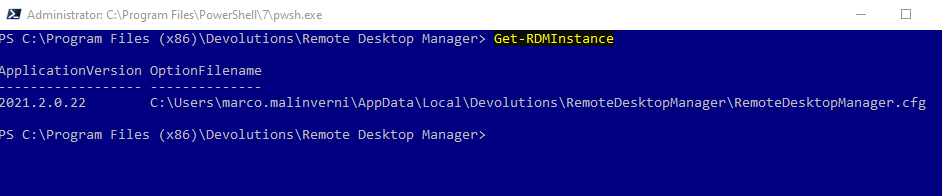
and now it's works.
if you run the script from RDM change the properties like this: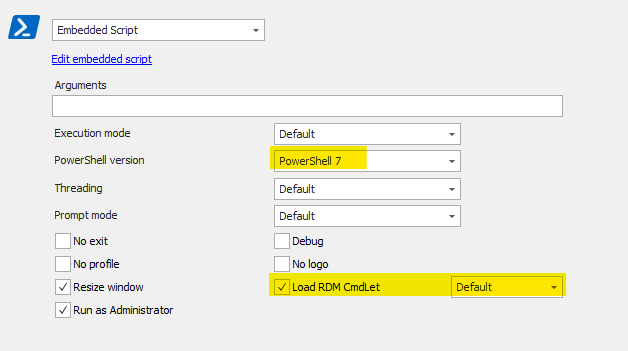
prop.png
rdmistance.png
You have to remember, when running VSCode you aren't running really PowerShell.exe but rather you are using the PowerShell extension.
Note the version:
I think this is your issue. You don't know how to use the PowerShell extension within VSCode. Can you try?
https://docs.microsoft.com/en-us/powershell/scripting/dev-cross-plat/vscode/using-vscode?view=powershell-5.1
https://marketplace.visualstudio.com/items?itemName=ms-vscode.PowerShell
Seems there is a different how the extension works from within VSCode between PWSH and POWERSHELL when you look at this line:
Console.WriteLine(String.Format("Host Version: {0}", UIManager.PSHost.Version));
Well, that's it, you found the difference between our setups.
I was not running the PowerShell extension and VSCode was actually running powershell.exe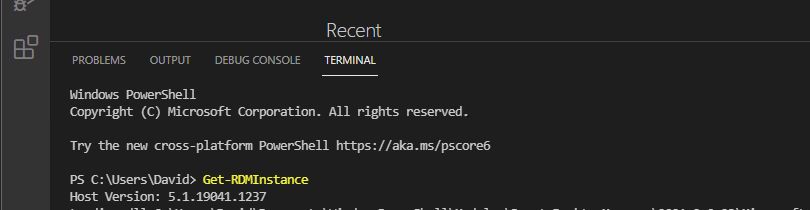
I can reproduce your issue with the extension installed.
Jonathan Lafontaine
Untitled.png
Awesome. So you'll take it from here? :-)
Yes, I'll find a solution.
Long story short, the module is targeting netstandard2.0 to be compatible between Windows PowerShell and PowerShell Core.
That however means all included dlls are also targeting netstandard2.0
For some reasons, loading System.Data.SQLClient under .net 4.6.1 (which is what Windows PowerShell) is targeting, fails with the error your reported. To workaround that, when we detected a host version of 5.1, meaning we are running Windows PowerShell under .net 4.6.1, we manually loaded the System.Data.SQLClient dll targeting 4.6.1
Now that some PS terminal are running under different hosts, I have to find a new way to determine if we are running .net 4.6.1 or .net core.
I know, that story wasn't that short.
Jonathan Lafontaine
Cool. If you want me to tinker as well, let me know. Anything I can do to help.
Can you try with 2021.2.0.24?
Jonathan Lafontaine
Hi Jonathan- I just found this after having my own issues in VS Code. I updated to 2021.2.0.24 and it is now working for me. Thanks!
Hi,
Glad it's working for you now.
Let me know if anything else comes up.
Regards
Jonathan Lafontaine