Machine Enrollment Failed.

I am trying to install wayk agent to machines with powershell from GPO. this powershell commands running exactly. It is installing waykagent to machine. Installing wayk agent module with powershell. After that i am using wayk-now enroll command on shell but it gives machine enrollment failed. See service logs for more details.
Codes
Start-Process msiexec.exe -Wait -ArgumentList '/i "\\dc-01\setup\waykagent.msi" /quiet'
Install-Module -Name WaykAgent -AllowClobber -Force
wayk-now enroll --token-id XXXX --den-url https://xxx
How can i achieve this problem ?
All Comments (12)
Hi,
In your case, the easiest way to achieve that is probably to enroll the machine during the installation. You can add options `ENROLL_TOKEN_ID` and `ENROLL_DEN_URL` when you install the MSI. You can see how it works in documentation here : https://docs.devolutions.net/wayk/agent/configuration.html#configuration-at-install-time
I hope it helps.
Best regards,
François Dubois
Hello,
You can also register the agent with PowerShell commands, since the PS module would already be installed (just replaced the URL and the ID):
Register-WaykAgent -DenUrl "https://bastion.ad.it-help.ninja" -TokenId "1be20ccc-7714-4bb7-b88a-a8a6a873f653"
Source:
https://docs.devolutions.net/wayk/bastion/deployment-automation.html#powershell-module
Best regards,
Richard Boisvert
Hi, i figured out what is the problem from the logs. It is caused by not resolving my den url. After i solve that problem, it is happening.
Thank you for your replies.
Hi,
In your case, the easiest way to achieve that is probably to enroll the machine during the installation. You can add options `ENROLL_TOKEN_ID` and `ENROLL_DEN_URL` when you install the MSI. You can see how it works in documentation here : https://docs.devolutions.net/wayk/agent/configuration.html#configuration-at-install-time
I hope it helps.
Best regards,
Hi there,
I have a similar problem with the Wayk client.
We are looking at the WaykAgent in the context of WaykBastion.
We would like to start an automated, unattended installation.
To do this, our idea is to have the Wayk agent roll out on our machines and call the MSI package as follows:
msiexec /i WaykAgent-x86-2021.1.3.0.msi /passive CONFIG_AUTO_LAUNCH_ON_USER_LOGON="true" CONFIG_ANALYTICS_ENABLED="false" CONFIG_CRASH_REPORTER_AUTO_UPLOAD="false" CONFIG_CRASH_REPORTER_ENABLED="false" CONFIG_DEN_URL="wss://bastion.mydomain.com" CONFIG_ALLOW_SYSTEM_AUTH="true" CONFIG_ALLOW_PERSONAL_PASSWORD="false" CONFIG_ALLOW_NO_PASSWORD="false" CONFIG_MINIMIZE_TO_NOTIFICATION_AREA="true" CONFIG_LOGGING_LEVEL="5" ENROLL_DEN_URL="wss://bastion.mydomain.com" ENROLL_TOKEN_ID="a-token-to-my-machine-group"
On the wayk bastion I now have the hostname, but only under "unregistered machines" and not in my actually intended folder.
So my group assignment of the users that are allowed to access this machine does not work.
If I start the installation again with the above mentioned options, the assignment works correctly and the machine has disappeared under the unregistered machinesand has been added correctly to the created group.
If I roll out the token afterwards with the wayk-now command, it also works.
Only during the installation, which is what I need, it does not work correctly.
Is this a bug, or am I somehow calling the file incorrectly?
I had also already try to call the items "ENROLL_TOKEN_ID" and "ENROLL_DEN_URL" at the beginning, right after the parameter "/passive". Unfortunately also without success.
Also with the possibility to create a CustoumExecutable, the TokenID does not work. The machine is also pushed into the unregistered machines section.
Best regards,
Steffen
Hello Steffen,
Could you try with quiet instead of passive for the installer? I also removed the CONFIG_DEN_URL, it is not required since you have the URL with ENROLL_DEN_URL and changed the bastion URL to use https instead of wss.
The command should be:
msiexec /i WaykAgent-x86-2021.1.3.0.msi /qn CONFIG_AUTO_LAUNCH_ON_USER_LOGON=true CONFIG_ANALYTICS_ENABLED=false CONFIG_CRASH_REPORTER_AUTO_UPLOAD=false CONFIG_CRASH_REPORTER_ENABLED=false CONFIG_ALLOW_SYSTEM_AUTH=true CONFIG_ALLOW_PERSONAL_PASSWORD=false CONFIG_ALLOW_NO_PASSWORD=false CONFIG_MINIMIZE_TO_NOTIFICATION_AREA=true CONFIG_LOGGING_LEVEL=5 ENROLL_DEN_URL="https://bastion.mydomain.com" ENROLL_TOKEN_ID="a-token-to-my-machine-group"
It is weird you are getting the same behavior by using the Custom Executable. Just to be sure, is your token set to expire after x days?
Best regards,
Richard Boisvert
Hello Richard,
Thanks for the really quick reply!
I have adjusted the enrollment according to your comments.
Unfortunately I still have the problem.
At first it seemed to work (I have uninstall agent and install with /qn again), but when I rolled it out to a machine where I had no wayk agent installed at all, it was the same again. :-(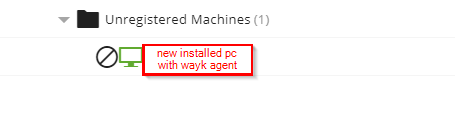
Yes the token I am creating expires on June 18.
2021-06-14 10_30_26-Window.png
Hello Richard,
I have an update for you.
It seems to be really related to the limited token.
I have now created another token that does not expire, with that the installation went through and pushed the machine into the correct group.
Is this perhaps a bug, or are the expiring tokens not intended for this type of installation?
Best regards,
Steffen
Hello Steffen,
It does seem to be a bug, you should be able to use a token with or without an expiry without any issues. The case for using a token with an expiry date is atypical, so it is possible it was tested thoroughly.
Could you please confirm the version of your Wayk Bastion, displayed in the bottom left corner of the web interface? The latest is 2021.1.5.1. I will try to replicate the issue and send a bug report.
Best regards,
Richard Boisvert
Hello,
I was able to replicate the issue, I will open an internal ticket with engineering and report back once I have more details. Thank you for bringing it to our attention.
Best regards,
Richard Boisvert
Hello Steffen,
It does seem to be a bug, you should be able to use a token with or without an expiry without any issues. The case for using a token with an expiry date is atypical, so it is possible it was tested thoroughly.
Could you please confirm the version of your Wayk Bastion, displayed in the bottom left corner of the web interface? The latest is 2021.1.5.1. I will try to replicate the issue and send a bug report.
Best regards,
Hi Richard,
yes, my version number is 2021.1.5.1.
Best regards,
Steffen
Hi Steffen
We're having trouble reliably reproducing the problem. If it's convenient for you, it would help if you can recreate the issue and provide me with some debugging information.
If you omit the "logging level" parameter from your installation command, a debug log will be generated (the default level is DEBUG).
Additionally, you can pass the `/l` parameter to `msiexec` to generate an installer log (although I don't believe the installer itself is at fault).
So, the final command might look something like this:msiexec /i WaykAgent-x86-2021.1.3.0.msi /qn /l*v installerlog.log CONFIG_AUTO_LAUNCH_ON_USER_LOGON=true CONFIG_ANALYTICS_ENABLED=false CONFIG_CRASH_REPORTER_AUTO_UPLOAD=false CONFIG_CRASH_REPORTER_ENABLED=false CONFIG_ALLOW_SYSTEM_AUTH=true CONFIG_ALLOW_PERSONAL_PASSWORD=false CONFIG_ALLOW_NO_PASSWORD=false CONFIG_MINIMIZE_TO_NOTIFICATION_AREA=true ENROLL_DEN_URL="https://bastion.mydomain.com" ENROLL_TOKEN_ID="a-token-to-my-machine-group"
Then, once you produce the issue, you can send us the installer log (you can specify a full path otherwise it will be generated in the working directory). Additionally, if you open WaykAgent.exe and choose Help > Export Diagnostics you will be able to generate a .zip containing debug information. You could share those either by sending me a PM, or by email to wayk@devolutions.net
Thanks again and kind regards,
Richard Markievicz
Hi Steffen
Just to give a small update, Wayk Agent 2021.1.4 is now available and contains some reliability fixes for enrolment via token.
Please let us know if you continue to experience issues with this
Thanks and kind regards,
Richard Markievicz