RDM and X sessions

Do you have a walkthrough/tutorial for setting up an SSH session that can spawn an X window? I have a user with a need for this and I'm struggling to find the information I need to accomplish setting this up.
All Comments (16)
Hello,
After having installed a X Windows Server (such as XMing) simply enable the X11 Forwarding from the SSH Session property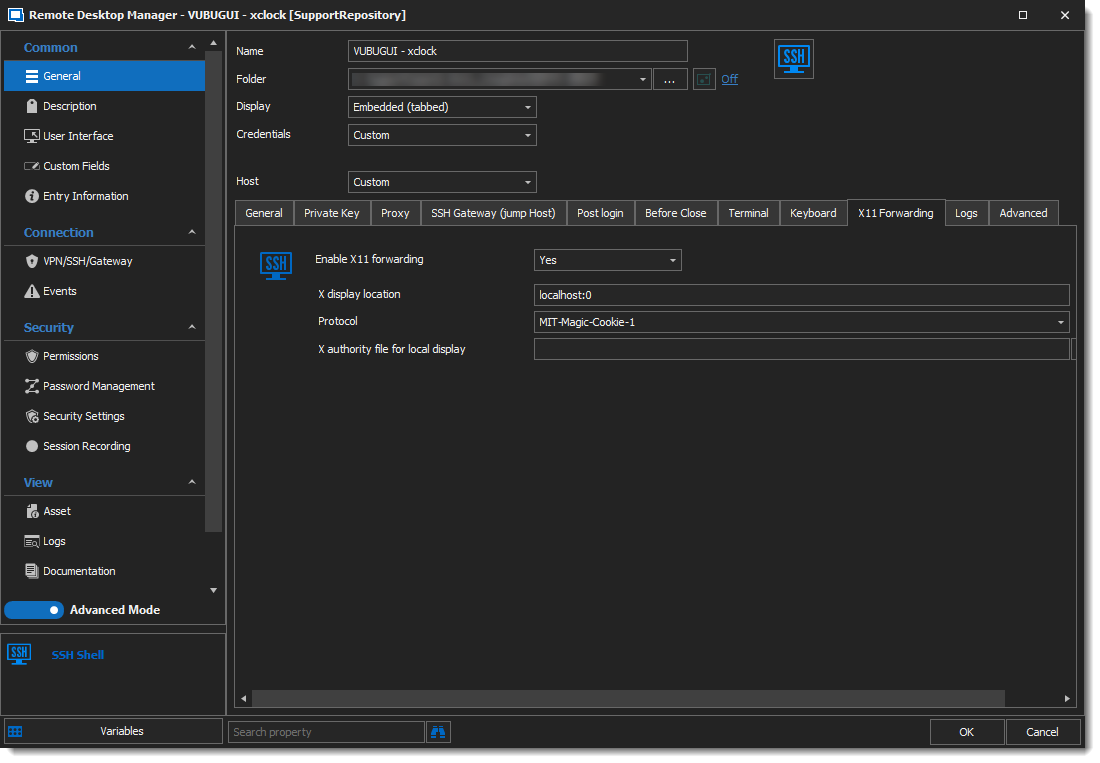
I hope this helps, thanks for letting us know!
Best regards,
Alex Belisle
2021-04-16_15-52-48.png
Worked for me, now to get my coworker squared away. That was quite easy.
Helo,
Thanks for your feedback, glad it works now!
Best regards,
Alex Belisle
Hello @all,
on Windows that one is working for me, too!
I look also for a solution on Ubuntu / Mate-Desktop and RDM.
If i using a termial window and ssh -X connection it is working but with RDM not.
Mybe someone has a solution?
Many thanks and nice weekend!
Hello @pvb1
Could you attach some screen captures of the configuration and the result?
Thanks for your cooperation
Best regards,
Alex Belisle
GM Alex,
many thank's for helping.
the configurations is almost the same as yours:
and after open the session i try to start oclock for testing.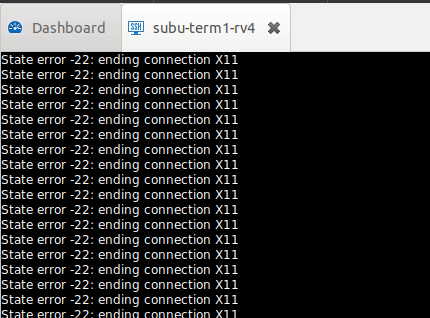
Both systems are Ubuntu 20.04 for RDM and 16.04 for testing oclock.
Is there somthing wrong in my configuration?
Many thank's in advanced
bob
rdm_x11_2.PNG
rdm_x1.PNG
Hello,
Thank you for your feedback.
We will try to reproduce this issue internally and will get back to you.
Thank you for your patience.
Best regards,
Érica Poirier
Hello,
Are the RDM Linux and RDM Windows connected on the same data source?
If they are and the entry has been created with RDM Windows, please create a new entry with RDM Linux with the same parameters and then try to establish the connection.
Let me know if that helps.
Best regards,
Érica Poirier
Hello,
no both are has different data source.
On Ubuntu i using currently a free Version 2021.1.2.4 with local data source.
On Windows i have a Enterprise Version based on MariaDB.
Both has tín RDM the same Prameter.
Many thank's for helping and have a nive weekend!
Hello,
Thank you for your feedback.
I have been able to reproduce the issue and I will submit a ticket to our engineering department. Once a fix will be available, you will be notified.
Thank you for your patience.
Best regards,
Érica Poirier
Hello,
I forgot to mention that this thread has been moved to the Remote Desktop Manager Linux - Support section.
Best regards,
Érica Poirier
Good Morning,
many thank's for your support and helping to reproduce it!
Greetings from Germany!
Hello, I am also looking to do this same as the original post. I'm running RDM on Windows trying to connect to X11 on CentOS.
I like to use RDM in portable mode shared across locations sync'ed via Dropbox. Or, download a zipped copy of my portable version to a customer workstation and run it locally without having to install software.
Is there a portable way to have XMing work (or some other X program)? Can i download a windows EXE and place it somewhere in the RDM folder and have RDM launch it on demand? I understand it's not built into RDM. But i want to avoid having to install another application on the desktop i'm running RDM portable from.
Thank you!
@doslager,
Just to let you know that we will continue in post https://forum.devolutions.net/topics/36624/rdm-on-windows--x-session
Best regards,
Jeff Dagenais
Hello,
Thank you for your feedback.
I have been able to reproduce the issue and I will submit a ticket to our engineering department. Once a fix will be available, you will be notified.
Thank you for your patience.
Best regards,
Hello,
are they any news about that?
Many thank's!
@RH,
The ticket associated with this thread is marked as resolved.
The fix should be in RDM Linux 2021.2.1.2. You can download this version here
https://remotedesktopmanager.com/home/download
Best regards,
Jeff Dagenais