RDM crashes after a certain amount of time

I am using the Arch Linux operating system, RDM version - 2020.3.2.2 Free Edition.
Some time after the start RDM crashes.
The log contains the following data:
=================================================================
        Native Crash Reporting
=================================================================
Got a SIGSEGV while executing native code. This usually indicates
a fatal error in the mono runtime or one of the native libraries
used by your application.
=================================================================

=================================================================
        Native stacktrace:
=================================================================
        0x559a69cc60f9 - ./RemoteDesktopManager.Free :
        0x559a69cc6479 - ./RemoteDesktopManager.Free :
        0x559a69c7276f - ./RemoteDesktopManager.Free :
        0x559a69cbfad3 - ./RemoteDesktopManager.Free :
        0x7f45b0170508 - /usr/lib/libgtk-3.so.0 :
        0x7f45a9ef7a90 - Unknown

=================================================================
        Telemetry Dumper:
=================================================================
Pkilling 0x139935251158592x from 0x139934862693952x
Pkilling 0x139937150654016x from 0x139934862693952x
Pkilling 0x139936911050304x from 0x139934862693952x
Pkilling 0x139935211021888x from 0x139934862693952x
Pkilling 0x139934860592704x from 0x139934862693952x
Pkilling 0x139936515483200x from 0x139934862693952x

(RemoteDesktopManager.Free:7283): Gtk-CRITICAL **: 10:06:37.536: gtk_tree_model_filter_iter_children: assertion 'filter->priv->stamp == parent->stamp' failed
Pkilling 0x139935205660224x from 0x139934862693952x
Pkilling 0x139937323349568x from 0x139934862693952x
Pkilling 0x139936913151552x from 0x139934862693952x
Pkilling 0x139936938321472x from 0x139934862693952x
Pkilling 0x139937418321920x from 0x139934862693952x
Could not exec mono-hang-watchdog, expected on path '/etc/../bin/mono-hang-watchdog' (errno 2)
[10:05:00:225] [7283:7318] [INFO][com.freerdp.client.common.cmdline] - loading channelEx rdpdr
[10:05:00:225] [7283:7318] [INFO][com.freerdp.client.common.cmdline] - loading channelEx rdpsnd
[10:05:00:225] [7283:7318] [INFO][com.freerdp.client.common.cmdline] - loading channelEx cliprdr
[10:05:00:225] [7283:7318] [INFO][com.freerdp.client.common.cmdline] - loading channelEx drdynvc
[10:05:01:853] [7283:7318] [INFO][com.freerdp.primitives] - primitives autodetect, using optimized
[10:05:01:856] [7283:7318] [INFO][com.freerdp.core] - freerdp_set_last_error resetting error state
[10:05:01:856] [7283:7318] [INFO][com.freerdp.core] - freerdp_set_last_error resetting error state
[10:05:01:867] [7283:7318] [INFO][com.freerdp.core] - freerdp_set_last_error resetting error state
[10:05:01:867] [7283:7318] [INFO][com.freerdp.core] - freerdp_set_last_error resetting error state
[10:05:01:877] [7283:7318] [INFO][com.freerdp.core] - freerdp_set_last_error resetting error state
[10:05:01:877] [7283:7318] [INFO][com.freerdp.core] - freerdp_set_last_error resetting error state
[10:05:01:977] [7283:7318] [INFO][com.freerdp.gdi] - Local framebuffer format  PIXEL_FORMAT_BGRX32
[10:05:01:977] [7283:7318] [INFO][com.freerdp.gdi] - Remote framebuffer format PIXEL_FORMAT_RGB16
[10:05:01:977] [7283:7318] [INFO][com.freerdp.channels.rdpsnd.client] - Loaded fake backend for rdpsnd
[10:05:01:977] [7283:7318] [INFO][com.winpr.clipboard] - initialized POSIX local file subsystem
[10:05:01:977] [7283:7318] [INFO][com.freerdp.channels.drdynvc.client] - Loading Dynamic Virtual Channel rdpgfx
Entering thread summarizer pause from 0x139934862693952x
Finished thread summarizer pause from 0x139934862693952x.
Failed to create breadcrumb file (null)/crash_hash_0x89fd52d85

Waiting for dumping threads to resume

(RemoteDesktopManager.Free:7283): Gtk-CRITICAL **: 10:06:37.536: ../gtk/gtk/gtktreeview.c:5573 (gtk_tree_view_bin_draw): assertion `has_child' failed.
There is a disparity between the internal view of the GtkTreeView,
and the GtkTreeModel.  This generally means that the model has changed
without letting the view know.  Any display from now on is likely to
be incorrect.
Full log in attach.
RDM always crashes, regardless of whether there is an active RDP or SSH session.
out.log
All Comments (26)
Hi,
To help narrow it down a bit, what data source are you connected to?
Jonathan Lafontaine
Hi,
To help narrow it down a bit, what data source are you connected to?
Dropbox
Thank you, I'll look into this.
Jonathan Lafontaine
Also, in the Linux version of RDM I do not see the ability to select the WebDav data source
We don't have feature parity with Windows.
Many features haven't been implemented yet and others are just impossible to support on Linux.
WebDav is in the former category.
Jonathan Lafontaine
We don't have feature parity with Windows.
Many features haven't been implemented yet and others are just impossible to support on Linux.
WebDav is in the former category.
I got it. Thank you...
Quick question, are you the only one accessing this dropbox data source?
Jonathan Lafontaine
Quick question, are you the only one accessing this dropbox data source?
Yes. I'm the only one who connects to dropbox at the same time. The account is personal, the data is not shared.
This is what it looks like to run RDM in KDE 5.21.4. Something seems to be working wrong...
I updated RDM to 2021.1.0.10 Beta and found another anomaly: If you maximize the RDM window to full screen while in an active RDP session, it crashes when you exit the session.
Full log in attach.
Pango:ERROR:../pango/pango/pango-layout.c:4288:pango_layout_check_lines: assertion failed: (!layout->log_attrs)
Bail out! Pango:ERROR:../pango/pango/pango-layout.c:4288:pango_layout_check_lines: assertion failed: (!layout->log_attrs)

=================================================================
        Native Crash Reporting
=================================================================
Got a SIGABRT while executing native code. This usually indicates
a fatal error in the mono runtime or one of the native libraries
used by your application.
=================================================================

=================================================================
        Native stacktrace:
=================================================================
        0x560613ac6139 - ./RemoteDesktopManager.Free :
        0x560613ac64b9 - ./RemoteDesktopManager.Free :
        0x560613a727af - ./RemoteDesktopManager.Free :
        0x560613ac56ef - ./RemoteDesktopManager.Free :
        0x7f3219270960 - /usr/lib/libpthread.so.0 :
        0x7f3218d8eef5 - /usr/lib/libc.so.6 : gsignal
        0x7f3218d78862 - /usr/lib/libc.so.6 : abort
        0x7f321083d084 - /usr/lib/libglib-2.0.so.0 :
        0x7f321089874d - /usr/lib/libglib-2.0.so.0 : g_assertion_message_expr
        0x7f3210631961 - /usr/lib/libpango-1.0.so.0 :
        0x7f3210632629 - /usr/lib/libpango-1.0.so.0 :
        0x7f3210c1b41a - /usr/lib/libgtk-3.so.0 :
        0x7f3210b5ac73 - /usr/lib/libgtk-3.so.0 :
        0x7f3210b61fbd - /usr/lib/libgtk-3.so.0 :
        0x7f3210c156f3 - /usr/lib/libgtk-3.so.0 :
        0x7f3210cd652a - /usr/lib/libgtk-3.so.0 :
        0x7f3210cd706e - /usr/lib/libgtk-3.so.0 : gtk_widget_get_preferred_width
        0x7f3210b114d4 - /usr/lib/libgtk-3.so.0 :
        0x7f3210b5ac73 - /usr/lib/libgtk-3.so.0 :
        0x7f3210b61fbd - /usr/lib/libgtk-3.so.0 :
        0x7f3210b09de3 - /usr/lib/libgtk-3.so.0 :
        0x7f3210cd652a - /usr/lib/libgtk-3.so.0 :
        0x7f3210cd706e - /usr/lib/libgtk-3.so.0 : gtk_widget_get_preferred_width
        0x7f3210d88b33 - /usr/lib/libgtk-3.so.0 : gtk_widget_size_allocate_with_baseline
        0x4079c167 - Unknown

=================================================================
        Telemetry Dumper:
=================================================================
Pkilling 0x139853141708800x from 0x139850924381760x
Pkilling 0x139853014492736x from 0x139850924381760x
Could not exec mono-hang-watchdog, expected on path '/etc/../bin/mono-hang-watchdog' (errno 2)
Pkilling 0x139852630709824x from 0x139850924381760x
Pkilling 0x139850971862592x from 0x139850924381760x
Pkilling 0x139850936206912x from 0x139850924381760x
Pkilling 0x139849648588352x from 0x139850924381760x
Pkilling 0x139850918635072x from 0x139850924381760x
Pkilling 0x139852632811072x from 0x139850924381760x
Pkilling 0x139852612089408x from 0x139850924381760x
Pkilling 0x139852657980992x from 0x139850924381760x
Pkilling 0x139852863358528x from 0x139850924381760x
Pkilling 0x139850394097216x from 0x139850924381760x
Pkilling 0x139850926483008x from 0x139850924381760x
Entering thread summarizer pause from 0x139850924381760x
/usr/bin/remotedesktopmanager.free: строка 4:  5730 Ошибка сегментирования                   (стек памяти сброшен на диск) ./RemoteDesktopManager.Free
resize_logoff.log
To, hopefully, prevent RDM from crashing randomly, you could temporarily disable your data source auto refresh.
It is in the advanced tab of the dropbox data source settings. Setting auto refresh to 0 should disable the feature.
I'll look into your other issues as well.
Jonathan Lafontaine
Jonathan, I am monitoring the 2021.1.0.10 beta version. This version does not seem to contain the bug that caused the crash after a period of time. Instead of a crash, there is a single noticeable redraw of the interface and work continues.
When exiting an RDP session (logoff) a crash happens, but not always. And, as far as I understand, there is no direct relation to window resizing.
I apologize for my English, I use deepl for translation.
Nice to know the new version fixed that issue.
That redraw is most probably the auto refresh kicking in, once in a while.
It seems the smart reconnect feature is trying to resize a closed window.
Is your connection using smart reconnect?
No need to apologize, as long as we can communicate, it doesn't matter how we achieve that goal.
Jonathan Lafontaine
Reconnect Mode is set to Standard...
What happens when the RDP window is resized is under the Display tab.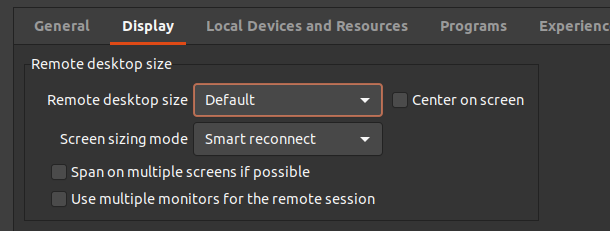
Jonathan Lafontaine
Screenshot from 2021-04-09 09-01-28.png
What happens when the RDP window is resized is under the Display tab.
Yes yes, I found it. It's set to Standard mode. Remote desktop size is set to Default.
Interesting.
So unless you've changed the default settings in RDM's preferences, Default isn't trying to smart reconnect but instead is trying to locally scale the displayed image the best it can.
I'll check in this particular area instead.
Jonathan Lafontaine
Tried different options. The program still crashes in the next scenario:
1 - I start RDM in a window (not expanded to full screen)
2 - Open RDP session to any windows server
3 - Expand RDM window to full screen
4 - Exit RDP session (logoff on remote server)
Thanks for the information.
I'll focus on that scenario.
Jonathan Lafontaine
What is your Desktop Environment?
Jonathan Lafontaine
What is your Desktop Environment?
I am using KDE (KDE Plasma 5.21.4, KDE Apps 20.12.3) in an Xorg session (xorg-server 1.20.11, xf86-video-ati 19.1.0).
The operating system is Arch Linux, Linux kernel 5.11.
VGA compatible controller: Advanced Micro Devices, Inc. [AMD/ATI] Whistler [Radeon HD 6730M/6770M/7690M XT]
I still don't have a fix for your issue but I might have a workaround in the mean time.
If you go in RDM's preferences, in the advanced tab and uncheck "Auto close embedded tab on disconnect", it might prevent RDM from crashing.
Jonathan Lafontaine
I still don't have a fix for your issue but I might have a workaround in the mean time.
If you go in RDM's preferences, in the advanced tab and uncheck "Auto close embedded tab on disconnect", it might prevent RDM from crashing.
I tried this option, but RDM still crashes...
I think I've fixed this issue.
Would you like to test a beta build?
Jonathan Lafontaine
I think I've fixed this issue.
Would you like to test a beta build?
I don't know how to download it...
I've sent you a private message.
Jonathan Lafontaine