restarting waykbastion every 3 days because of error 500

Hi,
im having an issue with the latest 2021.1.2 where i have to Restart-WaykBastion every 3 days?
i try to connect from my laptop to a clients computer and i get error message saying i cant connect
then when i inspect the wayk client debug logs, its showing internal error 500
[2021-03-30] [14:22:10:707] [6476:000027b4] [DEBUG][NowChannel] - Starting channel manager...
[2021-03-30] [14:22:10:707] [6476:000027b4] [DEBUG][NowChannel] - Start channel manager succeeded
[2021-03-30] [14:22:10:707] [6476:000027b4] [DEBUG][NowSharee] - NowSharee_SetSessionId: 4A063AE9-412A-447E-96BB-A6DCBEB087E7
[2021-03-30] [14:22:10:737] [6476:000003ec] [INFO][wayk_rust::den::ffi] - Entered NowDenSession_InitiateV3_c
[2021-03-30] [14:22:10:737] [6476:000003ec] [DEBUG][wayk_rust::den::wrapper] - Entered Den::resolve_v3
[2021-03-30] [14:22:10:737] [6476:000003ec] [DEBUG][NowCurl] - curl url: https://remote.server.com:443/wayk/resolve (proxy: )
[2021-03-30] [14:22:11:714] [6476:000003ec] [INFO][wayk_rust::den::wrapper] - Resolved "681205" -> ("efa0ffe4-1a65-7620-d6c7-8d29089dfd14", 0x23D20C56)
[2021-03-30] [14:22:11:714] [6476:000003ec] [DEBUG][wayk_rust::den::wrapper] - Exited Den::resolve_v3 successfully
[2021-03-30] [14:22:11:714] [6476:000003ec] [DEBUG][wayk_rust::den::session] - Entered DenSession::create_v3
[2021-03-30] [14:22:11:714] [6476:000003ec] [DEBUG][NowCurl] - curl url: https://remote.server.com:443/session (proxy: )
[2021-03-30] [14:22:11:714] [6476:000003ec] [DEBUG][NowOAuth] - access token for https://remote.server.com/lucid expires in 0s
[2021-03-30] [14:22:11:714] [6476:000003ec] [DEBUG][NowOAuth] - invalid access token, requesting a new one
[2021-03-30] [14:22:11:714] [6476:000003ec] [DEBUG][NowOAuth] - requesting access token from https://remote.server.com/lucid/auth/token using refresh token
[2021-03-30] [14:22:11:714] [6476:000003ec] [DEBUG][NowCurl] - curl url: https://remote.server.com/lucid/auth/token (proxy: )
[2021-03-30] [14:22:12:136] [6476:000003ec] [DEBUG][NowOAuth] - got an access token from https://remote.server.com/lucid/auth/token
[2021-03-30] [14:22:12:136] [6476:000003ec] [DEBUG][NowOAuth] - got a refresh token from https://remote.server.com/lucid/auth/token
[2021-03-30] [14:22:12:620] [6476:000003ec] [INFO][wayk_rust::den::session] - Session created successfully. Session id is "d2c7b61b-2f0b-4545-9077-af3d60e5ce44".
[2021-03-30] [14:22:12:620] [6476:000003ec] [DEBUG][wayk_rust::den::session] - Exited DenSession::create_v3 successfully
[2021-03-30] [14:22:12:620] [6476:000003ec] [DEBUG][wayk_rust::den::session] - Entered DenSession::initiate_v3
[2021-03-30] [14:22:12:620] [6476:000003ec] [DEBUG][NowCurl] - curl url: https://remote.server.com:443/wayk/message (proxy: )
[2021-03-30] [14:22:12:666] [6476:000003ec] [ERROR][wayk_rust::den::utils::ffi] - curl internal error: Body(ErrorResponseBody { typ: "/wayk/problems/internal-server-error", title: "Internal server error", status: 500, detail: "An error happened during the process. Please see server logs for more information.", invalid_params: None })
[2021-03-30] [14:22:12:666] [6476:000003ec] [ERROR][wayk_rust::utils] - den error: Internal
[2021-03-30] [14:22:12:666] [6476:000003ec] [WARN][NowDen] - NowDenSession_InitiateV3_c failed: INTERNAL
[2021-03-30] [14:22:12:682] [6476:000027b4] [DEBUG][NowSharee] - NowSharee_SetSessionId: 00000000-0000-0000-0000-000000000000
[2021-03-30] [14:22:12:682] [6476:000027b4] [INFO][NowApp] - current outgoing connections (0) lifetime connections (0 out) (0 in)
after checking the logs on the waykbastion, that isnt very helpful either?
all logs are empty apart from 2 (mytraefik container and den-server container)
my traefik container just simplys forwards the https/wss to dev-traefik which is also traefik ironically
my traefik docker logs:
111.111.111.111 - - [30/Mar/2021:13:22:12 +0000] "POST /wayk/message HTTP/1.1" 500 186 "-" "-" 5378 "waykden-https@file" "http://den-traefik:4000/" 19ms
den-server logs below:
2021-03-30T13:22:05.539346899+00:00 INFO den_server::http::middlewares::log - GET /health 200 OK (id=35c642fd-dcc4-44b8-abb1-28bacbc2aed6, User-Agent=curl/7.64.0, Duration_ms=65)
2021-03-30T13:22:11.295770148+00:00 INFO den_server::http::middlewares::log - POST /wayk/resolve 200 OK (id=489bf344-0118-404e-86a6-ef2ce0ceba9c, User-Agent=WaykNow/2021.1.0 (Windows; Windows 10 Pro 2004), Client-Ip=111.111.111.111, 172.18.0.2, Duration_ms=26)
2021-03-30T13:22:11.389964933+00:00 INFO den_server::http::middlewares::log - GET /health 200 OK (id=7cb0522c-4f9c-410e-8147-da917e36ea4c, User-Agent=curl/7.64.0, Duration_ms=26)
2021-03-30T13:22:12.319588228+00:00 INFO __USER__ - Session initiated between 3dc8c890-acaa-0c62-ca18-60cfd41f7f28 and efa0ffe4-1a65-7620-d6c7-8d29089dfd14.
2021-03-30T13:22:12.328370760+00:00 INFO den_server::http::middlewares::log - POST /session 200 OK (id=c1d33940-201b-4cad-aafb-8bd576878070, Den-Version=3, User-Agent=WaykNow/2021.1.0 (Windows; Windows 10 Pro 2004), Client-Ip=111.111.111.111, 172.18.0.2, Duration_ms=135)
2021-03-30T13:22:12.415235682+00:00 ERROR den_server::http::error_code - cow call failed: IO error: Broken pipe (os error 32)
2021-03-30T13:22:12.415360053+00:00 INFO den_server::http::middlewares::log - POST /wayk/message 500 Internal Server Error (id=2a5a1522-8b54-4510-80f5-c9fbd5fcc65b, Den-Version=3, User-Agent=WaykNow/2021.1.0 (Windows; Windows 10 Pro 2004), Client-Ip=111.111.111.111, 172.18.0.2, Duration_ms=10)
2021-03-30T13:22:17.378979520+00:00 INFO den_server::http::middlewares::log - GET /health 200 OK (id=abc1af4c-b109-4a54-8ebc-fbc753428d23, User-Agent=curl/7.64.0, Duration_ms=64)
THE ONLY WAY OF FIXING THIS IS TO RESTART WAYKBASTION ITSELF
sudo pwsh -c Restart-WaykBastion
i havent restarted the machine yet if you require anymore logs but its driving me insane at the moment!
Regards
Simon
All Comments (26)
Hi Again,
after restarting each den service one by one, i have found after i restarted the den-server,
all the connections then come back to life,
so i can avoid a whole server Restart-WaykBastion, and just docker restart den-server to fix this issue
but again i shouldnt have to do this every 3 days!
Regards
Simon
Hello Simon,
Does it happen exactly 3 days after the restart, or is there randomness associated with it? Also, could you specify what version are your Wayk Agents running (2021.1.0 is the latest)? As a side note, 2021.1.1 should be out soon, with improved stability.
Also, is the web UI of the Wahyk Bastion still working when the issue occurs, you only get the 500 error when trying to either use the desktop or Web Client?
Finally, would you be able to send us the full den-server log to ticket@devolutions.net? If it is too large, you can send it to https://api.devolutions.net/redirection/f621a158-4b6e-4752-8ecf-4c7d33fdbc57
Simply run the following in PowerShell: docker logs den-server > den-server.log
Best regards,
Richard Boisvert
Hi Richard,
its hard to say if its exactually every 3 days but from what im noticing now from looking at the logs its actually about every 5 days,
as i last restarted it on the 25th, and needed to restart it today (so 5 days)
however i used it yesterday no problem to connect to a computer in another room (i was too lazy to walk into the other room haha)?
all clients are running the latest version 2021.1.0, and also i couldnt connect via RDM OR the html5 websocket client, that was both saying error to connect, it was only in the waykclient debug logs that i spotted the error 500, then after checking the den-server and my traefik logs, they also show error 500's ???
the webpanel is fine and usable, just sadly not the html5 client
also connecting to the waykbastion entry in RDM has no problems what so ever? (shows list of clients no problems, just doesnt let me connect to any of them)
i have gone though the logs myself manually but i cant find anything that stick out like a nail, but i will send logs over soon to you
EDIT: have sent logs using link
Regards
Simon
Hi All,
so its only been 2 days, and yet again the den-server has locked up again!
i couldnt connect to any devices without restarting the den-server!
restarting the den-server and works again no problem!
Regards
Simon
Hello Simon,
I verified with the engineering team and we could not find anything in your logs. We would need you to restart the service with the debug level and then send it back to us. To do so, please run Restart-WaykBastion -verbose
In one of the steps, you will see something like this (I removed most parameters but yours will be a lot longer):
Starting den-server

VERBOSE: docker run --name den-server -d --restart=on-failure --network=den-network -e … -l info -m onprem

den-server successfully started
You will need to copy the complete docker run --name den-server... line but at the before last parameter, where it says -l info, replace it with -l debug
You can then stop the container run docker stop den-server
And launch it with the modified command. Once you can no longer connect to a remote machine, please send us back the logs.
Please note that in the next release, it will be possible to modify a property in the WaykBastion to set it at the debug level directly.
Best regards,
Richard Boisvert
Hi,
output below from restarting it with verbose
EDIT: copy and paste didnt work, so here is a pastebin instead haha - https://pastebin.com/9vgzAH51
Regards
Simon
Hello Simon,
Perfect, the den-server container is now running with the debug mode on. Sorry I forgot to add the docker rm den-server command.
The next time you experience the issue, you can send us the logs the same way as previously: docker logs den-server > den-server.log
This time, however, it will contain the debug information.
Best regards,
Richard Boisvert
Hi Richard,
no crashing so far, but its only been 24 hours, so case of wait and see what happens
Regards
Simon
Hi Richard,
came into the office this morning, tried to connect to two different clients and long behold it didnt work!
i have DM you the logs from the den-server
restarted the den-server using docker restart den-server, and it was back up and running, no problem!
EDIT: BTW the logs are an hour out because of the UK time change (9.17am is 10.17am really)
Regards
Simon
Hello Simon,
The engineering team has found the source of the issue but they are still investigating how to fix it. I will provide you with an update once we have more details.
For now, you can always configure a task to run the Restart-WaykBastion every 2 days, for example with Cron: https://help.ubuntu.com/community/CronHowto. Sorry for the inconvenience.
Best regards,
Richard Boisvert
Hi Richard,
glad to hear you found the issue!
and im happy to help you beta test/track down bugs if need be, more than welcome!
i just normally restart the den-server whenever its not working at the moment, as i generally dont use the remote support every day
(quiet this past week weirdly?)
but then the is always that one day where i used 24/7 haha
Regards
Simon
Hi Simon,
Could you update your Wayk Bastion with the latest version 2021.1.3 (https://www.powershellgallery.com/packages/WaykBastion/2021.1.3), change the log level and send me the logs again please ? We had an issue with the cache and we fixed it. I don't expect that new version to fix your issue, but the logs will be different. And I also think that you could see different behavior from your Wayk Agent. Do you know if the Wayk Agent was able to connect to the Wayk Bastion again after the issue was there ? With that new version, I expect the Wayk Agent to fail at connection with Wayk Bastion.
We added a way to set the log level in WaykBastion latest version so you can run this command to set the log level to debug : Set-WaykBastionConfig -ServerLogLevel debug
It will always keep it to debug, even if you stop and restart. You can keep it to debug for now. You could run Clear-WaykBastionConfig ServerLogLevel later to remove it and reuse the default value.
When you get the issue again, you can run this command: Export-WaykBastionLogs It will create a zip file that you could send directly to Richard or me.
Thank you for your help and sorry for inconvenience
Best regards,
François Dubois
Hi Francois,
I will update my server tomorrow and see how I get on for you
i will then come back to you in a few days or when the error happens again!?
regards
Simon
Hi François/Richard,
ive updated this morning to 2021.1.3, then within 20mins the den-gateway container bottled my cpu at 198% (2 cores),
so i restarted the den-gateway container but then again 20mins later, it bottled my cpu back to 198% (2 cores)
ive had to roll back to 2021.1.2 sadly,
the is also nothing in the logs for den-gateway thats weird either, only a few lines?
ubuntu@ip-172-31-5-58:~$ docker logs den-gateway -n50
2021-04-10 12:25:48:441838 INFO Loading HTTP middlewares, module: [devolutions_gateway::http::http_server]
2021-04-10 12:25:48:441914 INFO Loading HTTP controllers, module: [devolutions_gateway::http::http_server]
2021-04-10 12:25:48:441995 INFO Configuring HTTP router, module: [devolutions_gateway::http::http_server]
2021-04-10 12:25:48:442760 INFO Starting websocket server (ws://0.0.0.0:7171/)..., module: [devolutions_gateway::service]
2021-04-10 12:25:48:443822 INFO Starting TCP jet server (tcp://0.0.0.0:8080/)..., module: [devolutions_gateway::service]
2021-04-10 12:26:33:486884 INFO GET /jet/accept/ae04fa6b-7581-4354-b24c-8da337b6fc7c/b5577ba9-5d7b-42e8-a6a1-87a7e95fd1c4, listener: 0.0.0.0:7171, module: [devolutions_gateway::websocket_client]
2021-04-10 12:26:33:588699 WARN Protocol is unknown. Data received will not be split to get application message., listener: 172.18.0.8:8080, client: 217.149.xx.xx:63431, module: [devolutions_gateway::proxy]
2021-04-10 12:26:33:686804 INFO GET /jet/connect/ae04fa6b-7581-4354-b24c-8da337b6fc7c/b5577ba9-5d7b-42e8-a6a1-87a7e95fd1c4, listener: 0.0.0.0:7171, module: [devolutions_gateway::websocket_client]
2021-04-10 12:26:38:690519 INFO Stream client -> Sink server: terminated normally, listener: 172.18.0.8:8080, client: 217.149.xx.xx:63431, module: [devolutions_gateway::proxy]
2021-04-10 12:26:39:691069 WARN Stream server -> Sink client (remaining): deadline has elapsed, listener: 172.18.0.8:8080, client: 217.149.xx.xx:63431, module: [devolutions_gateway::proxy]
2021-04-10 12:26:39:693016 ERRO Failed to get association, module: [devolutions_gateway::websocket_client]
2021-04-10 12:43:26:278750 INFO GET /jet/accept/2784cc10-8798-4588-84b3-1e4580f43cc8/460f6dc6-9edb-4dde-81b3-286c1aa892b1, listener: 0.0.0.0:7171, module: [devolutions_gateway::websocket_client]
2021-04-10 12:43:26:619745 WARN Protocol is unknown. Data received will not be split to get application message., listener: 172.18.0.8:8080, client: 217.149.xx.xx:64257, module: [devolutions_gateway::proxy]
2021-04-10 12:43:26:938905 INFO GET /jet/connect/2784cc10-8798-4588-84b3-1e4580f43cc8/460f6dc6-9edb-4dde-81b3-286c1aa892b1, listener: 0.0.0.0:7171, module: [devolutions_gateway::websocket_client]
2021-04-10 12:43:31:798493 INFO Stream client -> Sink server: terminated normally, listener: 172.18.0.8:8080, client: 217.149.xx.xx:64257, module: [devolutions_gateway::proxy]
2021-04-10 12:43:32:800185 WARN Stream server -> Sink client (remaining): deadline has elapsed, listener: 172.18.0.8:8080, client: 217.149.xx.xx:64257, module: [devolutions_gateway::proxy]
2021-04-10 12:43:32:801058 ERRO Failed to get association, module: [devolutions_gateway::websocket_client]
ubuntu@ip-172-31-5-58:~$
EDIT:
restarted the den-gateway again and then within 60 seconds its bottled my cpu at 125%,
the only thing i did was connect to a computer to check it was still working,
but the computers actually onsite with direct access so it never used the gateway so im confused?
ubuntu@ip-172-31-5-58:~$ docker logs den-gateway
2021-04-10 12:47:29:952823 INFO Loading HTTP controllers, module: [devolutions_gateway::http::http_server]
2021-04-10 12:47:29:952883 INFO Configuring HTTP router, module: [devolutions_gateway::http::http_server]
2021-04-10 12:47:29:960192 INFO Starting websocket server (ws://0.0.0.0:7171/)..., module: [devolutions_gateway::service]
2021-04-10 12:47:29:961465 INFO Starting TCP jet server (tcp://0.0.0.0:8080/)..., module: [devolutions_gateway::service]
2021-04-10 12:48:58:570368 INFO GET /jet/accept/4ddbea8d-6133-496a-8667-6141ad40b072/1867cfd6-b813-42a9-a686-0bb5d50f04eb, listener: 0.0.0.0:7171, module: [devolutions_gateway::websocket_client]
2021-04-10 12:48:58:654950 WARN Protocol is unknown. Data received will not be split to get application message., listener: 172.18.0.8:8080, client: 217.149.xx.xx:64350, module: [devolutions_gateway::proxy]
2021-04-10 12:48:58:745410 INFO GET /jet/connect/4ddbea8d-6133-496a-8667-6141ad40b072/1867cfd6-b813-42a9-a686-0bb5d50f04eb, listener: 0.0.0.0:7171, module: [devolutions_gateway::websocket_client]
2021-04-10 12:49:03:748082 INFO Stream client -> Sink server: terminated normally, listener: 172.18.0.8:8080, client: 217.149.xx.xx:64350, module: [devolutions_gateway::proxy]
2021-04-10 12:49:04:748291 WARN Stream server -> Sink client (remaining): deadline has elapsed, listener: 172.18.0.8:8080, client: 217.149.xx.xx:64350, module: [devolutions_gateway::proxy]
2021-04-10 12:49:04:749273 ERRO Failed to get association, module: [devolutions_gateway::websocket_client]
ubuntu@ip-172-31-5-58:~$
Regards
Simon
Hello Simon,
Thank you for reporting the issue with the newest Wayk Bastion version, we had another customer report an issue similar to yours. I have notified the engineering team but it will need to wait until Monday before they have a look at the issue.
I apologize for the inconvenience.
Best regards,
Richard Boisvert
Hello Simon,
I'm sorry for the inconvenience, you got 2 issues back to back. They were difficult to find and reproduce (I didn't reproduce one of them) The good news is: we fixed both. There is a new version 2021.1.4 available : https://www.powershellgallery.com/packages/WaykBastion/2021.1.4
You should be able to upgrade to that version without any CPU issue. And you should not have to restart your Wayk Bastion every few days like before. But I didn't reproduce that issue on my side so I would like to get your logs after a week or two. I added a trace in the log to see when we get the condition causing the previous issue and I would like to see if it occurs often. So if you could set the ServerLogLevel to debug and send me the logs after 5-10 days, I would really appreciate.
To set the log : Set-WaykBastionConfig -ServerLogLevel debug
To export logs : Export-WaykBastionLogs
The export command will generate a zip file that you can send to us, Richard or me, via direct message.
Thank you for your help
Best regards,
François Dubois
Hi Francois
ok i have updated this morning, so i will see how i get on!
only weird issue i have at the moment, is i have 2 sessions that are stuck on the webpanel and i cant terminate them?
these where when i tried to connect this morning but it didnt work before i upgraded and restarted everything
any ideas how i get rid of them?
i just keep getting the following error?Http failure response for https://remote.server.com/session/efdcf9aa-f7cf-4917-b337-3411b15f5fde/terminate: 404 Not Found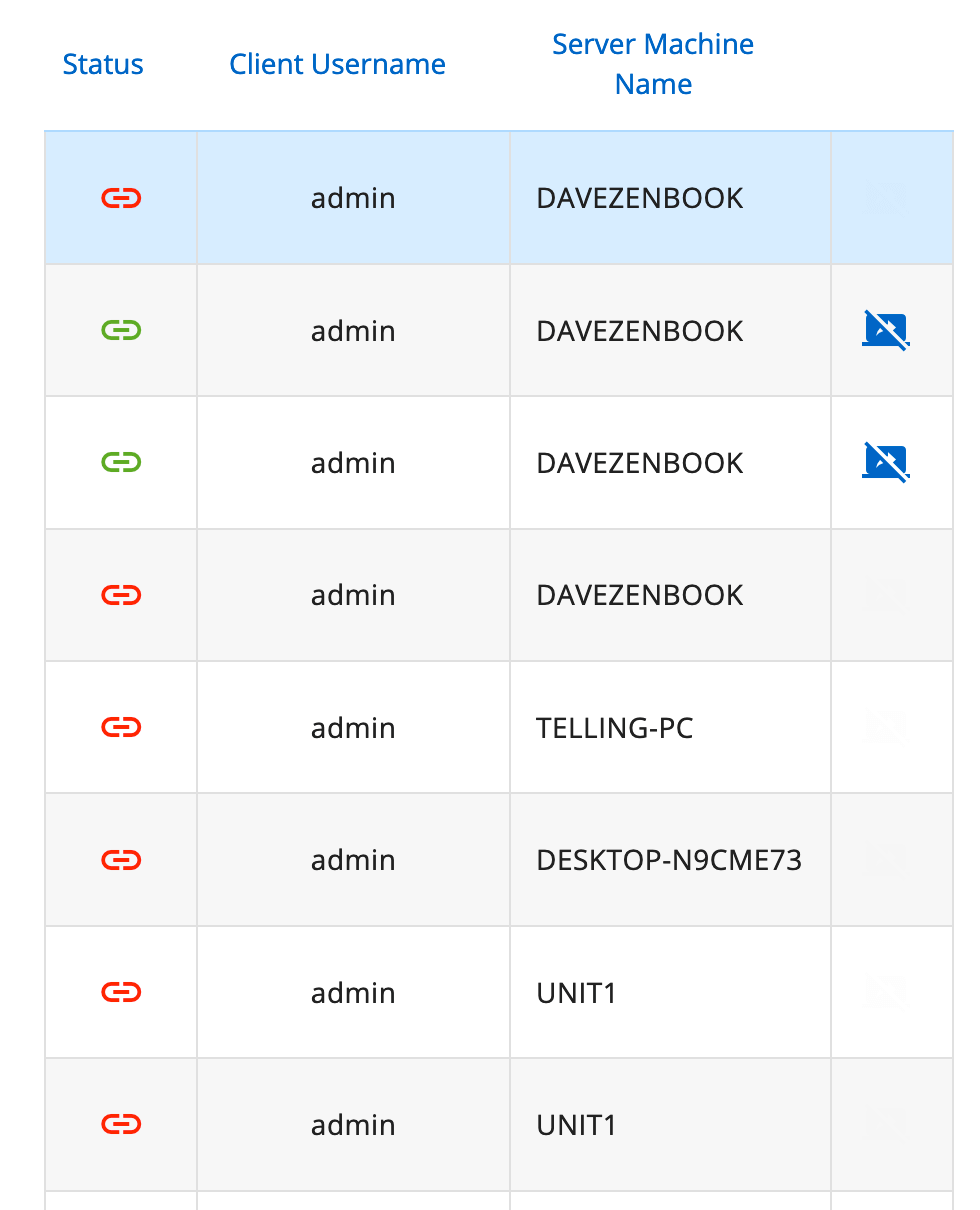
Regards
Simon
Screenshot 2021-04-14 at 10.57.40.png
Hi,scratch my last message about the stuck sessions, they cleared up after an hour, and showing as closed now, ha!
Regards
Simon
Hi Simon,
You probably had sessions running when you have restarted your Wayk Bastion server. After a restart, the server doesn't track "old" session, it is not aware of those sessions. This is why you were not able to stop them. But there is a task running in background to clean these "old" sessions. That task runs every hour, so that explains what you have seen. If the session is flagged terminated by the server itself, it will also set a field on the session "ended gracefully" to false, so it tells you that you can't be sure that the session end time is right. That information can be seen in the session detail. It usually means that the server lost track of that session and flag it terminated by itself, but the server didn't really know. There is some edge cases where the server could lost track of a session. Of course, restarting the server itself is one case.
Having said that, I think we could do better, at least on server restart. We have not revisited that since a while, I will create a ticket to see if it could be improved.
Thank you for reporting that behavior.
Best regards,
François Dubois
Hi Francois
thats another issue, i wasnt connected to anything before i restarted the server!
i had TRIED to connect to the clients computer but it wasnt having any of it, so i just stopped the server, then upgraded and started the server
then i could connect no problem, it was only after i had disconnected from the clients computer then i spotted the 2 active sessions from before hand (they didnt connect, and wasnt working)
the times of them where BEFORE i stopped/upgraded the server
so the must be a bug with because it couldnt connect for whatever reason (2 day weird issue), it was not closing the sessions correctly on the server maybe
and the server through they where still active when in fact they wasnt!
EDIT: also surely the server knows when it has started up? so IF on start-up the where previous sessions opened but terminated unexpectedly like a server restart/crash, surely it could just terminate them itself, instead of waiting an hour for the session cleanup to run and close terminate them?
Regards
Simon
Hi Simon,
The weird issues that you have probably seen in last days were probably cause by the issue where the server was not able to reach any Wayk Agent (fixed in the last version). So when you wanted to open a session, the session was created, but the Wayk Client was not able to reach the Wayk Agent via the Wayk Bastion. I will try to force a such situation and see what happen, but it could be an issue if they are not flagged terminated.
And yes, the server knows about all sessions and this is why I said that it could improved, but it is not as easy as it looks like. A session could still be alive and would be nice to be able to track again that session. We will investigate to see how we can improve that.
Best regards,
François Dubois
Hi Francois,
uptime of 2 days and couldnt connect again this morning...
this time however, i had to physically restart the whole server?
normally a restart of den-server alone would fix the issue but this time it didnt fix which was weird?
have DM you zip logs
Regards
Simon
Hi Simon,
I'm sorry to hear that, I'm looking your logs and will keep you posted as soon as I find something. Could you describe me your installation please ? Linux ? Windows server ? Something in front of your Wayk Bastion server to manage TLS (IIS or other) ?
Best regards,
François Dubois
Hi Francois,
its Ubuntu 20.04 running on AWS eu-west-2 region t3a.small instance (1GB ram, 2 AMD cores, 5GB uplink), 10 GB EBS Storage
the memory usage sorts bobs around the 600MB used
im running my own traefik container to direct the HTTPS/WSS to the den-traefik (this handles the creation of the SSL itself and renewals too with lets encrypt)
in the logs you might see loads of EOF's but thats only because we run external monitoring to check the port 8080 (den-gateway) is running
i run SNMP on the server too for again external monitoring of the instance and the docker containers themselves (like cpu/memory usage)
the is really nothing else thats special about my environment?
Regards
Simon
Hi Simon,
Thanks a lot for the information. I didn't reproduce that issue and I thought it would be fix with latest version but obviously, it is not. I'm looking at it and will let you know when I find something. For now, unfortunately, restarting the server is the only way to fix that. Restarting only den-server should fix though, I don't know why it didn't work. If it happens again, try to restart den-server only. If it doesn't fix, send me logs after den-server reboot. I will try to investigate that, it could give us some hints.
Again, sorry for inconvenience, working on this.
Best regards,
François Dubois
Hi Francois
its only been 1 hour and i now cant connect to a few computers?
the only error i see myself in the logs now that stick out are
'2021-04-19T14:20:44.765890174+00:00 ERROR cowrpc::async_peer - Msg processor got an error : Internal("Unable to send http response through futures oneshot channel")'
DM you the logs from now
EDIT:
ok thats weird, it reason it wont connect is because its only allowing 1 connection at a time ???
i can to the first computer but the minute i try to connect to the second, its not letting me ???
even weirder the first computers session is still working perfectly fine no problems ???
also the minute i disconnect from the first one, i can then connect to the second computer ??
Regards
Simon