ConnectWise Control Authentication Failed

Hello dear friends,
I'm trying ConnectWise Control with the Remote Desktop Manager integration, but I tested it with various combinations of Remote Desktop Manager settings and no options worked for me. Can someone using this integration tell me if I am configuring something wrong or maybe someone can help me?
If I try to use One Time Password I didn't receive any e-mail with the code, and if I just use my user and password I received the failed to authenticate.
In the application log, I just have this superficial error:
[30/01/2021 15:43:03 - 2020.3.27.0 - 64-bit] Error Silent: ScreenConnect: Login Form contains no Action
See the screens below as a sample.


All Comments (16)
Well, this is awkward, but we are deprecating this type in our 2021.1 release coming out next month.
Low user adoption, complexity that drives up the maintenance cost, etc.
we always regret deprecating integrations, but it’s in order to dedicate more time to technologies that are widely used, or that are not a nightmare to maintain, we must make hard choices.
if ever they come out with a stable API and a simpler deployment topology, we’ll definitely look into it, but right now the conditions are such that both Devolutions and the community are not well served.
Best regards,
Maurice
Hi Maurice,
I understand you, well, I reinstalled ConnectWise Control with about 20 different releases until I find out which release the integration stops working on. The Integration works perfectly until ScreenConnect_20.12.1734.7640_Release, after that version stops working, example ScreenConnect_20.13.1905.7657_Release, the integration stops working with only the error "ScreenConnect: Login Form contains in Action", I believe that the system login is a little different from previous versions and maybe a little adjustment will solve it, maybe you can take a look? I opened a ticket on ConnectWise but they said they don't support your plugin :(
I will be very grateful because it would be very valuable to us that this integration works again.
If you need any files or anything I can do to help, please don't hesitate to count on me.
BTW, I was able to download the releases from this link - https://www.connectwise.com/platform/unified-management/control/download/archive
Hugs.
Hello Dear,
Is there any possibility for you to take a look or can I totally dismiss that possibility? Thank you.
Hello,
Sadly we still feel its better to just drop the integration. We have few integrations that require plugins, and we are moving away from that as best we can.
Best regards,
Maurice
Well, that is very unfortunate to hear that the ConnectWise Control integration will be depreciated.
We use it a lot, are depended on it even. So that makes me really wonder if I want to upgrade RDM.
@andre07 : I have the same issue with ConnectWise as you have. The problem is not related to RDM/Devolutions, but on ConnectWise side.
You need to revert back to a snapshot of version .7640 for it to work again. I already raised a ticket at ConnectWise, but haven't heared back from them yet.
Hello,
Sadly we still feel its better to just drop the integration. We have few integrations that require plugins, and we are moving away from that as best we can.
Best regards,
Hi Maurice,
Will the ConnectWise Control add-in stop working in general, even if we don't update RDM ?
For us this is very crucial information, as we have a lot of customers we connect to using ConnectWise Control and we need to switch to another way of remote connecting.
Thank you Ron for the details. Let us know if they answer. For now, we don't plan to remove the integration or the code. It's just that it's not easy for us to support our users when we don't have the support from the third party. We mark it deprecated because we know that it's possible that we could not find a solution if the problem is not on our side.
By the way, this does not mean that in the future we will not change our mind.
Regards
David Hervieux
Well, that is very unfortunate to hear that the ConnectWise Control integration will be depreciated.
We use it a lot, are depended on it even. So that makes me really wonder if I want to upgrade RDM.
@andre07 : I have the same issue with ConnectWise as you have. The problem is not related to RDM/Devolutions, but on ConnectWise side.
You need to revert back to a snapshot of version .7640 for it to work again. I already raised a ticket at ConnectWise, but haven't heared back from them yet.
Hello Dear, I agree with Ron van Elteren, it is frustrating for us to know that this excellent integration will stop working because both solutions (RDM and Control) are great solutions, the best on the market today.
As it stopped working from version 2020.13, I checked the release notes for that version and noticed that they updated or fixed bugs in the login form, you may just need to correct some parameter in the RDM integration to work with this new form of Control, if if i had knowledge i would even take a look to try to find out what is wrong to fix but the RDM Event Log only shows "ScreenConnect: Login Form Contains in Action" then i don't know which file to fix this login form in.
It really is very sad to know that. If someone wants to venture to look, below is a print of the changes in this version that stops working.
Link - https://docs.connectwise.com/ConnectWise_Control_Documentation/ConnectWise_Control_release_notes/Release_notes_archive#ConnectWise_Control_2020.13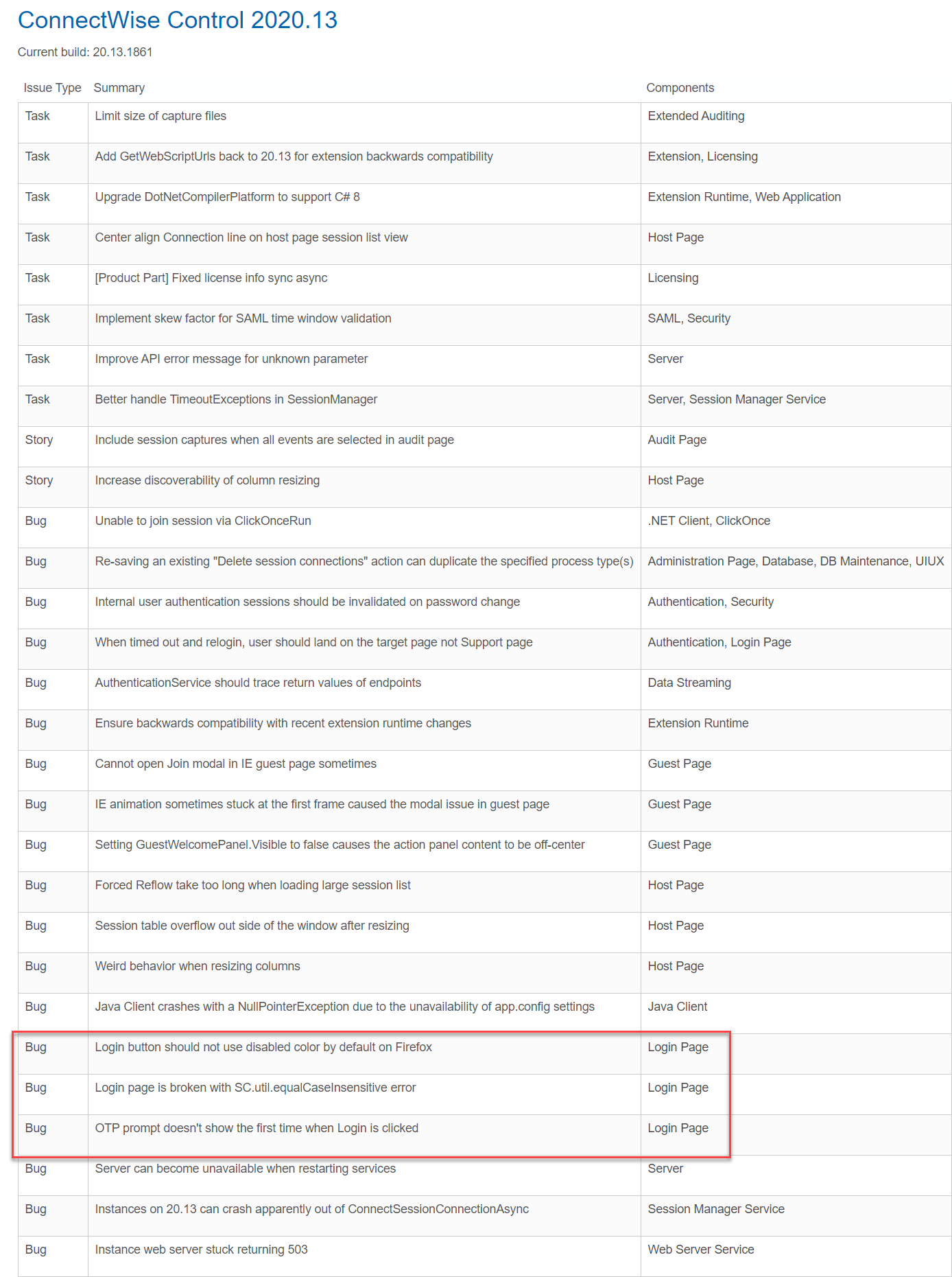
screenconnect control 2020.13 release notes.png
Thank you Ron for the details. Let us know if they answer. For now, we don't plan to remove the integration or the code. It's just that it's not easy for us to support our users when we don't have the support from the third party. We mark it deprecated because we know that it's possible that we could not find a solution if the problem is not on our side.
By the way, this does not mean that in the future we will not change our mind.
Regards
Hi David,
Working for a software company myself, I really understand that it is not easy to support a third party product.
I am only worried if you have to switch our current customers, for which we use ConnectWise Control add-in of RDM, to another solution to remotely connect to.
We made a decision over 1 year ago to use ConnectWise, solely based on the fact that RDM has an integration.
Seeing that RDM is our main application for remote connections to our customers, an integration is crucial for us.
Because our company has been acquired by an American/Canadian firm (Aptean) and they don't use RDM for remote connections, we might need to switch to another solution anyways.
But I'll try to hold on to RDM as long as I can, simply because I just love it !
May I ask if an integration with SecureLink is in the pipeline ? I know Aptean uses SecureLink to remotely connect to its customers, so an integration with RDM would be awesome !
@andre07
As I said, I have the same issue not able to connect to my ConnectWise sessions with RDM version 2020.3.23 or even 2020.1.20 (we are using 2 different RDM versions, 1 for production other for testing).
The problem is not related to RDM or the ConnectWise integration add-in.
It is related on side of ConnectWise itself.
Just log into your ConnectWise instance https://cloud.screenconnect.com/#/account
Click on the 3 dots next to your instance name and select "Revert to Snapshot"
Select a snapshot of version .7640 or earlier.
(version .7657 and upwards gave the issues, so I reverted back to .7640).
This solved the issue for me at least.
Hello Ron,
The problem is that I don't have this option in my instance, I'm moving to the cloud now and I have just new versions of ScreenConnect how can you see below 😭😭😭
Than the only way is to contact their support, I'm afraid.
Hi guys,
I have a big issue with ConnectWise and I have contacted them, but they are eighter unwilling to help or just fed up with me.
Background: I have been using CW for more than 1 year now and never really had an issue.....up untill now.
I use LDAP (configured in their web portal) for our users to get authenticated. Again, this works really well.
In RDM I have several sessions, which are customer specific and so point to the correct session.
Currently I am on version 20.12.1734.7640.
If I try any newer version, the sessions stop working and I get the error "authentication failed".
All of them.
First I thought it could have something to do with the configured LDAP, but on their web portal there's the option to do a lookup and that works.
So LDAP seem to work.
Each time when they release a new version, they change servers with new IP addresses (AWS). So I thought it could be something blocking the connection.
But when I try it from home, where I don't have IP whitelisting or blocks to their portal, I get the same error.
Funny thing is, I only get this error when I use RDM with the CW integration.
When I use the portal and start a session over there, everything works fine.
When I revert back to version 20.12.1734.7640, I am able to use RDM with the CW integration again.
Could it have something to do with the CW integration ?
Could they have done something on their end that makes the CW integration in RDM stop working ?
I really hope you guys can help, we have over 50 customers configured in CW and I don't want to move them all to another solution.
P.S. I'm running 2 different versions of RDM, both have the same problem. Versions 2020.1.20 and 2020.3.23.
Hello,
This was a difficult decision, but as you know, the ConnectWise Control (ScreenConnect) entry type is now deprecated in Remote Desktop Manager (RDM). The last thing we want to do is deprecate support for any technology, however, we’ve had to put the needs of our community first, and did not feel that this entry was used by enough users to justify the engineering time devoted to its maintenance. The entry will still be available when displaying the deprecated entries in RDM, but there will be no further enhancements or bug corrections. For more information on our deprecated entries, please consult https://kb.devolutions.net/kb_rdm_deprecated_entries.html
Sorry for the inconvenience, but if this integration was the sole reason for you to purchase RDM, we can work on a refund with our sales team.
Best regards,
Jeff Dagenais
Hi Jeff,
I understand the decision of deprecation and I don't hold any grudges or anything.
Our company has been acquired by an American firm and they are using SecureLink to connect to customers.
From what I can gather, SecureLink is practically a copy of ConnectWise Control.
We use CW currently for customers who normally use a VPN to their servers.
But as VPN tunnels always run on virtual PC's on our network, RDP into the virtual PC + start the VPN + RDP into customer server just takes too long.
CW is much faster and secure enough (encrypted connection). Our Customer Service benefits greatly from the faster connection, also for our consultants (over 100).
Do you then perhaps know any good alternative for CW ? Secure connection + RDM integration ?
I'm open to idea's.
@Ron van Elteren,
I could propose a good alternative, which is one of our product called WaykBastion.
With a WaykBastion server installed internally and the WaykClient to establish the connection, this will avoid you the usage of VPN.
For more information on that product, please consult https://wayk.devolutions.net/
If you are interested in a live demo, please let me know. We can schedule a remote session with a technician in my team to show you the capabilities of that product.
Best regards,
Jeff Dagenais