Users disconnected from Wayk Bastions: password invalid.

Hi,
We are using Wayk Bastions with RDM since a few weeks (now we are at latest version 2020.3.4.0) and we are facing an issue since the very beginning. We are using account from AD and some of them are logged out randomly and, when it happens, the password is not recognized anymore (see image) making impossible to login again. Restarting the Wayk server sometimes fixes the issue, but after a few hours the user is disconnected again. The strange thing is that the problem is always with the same accounts. Any ideas?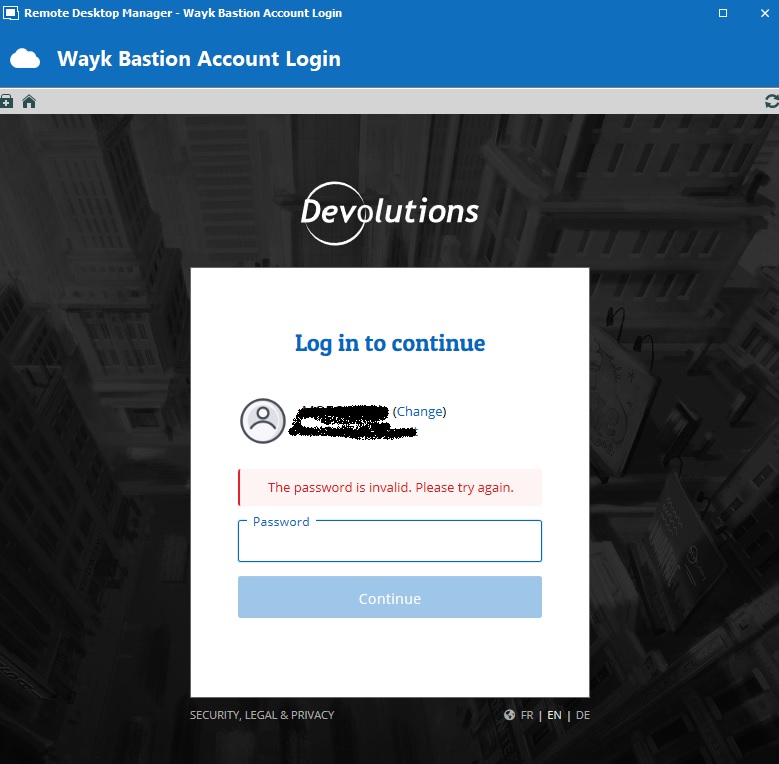
LoginError.jpg
All Comments (7)
Hello,
An issue was identified with AD and JumpCloud with version 2020.3.4 of Wayk Bastion. A new release will be pushed out this week to fix the issue. I will update this thread once it is ready to keep you notified.
Best regards,
Richard Boisvert
Hi Richard,
Many thanks, looking forward for the release...
Best regards,
Diego
Hello Diego,
Wayk Bastion 2021.1.0 has been released, containing the authentication fix for AD: https://www.powershellgallery.com/packages/WaykBastion/2021.1.0
Let us know if you have any further questions or problems.
Best regards,
Richard Boisvert
Hello Richard,
I just upgraded, but the situation seems even worse. Some of the user can login and some get the "password invalid", same as before, but now I cannot login anymore with "wayk-admin", I get the error you see in the attached image.
I forgot to mention that I am running Wayk Bastion on Windows Server 2019.
Diego
way-admin.jpg
Hello Diego,
I'm sorry to hear that. We will help you with that. First, could you send us your server logs. You can run these 2 commands :
> docker logs den-server > den-server.log
> docker logs den-lucid > den-lucid.log
After, you can send me the 2 logs file. I will have a look and try to understand what is going on.
Best regards,
François Dubois
Hi Francois,
I sent you a DM.
Diego
Hi,
Here is a conclusion of what we found after many exchanges in case it could help others.
You can validate which version are installed with the command Get-Module WaykBastion -ListAvailable -All Depending how you installed and update the powershell module, you can have module in Users folder or Program Files folder. Here is an example of what you could have, version 2020.3.4 in Users folder and 2021.1.0 in Program Files folder :
PS C:\Users\wayk-admin> Get-Module WaykBastion -ListAvailable -All


    Directory: C:\Users\wayk-admin\Documents\WindowsPowerShell\Modules


ModuleType Version    Name                                ExportedCommands
---------- -------    ----                                ----------------
Script     2020.3.4   WaykBastion                         {New-WaykBastionConfig, Set-WaykBastionConfig, Get-WaykBas...
Script     2020.3.4   WaykBastion                         {New-WaykBastionConfig, Set-WaykBastionConfig, Get-WaykBas...


    Directory: C:\Users\wayk-admin\Documents\WindowsPowerShell\Modules\WaykBastion\2020.3.4


ModuleType Version    Name                                ExportedCommands
---------- -------    ----                                ----------------
Binary     0.0.0.0    WaykBastion


    Directory: C:\Program Files\WindowsPowerShell\Modules


ModuleType Version    Name                                ExportedCommands
---------- -------    ----                                ----------------
Script     2021.1.0   WaykBastion                         {New-WaykBastionConfig, Set-WaykBastionConfig, Get-WaykBas...
Script     2021.1.0   WaykBastion                         {New-WaykBastionConfig, Set-WaykBastionConfig, Get-WaykBas...


    Directory: C:\Program Files\WindowsPowerShell\Modules\WaykBastion\2021.1.0


ModuleType Version    Name                                ExportedCommands
---------- -------    ----                                ----------------
Binary     0.0.0.0    WaykBastion
No version should be installed in a user folder. In the previous example, version 2020.3.4 is installed in the user folder and 2021.1.0 is installed in Program Files folder. It means that depending how you start the Wayk-Bastion, it will launch a different version. If you use the Windows Service, it will launch 2021.1.0 since the service use the Program Files folder. If you launch it with your user 'wayk-admin', it will launch 2020.3.4.
To avoid such situation :
#1 - Always open powershell as Administrator (elevated mode)
#2 - Always install the powershell module with the parameter -Scope AllUsers
> Install-Module -Name WaykBastion -Scope AllUsers
It will force the installation in Program Files folder.
#3 - If you have version installed in your user folder, you can uninstall them with that command
> Uninstall-Module -Name WaykBastion -AllVersions
If you are not sure of your installation and you have issue with that, don't hesitate to contact us, it will be a pleasure to help you.
Best regards,
François Dubois