3.3.0 release unable to login using AD credentials

Hi,
the computers have auto upgraded themselves to 3.3.0 overnight,
HOWEVER i am now unable to connect to the computers this morning ???
I have the auth type set as Secure Remote Delegation
and my credentials are my AD details (RBS\Administrator) (i know i shouldnt be using it but its only myself)
it was all working perfectly fine yesterday?
the only debug log i have found in the NowSession is
2021-01-07 13:43:30 common::logging [DEBUG] - TransitionToState: Initial -> Handshake
2021-01-07 13:43:30 common::logging [DEBUG] - TransitionToState: Handshake -> Negotiate
2021-01-07 13:43:30 common::logging [DEBUG] - TransitionToState: Negotiate -> Authenticate
2021-01-07 13:43:30 NowService::service::callbacks [DEBUG] - on_negotiate called
2021-01-07 13:43:30 NowService::service::callbacks [DEBUG] - on_negotiate successfully finished
2021-01-07 13:43:39 NowService::service::callbacks [DEBUG] - on_auth_begin called
2021-01-07 13:43:39 NowService::service [DEBUG] - SRD authentication
2021-01-07 13:43:39 NowService::service::callbacks [DEBUG] - on_auth_begin successfully finished
2021-01-07 13:43:39 common::logging [DEBUG] - TransitionToState: Initial -> Continue
2021-01-07 13:43:39 NowService::service::callbacks [DEBUG] - on_srd_logon called
2021-01-07 13:43:39 wayk_rust::platforms::windows::credentials [DEBUG] - LookupAccountName failed: 1332
2021-01-07 13:43:39 wayk_rust::platforms::windows [DEBUG] - authenticate_user: Administrator Some("RBS") (RBS\Administrator)
2021-01-07 13:43:39 NowService::service [INFO] - authenticate_user failed: IO error: The user name or password is incorrect. (os error 1326)
2021-01-07 13:43:39 NowService::service::callbacks [DEBUG] - on_srd_logon successfully finished
2021-01-07 13:43:39 common::logging [DEBUG] - TransitionToState: Continue -> Failure
i have also tried using different user combinations to no success eitherRBS\Administator Administrator@RBS Administrator@rbs.local
Regards
Simon
All Comments (13)
Hi Simon
I apologize for the inconvenience. We'll try to get this figured out ASAP for you.
2020.3.3 made some changes to how we authenticate users against Windows; specifically, we changed the type of logon that we perform.
I suspect this is related to cached domain credentials. Is the remote machine in contact with the domain? Or it's on a different/remote network, and must use a VPN to talk to the domain?
Is it possible this machine is caching an old password the RBS\Administrator account? (i.e. you've changed the password at some point, but this machine hasn't been on the domain since that time and still remembers an old password)
If not, it could also relate to the specific TLD when using the UPN to authenticate. Do you have any other domain suffix configured in your AD (e.g. rbs.loc, rbs.net)?
Previously (i.e. yesteday) you were using the down-level username (RBS\Administrator) to login?
Thanks and kind regards,
Richard Markievicz
Hi Richard
the remote computer is connected directly to the domain network (same subnet mask)
the domain server is online all the time apart from monthly updates which require restarts during the night
the administrator password hasnt been changed in months (bad practice sorry)
the issue is actually at 2 different sites, both using there own local ADs and not Azure AD !
domains are RBS.local and FTH.com, different names
all dns resolved internally no problem, no issues
i actually connected to a computer at the FTH.com site yesterday evening no problem using the admin credentials
its just simply today i cant connect to any of the computers at either sites,
and the only difference is they have all auto-upgraded to 3.3.0
Regards
Simon
Hi Simon
Ok - that's strange indeed. It's obviously not related to cached credentials.
You're obviously able to access a machine through another route as you posted the log file. Did you login interactively using the domain admin user? If you are logged in interactively as the domain user, can you then try to connect via Wayk and see if it accepts the credentials then?
Thanks and kind regards,
Richard Markievicz
Hi Richard
sadly no I had no other way of accessing the users desktop remotely
the way I retrieved the logs was to login to the domain controller server and access the computers c drive directly remotely using file explorer \\unit1\c$\ProgramData\Wayk
i also connected to the computer using powershell to restart the Wayk agent service to change the logs from info to debug
but sadly no other way of controlling the computer directly
the was users logged into the computers at the point I tried to connect to them
They where domain users too but again I used my administrator details for full access with no luck
Regards
Simon
Hi Simon
Can you confirm that the user has the SE_INTERACTIVE_LOGON_NAME privilege? In GPO / Local security policy I believe it's called "Log on locally".
(I expect that a domain admin normally does hold that privilege, but I'd like you to check please)
Thanks and kind regards,
Richard Markievicz
Hi Richard
im not sure how i would check that?
any help? pretty plz?
EDIT: found this on our server2012r2 if thats any help?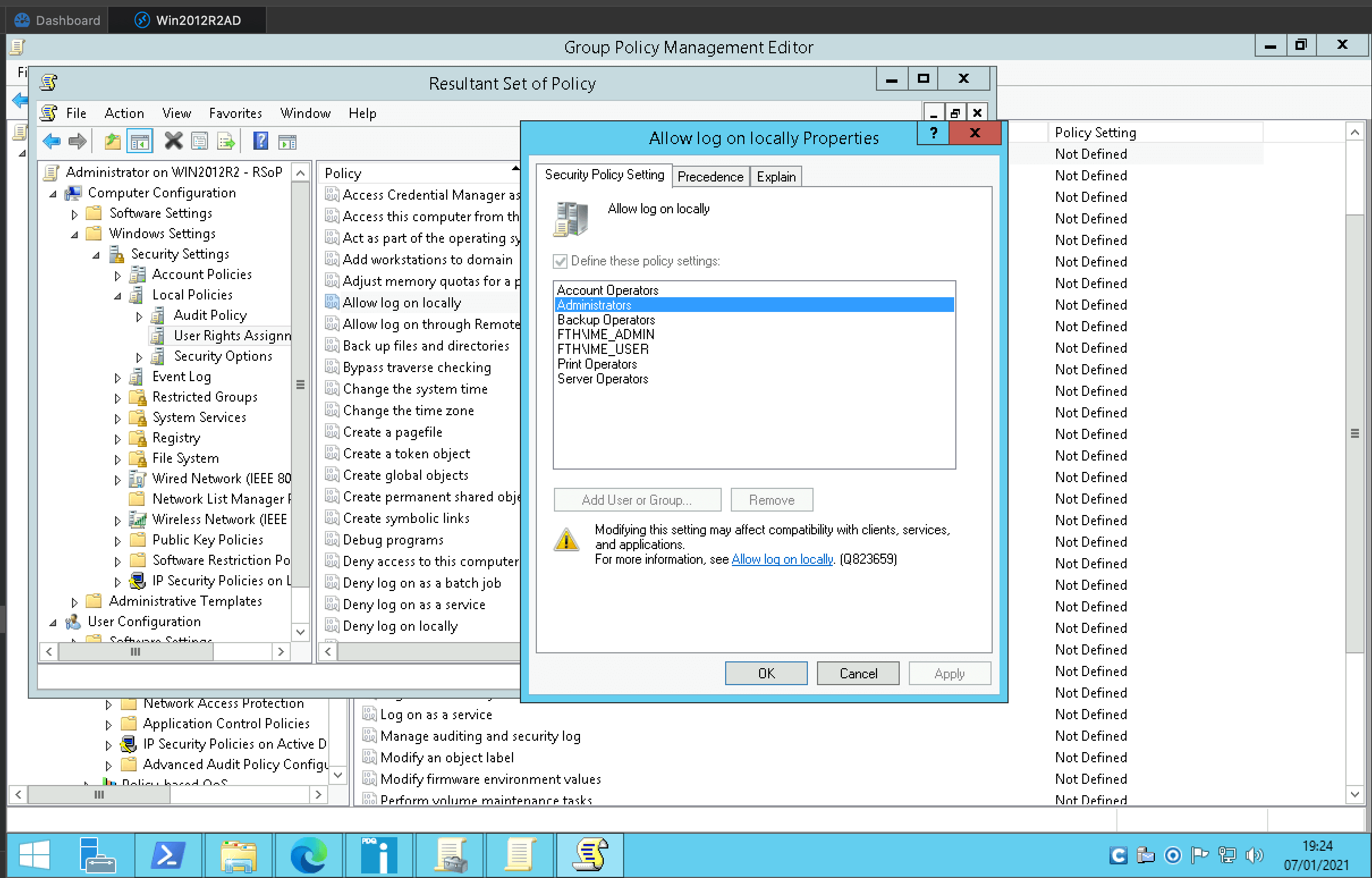
Regards
Simon
Screenshot 2021-01-07 at 19.24.41.png
Hi,
ok randomly i decided to try connecting with my user instead of administrator
simon@rbs OR simonsmith@fth at the different sites
and weirdly enough, they connected straight in! no problems!?
but ive also just realized, doesn't this then pose a security risk?
if a hacker gains access to say my AD credentials (simonsmith NOT administrator) and they gained access to the waykbastion
they could control all the computers in that domain? even if a different user was logged into that computer?
surely only the Administrators or selected domain groups should be allowed access via waykbastion?
Regards
Simon
Hi Simon
Sorry for the delay, I took some time to work on setting up a fresh lab to see if I can recreate your issue.
It's not related to "Log on locally" privilege - while restricting that for domain admins is considered "good practice", it's laborious to set up via GPO (i.e. you'd probably know that it was set up that way!) and then the error message returned by LogonUser is different.
Actually, I now think we're seeing some weirdness between local and domain admin.
Instead of using "RBS\Administrator", can you try ".\Administrator"?
Regarding your last question, what groups is your account a member of? It's restricted to administrators, remote desktop user and wayk-users; so I'm guessing your account is in one of those groups on the target machine.
Thanks and kind regards,
Richard Markievicz
Hi Richard
.\Administrator doesnt work, that displays a lookup error?
2021-01-07 20:58:54 NowService::service::callbacks [DEBUG] - on_auth_begin called
2021-01-07 20:58:54 NowService::service [DEBUG] - SRD authentication
2021-01-07 20:58:54 NowService::service::callbacks [DEBUG] - on_auth_begin successfully finished
2021-01-07 20:58:54 common::logging [DEBUG] - TransitionToState: Failure -> Continue
2021-01-07 20:58:55 NowService::service::callbacks [DEBUG] - on_srd_logon called
2021-01-07 20:58:55 wayk_rust::platforms::windows::credentials [DEBUG] - LookupAccountName failed: 1332
2021-01-07 20:58:55 wayk_rust::platforms::windows [DEBUG] - authenticate_user: Administrator Some("UNIT1") (.\Administrator)
2021-01-07 20:58:55 NowService::service [INFO] - authenticate_user failed: IO error: The user name or password is incorrect. (os error 1326)
2021-01-07 20:58:55 NowService::service::callbacks [DEBUG] - on_srd_logon successfully finished
2021-01-07 20:58:55 common::logging [DEBUG] - TransitionToState: Continue -> Failure
also my own user 'simonsmith' isnt part of any of those groups so im totally confused why it can login but the Administator cant?
EDIT:
my mistake my own user 'simonsmith' is part of 'FTH\staffgroup' which has been added to the remote desktop users in the GPO,
even tho it wasn't set in the 'active directory users and computers'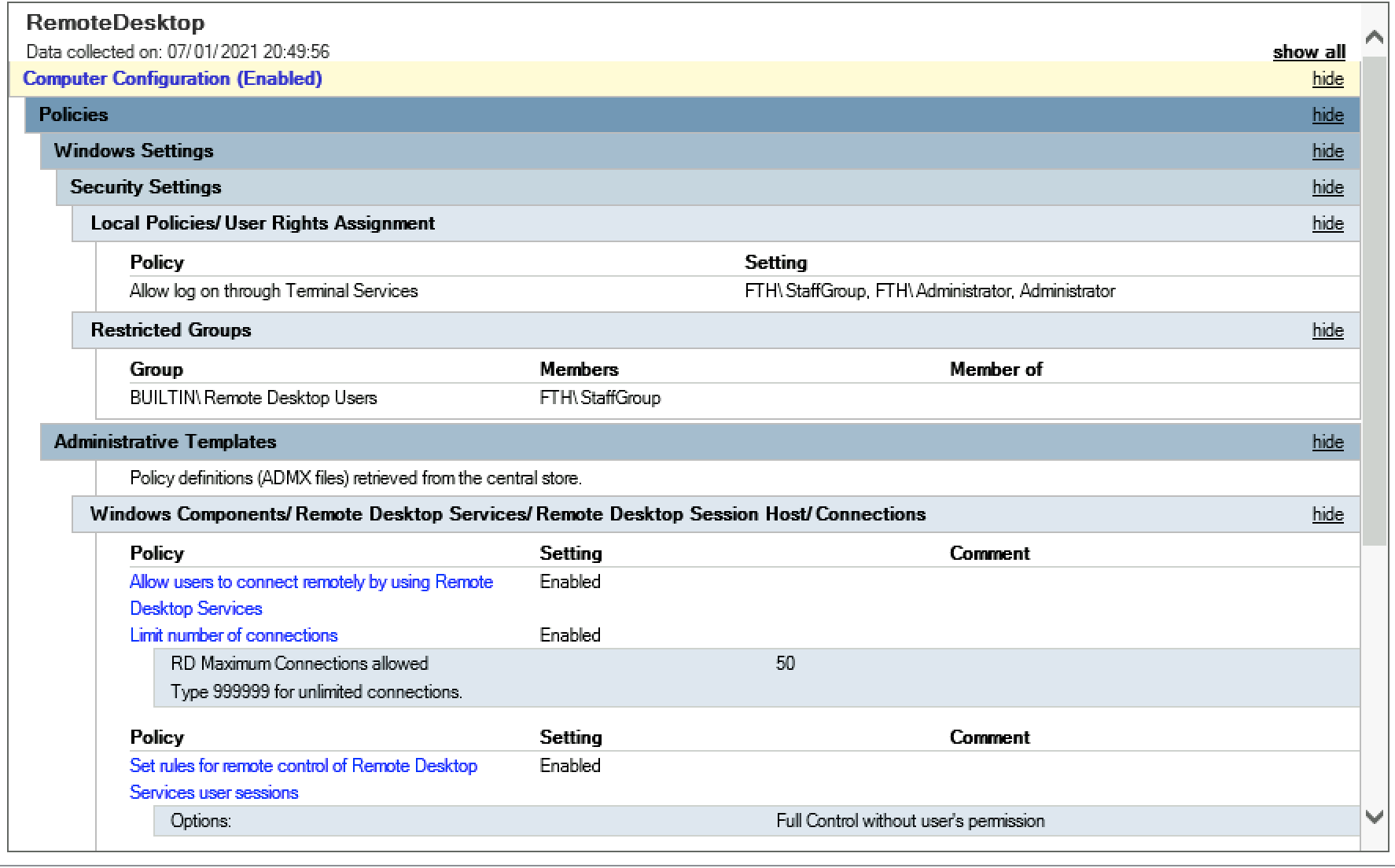
Regards
Simon
Screenshot 2021-01-07 at 20.50.40.png
Hey Simon
Can you send me the unedited %programdata%\wayk\logs\NowService.log from the machine you're (trying to) connect to? Either by PM or rmarkiewicz at devolutions dot net.
Thanks and kind regards,
Richard Markievicz
Hi Richard
sorry for delay, have sent you email :)
Regards
Simon
Hi All,
im just posting here to let others know of the progress
so ive just looked at the Event viewer logs this morning for a remote computer
And I can see Audit Failure inside the Security tab of Windows Logs!
It appears waykagent is trying to sign in with the computers Local Administrator account and not the domains account as the Account Domain field is blank!?
if you authenticate using another domain user thats inside the 'administrators, remote desktop user or wayk-users' groups it will work no problem!
Regards
Simon
Hello
Wayk Agent and Client 2020.3.4 will shortly be available and should address this issue. The problem could occur in some cases when trying to logon with a domain account, where the same account exists locally as well (e.g. "administrator").
Thanks to Simon for his patience and assistance with troubleshooting the issue.
Kind regards,
Richard Markievicz