Can't connect, or login or use anything!

Ok, o i'm getting frustrated here because I went from a product that used to work albeit with a little issue here or there to a fragmented product where it appears that features are being removed or portions handed off and this shift is being done on a live in production product? because I used to have wayk-now and wayk-den and now i've got a client an agent and setup a den on my own because the online one is/was taken down. Now i've got all m components configured and ive got a series of issues that all prevent me from being able to use wayk at all. below are screenshots of all my various attemps to use or login to wayk, be it from den or directly through the client to the agent. There's also some strangenes going on with machine registrations duplicating repeatedly. And al this is from any computer or even my phone.
I'm able to login as wayk-admin but not even the webclient works. I have copied my license over to the den server and registered several clients on the den.
- Repeating machine registration
- Login to den as a user (with admin rights)
- directly attempting to connect to an agent using a client
- attempting to use the den webclient
- attempting to use an invitation or previously working bookmark.
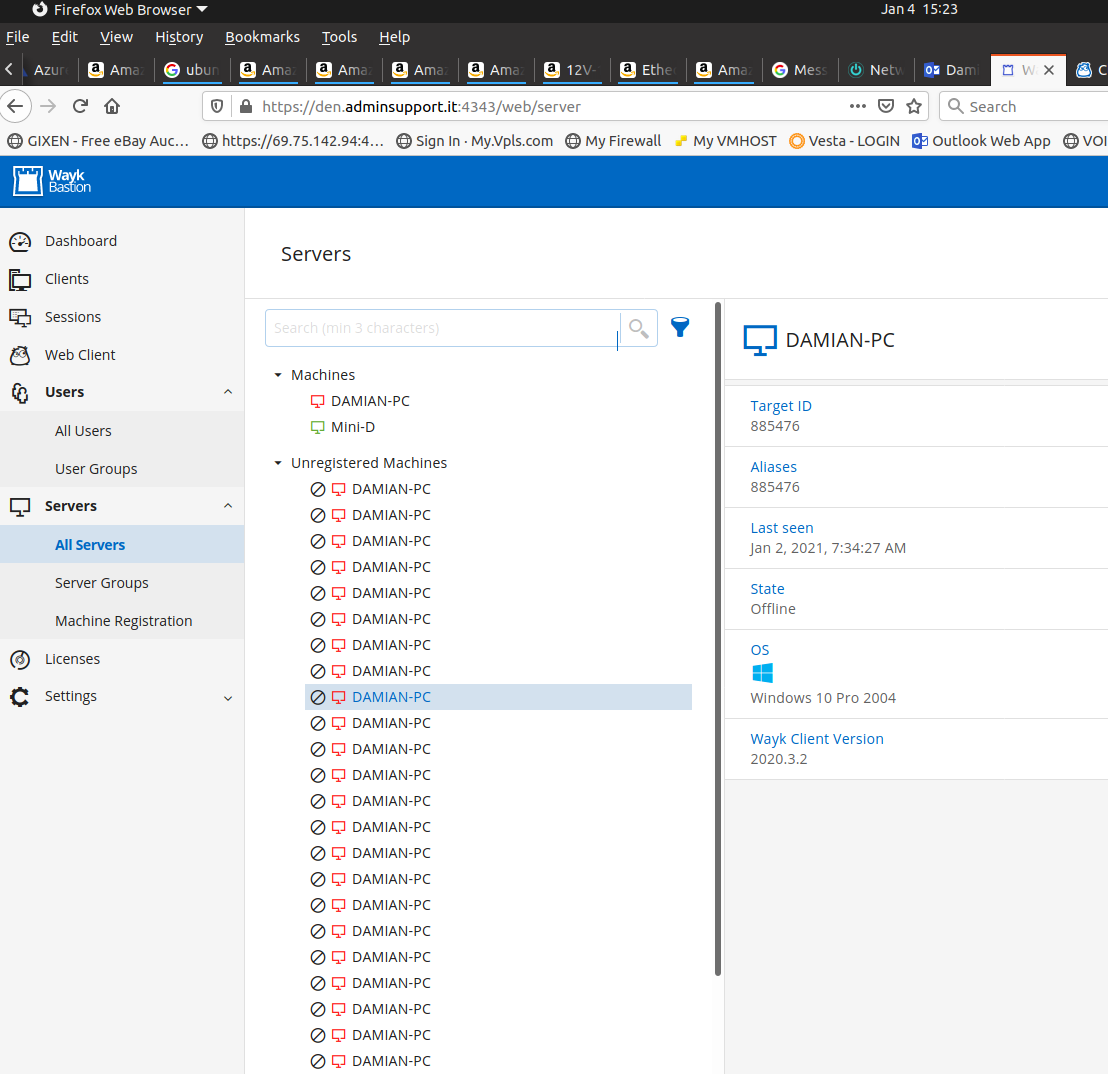
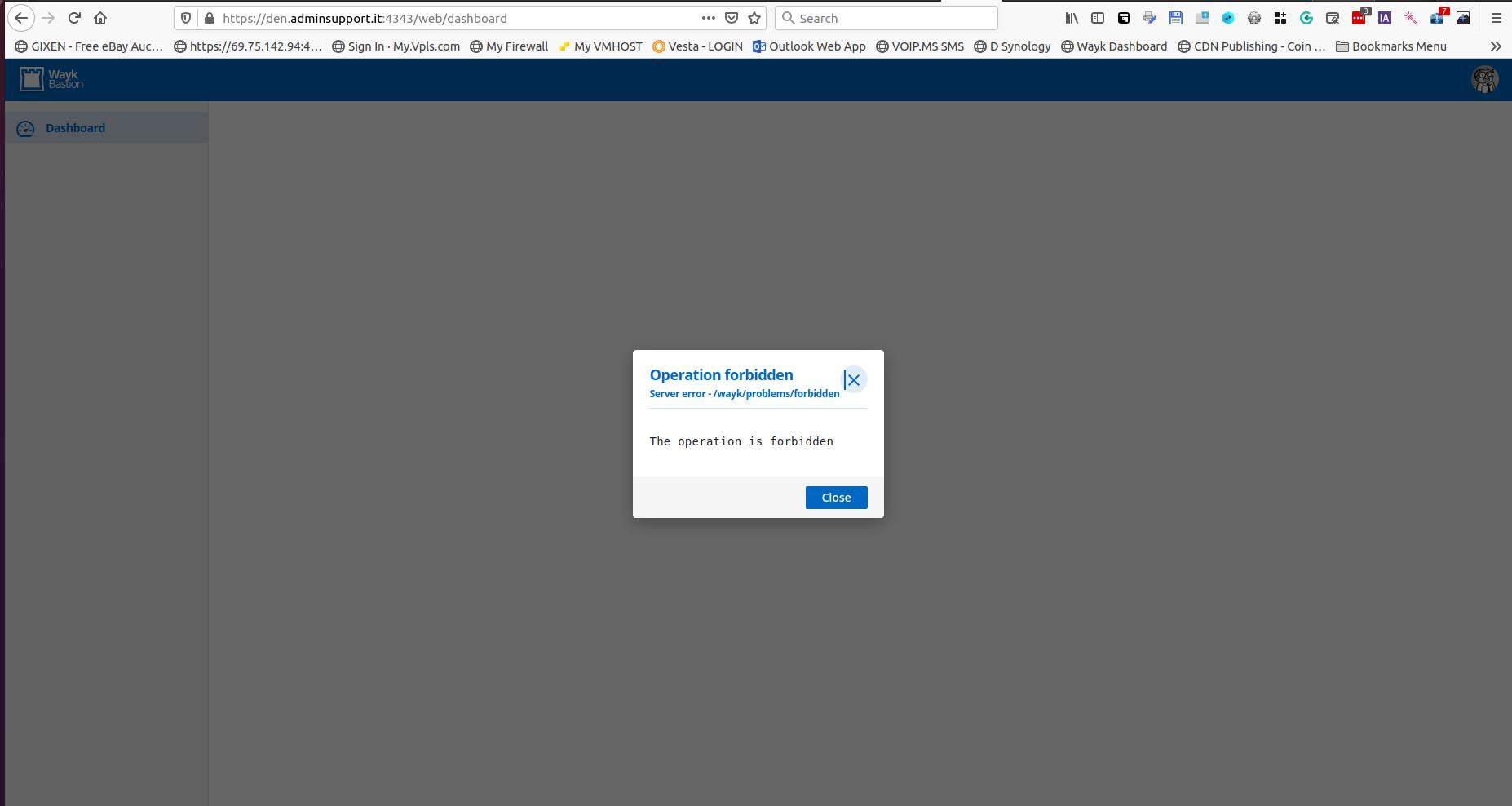
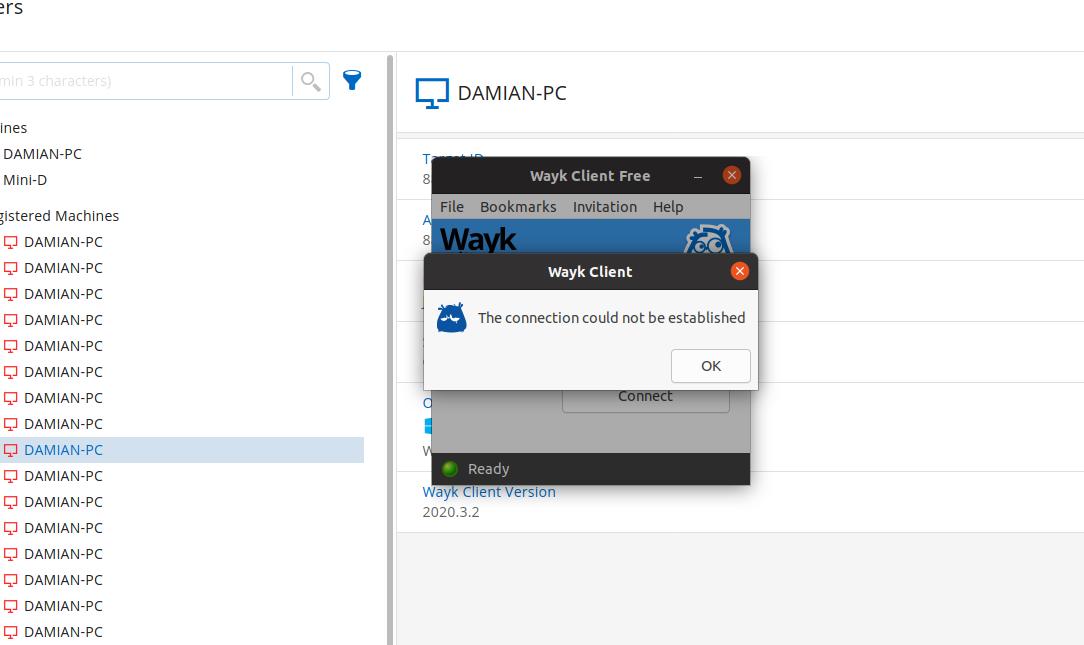
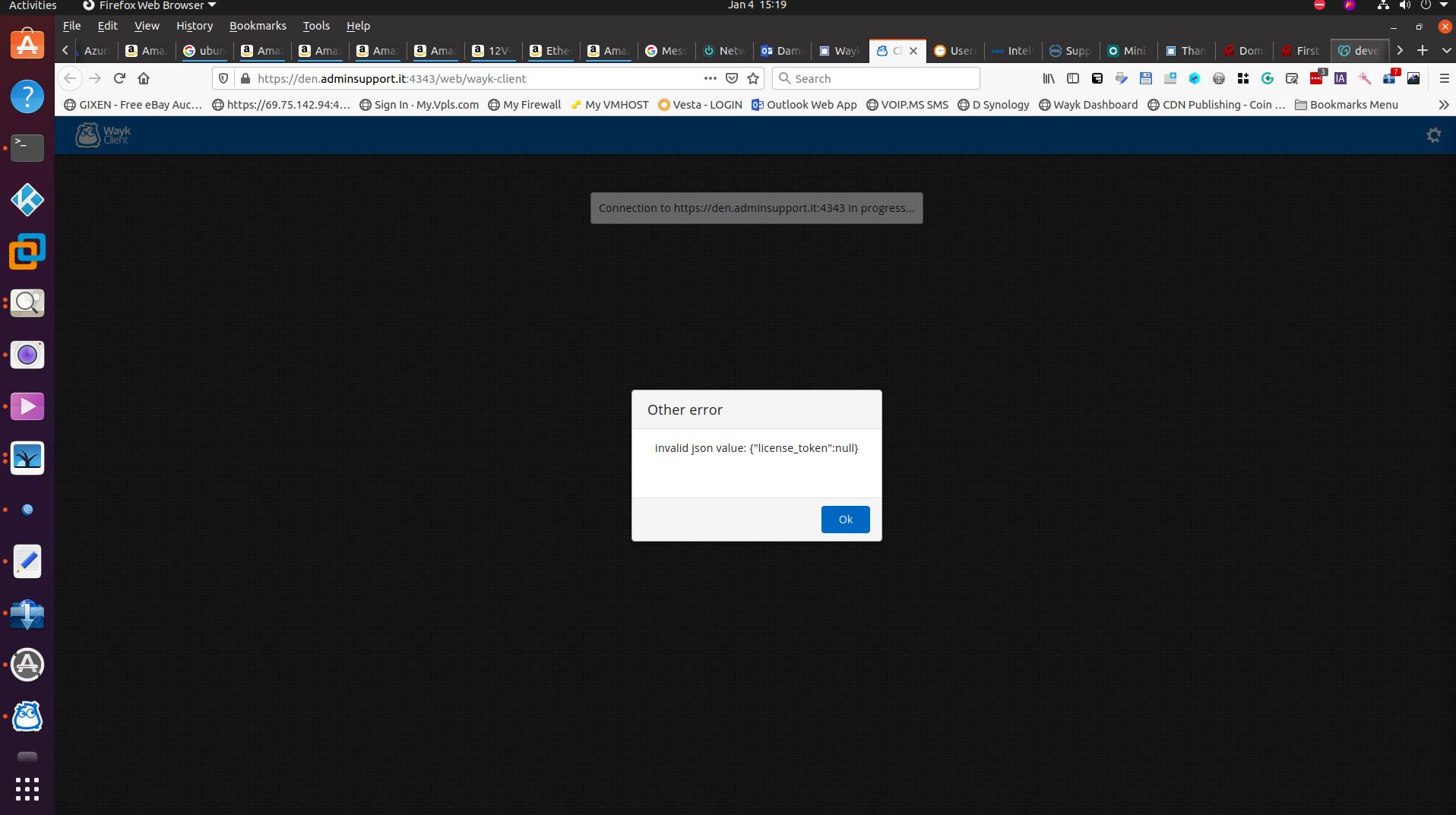
![wayk client connectio]](https://forum-api.devolutions.net/api/messages/147778/attachments/wayk client connectio].png)
waykden wierdness.png
wayk den user login.jpg
wayk client local fail.jpg
wayk client connection issues.jpg
wayk client connectio].png
All Comments (14)
Hello,
Sorry, you are experiencing those issues. The public Wayk bastion is still available, but to use Wayk Client and Wayk Agent on it, you need to have a license for Wayk Client. You can request a 90 days trial here: https://wayk.devolutions.net/trial
Your issue seems to be that the Wayk Client license is not assigned properly, hence the license_token null error in the Web Client and that the Wayk Client is indicating Free in the title bar. You can add your Wayk Client license in Wayk Bastion and then assign it to a user. You would then login as that user in either Wayk Bastion or the Wayk Client application. The screenshots indicate Wayk Den, but it is exactly the same under Wayk Bastion. You can view the process in the images below, or for documentation on this subject: https://docs.devolutions.net/wayk/bastion/license-management.html
As for the registration, I would recommend removing the duplicate entries and registering the matching using a token ID. You can find more information about it here: https://docs.devolutions.net/wayk/bastion/deployment-automation.html 


Best regards,
Richard Boisvert
Hello,
Sorry, you are experiencing those issues. The public Wayk bastion is still available, but to use Wayk Client and Wayk Agent on it, you need to have a license for Wayk Client. You can request a 90 days trial here: https://wayk.devolutions.net/trial
Your issue seems to be that the Wayk Client license is not assigned properly, hence the license_token null error in the Web Client and that the Wayk Client is indicating Free in the title bar. You can add your Wayk Client license in Wayk Bastion and then assign it to a user. You would then login as that user in either Wayk Bastion or the Wayk Client application. The screenshots indicate Wayk Den, but it is exactly the same under Wayk Bastion. You can view the process in the images below, or for documentation on this subject: https://docs.devolutions.net/wayk/bastion/license-management.html
As for the registration, I would recommend removing the duplicate entries and registering the matching using a token ID. You can find more information about it here: https://docs.devolutions.net/wayk/bastion/deployment-automation.html
Best regards,
Thanks for replying. Now correct me if I'm wrong, but in all the ways that I attempted to connect or even just logging into the den, shouldn't one of them say the word "license" somewhere in the error messages if this were just a licensing issue? I mean, when I install a fresh new client and attempt to use it It clearly states the need for a license. Not to mention I actually have my license regstered directly into the wayk client on a number of computers as well as in the den itself. while I hadn't asigned the license specificly to a user this had not prevented me from being able to login to the den webpage when i first created the account. I'm not sure what happen to my installation of wayk den as I have not changed anything once I had it up and running. The repeating registration IS from using the token method since I was having issues registering using the confiuration settings. the only thing I remember attempting to do last before having all these problems was attempting to register the den server itself to itself using the token method except with wayk-agent or wayk-host since wayk-now was not working as a command on the server powershell.
Hello,
I am uncertain when you had initially configured your Wayk Den/Bastion, but near the start of the pandemic, a 6 months global license was applied automatically on all instances:
https://blog.devolutions.net/2020/03/covid-19-announcing-wayk-den-including-unlimited-access-with-wayk-now-enterprise-free-for-6-months
This meant that a license did not have to be assigned to a user, since all users were given one automatically. Since the end of September 2020, you need to assign one to the users, unless you purchased a global license.
A user that is not assigned a license will still be able to log into the web interface, but not to start a remote session.
Could you specify which version of Wayk Bastion you are using (Settings - System information - Cmdlet Version)
Best regards,
Richard Boisvert
OK. So here is some additinal information. Setting asside my whole DEN server configuration I installed a fresh new copy of windows on a diffrent computer and went to the devolutions website and installed the wayk-client. I then proceeded to visit my account on the devolutions website and obtained my licesense key and then went to my wayk-client and registered my serial. I got the Client ID from my client and I could not connect either! No message about licensing or anything other "failed to connect". I had to quickly find another solution so I downloaded teamviewer and I had 0 zero problems! This is not looking good for you guys. I was really hoping this wayk remote solution was ready for production use. But I'm still hoping to get whatever is going on with my account? fixed, I don't know what could be wrong at this point.
Hello
In this case, were both machines connected to the same Wayk Bastion?
On the fresh Wayk Client install you made, it will default to the public Wayk Bastion at wss://den.wayk.net. A license is required to use it; it sounds like you successfully applied your license key to the client.
What about the remote machine? Was it earlier set up using your custom Wayk Bastion? Or also a fresh install, defaulted to the public Wayk Den?
The "failed to connect" error message is unfortunate. It sounds like the remote machine could not be resolved. The problem is; there can be a crossover between machines addressable over Wayk Bastion and over the LAN - for example, on a private Wayk Bastion you can connect using the machine's name instead of it's 6-digit Wayk ID. The client doesn't have smarts to know if you're attempting a Bastion or local connection. It will try to find the machine over Wayk Bastion first; if that fails, it will fall back to a local lookup - that's just a side-effect of the product evolution (Wayk Bastion né Den was only introduced with version 2.0, but the local connectivity remains available).
I'm making a work item internally to improve error reporting here, and we'll make that a priority for an upcoming release. This has been a pain point for multiple users.
In the meantime - please check that the machines you're expecting to connect are on the same Wayk Bastion. A log file from your client would help give a definite answer to the issue (Options > Advanced > Logging Level - "Debug"; restart Wayk Client and try again. The log will be found in ~/.config/Wayk/logs/WaykClient.log and can be sent by PM or email to wayk@devolutions.net).
I do apologize for the continued frustration. Assuming both machines are on the same Wayk Bastion; we would like to understand why connectivity failed as such issues are a top priority for us. We appreciate your help in making this work for you.
Thanks and kind regards,
Richard Markievicz
Hello
In this case, were both machines connected to the same Wayk Bastion?
On the fresh Wayk Client install you made, it will default to the public Wayk Bastion at wss://den.wayk.net. A license is required to use it; it sounds like you successfully applied your license key to the client.
What about the remote machine? Was it earlier set up using your custom Wayk Bastion? Or also a fresh install, defaulted to the public Wayk Den?
The "failed to connect" error message is unfortunate. It sounds like the remote machine could not be resolved. The problem is; there can be a crossover between machines addressable over Wayk Bastion and over the LAN - for example, on a private Wayk Bastion you can connect using the machine's name instead of it's 6-digit Wayk ID. The client doesn't have smarts to know if you're attempting a Bastion or local connection. It will try to find the machine over Wayk Bastion first; if that fails, it will fall back to a local lookup - that's just a side-effect of the product evolution (Wayk Bastion né Den was only introduced with version 2.0, but the local connectivity remains available).
I'm making a work item internally to improve error reporting here, and we'll make that a priority for an upcoming release. This has been a pain point for multiple users.
In the meantime - please check that the machines you're expecting to connect are on the same Wayk Bastion. A log file from your client would help give a definite answer to the issue (Options > Advanced > Logging Level - "Debug"; restart Wayk Client and try again. The log will be found in ~/.config/Wayk/logs/WaykClient.log and can be sent by PM or email to wayk@devolutions.net).
I do apologize for the continued frustration. Assuming both machines are on the same Wayk Bastion; we would like to understand why connectivity failed as such issues are a top priority for us. We appreciate your help in making this work for you.
Thanks and kind regards,
If I'm understaning what you are saying right, If I deploy Wayk agents to my many clients from various networks and they are all happily registered with the den and everything in theory was working great. If for whatever reason the den server goes down then all those agents are useless? Even if I get a client ID and pasword from the user opening and reading it from the agent? So if the den server is for whatever reason compleatly toast then the agents would have to be redeployed to a new server? This may not seem like a big deal if all the computers you support are mostly on the same LAN, but if I deploy to my clients who are mostly on completely diffrent networks and my deployment process was literally done one by one as i visit them you can imagine that this would be a serious problem. Is there a method of creating an agent that will uninstall and reinstall the agent from a single click n a webpage? the process would have to be dead simple because getting users to even download, locate the download and launch can prove to be a whole 30min of phone call and that's IF their problem isn't browser related since a great many people are prone to spyware that hijacks their browsing.
Hello,
That is correct, if the Wayk Bastion server becomes unavailable, the connection between the Wayk Client and Wayk Agent will not be possible, unless they are on the same network.
We recommend you perform an export of the configuration (Backup-WaykBastionData) and copy the configuration folder (Get-WaykBastionPath) on a regular basis. This way, you will be able to restore the server quickly if it ever crashes. You can, of course, also perform snapshots of the server itself.
As for your request, the engineering team is working on a bootstrap executable that will install the agent and automatically register and configure the Wayk Agent. We do not have an ETA for this however.
Best regards,
Richard Boisvert
Hello,
That is correct, if the Wayk Bastion server becomes unavailable, the connection between the Wayk Client and Wayk Agent will not be possible, unless they are on the same network.
We recommend you perform an export of the configuration (Backup-WaykBastionData) and copy the configuration folder (Get-WaykBastionPath) on a regular basis. This way, you will be able to restore the server quickly if it ever crashes. You can, of course, also perform snapshots of the server itself.
As for your request, the engineering team is working on a bootstrap executable that will install the agent and automatically register and configure the Wayk Agent. We do not have an ETA for this however.
Best regards,
while backup and restore options is of course a last resort option, that option doesnt preclude events where the dn isn't accesible for a multitude of other reasons. Case in point my curent situation where my server appears to be installed and configured but i cannot connect to the agents and i have mysterious login issues. I am able to login using the wayk-admin and i moved my liecnse over to the wayk admin but since you pointed out the agent registration issue the error I got on the web agent makes sense and is ultimately ueless unless registered and connected to that server. So for the time being until tmy login issue is resolved, what is the default url den that the agents register to move them over to the devolutins den along with my client?
Hello,
Until your Wayk Bastion is operational, you can use the public Bastion:
Wss://den.wayk.net/
If you wish, you can also send your Get-WaykBastionConfig to ticket@devolutions.net and we can help you troubleshoot the issue further. You can also send the diagnostics of the Wayk Client and Wayk Agent, as the engineering team suggested previously.
Best regards,
Richard Boisvert
Hello,
Until your Wayk Bastion is operational, you can use the public Bastion:
Wss://den.wayk.net/
If you wish, you can also send your Get-WaykBastionConfig to ticket@devolutions.net and we can help you troubleshoot the issue further. You can also send the diagnostics of the Wayk Client and Wayk Agent, as the engineering team suggested previously.
Best regards,
I have a ticket started but it's also kinda slow getting responses. My only choice I had for support at the time i started the ticket was by message. It's been about 1 response per day. Seems awful slow for a mission critical application. In any case I thought Id add something new in attempting to remote into an agent. After having re-configured this agent to use the devolutions den and my client as well I was able to remote in long enough to reconfigure the agent to my den. After reconfiguring my client as well and rebooting I now have a different error when attempting to remote in and I do't understand why??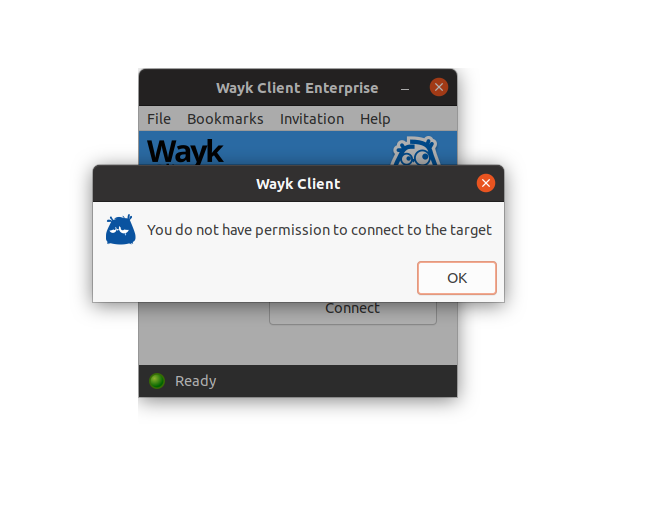
Screenshot from 2021-01-13 11-06-01.png
Hello,
Sorry for the delay in the ticket, you replied just after I left yesterday, so I replied this morning.
As for this issue, what version is your Wayk Client? A fix was implemented in 2020.3.3 ( https://wayk.devolutions.net/home/thankyou/waykclientmac ) to fix an issue with authentication when you go in the options. For more details: https://wayk.devolutions.net/release-notes/wayk
There is also a fix in Wayk Bastion so the Wayk Client does not get disconnected every day in 2020.3.4: https://github.com/Devolutions/WaykBastion-ps/blob/master/CHANGELOG.md#202034-2020-01-07
To update Wayk Bastion, simply go to your server running it and run the following:
Update-Module WaykBastion
#close the PowerShell Window
#open a new PowerShell Window
Restart-WaykBastion
We would recommend you update both the Wayk Bastion and Wayk Client if you do not have those versions, and make sure you are authenticated in the Wayk Client under Options - Connectivity. You can then try to remote into a remote machine.
Best regards,
Richard Boisvert
So when someone registers an agent manually using the connectivity settings, that user login remains the active login in the agent? what happens if that user is no longer valid later? Also, oddly enough with this problem I'm having I can login or register new computers in the connectivity settings just fine. I just can't login to the den or connect to the agent despite being the same user login on both connectivity settings. I did the updates you said but no joy. I have some log files and I believe you are the last one to reply to my ticket I have open as well so that should be convenient. I'll attach to the ticket correspondence.
Hi,
You can register a Wayk Agent via the UI, but we would recommend to use the enrollment token for that instead of login in the agent and using the `Register` link. You can follow documentation here : https://docs.devolutions.net/wayk/bastion/deployment-automation.html#enrollment We plan to remove in the future that interface to enroll host only via a token created on the Wayk Bastion server.
Once a host is registered, even if the user that you used to register that host is no longer valid, the host will stay registered. You can even logout from the Wayk Agent once you have registered the host, it doesn't matter. You have to log in only because the operation of registration has to be done by a user with sufficient right. But once it is done, it is done.
And if you can't login to the Wayk Bastion interface, please be sure that you have given a role to your user. We have a known issue right now that if a user doesn't have any role, it will get an error "operation forbidden" if he try to login in Wayk Bastion UI. With an admin account, just go in the user list, and for a specific user, click on `Manage role` to give him a role. We will send you more information in the support ticket.
Best regards,
François Dubois
Hello,
You should have all the information inside the ticket on how to log in with a user, but I will add it here also for the community:
You would need to add a right for the user you created, by default, no rights are applied to new users. On the website, log in with your wayk-admin, go to Users:
For the user you want to grant access, click on the vertical ellipsis at the end and select Manage Roles:
Reader right is required to have access to the web interface, an owner will have all the rights. You can then click on the + sign:
Once added, it will appear at the bottom of the window:
You should now be able to log in with that user. Note that you can also grant the rights with a user group, and just add the user to that group:
Best regards,
Richard Boisvert