Install option for Recording server gone in version 2020.3.12 ?

Hi, me again,
Still testing DPS and I'm not able to find how to install Recording server ?
I've found this https://blog.devolutions.net/2020/04/new-feature-devolutions-password-server-2020-1-recording-server
But in the latest release of Devolution Server 2020.3.12, I cannot find the option to install the recording server from the console?
Thanks again.
Sebastien
All Comments (3)
Hello Sebastian,
In the new Devolutions Server Console, under Companions, you will find the option to install, update , etc. the Recording Server:
Best regards,
Richard Boisvert
Hello Richard,
Thank you for your help. I was able to make it work.
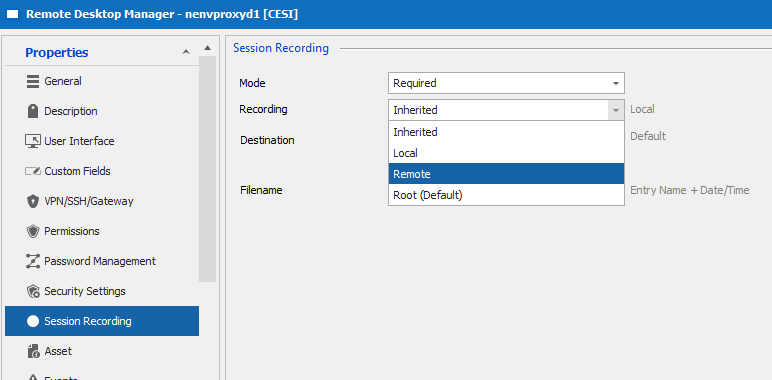
Do you have any documentation about how to use it ? I successfully recorded a RDP session, but I can't set the recording of a SSH session to "Remote" through web interface. Whereas it seems possible with RDM but it's not working.
Thanks again.
Sebastien
Sebastien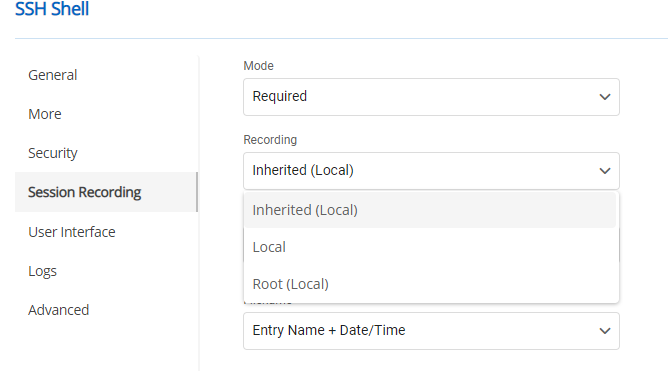
DPS_web.png
RDM.png
Hello Sebastien,
Unfortunately, for the recording in Devolutions Server, we do not have documentation at the moment. The recording would always be local, and then it would take the configuratuin you have saved under the recording server, for example:
The recording options in RDM are different than the ones from the Devolutions Server, it is a 1FPS auditing tool. For more information on the RDM options, you can read the following: https://kb.devolutions.net/rdm_session_recording.html
Best regards,
Richard Boisvert