Mix Wayknow and WaykAgent

Hi,
something go wrong with update.
Unattended access don't work - I see old service with new app?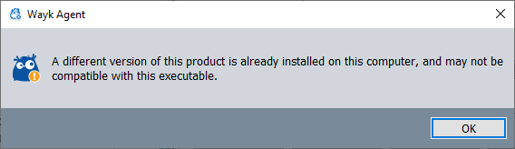
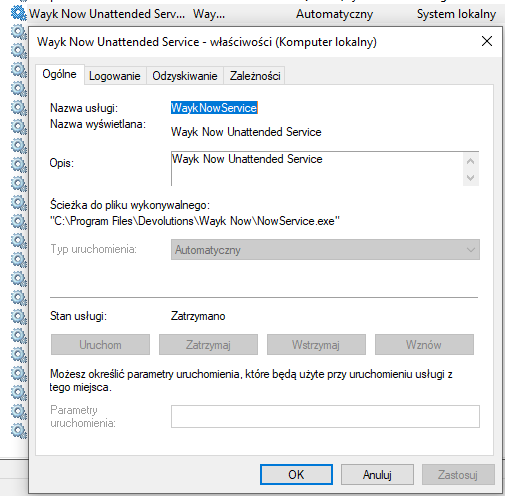
--
KriS
unnamed.png
13B77A02B4EB4AB8B16C435876F3DC21.png
WaykNow_2020-11-13T18_22_11Z.zip
All Comments (9)
Hi Kris
That's strange - what's the story with the computer? Is it your computer, or belonging to a customer? How was the update made - auto update? Or by manually running the new .msi?
There is an issue with the 2020.2.6 Wayk Now msi that will prevent it from being fully removed if you re-run the .msi and choose "Remove". Removal via Add/Remove Programs control panel works fine, however.
Thanks and kind regards,
Richard Markievicz
Hi,
it's not my computer.. but if I well remember it was time where auto update didn't work, so I grap msi file from web site and install it manually.
I didn't see any strange info nor errors when it was installed.
Now when I did try access it from remote location it doesn't work, so I go at customer site check whats going on.
Hi Kris
That's really strange. It's not expected, since the new install should fail if it can't deploy NowService.exe (which should be the case if it persists from the previous installation).
I would also expect the machine to still be serving connections, even with the install broken in this fashion.
We will try to reproduce that behaviour here; it's the first we've heard of the issue but it's possible that we missed an edge case on the 2020.2.6 > 2020.3.0 upgrade path.
What is listed in the Programs and Features control panel?
Thanks and kind regards,
Richard Markievicz
Hi,
when I'll have access, I'll check what you need. Anything else you wanna check out? If msi installer leave any log messages? Logs from event logs?
I can't have access all the time to this computer.. user ask why I wanna connect to him if he doesn't have any problems. I can't log in at every customer without permission.
User don't have admin privilege access.
If you wanna reproduce try this scenario:
- log as user without admin rights
- run wayknow window
- switch user to admin (without logout first one)
- download msi, install with upgrade
- restart
I don't really remember how I upgrade this computer.. I upgrade many instances manually because auto update problems, and every were everything was fine.
At add/remove programs list from control panel I see old version.
ss.png
Hi Kris
Thanks for the extra details
I can't have access all the time to this computer.
Yes, I totally understand. It's hard to get diagnostics from the installer afterwards anyway. We can ask Windows Installer to make a log, but you have to run the .msi using msiexec and specify the /l argument - it's fairly painful.
upgrade many instances manually [...] and every were everything was fine
That's good to know. I do believe this is an edge case.
I managed to reproduce something similar on my side in a Windows 10 lab. Basically, WaykNow.exe running in another session might prevent the previous version from being removed fully. However, in my case; the installer did warn me that something was going wrong ("Service could not be installed... [Retry] [Cancel]") and my machine was left with no product installed, just the Wayk Now service listed as "Disabled". A reboot cleared the issue and I could then install Wayk Agent successfully.
That's obviously not exactly what happened in your case, but I do believe the cause is something similar. We've made some changes to the .msi for 2020.3.1 that should help prevent this in future.
For this exact machine, I would recommend trying to remove Wayk Now using the Add/Remove Programs control panel; then re-running the Wayk Agent installer. Let us know what happens.
Thanks and kind regards
Richard Markievicz
Reinstall it's not a problem.. before I do that I wanna be sure if you have all what you need.
I'll go to the client tomorrow, because nobody help me remotely without questions what company I support today and what problems I resolve hehe :-))
I'll send info tomorrow.
Hey,
I back from customer, and wasn't able uninstall wayknow from control panel. It need msi file for uninstal.. so I download 2020.6.0 from repository and uninstall was fine.
I still see waykagent files at disk and whole program wasn't removed.
So I download newest msi file, reinstall it and now is everything ok.
I did notice one more this.. uniq ID was change.. idk when, but I've noted another one.
--
KriS
Hi Kris
Thanks for the update and sorry once again for the inconvenience. We'll do some more exploration to see if this scenario could cause an issue with the unique ID. I suspect it's possible, if there was a conflict between the partly-uninstalled Wayk Now service and the incoming 2020.3.0 version.
Thanks and kind regards,
Richard Markievicz