Full X11 Crash when editing an SSH Entry

Hello - I am running RDM Enterprise Edition 2020.2.4.0 on Ubuntu 20.04 with a MariaDB backend.
When attempting to edit an SSH Entry - I get a full X11 crash which kills all applications and returns me to a login window.
The entry in question has the "Use SSH Agent" option selected, other SSH Entries are not affected.
Output of running remotedesktopmanager 2>&1 | tee ./tmp/remotedekstopmanager-debug.txt below:
(RemoteDesktopManager:429044): GLib-GObject-CRITICAL **: 15:25:10.954: g_signal_connect_data: assertion 'c_handler != NULL' failed

(RemoteDesktopManager:429044): GLib-GObject-CRITICAL **: 15:25:10.979: g_signal_connect_data: assertion 'c_handler != NULL' failed

(RemoteDesktopManager:429044): GLib-GObject-CRITICAL **: 15:25:10.987: g_signal_connect_data: assertion 'c_handler != NULL' failed

(RemoteDesktopManager:429044): GLib-GObject-CRITICAL **: 15:25:10.993: g_signal_connect_data: assertion 'c_handler != NULL' failed

(RemoteDesktopManager:429044): GLib-GObject-CRITICAL **: 15:25:10.996: g_signal_connect_data: assertion 'c_handler != NULL' failed

(RemoteDesktopManager:429044): GLib-GObject-CRITICAL **: 15:25:11.002: g_signal_connect_data: assertion 'c_handler != NULL' failed

(RemoteDesktopManager:429044): GLib-GObject-CRITICAL **: 15:25:11.007: g_signal_connect_data: assertion 'c_handler != NULL' failed

(RemoteDesktopManager:429044): Gtk-CRITICAL **: 15:25:38.185: gtk_window_add_accel_group: assertion 'GTK_IS_WINDOW (window)' failed

(RemoteDesktopManager:429044): Gtk-WARNING **: 15:25:38.185: ../../../../gtk/gtkwidget.c:8648: widget not within a GtkWindow

(RemoteDesktopManager:429044): Gtk-CRITICAL **: 15:25:49.147: gtk_window_add_accel_group: assertion 'GTK_IS_WINDOW (window)' failed

(RemoteDesktopManager:429044): Gtk-WARNING **: 15:25:49.147: ../../../../gtk/gtkwidget.c:8648: widget not within a GtkWindow

(RemoteDesktopManager:429044): Gdk-WARNING **: 15:25:49.337: Native Windows wider or taller than 32767 pixels are not supported

(RemoteDesktopManager:429044): Gdk-WARNING **: 15:25:49.350: Native Windows wider or taller than 32767 pixels are not supported
Gdk-Message: 15:25:55.315: RemoteDesktopManager: Fatal IO error 11 (Resource temporarily unavailable) on X server :1.

Gdk-Message: 15:25:55.315: WebKitWebProcess: Fatal IO error 11 (Resource temporarily unavailable) on X server :1.
All Comments (4)
I think I may have figured something out - it's not the fact that the Agent is selected, but the Font was customized.
In the UI I Changed the Font in the entry to "Cascadia Code" Size 12, and the resultant output is from the exported connection. Note the Font size is 12288.
If I delete the connection, remove the Font and FontSize keys from the xml file and re-import, I am able to edit it again without a crash - So we're looking at multiple bugs here I think.
The first bug is to possibly ignore whatever the font size is if the # is greater than a certain size. The second would be to make sure to save the font size correctly when using the UI.
<?xml version="1.0"?>
<ArrayOfConnection>
  <Connection>
    <ConnectionType>SSHShell</ConnectionType>
    <Group>Openstack</Group>
    <ID>6896e83c-fc62-4db0-8008-658c1962910f</ID>
    <Name>OSA-DEPLOY</Name>
    <OpenEmbedded>true</OpenEmbedded>
    <PinEmbeddedMode>False</PinEmbeddedMode>
    <Stamp>06760b86-8759-4519-83ab-ec963fbbf6e2</Stamp>
    <MetaInformation>
      <CustomField1Title>Custom #1</CustomField1Title>
      <CustomField2Title>Custom #2</CustomField2Title>
      <CustomField3Title>Custom #3</CustomField3Title>
      <CustomField4Title>Custom #4</CustomField4Title>
      <CustomField5Title>Custom #5</CustomField5Title>
    </MetaInformation>
    <Terminal>
      <CloseOnDisconnect>false</CloseOnDisconnect>
      <Font>Cascadia Code</Font>
      <FontSize>12288</FontSize>
      <Host>192.168.41.9</Host>
      <LocallyManagedTCPKeepalive>true</LocallyManagedTCPKeepalive>
      <MaxScrollbackLines>9999</MaxScrollbackLines>
      <ProxyType>Socks4</ProxyType>
      <TCPKeepaliveInterval>30</TCPKeepaliveInterval>
      <TryAgent>true</TryAgent>
    </Terminal>
    <TerminalMac />
  </Connection>
</ArrayOfConnection>This is confirmed - I can duplicate it on 2 machines.
If I edit an SSH Entry, click on SSH Shell->Terminal->Display Tab and edit the Font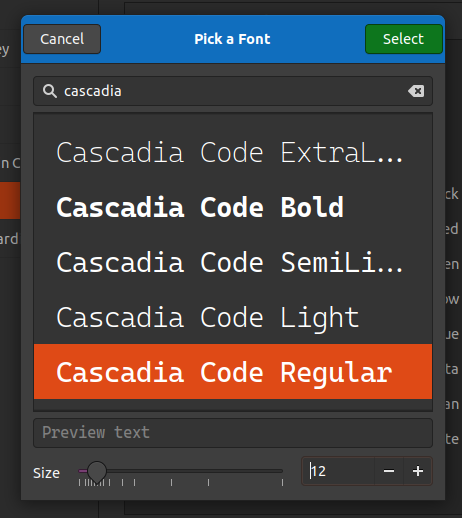
I can choose a font, select a size and save it.
If I pull up MariaDB and run the Query: SELECT Data FROM rdmanager.Connections WHERE ID = '6896e83c-fc62-4db0-8008-658c1962910f';
I can see that the Font Size is set to 12288 - and if I attempt to edit it on either of my Ubuntu machines, I get a full crash of X11 where I end up logged out of the system.
<?xml version="1.0"?>
<Connection>
  <ConnectionType>SSHShell</ConnectionType>
  <CreatedBy>henry</CreatedBy>
  <CreationDateTime>2020-10-10T20:22:51</CreationDateTime>
  <Group>Openstack</Group>
  <ID>6896e83c-fc62-4db0-8008-658c1962910f</ID>
  <Name>OSA-DEPLOY</Name>
  <OpenEmbedded>true</OpenEmbedded>
  <PinEmbeddedMode>False</PinEmbeddedMode>
  <Stamp>5769312d-f473-441a-95b1-2ac7a72a4f6e</Stamp>
  <UpdateDateTime>2020-10-10T20:23:53</UpdateDateTime>
  <Terminal>
    <CloseOnDisconnect>false</CloseOnDisconnect>
    <Font>Cascadia Code</Font>
    <FontSize>12288</FontSize>
    <Host>192.168.41.9</Host>
    <LocallyManagedTCPKeepalive>true</LocallyManagedTCPKeepalive>
    <MaxScrollbackLines>9999</MaxScrollbackLines>
    <ProxyType>Socks4</ProxyType>
    <TCPKeepaliveInterval>30</TCPKeepaliveInterval>
    <TryAgent>true</TryAgent>
  </Terminal>
  <TerminalMac />
</Connection>
Screenshot from 2020-10-10 16-13-39.png
Hi,
Thank you for the provided information, I was able to fix this internally.
You will however need to recreate any entry that is currently crashing.
The 2020.2.5.0 release should be available soon.
Regards
Jonathan Lafontaine
That's great to hear! Glad I was able to help.
I am very happy to see this Linux version, keep up the good work!