Can not access Jet Relay Server

Hello,
since days, I'm trying to build my own Wayk Den and Jet Relay Server (both on the same machine / VM Ubuntu 18.04 behind a reverse proxy).
Wayk Den Server (configuration like Figure 2) is working fine, but with the Jet Relay Sever I have some troubles.
I'm use that two configurations/deployments for the Server with the two different subdomains, and the same ports.
and 
As a reverse proxy, I'm using NGINX.
When I test the connection to the Jet relay server with the two power shell commands (> $JetRelayUrl = 'https://jet.buzzword.marketing' > (Invoke-WebRequest "$JetRelayUrl/health").StatusCode -Eq 200), I get two different error, connection timeout or 502 Bad Gateway.
Does someone have an idea what could be wrong with the configuration?
Thanks
Best regartds
Patrick
All Comments (10)
Hi,
Just confirming a few things:
Your Wayk Den deployment works, and it is behind nginx on Ubuntu. You are having issues with the jet relay configuration part. If both are on the same machine, how did you manage to use the same ports? Did you use virtual hosts in nginx, forwarding traffic based on TLS Server Name Indication (SNI) or the HTTP Host header?
Some things to confirm: in both cases, are you handling https in nginx, and forwarding http traffic to Wayk Den and the Jet relay?
Please make sure that your request on your equivalent of https://jet.buzzword.marketing/health gets correctly routed to your jet relay server behind nginx. Maybe check your nginx logs or use wireshark in between to see if you're receiving the forwarded request?
Connection timeout or bad gateway errors indicate that nginx is unable to forward the traffic to the jet relay. One other thing you could do is try poking the health check using the internal network http listener that nginx is supposed to forward to. Make sure it is listening in http on the port you are expecting, and then check that nginx is correctly forwarding the traffic to it.
While the default nginx configuration should work for the health check, please make sure that WebSocket traffic is correctly enabled. Here's what a configuration looks like:
server {
    listen 443 ssl;
    ssl_certificate /home/$USER/.../fullchain.pem;
    ssl_certificate /home/$USER/.../privkey.pem;
    server_name my.domain.com;
    location / {
        proxy_pass http://127.0.0.1:4000;
        proxy_http_version 1.1;
        proxy_set_header Upgrade $http_upgrade;
        proxy_set_header Connection "upgrade";
    }
}
Let me know what you can figure out. Otherwise, I have made a new option in WaykDen-ps to launch a jet relay server automatically with Wayk Den. While it is not recommended for scalability, it should be easier to get started with a working jet relay and no second deployment to make.
It's not released yet, but if you just follow the steps to build the cmdlet from source, this is actually the new default (Set-WaykDenConfig -JetExternal $false -JetTcpPort 8080):
https://github.com/devolutions/WaykDen-ps
This "internal" jet is automatically added behind the same traefik instance as Wayk Den, so all you need is to configure a certificate in Wayk Den. The Jet URL is also automatically injected in the configuration, the only thing that changes for Wayk Den is that the JetTcpPort will be mapped on the host (TCP/8080). This is the port for the Jet TCP relay listener.
Best regards,
Marc-André Moreau
Hi,
for the same ports, I'm using SNI.
Yes. Nginx is handling https and forward http traffic to Wayk Den and the Jet relay.
Thank's for the test cases, and the nginx example cofiguration. Due to your recomondation, I will use a seperat instance for the jet relay server.
I will try that with your example configuration in the next days.
Thank you very much
Best regarsd
Patrick
Now I have setup a new machine for the Jet relay server and the Nginx server with the above posted example configuration, but I got the same error.
For the Jet relay server, I only use this configuration: Set-JetConfig -JetInstance 'jet.buzzword.marketing' -JetListeners @('tcp://0.0.0.0:8080', 'wss://0.0.0.0:7171,wss://<jet_instance>:443')
Is that right?
And with an nginx server handling the ssl connection, I must not set the ssl certificate on the jet relay server?
Is port 4000 the correct port for the jet relay server in nginx configuration?
With ...
> $JetRelayUrl = 'https://jet.buzzword.marketing'
> (Invoke-WebRequest "$JetRelayUrl/health").StatusCode -Eq 200
.. I alway get 502 Bad Gateway
Thank you very much
Best regarsd
Patrick
Hi,
Would you rather try the new simplified mode where a Jet Relay is started/stopped with Wayk Den, but also automatically deployed behind the same traefik instance as Wayk Den, such that you don't need a separate configuration and TLS certificate? I have to review a few changes on the WaykDen-ps cmdlet before officially publishing it, you can can definitely just download it from github and compile it (run the build.ps1 script, follow instructions for the dependencies you need to install to build it):
https://github.com/devolutions/WaykDen-ps
https://github.com/Devolutions/WaykDen-ps/commit/6500b2f3d34ca44935e3e67c8a25cc1466c546d2
I'll see if I can publish it on PowerShell gallery at the beginning of this week.
Regarding your current Jet configuration:Set-JetConfig -JetInstance 'jet.buzzword.marketing' -JetListeners @('tcp://0.0.0.0:8080', 'wss://0.0.0.0:7171,wss://<jet_instance>:443')
This will make your Jet Relay listen on TCP/8080 for TCP relaying, and port 7171 in WSS (this requires a TLS certificate inside the Jet Relay). This would be suitable for a "layer 4" type of deployment where you only forward the following at the TCP level:
external TCP/8080 -> internal TCP/8080 (TCP)
external TCP/443 -> internal TCP/7171 (WSS)
However, since you are talking about handling TLS in nginx, you probably wish to do the following instead. Notice I have changed "wss" to "ws" for the listener part:Set-JetConfig -JetInstance 'jet.buzzword.marketing' -JetListeners @('tcp://0.0.0.0:8080', 'ws://0.0.0.0:7171,wss://<jet_instance>:443')
Forward external TCP/8080 to internal TCP/8080 for the TCP-based relaying, and do the following with nginx:
external https://jet.buzzword.marketing:443 -> internal http://jet-relay:7171 where "https" and "http" also correctly handles WebSocket traffic. "jet-relay" here is just the internal network name of your jet relay server.
Best regards,
Marc-André Moreau
Hi,
I have changed wss to ws, and forwarded port 8080 (external) to jet relay server port 8080 (internal) on the firewall. Is there a way to do the port forwarding with nginx?
Now I can reach the jet relay server with https://jet.buzzword.marketing/health, and it seams to work. But when I want to use it with my Wayk Now client (Web and Desktop), I see these errors.
or that
I will test the simplified mode later in a new VM.
Thank you very much
Best regards
Patrick
Hi Patrick,
If you open your equivalent of "https://jet.buzzword.marketing/health" in your browser, do you get a "Jet instance "jet.buzzword.marketing" is alive and healthy." (returned by jet relay) or do you get "I'm here and I'm alive, that's enough" (returned by Wayk Den)?
Make sure that jet.buzzword.marketing points to your jet relay. If this is the case, you can verify that WebSocket traffic is correctly allowed through nginx (for both Wayk Den and the Jet Relay).
If this is all good, then check that Wayk Den is correctly configured to point to your jet relay:Set-WaykDenConfig -JetRelayUrl "https://jet.buzzword.marketing"
Best regards,
Marc-André Moreau
Hi Marc-André,
from my Den instance with "https://den.xxx.xx/health" I get: I'm here and I'm alive, that's enough
and from my Jet instance with "https://jet.xxx.xx/health" I get: Jet instance "jet.mechatronic-system-design.at" is alive and healthy.
The configuration for the jet relay in den also seems to be OK.
Best regards
Patrick
Is it Ok that I do the 8080 via firewall direct to the jet relay server?
I have restarted all server (nginx, de and jet). I can connect with the clients to the den server and se them on my den server, but I can not connect to them.
Hi Patrick,
Can you enable and export the logs from one of the Wayk Now servers? It is probably still a configuration issue with the jet relays, and we'd be able to tell from the server logs that include a peer-to-peer connection attempt.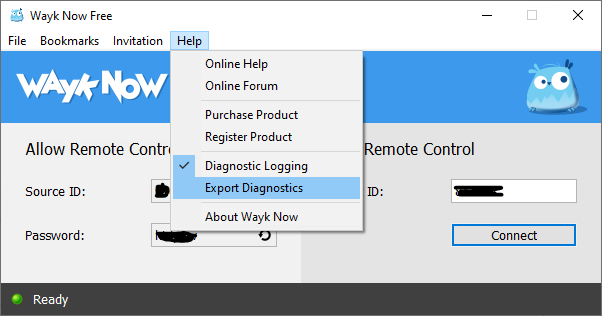
Also, we just published Wayk Den 2020.2.4 on PowerShell gallery. This update launches a built-in jet relay server along with Wayk Den. If you wish to keep using your external jet relay, you should set it explicitly like this now:Set-WaykDenConfig -JetExternal $true -JetRelayUrl 'https://jet.buzzword.marketing'
The default is now JetExternal = $false, which means we'll launch a jet relay instance and configure it automatically behind Wayk Den, no separate deployment required. This should be fine for small deployments or just to get started. If you want to revert back to the "simple" mode, you set JetExternal to $false again:Set-WaykDenConfig -JetExternal $false
Best regards,
Marc-André Moreau
wayk_export_logs.PNG
Hi Marc-André Moreau,
thank you very much for all the informations and help.
Today I have tried to install Wayk Den and Jet Relay in the simply version (2020.2.4) and everything is working fine.
In the Jet Relay Server settings of the den server i can see my domain so that schoud be correct.
I will test it for the next days and maybe then i will try again to seperate the servers.
Thank you very much
Best regards
Patrick