New Setup - WaykDen not listening on port 8080

Hello, new WaykNow / WaykDen user here. Former Logmein / RemotePC user.
I setup WaykDen over the weekend and was able to get to the dashboard on the localhost but could not access it using the external URL I configured. I even tried using the cloudflare proxy and it could not get to it.
I can access the WaykDen server fine if I use http://localhost:4000. If I use https://den.domain.com:8080 (or without the 8080) I get a site cannot be reached error.
When I try to access the cloudflare proxy, I get an error saying the target machine actively refused it...
the curl command to test in the documentation works for localhost:4000 but not for the external URL.
I check the firewall and it is off... but if I do a netstat -an, I don't see the server listening on port 8080... and I don't know how to fix that.
Also... this may be related and it might not be... but it seems like after a while, the waykden services will die and I will not be able to access the dashboard via localhost:4000 anymore. I have to issue restart-waykden and it then it starts working again for a while.
Any help would be much appreciated!!
All Comments (2)
Hi,
Let's focus on getting it deployed without the cloudflare argo tunnel, unless you intended to use the argo tunnel for your production deployment.
If you can reach Wayk Den on the host machine with http://localhost:4000, then you at least know that it is working, but it isn't correctly exposed externally.
You mention port 8080, where did you take that from? If http://localhost:4000 works, then Wayk Den is listening on port 4000 in HTTP. You can change that with the ListenerUrl parameter of the Wayk Den configuration:Set-WaykDenConfig -ListenerUrl 'http://localhost:8080'
But before doing that, make sure that nothing else is listening on TCP/8080 already.
Now the tricky part: how will you expose Wayk Den to the internet? You can take a look at suggested deployments here:
https://github.com/devolutions/WaykDen-ps#deployment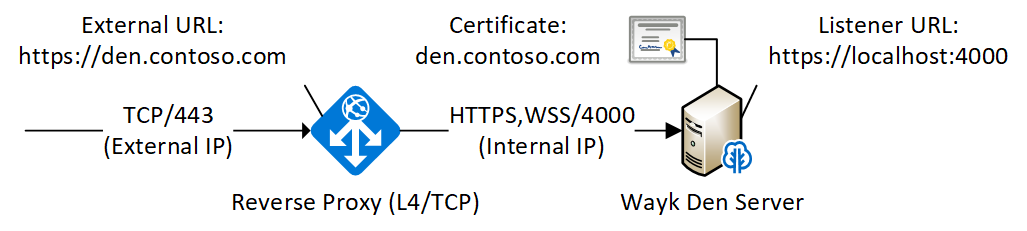
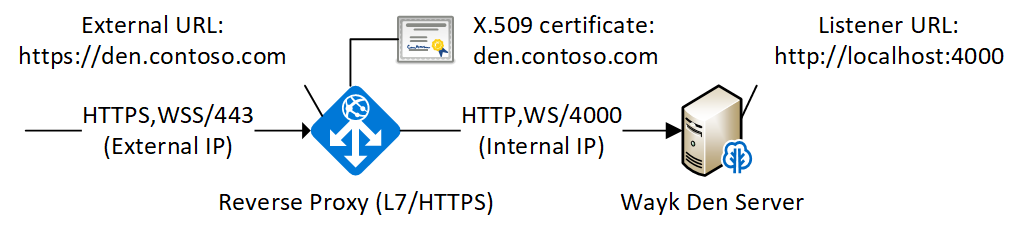
In all cases, you will need a public IP address, and something to redirect the traffic from the internet to Wayk Den in the internal network. With the TCP / Layer 4 deployment, you redirect a TCP port to the Wayk Den server, and install your TLS certificate in Wayk Den. With the TCP / Layer 7 deployment, you redirect HTTPS traffic from the external network to HTTP in the internal network, and you install your TLS certificate inside the reverse proxy (oftentimes nginx, haproxy, traefik, etc) instead.
Regardless of how you expose Wayk Den to the internet, you need to configure your ExternalUrl such that it matches how you will access it. If in the end, your Wayk Den is exposed through https://den.contoso.com, then your external URL should be https://den.contoso.com:Set-WaykDenConfig -ExternalUrl 'https://den.contoso.com'
What the cloudflare argo tunnel does is equivalent to the Layer 7 deployment, except that cloudflare handles the external HTTPS access for you (no public IP address required, no TLS certificate configuration). It is meant as a shortcut, but if it doesn't look any easier, then don't bother with it.
Best regards,
Marc-André Moreau
wayk_den_l7_deployment.png
wayk_den_l4_deployment.png
Hi Marc-Andre,
Thanks for the quick response. Glad to hear the system should only be listening on port 4000... I don't need the Argo tunnel... I was just trying that because my initial setup wasn't working... I think that just confused me more... LoL!!!
So I had already set the external URL and also already installed the certificate on the server. I also had configured a public IP and registered the hostname in DNS and tested that it is resolving by pinging the DNS name and IP from another location.
So I guess my external setup was close to the first option as I installed the cert directly on the server. One thing I did miss before was that I needed to change the ListenerUrl to "https" after adding the cert, so I've done that now as well. Now I get an invalid cert warning since doing that as the cert is expecting the domain name in the URL so I guess that is to be expected... I can accept the warning and continue to the dashboard.
Also... the curl command started working with the ExternalUrl... but not the ListenerUrl... it says it's a TLS error... which is probably because of the cert.
Initially I still wasn't able to get the page to load... because the ExternalUrl did not have the "4000" port loaded at the end and currently the server has its own public IP and is not behind the firewall to proxy the 443 traffic so I had to add the port 4000 to the ExternalUrl config and now I am able to see the dashboard using using the ExternalUrl...
I'm even able to register WaykNow on the server for unattended access... Yea Sucess!!!
However, I then I had a new problem... I've fixed it but I'll describe it in case someone else runs into the same problem.
When I went to load the ExternalUrl from my system at my home, it didn't load webpage. and I couldn't connect to WaykNow. If I connected to the vpn and try it, it loaded..
This made absolutely no sense as this system has a public IP and is not currently behind my firewall... plus... I could ping the public hostname & IP as well as rdp to the system with no issues... but I couldn't pull up the webpage... I even tried my phone... I got an error saying the page took too long to respond.
Then it dawned on me... When I setup the server, I configured it with another NIC with an internal local IP for management. I disabled the nic... restarted WaykDen and Voila... I was able to login to the dashboard from my home... I re-enabled the internal NIC and removed the gateway and everything is still working now... Yea Success Again!!!
Just wanted to put that out there in case any other newbies run into the same issue.
So as of now... I'm fully up and running on my test server... I'll be playing around with it before rebuilding it in my production environment and putting it behind the firewall... you'll probably be hearing from me again then... LoL
Thanks for the assist!!!
P.S. My mysterious issue where WaykDen was hanging and needed to be restarted has been resolved through this process as well... in case anyone reading this wanted to know.