what is the correct procedure to register new account/assign computers in waykden
Hi,
im trying to find out what is the correct procedure for a new account in waykden?
what do each of the roles mean exactualy?
when i sign in with the new account, that account can see all the computers on the waykden server,
is the any way of restricting that user can only see certain computers?
is the any way of restricting that user only accessing certain computers?
the is no real help guide with the waykden :(
Regards
Simon
All Comments (41)

Hello Simon!
Thank you for reaching out to us on this.
We don't have the documentation done on this yet as it's still pretty recent but here's a quick summary of each role :
Owner : You can compare this to a master account / administrator. No limitations.
Reader : Basic User profile.
Machine Contributor : Can only register machines to the Den
Machine User Login : Can only connect to machines
There's currently no way to limit who sees which computers.
You can limit who can connect to which machines by assigning users/user groups to machine groups with the right roles.
The Role Based Access Management in WaykDen is still in its infancy as of now and will of course evolve over time.
Best regards,
Hi
Thanks for this
ibqas able to determine the roles by playing with the software and guess what each role was but thanks for the clarification!?
however I’ve not been able to get the restriction on the connect to work yet?
how should it be setup?
NOTE: I don’t use ldap or cloudjump I just use the internal access via web panel
plan is create a user for a company say ‘company1’
that company can then install wayknow against our waykden and then login and register the unattended against there company1 user
but then the company1 user can only access the computers assigned to company1?
the is again no docs on how to setup the roles as the is roles per user, roles per user groups, roles per servers and roles per server groups?
its all very confusing :(
regards
simon
Hello Simon,
In regards to the "company1" user to register the unattended devices. That's a user that you would give the Machine Contributor role to.
Following that, you could make a Machine group with those devices and then give a user Machine User Login access to that group so that user would be able to connect to that group of devices.
I hope that helps clarify things.
Best regards,
Following that, you could make a Machine group with those devices and then give a user Machine User Login access to that group so that user would be able to connect to that group of devices.
Hi,
i have already tried this, and the problem i have, is when a new computer links to the waykden server, and the 'company1' user types in that computers id number, they are able to connect as it pops up asking for the computers password?
i have also tried registering that computer for unattended access and assigning that computer to a totally different group, but the 'company1' user who should only have access to the group of computers, can still access to the other computer?
so im not sure what i am doing wrong?
any sorta tutorial you can give/make to show how it should be setup?
even if its a few simple 1.2.3 here just to point me in the right direction?
regards
Simon
We don't have the documentation done on this yet as it's still pretty recent but here's a quick summary of each role :
Owner : You can compare this to a master account / administrator. No limitations.
Reader : Basic User profile.
Machine Contributor : Can only register machines to the Den
Machine User Login : Can only connect to machines
The Role Based Access Management in WaykDen is still in its infancy as of now and will of course evolve over time.
if a reader can only see his basic user profile, what's actually the point of that and what can users without any roles do?
but this type of profile seperation is kinda nice especially since you can use a special profile as contributor when adding new machines.
Hello Simon,
Sorry for the delayed answer. We're currently working on a document for this. I'll post a link to it as soon as it's done.
Best regards,
Hi Simon,
Sorry for the delay, the documentation will probably comes later, but I think you understood the role correctly. From what I understood, you would like to understand how to do it via our WebUI interface. Even if more documentation will comes later, I just want to give you more information.
As Maxime told you, with the current version, you can't restrict a user to see only certain computers. The role that we have today is "Reader" and it allows you to see all or nothing. But even if you can see all machines, it doesn't mean that you can open a session on those machines.
To open a session, you need another permission and to get this permission, you need the role "Machine User Login". You can give that role to a user at different level (in fact, all roles can be applied at different level as explained below).
1 - If you want a user to be able to open a session on all machines
- Open to the user page
- Click on the 3 dots buttons at the right of your user and select the item menu "Manage roles"
- Give the role "Machine User Login" to the user
After those steps, the user should be able to open a session on all servers since you give him permission for the full installation.
2 - If you want a user to be able to open a session on some machines only
- Create a server group
- Open the Server Groups page
- Create a group named "Company_1" for example
- Open the servers page
- Click on the 3 dots buttons at the right of your server that you want to add in your group and select the item menu "Edit group"
- Select the group created before to add the server in the group
- Open the Server Groups page
- Give access to a user or a user group to that group
- Click on the 3 dots buttons at the right of your group and select the item menu "Assign users to server group".
After those steps, the user should be able to open a session only on servers included in that group.
3 - If you want a user to be able to open a session on one machine only
- Open the Servers page
- Click on the 3 dots button at the right of your server and select the item menu "Assign users to machine"
After those steps, the user should be able to open a session only on that server. Of course, you could do those steps many times and give access to many servers to one user. But we have created groups to simplify that.
In your case, if I understood correctly, you probably want to create a server group per company. Than you could create a user group per company and set the role on that user group. So if you add a new user, you will have to add it to the right user group and he will be granted with the right permission.
Of course, we are looking to be able to restrict the view to only "your" computers. We probably don't want to see the server if we can't open a session on it.
What we have in mind for now would be to show only servers that you have permission to open a session. Would it work for you ? Don't hesitate to send us more information about your need and what would be your best solution.
I hope I answered your questions. Let me know if it is not clear.
Best regards,
François Dubois
But we have created groups to simplify that
might be cool to have something to mass add to a group. e.g. to set the default group when registering dependent on the contributor or whatever.
Hi
i have already tried all those options and they dont work...
i would of through option 3 would of been the simplest and easiest but that doesnt work either
- create a user, dont add it to any group, only add Machine Contributor role to the user (needed this role adding otherwise the user couldnt register the remote comp to control for unattended)
- login with the new user on a remote comp and then register for unattended
- go into the all server and add the new user with the role 'Machine User Login' to that remote computer, DONT ADD COMPUTER TO ANY GROUPS!
- login on another comp using new user then connect to the remote comp (works fine)
- pick another random computer from my list which i NOT registered for unattended, enter that comps id and try connecting, get prompted for user, was then able to login to that computer, even tho that shouldn't be the case?
hopefully my steps have helped a little with debugging this issue,
although i am just wondering now as i type this, can any user connect to any computer that isnt registered regardless of restrictions?
and the only restrictions to certain comps/groups/etc are if that computer is registered for unattended access?
Regards
Simon
Hi,
ok so my theory about all the comps must be registered for unattended for the restrictions to work are wrong and still dont work :(
just tried creating 2 users, registering 2 comps with different users, then my laptop with first user trying to connect to second computer and that was allowed access no problem
so its not work either :(
really stuck at the moment :(
Regards
Simon
Hi,
another issue i have spotted is the role 'Machine Contributor' doesnt just allow unattended registers, but also control of all computers!!!
just been through trying another new user with different permissions doing different things and ive concluded what each of the roles do as below
Owner - read/delete comps online / allowed register for unattended / allowed control of comps
Reader - read comps online / doesnt allow register for unattended / doesnt allow control of comps
Machine contributor - dont read/delete comps online / allowed register for unattended / allowed control of comps
Machine user login - dont read/delete comps online / dont allow register for unattended / allowed control of comps
Regards
Simon
Hi,
ok i have found the issue / a bug
because i assigned the role 'Machine Contributor' to my new user, its also allowing control over all computers!
ive proven this by logging into comp/registering for unattended with the 'machine contributor' role assigned to the new user, then removing the machine contributor role afterwards
once it was removed i could only access the remote comp with the permission of 'machine user login' assigned to that user! the other comp assigned to another user was getting denied now!
although i have now lost access to computers that arent registered for unattended access, not sure how to get that back?
Regards
Simon
Hi Simon,
Sorry if I didn't talk about the Machine Contributor role, I thought you wanted only to give access to the remote host. Like you said, Machine Contributor can open a session on a machine. In fact, Machine Contributor role has all permissions related to a machine. It can read/write and open session on a machine. So you can register a machine with that role because you need the permission to write the machine to do that operation. But you can also open a session on that machine.
In conclusion :
- Machine Contributor : You can do all operations on machines (read/write/login)
- Machine User Login : You can only open session on machines. All other operations are refused
And for the unattended access, we don't expect user to give access to those servers directly. We think that people will register all machines that they want to manage. This is why we put them in a default group (Unregistered Machines) and we suggest our users to add role assignment on that group. Of course, if you have the role Owner on the full installation, you will be able to open session on those machines. But you could give access to unregistered machine only to a specific group of user. As soon as somebody connects his computer on your WaykDen server, the server is added in the unregistered machine. We don't want to give access to that machine to anybody. So by default, only owner of the installation (admin) will be able to open session on those machines. And you could give right to some users if you want by giving right on the unregistered group.
I hope it is clearer. Don't hesitate to ask more questions.
Best regards,
François Dubois
might be cool to have something to mass add to a group. e.g. to set the default group when registering dependent on the contributor or whatever.
@my1 : Next WaykDen version will allow to create enrollment token and use that token to register host. It will be possible to specify the group that you want the server to be added. So it will be possible to create different token for different group and use the proper token on the proper machine. And right at the registration step, the server will be added in the right group. That version should be available next week.
And we also plan to improve our Web interface to simplify simple action like add/remove server from a group, but those improvements will come later.
Best regards,
François Dubois
Hi Francois
ok im going to struggle with this then,
the idea i had was to create a user for a company (company1)
that company can then use that user to install remote support on there computers in the office and then allow staff to use that use to connect into there computers from home
this is going to be a problem because i will need to assign the contributor role to achieve this, which sadly assigns the full access to any comps, not just there group of computers
however the enrolment token you have just mentioned might be a perfect option!
use this token in the powershell setup (auto generated maybe) to register there computers into there server group automatically,
and then just assign the machine login role to the user so they can only login to there server group!
would it be possible to maybe split the 'machine contributer' role up?
or maybe add another role which is ONLY for machine registers?
any suggestions to my plan would be appreciated
Regards
Simon
might be cool to have something to mass add to a group. e.g. to set the default group when registering dependent on the contributor or whatever.
@my1 : Next WaykDen version will allow to create enrollment token and use that token to register host. It will be possible to specify the group that you want the server to be added. So it will be possible to create different token for different group and use the proper token on the proper machine. And right at the registration step, the server will be added in the right group. That version should be available next week.
And we also plan to improve our Web interface to simplify simple action like add/remove server from a group, but those improvements will come later.
Best regards,
sounds fun.
even more awesome would be the option that when/if we get customized installers and stuff that we can slap that token right in there.
also the info that the machine contributor can do also connects is a little scary altho does it really matter?
It's not like with teamviewer where the account itself works as authentication towards the computer. you still need to provide some sort of credentials (be it a password, SRD or a permission prompt that gets accepted) to actually access the computer
(although for some computers like servers that would be pretty interesting to say the least (especially since if you want to remember credentials you dont have to store cleartext passwords anywhere, but you have just a token. (even if they are encrypted on the hdd in some way, if they can be decrypted without any passwords, smartcards or other interaction, they are basically as worthless as plaintext), which especially on SRD gets very fun very fast as you have double the impact from one credential. you have remote control AND user account credentials, which might even be admin-level)
Hi Simon,
I understand what you want to do. For now, the only way that I can see is you could create 2 different users : One is machine contributor, one is only machine login user. You use the machine contributor to register machine but after, you can log out that user from WaykNow and login with the other user (the machine login user). The machine will be registered, but the machine user login will be used to open session and he will not be able to open session on all machines. And to be sure that nobody will re-use the machine contributor user, you could delete it or just change the password. But I understand that it is not the best solution.
I think the enrollment token will fix that issue. You will be able to generate that token on the Web interface. Then you will give that token information to the company 1. They will register there computers with that token (no login will be required, only that token). Then, they will use the machine login user. And of course, you will have set there roles correctly in WaykDen server. It should work well that way. We plan that new version very soon, next week for sure.
Finally, we gave all rights to the machine contributor role because at the beginning, we didn't have other option to register a machine. But we could change that role in future release, we are not sure yet, but it is a possibility. I'll keep that in mind.
I will keep you posted when the next release will be available.
Best regards,
François Dubois
also the info that the machine contributor can do also connects is a little scary altho does it really matter?
It's not like with teamviewer where the account itself works as authentication towards the computer. you still need to provide some sort of credentials (be it a password, SRD or a permission prompt that gets accepted) to actually access the computer
@my1 : I understand your point, but I don't think we want a user to be able to start a WaykNow session on a computer that we know in advance that he doesn't have access. Even if that user doesn't have credential to pass the authentication, we will prefer to block that user at the session request step instead of blocking him at the login step. In a security point of view, it is better.
Best regards,
François Dubois
also the info that the machine contributor can do also connects is a little scary altho does it really matter?
It's not like with teamviewer where the account itself works as authentication towards the computer. you still need to provide some sort of credentials (be it a password, SRD or a permission prompt that gets accepted) to actually access the computer
@my1 : I understand your point, but I don't think we want a user to be able to start a WaykNow session on a computer that we know in advance that he doesn't have access. Even if that user doesn't have credential to pass the authentication, we will prefer to block that user at the session request step instead of blocking him at the login step. In a security point of view, it is better.
Best regards,
not saying it is any bad, just curious :-)
also would that trigger if you could just access a PC by IP or hostname (e.g. them being in the same network or VPN'ed together etc.)?
also would that trigger if you could just access a PC by IP or hostname (e.g. them being in the same network or VPN'ed together etc.)?
We already have a task to add an option on WaykDen server to allow or not direct connection between client. So if the WaykDen server doesn't allow direct connection, all connections will be launched through WaykDen so the RBAC rules will always be applied. Of course, if a user set his WaykDen server to allow direct connection, those rules will not be applied, but it will be user's choice.
And for your information, next WaykDen version will allow a user to reach a remote host with its machine name. So in future, when direct connection could be not allowed, a user will be able to continue to use machine name to reach them even via the WaykDen. The machine name will be an alias. The Den ID or the machine name will give you access to the machine through WaykDen server.
Best regards,
François Dubois
Hi
wont using the computers alias name to connect cause confusion?
because 2 company’s we look after both have there servers called ‘server’ ?
yes the ids would be different but the names won’t be?
also any idea of release date for waykden? Really keen to try the tokens now!?
regards
simon
Hi Simon,
You're right, we could have same computer name from different company. But that feature will be more useful for user who wants to manage all machines in a specific domain. If you manage computers from different company, you probably already use the Den ID since you are probably not on the same network and you will not use the machine name anyway. But user who manages only their computer, they use the machine name instead of the Den ID. We wanted to keep it simple so we decided to add computer name as alias for all servers, but if there is a conflict, the first who requested it will keep it. And we give priority to register server.
Conclusion : if you work with computer from different domain where you can have conflict, you probably use the DenID and you will continue to work that way. But if you are in a domain and you know that computer name are unique, it will be possible to use the machine name instead of the denID to open a session via WaykDen.
also any idea of release date for waykden? Really keen to try the tokens now!?
The release date should be Monday, but could be delayed later next week if we find issue during our test. I will keep you posted.
Best regards,
François Dubois
Hi
ok that makes more sense as we do look after a few companies with a a few domains but the id number is the best way...
also is the going to be a like a gui addressbook feature at some point?
currently the is only a bookmarks feature which is ok but no way of like grouping comps together
also the Remote Desktop manager doesn’t allow connection either to your waykden, only your cloud or local on the network
im getting to a point where I think I’ll just right my own little electron bookmark gui so I can create groups etc to manage the computers
regards
simon
Hi Simon,
Our colleague Richard did a first pass of improvements recently in the Wayk Den RDM integration. The correct way going forward is to create a Wayk Den entry and login with your Wayk Den user (it'll show the browser login prompt). You will also need to be logged in from the Wayk Now native application as well, a limitation we will soon resolve.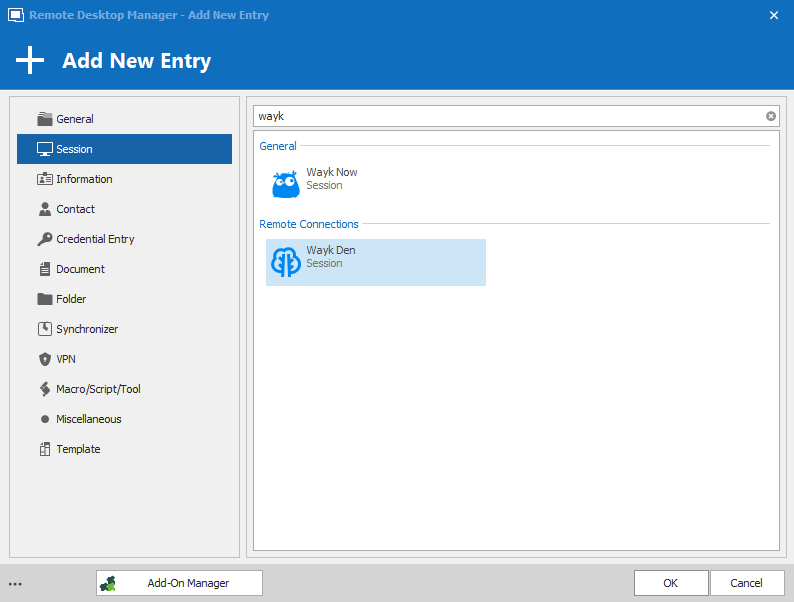
Once you have successfully created a Wayk Den entry and logged in with your user, you should be able to open it to see a list of machines from Wayk Den, the same list of machines seen in the Wayk Den Web UI. The next time you create a Wayk Now entry, you should be able to select your Wayk Den from the dropdown list like this: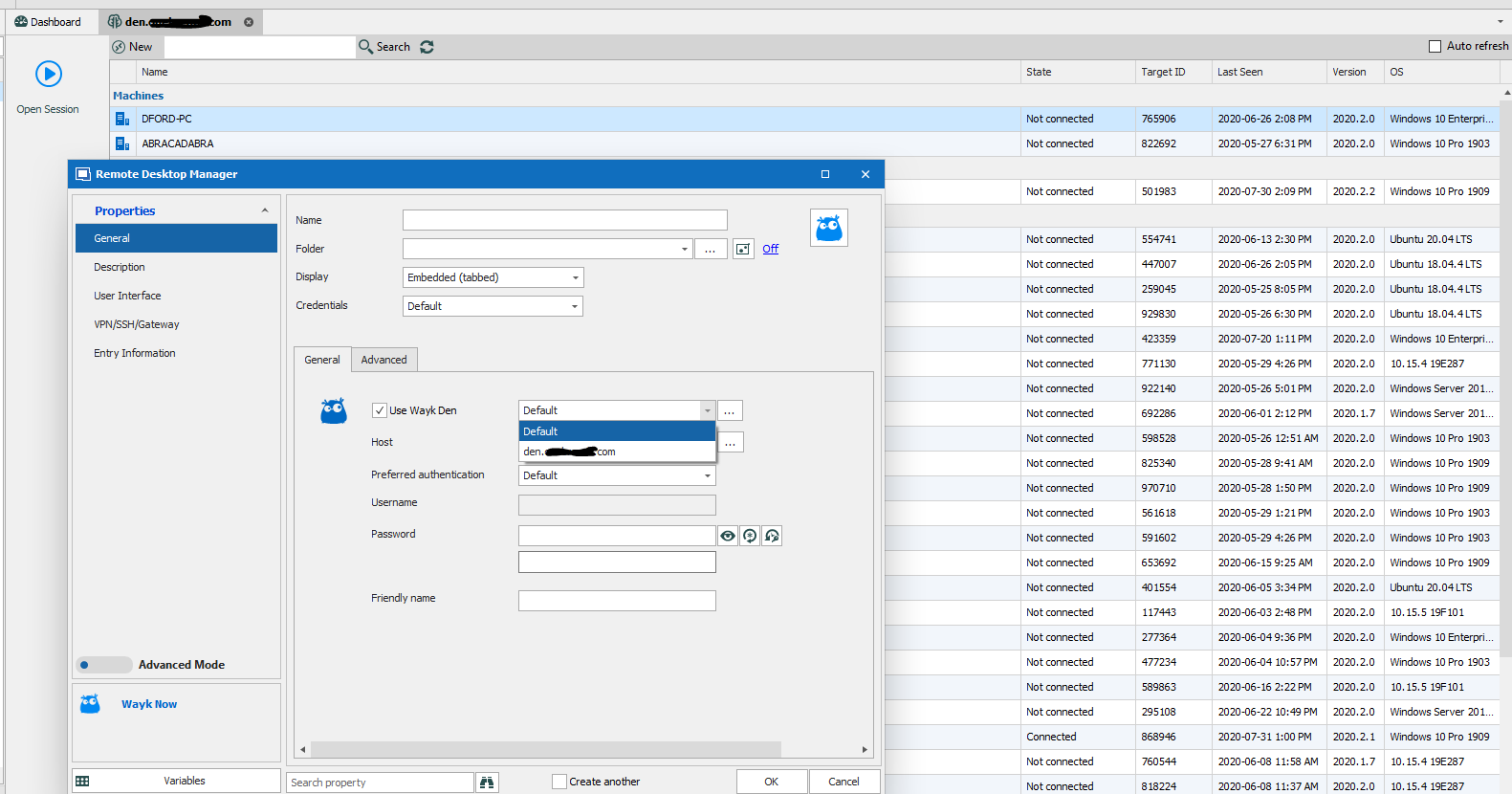
This new Wayk Now entry should then correctly use your custom Wayk Den. As for grouping machines, we should be releasing a new version of Wayk Now and Wayk Den next week where machine listing will always be done by group in both RDM and the Wayk Den Web UI.
Best regards,
Marc-André Moreau
rdm_wayk_den.png
rdm_wayk_entry_types.PNG
Hi
this new option to use a waykden doesn’t show in my version on Mac???
that option is totally missing???
is it windows only?
or will it be in the new release of rdm?
regards
simon
Hi Simon,
This new integration is currently available in RDM for Windows only. We still have many improvements to make in the RDM Wayk integration, and they will be done in RDM for Windows first. I don't have an ETA for when the integration will be updated in RDM Mac, but I can inquire with the RDM Mac team next week.
Best regards,
Marc-André Moreau
Hi
very sad news to hear the Mac version is way behind the windows one
i will try creating a wine app and install the windows version in it, I do have a windows 10 vm via parallels desktop but it’s annoying having to start the vm every time just to use the rdm where as the Mac version is brilliant! It just works but just missing the wayk support
regards
simon
Hi Simon,
I've increased the priority of the Wayk Den dashboard integration in RDM Mac. I can't provide an ETA yet, but we'll get back in touch with you when this is done.
Best regards,
Xavier Fortin
Hi,
A new version of RDM Mac (2020.2.4.0) will soon be released with the Wayk Den entry.
Best regards,
Xavier Fortin
Hi Xavier,
thanks for the update on this, i have download it and spotted the waykden and it loads just like the windows version!
only issue is the wayknow entries on mac are still using the default waykden server rather than my custom waykden server
the is also no option to set one wither inside the wayknow entries of RDM Mac
Regards
Simon
Hi,
Yes, our Wayk session needs to be updated. We have a ticket opened for this. I'll post back here when it is done.
Best regards,
Xavier Fortin
Hi Simon,
RDM Mac Wayk client has been updated with Den support in our latest release (2020.3.1.0). Note that the Wayk component as been updated recently too, so there might be some friction there. Please, inform us if you have any issues with it. At the moment, there is a known issue with Remote Execution.
Best regards,
Xavier Fortin
Hi Xavier,
thanks for the update,
i have updated my mac and yes it now seems to work with my own waykden but the is still problems...
problem i have is i connect to one machine no problem but then the screen is too big?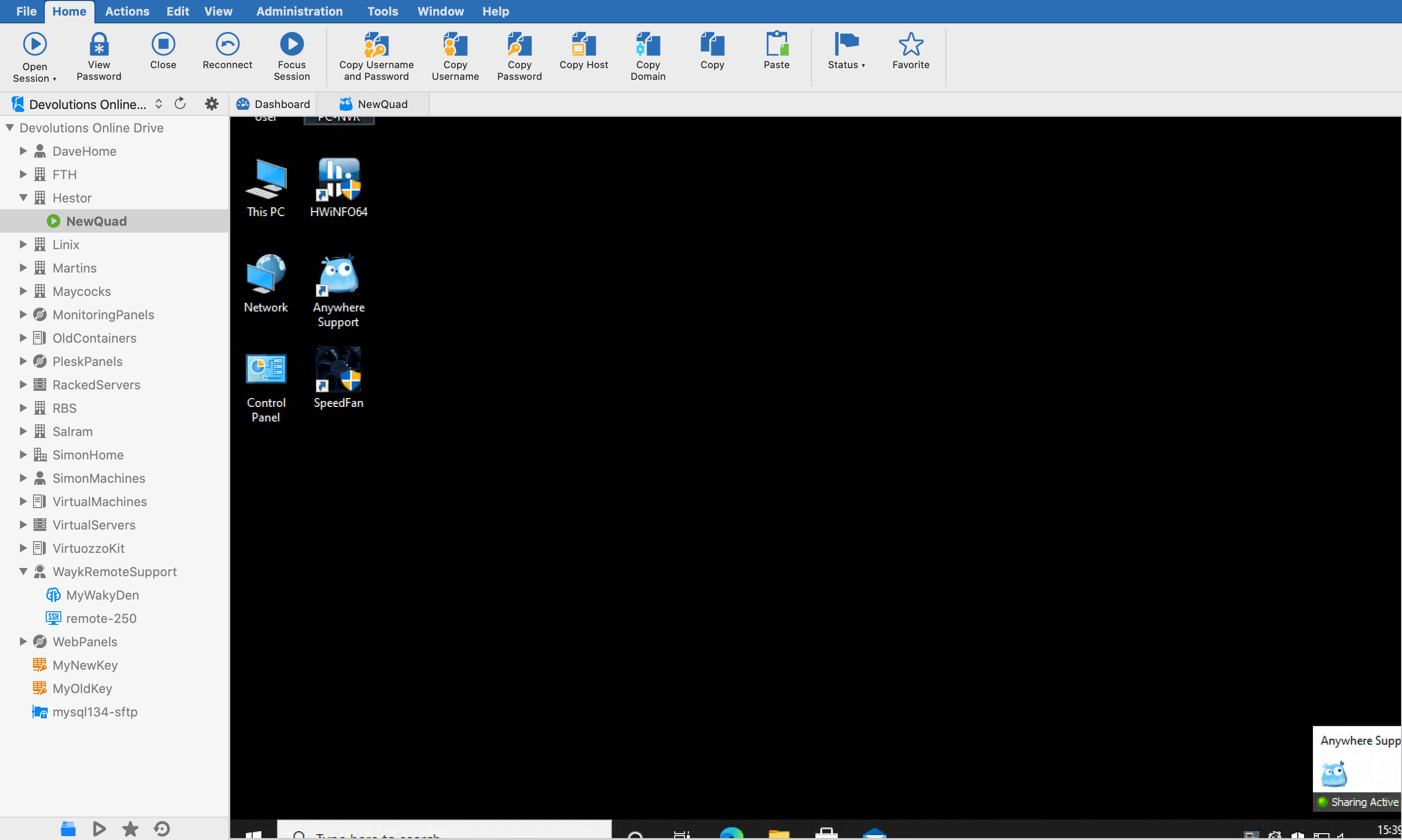
the is no way of shrinking it or resizing it!
the also no options for file transfer, different screens, the its alot missing!?
Regards
Simon
Screenshot 2020-10-28 at 15.39.10.png
Those options should be available under the Actions menu: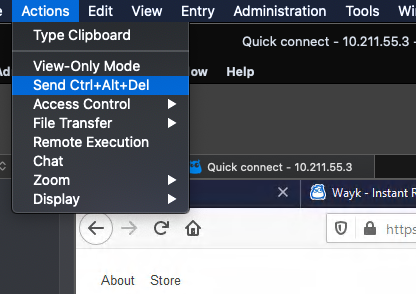
Or the embedded menu of the tab.
Best regards,
Xavier Fortin
WaykActionSettings.png
Hi,
thank you for that,
totally forgot about the mac menu bar!
i expected the options to be visible somewhere in the app
but its hidden when the apps in full screen mode on mac
im not sure what you mean by embedded menu tho?
Regards
Simon
This won't help you in full screen, but the actions are also available in the session tab menu: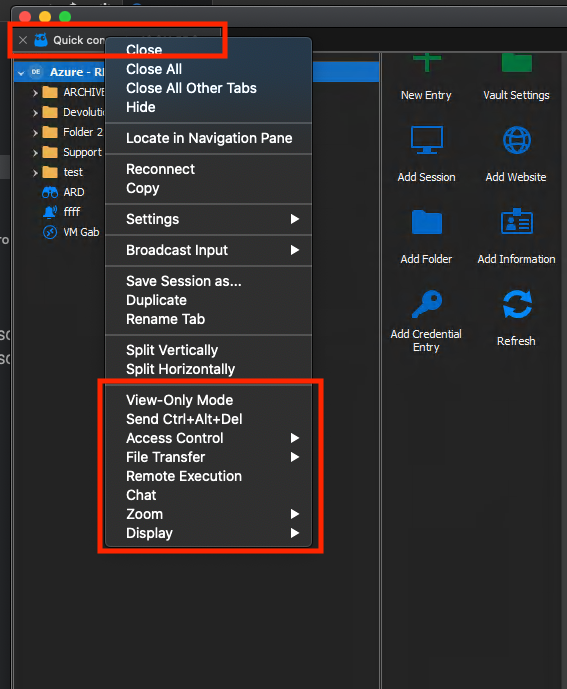
You can still access the main menu in full screen by bringing your mouse to the top of your screen. That being said, I imagine it can be less than ideal.
I'll create a ticket to add the action bar from RDM Windows.
Best regards,
Xavier Fortin
WaykEmbeddedMenu.png
Hi
found a tiny bug for you,
when i file transfer its starts at 0% then goes past 100% and carrys on to like 1000% then suddenly changes to 1%, 2%, 3% etc...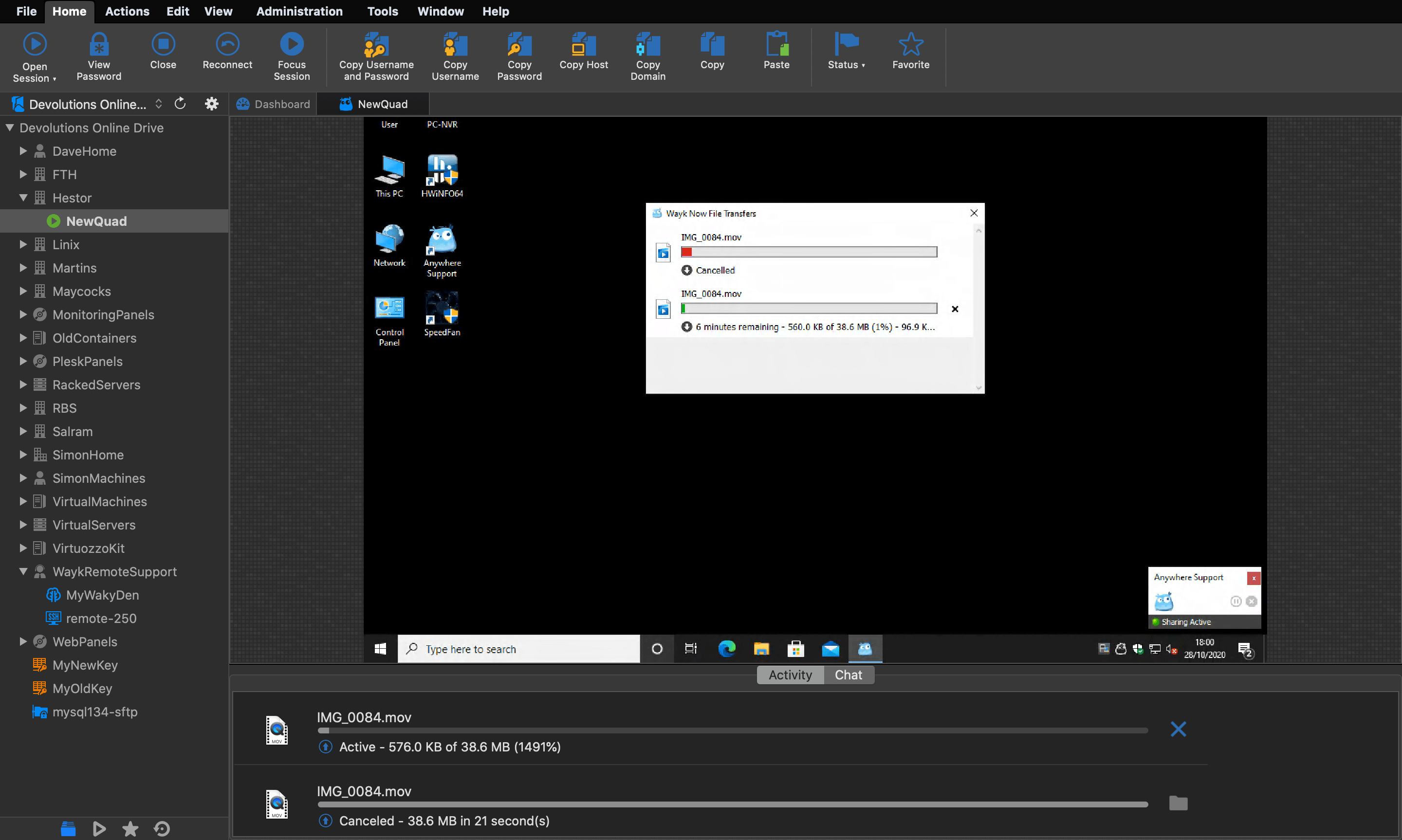 Regards
Simon
Screenshot 2020-10-28 at 18.00.43.png
We'll look into it.
Best regards,
Xavier Fortin
Hi Simon,
RDM and RDM Free 2020.3.2.0 will be available shortly. Wayk sessions will now have an action bar at the top of their view.
Best regards,
Xavier Fortin
Hi Xavier,
thanks for this i have updated this morning, but the app hasnt stopped crashing all day
its just randomly crashing, but only when i have a waykclient connection open inside the app
i have submitted a few bug reports when it asks me too so far
Regards
Simon
Hi Simon,
Indeed, I've received them properly. Seems to be a regression on our part. Should be fairly easy to fix.
I'll post back when the fix is available. In the meantime, you can revert to the previous version.
Free: https://cdn.devolutions.net/download/Mac/Devolutions.RemoteDesktopManager.Free.Mac.2020.3.1.0.dmg
Enterprise: https://cdn.devolutions.net/download/Mac/Devolutions.RemoteDesktopManager.Mac.2020.3.1.0.dmg
Best regards,
Xavier Fortin