Offline Mode not working after update to 2020.2.13.0 unless VPN connection is active
Offline Mode not working after update to 2020.2.13.0 unless VPN connection is active

Hi,
I have a strange issue with RDM after updating to the latest version where in Offline Mode password copying and opening of sessions results in RDM and OS hangs and simply doesn't work (sessions don't open, passwords don't get copied, windows layout resets after ~10 seconds) UNLESS I connect to my corporate network via VPN. I don't have to connect to the RDM database for it to work. I reset my offline cache but to no avail. What else could I try?
Regards, JK
All Comments (18)
JK,
Very strange.
Do you have anything relevant/recent in Help > Application Logs? If so please post it here for analysis.
What version were you on before the upgrade?
Best regards,
Stéfane Lavergne
Yes, strange indeed. Several of my co-workers have reported the same though, so I'm not the only one having this issue.
I do have about 40 of the following error messages in the log:
System.Data.SqlClient.SqlException (0x80131904): A network-related or instance-specific error occurred while establishing a connection to SQL Server. The server was not found or was not accessible. Verify that the instance name is correct and that SQL Server is configured to allow remote connections. (provider: Named Pipes Provider, error: 40 - Could not open a connection to SQL Server) ---> System.ComponentModel.Win32Exception (0x80004005): The network path was not found
I do not know what version I was on before the upgrade, but it should have been the latest that was available on the 3rd of June.
Regards, JK
JK,
Nice we are making progress. Can you please activate the call stack on the error messages (File > Options > type "stack" in the bottom filter box + ENTER, select first item then make sure the checkbox is unchecked)
Let/make RDM crash again, this time the error message should contain full details of the issue. Please send that my way. It looks like there is sub-system that isn't behaving properly while in offline mode (trying to query the database). The error message should tell me exactly what the issue is.
Best regards,
Stéfane Lavergne
Hi,
"disable stack trace" was disabled already, I just haven't posted the complete error message. Here it is:
System.Data.SqlClient.SqlException (0x80131904): A network-related or instance-specific error occurred while establishing a connection to SQL Server. The server was not found or was not accessible. Verify that the instance name is correct and that SQL Server is configured to allow remote connections. (provider: Named Pipes Provider, error: 40 - Could not open a connection to SQL Server) ---> System.ComponentModel.Win32Exception (0x80004005): The network path was not found
at System.Data.SqlClient.SqlInternalConnectionTds..ctor(DbConnectionPoolIdentity identity, SqlConnectionString connectionOptions, SqlCredential credential, Object providerInfo, String newPassword, SecureString newSecurePassword, Boolean redirectedUserInstance, SqlConnectionString userConnectionOptions, SessionData reconnectSessionData, DbConnectionPool pool, String accessToken, Boolean applyTransientFaultHandling, SqlAuthenticationProviderManager sqlAuthProviderManager)
at System.Data.SqlClient.SqlConnectionFactory.CreateConnection(DbConnectionOptions options, DbConnectionPoolKey poolKey, Object poolGroupProviderInfo, DbConnectionPool pool, DbConnection owningConnection, DbConnectionOptions userOptions)
at System.Data.ProviderBase.DbConnectionFactory.CreatePooledConnection(DbConnectionPool pool, DbConnection owningObject, DbConnectionOptions options, DbConnectionPoolKey poolKey, DbConnectionOptions userOptions)
at System.Data.ProviderBase.DbConnectionPool.CreateObject(DbConnection owningObject, DbConnectionOptions userOptions, DbConnectionInternal oldConnection)
at System.Data.ProviderBase.DbConnectionPool.UserCreateRequest(DbConnection owningObject, DbConnectionOptions userOptions, DbConnectionInternal oldConnection)
at System.Data.ProviderBase.DbConnectionPool.TryGetConnection(DbConnection owningObject, UInt32 waitForMultipleObjectsTimeout, Boolean allowCreate, Boolean onlyOneCheckConnection, DbConnectionOptions userOptions, DbConnectionInternal& connection)
at System.Data.ProviderBase.DbConnectionPool.TryGetConnection(DbConnection owningObject, TaskCompletionSource`1 retry, DbConnectionOptions userOptions, DbConnectionInternal& connection)
at System.Data.ProviderBase.DbConnectionFactory.TryGetConnection(DbConnection owningConnection, TaskCompletionSource`1 retry, DbConnectionOptions userOptions, DbConnectionInternal oldConnection, DbConnectionInternal& connection)
at System.Data.ProviderBase.DbConnectionInternal.TryOpenConnectionInternal(DbConnection outerConnection, DbConnectionFactory connectionFactory, TaskCompletionSource`1 retry, DbConnectionOptions userOptions)
at System.Data.SqlClient.SqlConnection.TryOpenInner(TaskCompletionSource`1 retry)
at System.Data.SqlClient.SqlConnection.TryOpen(TaskCompletionSource`1 retry)
at System.Data.SqlClient.SqlConnection.Open()
at Devolutions.RemoteDesktopManager.Business.DataSources.SQLServerConnectionDataSource.CreateDbConnection(String connectionString, Boolean openConnection)
at Devolutions.RemoteDesktopManager.Business.DataSources.SQLServerConnectionDataSource.CreateDbConnection(String connectionString)
at Devolutions.RemoteDesktopManager.Business.DataSources.DatabaseConnectionDataSource.CreateDbConnection(Boolean master, Nullable`1 connectTimeout)
at Devolutions.RemoteDesktopManager.Business.DataSources.DatabaseConnectionDataSource.GetData(String sql, IDbDataParameter[] parameters)
at Devolutions.RemoteDesktopManager.Business.DataSources.DatabaseConnectionDataSource.GetData(String sql, IDbDataParameter[] parameters, IDbTransaction dbTransaction)
at Devolutions.RemoteDesktopManager.Business.DataSources.DatabaseConnectionDataSource.cbce30e6cabffbfc504aa3ab16502c915(IDbTransaction c5a0ca8eaa594113c2f0b3cfe13dedff9)
at Devolutions.RemoteDesktopManager.Business.DataSources.DatabaseConnectionDataSource.GetDataSourceSettings()
at Devolutions.RemoteDesktopManager.Managers.ConnectionStatusUIManager.cc90b9e7e3172b4bee78c6a6cf4ea12fb(Connection c6aea3d31dfb3fea36c5f53f7fe93584c)
at Devolutions.RemoteDesktopManager.Managers.ConnectionStatusUIManager.c925eb093e8a7caa28a0f52c16f7478e0(Connection c6aea3d31dfb3fea36c5f53f7fe93584c)
at Devolutions.RemoteDesktopManager.Managers.ConnectionStatusUIManager.ProcessStatus(Connection connection, Boolean automaticCheckOutPossible)
at Devolutions.RemoteDesktopManager.Managers.ActionManager.ViewCredentialPassword(Connection connection)
at Devolutions.RemoteDesktopManager.Managers.SessionMenuManager.c62bc518e10905bbb66b1519abaf2ea07(Object c19f185fd70cefc696ba148af1c4faf54, EventArgs cf1018bb83ec7debd818319fd3cb4844e)
at System.Windows.Forms.ToolStripItem.RaiseEvent(Object key, EventArgs e)
at System.Windows.Forms.ToolStripMenuItem.OnClick(EventArgs e)
at System.Windows.Forms.ToolStripItem.HandleClick(EventArgs e)
at System.Windows.Forms.ToolStripItem.HandleMouseUp(MouseEventArgs e)
at System.Windows.Forms.ToolStrip.OnMouseUp(MouseEventArgs mea)
at System.Windows.Forms.ToolStripDropDown.OnMouseUp(MouseEventArgs mea)
at System.Windows.Forms.Control.WmMouseUp(Message& m, MouseButtons button, Int32 clicks)
at System.Windows.Forms.Control.WndProc(Message& m)
at System.Windows.Forms.ToolStrip.WndProc(Message& m)
at System.Windows.Forms.ToolStripDropDown.WndProc(Message& m)
at System.Windows.Forms.NativeWindow.Callback(IntPtr hWnd, Int32 msg, IntPtr wparam, IntPtr lparam)
ClientConnectionId:00000000-0000-0000-0000-000000000000
Error Number:53,State:0,Class:20
****************************** SqlError ******************************
Message:A network-related or instance-specific error occurred while establishing a connection to SQL Server. The server was not found or was not accessible. Verify that the instance name is correct and that SQL Server is configured to allow remote connections. (provider: Named Pipes Provider, error: 40 - Could not open a connection to SQL Server)
Regards, JK
Nice, I have an idea what the issue is. I'm looking into it, we should be able to fix this relatively quickly. I will keep you posted.
Stéfane Lavergne
Is your user an admin? Can you try with an admin user to see if you have the same behavior?
Stéfane Lavergne
Unfortunately no, but I will try to get access to an admin account for testing.
No worries, the support team has been in contact with other users that are experiencing the issue and they have confirmed that it works correctly with an admin.
Stéfane Lavergne
The issue has been resolved internally. We will release the build once it's available, expect a new build within the next 24 hours.
Sorry for the inconvenience.
Stéfane Lavergne
Thanks for the quick fix, looking forward to it!
Regards, JK
Good morning,
I can confirm that the issues are gone after updating to 2020.2.14.0. Thanks again!
Regards, JK
Hi,
Is it possible the issue is back in 2020.2.15? A bunch of techs here are experiencing the same problem.
Thank you!
Can you post the details of the error? Help > Application Logs
Stéfane Lavergne
It's weird cause non-admin users don't seem to have any application logs.
I've found that if we start the application offline, everything is working
2020-06-26 14_02_21-Remote Desktop Manager.png
**Update - if I log with an admin account, I don't have the problem.
So non-admin users, while offline, get freezes but nothing in the logs and no crash window. I will get our QA team to try to reproduce the issue.
Best regards,
Stéfane Lavergne
Just to make sure, it doesn't crash. The navigation pane is just empty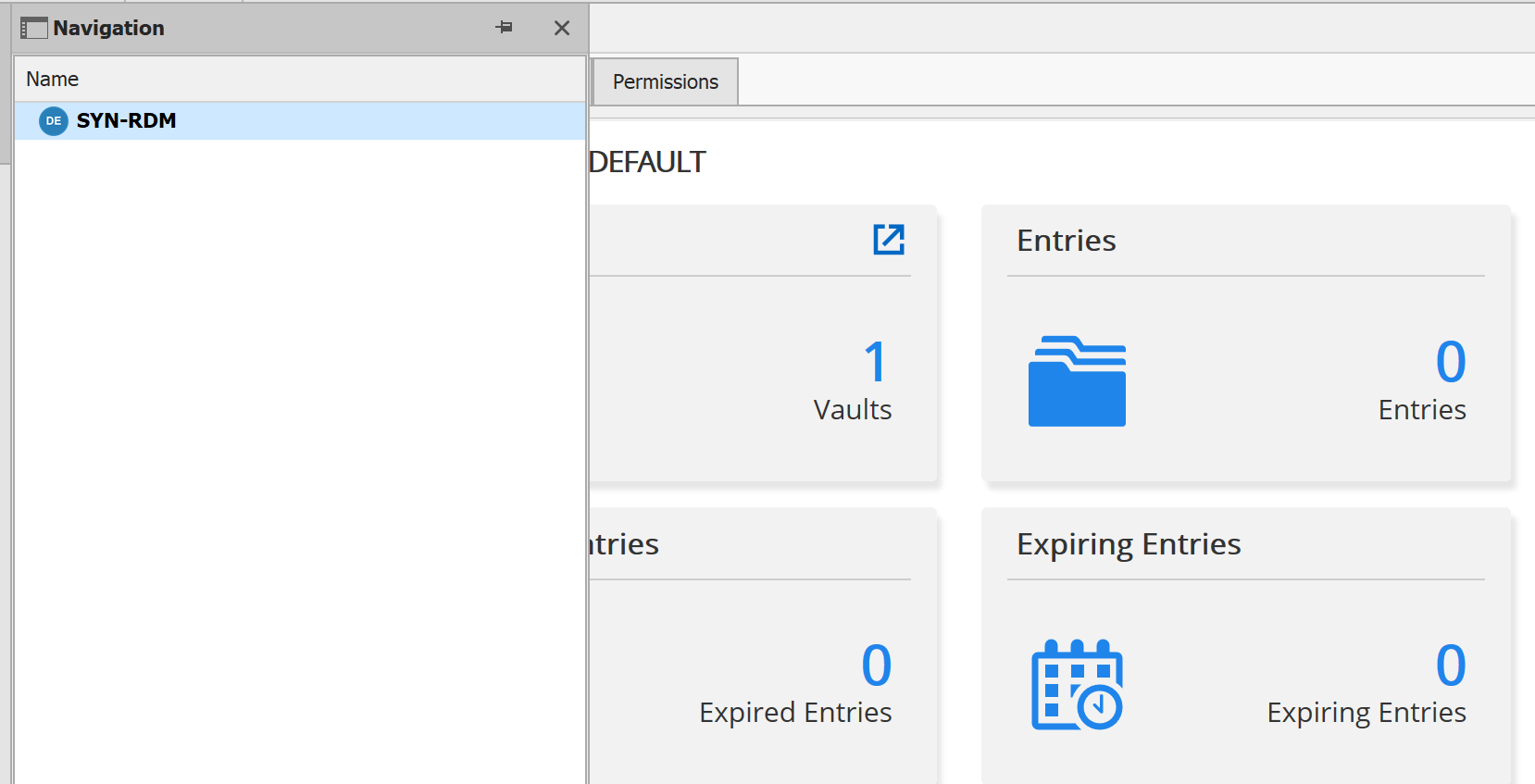
2020-06-26 14_51_59-.png
Can you please try the new version v2020.2.16.0? https://remotedesktopmanager.com/home/downloadenterprise
I'm not sure it will solve it since we were not able to reproduce the exact scenario but changes have been made that may (small chance) solve the issue.
With the non-admin, perform a "full refresh" (CTRL + top left refresh icon) and force the local connection cache to be reinitialized. Does the issue still occur?
Best regards,
Stéfane Lavergne