Not true colors on remote desktop display

I am color blind so shades of colors can confuse me. I am running Wayk Now on a WIN 10 PC to monitor a remotely unattended WIN 7 PC. It is running an app that has square buttons that are either RED or GREEN. When I am at the WIN 7 PC I can easily see the difference. On the WIN 10 view of the WIN 7 I cannot. My wife, with color vision, says the Red are Orange.
Is there a way I have the WIN 10 PC display the colors more accurately? There is no problem with the color of other apps running on the WIN 10 (word, excel,etc.)
All Comments (8)
Hello
To further assist you, please can you provide some additional information:
- What is the version of Wayk Now running on the remote computer? You can determine that by opening Wayk Now and choosing "About Wayk Now" from the Help menu.
- On the client (the Windows 10 machine you connect *from*) what is configured under Options > Performance > Codec?
- Is there a possibility to take a screenshot of the app on both the Windows 7 machine and in the Wayk Now session? You could crop the screenshot to just show the problematic area and exclude any sensitive information.
Thanks and kind regards,
Richard Markievicz
Both computers are running 2020.1.7.
WIN 10, the defaults:.Quality: Medium, Codec; Automatic.
Attach are photos of the screens from a cell phone. The top is from the WIN 7 remote PC. The bottom is from the WIN 10 PC.
Interestingly, I found I could see the colors better from looking at the WIN 10 connected AOC monitor at an angle, not straigh on. I use the Win 10 docked so I am not viewing the PC screen itself. If changing the Performance options does not help perhaps I can tweak the monitor's settings. Prefer to adjust the Wayk Now options.
Thanks.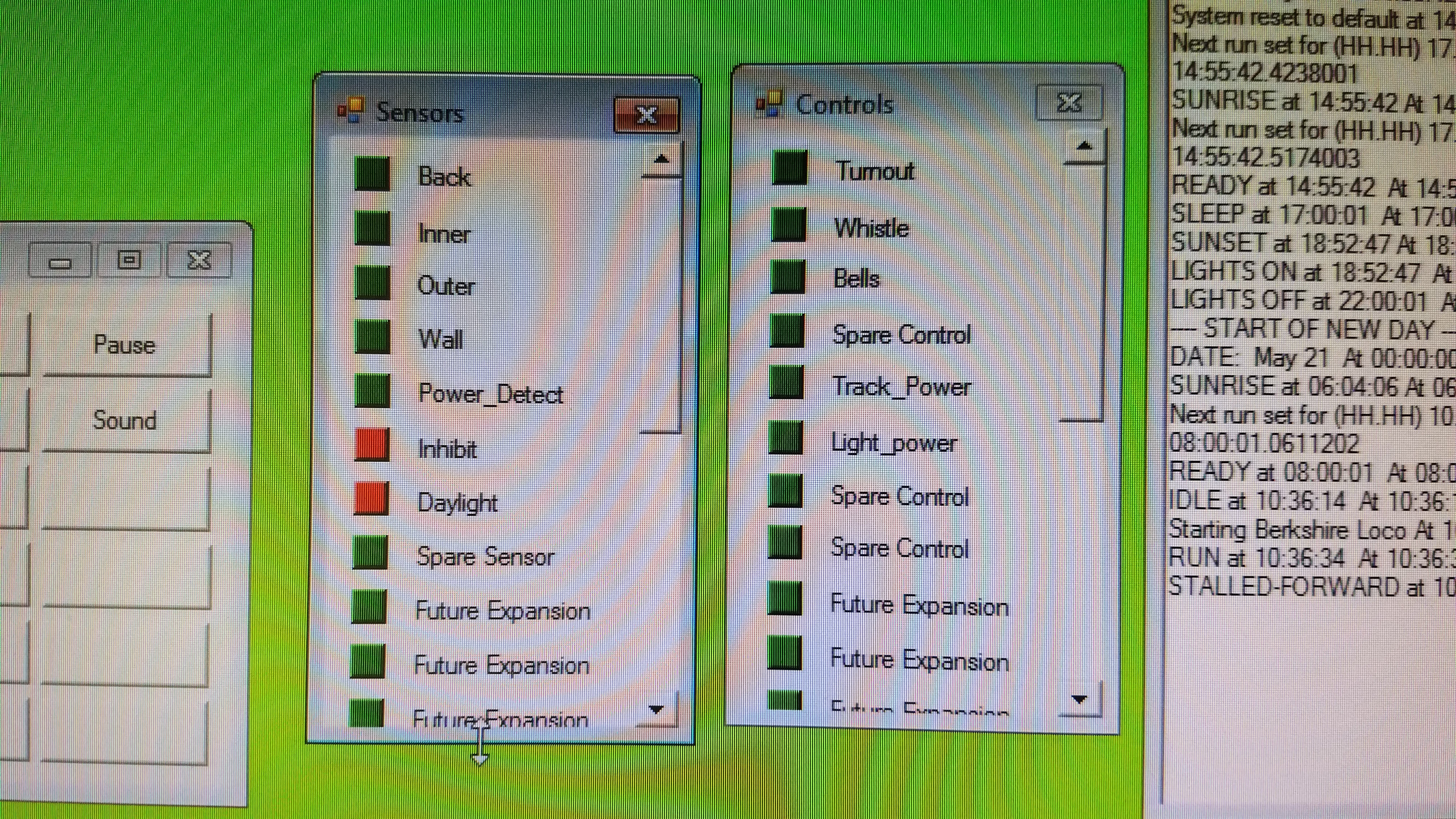
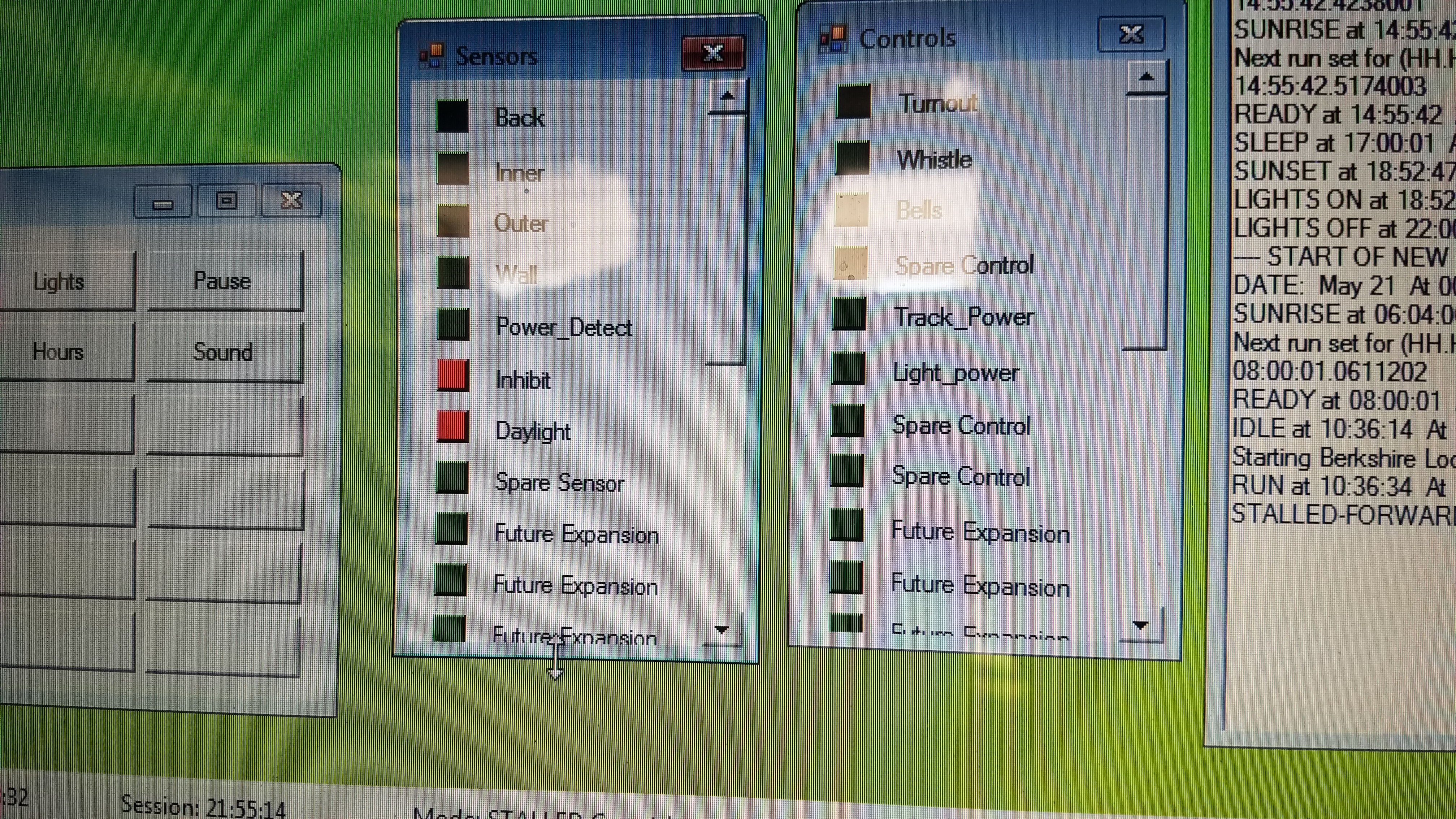
2020-05-21 11.29.06.jpg
2020-05-21 11.28.34.jpg
Hi,
Here is some more insight on parameters that should matter:
The quality mode and preferred codec parameters are client settings, meaning the client sends them to the server at connection time. These are the first parameters you should tweak on the computers you are making the connection from, and not the destination computer.
We have two codecs: JPEG and GFWX, the default being GFWX. Since both codecs are fundamentally different in the way they compress the image, trying JPEG and GFWX could lead to different visual results, so I am curious to see if it would make a difference in your case.
Last but not least, you should try changing the quality mode to "high" in an effort to reduce the compression, and therefore the amount of color information loss in the image. If you see an improvement in color perception, this could be meaningful.
Because a photo of a computer monitor doesn't provide good enough image detail, I would really need actual screenshots taken on both sides for comparison (the "print screen" key or the Windows snipping tool). Please save the screenshots in .png format to avoid additional compression. The ideal screenshots would be a screenshot of the Wayk Now client window where the desktop is shown without scaling (Display -> Zoom -> 100%) and a corresponding screenshot of the target system at the same time. This way, I should be able to perform accurate comparison of the source and destination images, where the only thing standing in between is the Wayk Now codec compression that seems to be causing trouble here.
Best regards,
Marc-André Moreau
Hi,
I produced test images with the standard web colors compressed with different codecs and parameters so you can take a look at tell me if one of them looks better. Since I didn't get a clean, uncompressed screenshot of the target system I could not know for sure what the original RGB colors are for the red and green buttons, so I guessed they should be close enough to the standard color names "red (255,0,0)" and "lime (0,255,0)", the two colors for full red, and full green in RGB. However, if you were to provide such a screenshot, I would be able to recompress it multiple times with exactly the original pixels that result in incorrect color values in Wayk Now. I used the color picker to identify the result colors, and they are quite close to the original values, so I am unsure if it would make a difference in color perception. In any case, here is the sample for reference, I have numbered them from #1 to #4, where #3 is the default in Wayk Now.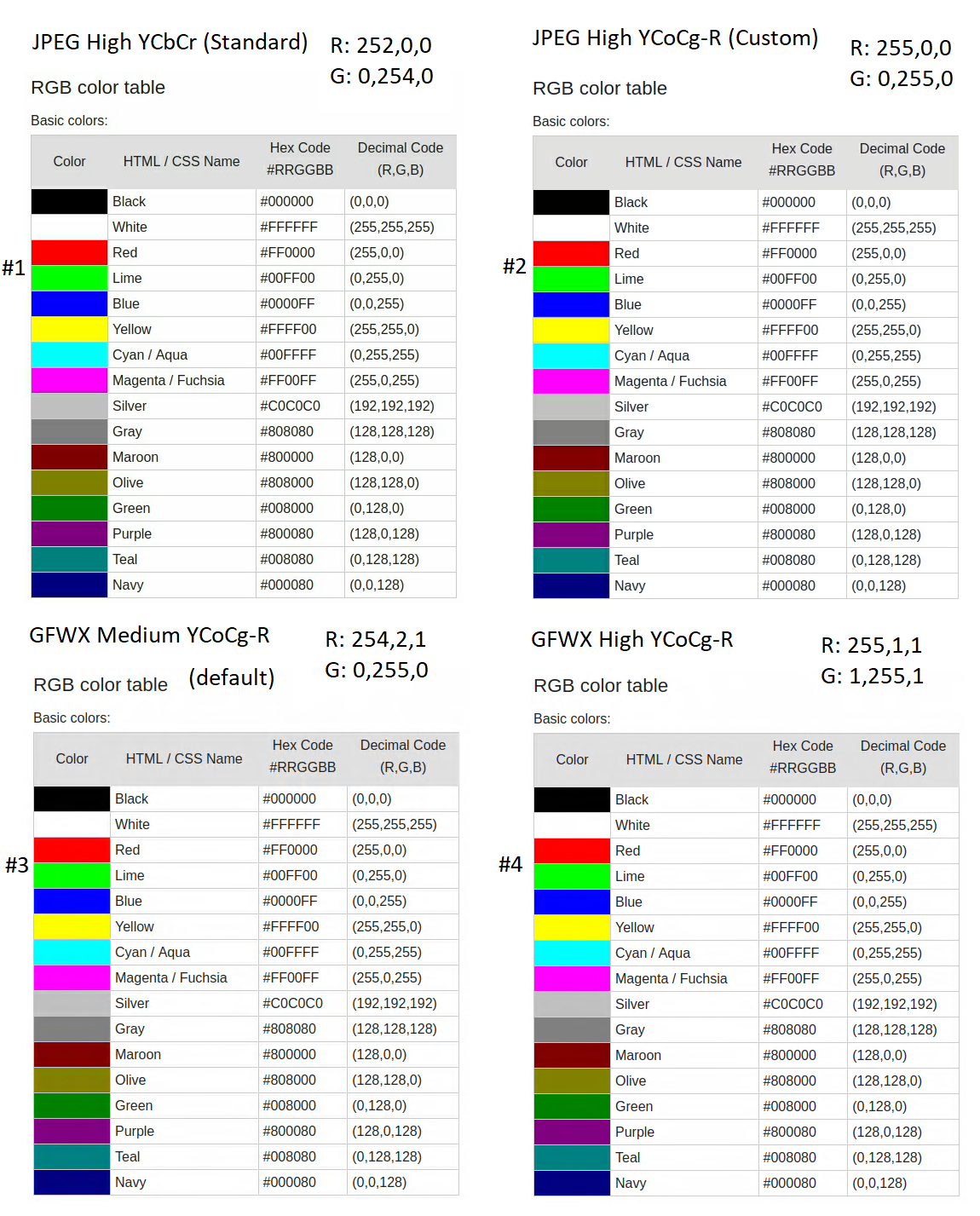
Please let me know if you can distinguish red from green in the above samples, and if color perception is easier with one of them.
Best regards,
Marc-André Moreau
wayk_colors_comparison.png
Thanks for following up on my unique problem. I will try your idea soon. This is not a critical issue as I use you tool for a hobby computer controlled train. Right now I am having some success with WIN 10 Color Filters which I discovered have settings for the three most common forms of color vision problems. One of the problems for people like me is first distinguishing the color from others, and then naming it correctly. One has to do with understanding a color legend on a chart and the other is communicating the colors seen. I am "weak red" so colors with a red component are confused, blue/purple, green/brown, yellow/orange.More than you wanted to know.
Marc,
I have discoverd the WIN 10 color filters, some designed for colorblind people. I have found this useful and easily switched on and off. That has solved the problem. Thanks for the time you spent working on this.
Hi,
I'm glad that it is working for you now. For the record, can you tell me if the image with color comparisons from my last post was correct or not when viewed without an additional color filter?
Best regards,
Marc-André Moreau
I have viewed the images on my office laptop with the remote AOC screen and see little differences in your four samples. Using Wayk Now I have accessed the remote computer and sent it to your post with the colors to see how they compare. Fig 1 is a screen shot of your color palate from my AOC screen directly from my office laptop with color filters off. Fig 2 is the same with WIN 10 color filters on. Fig 3 is a screen shot of my AOC laptop screen showing the colors via Wayk Now as seen on the remote computer screen using Win 7 Basic Screen settings on the remote and no color filters on the office laptop. Fig 4 is fig 3 with the WIN 10 color filters on. Fig 5 is the troublesome screen from the remote computer, Note DAYLIGHT is on but the rest are not. I will not try to tell you what colors they are. I can't. Not important to me. Just have to tell the difference. Fig 6 is fig 5 with the WIN 10 color filters on. This is the best display for me. DAYLIGHT is clearly different than the others and therefore on.
I hope this helps you. I have solved my problem. Born with color vision issues I have accommodated it all my life. Colors, as I see them, are different that everyone else. But colors are learned so I call them correctly unless there is a red component. Then the confusion begins.My condition is protanopia.
Ray
Fig 1.JPG
Fig 2.JPG
Fig 3.JPG
Fig 4.JPG
Fig 5.JPG
Fig 6.JPG