Wayk Now Fee Mac Versions Wayk.now.2020.1.5.0.dmg

I am using the free versions of WaykNow. On the source computer (Windows PC) the most current version is installed and running. On the remote computer (Mac laptop) I have the Wayk.no.2020/1.5.0.dmg version running that was downloaded and installed this morning. Previously I have been using the 3 and 4 version of the application with no issue of connecting. Now with the new version I receive this error "The connection could not be established because unattended access requires a license." I am not using unattended access.
The source computer is running the client software and is active. Another user has been able to establish connection to that same source computer.
This issue appears to be on my end with my remote Mac and the new software that was installed this morning.
All Comments (10)
Hi,
Let me summarize what I think I understood:
Your server is a Windows PC with Wayk Now 2020.1.5. Your client is a macOS laptop, and after updating to Wayk Now 2020.1.5 on it, you can no longer connect from the macOS laptop to the Windows PC, with an error saying "The connection could not be established because unattended access requires a license.", while this used to work in the past. Somebody else was able to connect to that same Windows PC without trouble, so you're thinking the problem is with your macOS laptop.
I have removed my Wayk Now licenses on both my Windows PC and macOS laptop as well to try this, and I couldn't reproduce the issue (both ways). Of course, this is assuming you are not using Secure Remote Delegation (SRD) authentication, because otherwise the error message would be the expected behaviour. Can you confirm which authentication method you are trying to use (SRP, PFP)?
Otherwise, it might be worth going in the Wayk Now preferences/options on your mac, and remove saved credentials ("credentials" section) that might be present for the Windows PC. I'm thinking something might be off that would make Wayk Now attempt SRD when it shouldn't if this is the case.
Best regards,
Marc-André Moreau
Can you describe why you say "because otherwise the error message would be the expected behaviour"? Is it not supported to connect unattended to Windows PC from non-Windows client?
Hi,
I'm sorry about the confusion. The expected behaviour is that a Wayk Now Free client will not be able to use Secure Remote Delegation (SRD) as it is meant for unattended access, and therefore requires a license. In other words, you need a Wayk Now Enterprise license to use Secure Remote Delegation (SRD) authentication. It would be a problem if you saw the error message you reported when using Secure Remote Password (SRP) or Prompt for Permission (PFP).
Which authentication method are you attempting to use when connecting?
Best regards,
Marc-André Moreau
The problem was rectified. The issue was when the updated version was installed the security authentication type had been changed inadvertently or automatically from the SRP type to the SRD type. I am not certain how the change happened. When removing and reinstalling the software, I noticed the issue because of Marc-Andre's post. I switched it back to then SRP authentication and then gained access.
I am having a similar issue again. The system is set on SRD. It had change somehow, I did not actively reset it. However, now I cannot locate how to set back to SRP. That security does not appear to be present in the system anymore.
Hello
I'm sorry to hear that you are experiencing a problem again. I'm not sure I completely understand the issue, but I'll walk through how things should normally work and hopefully it will allow us to discover where the problem is. Are you still using a macOS client connecting to a Windows server?
In File > Options on the server side, you can select the different authentication types you would like to be available. In the below screenshot, I have all 3 enabled: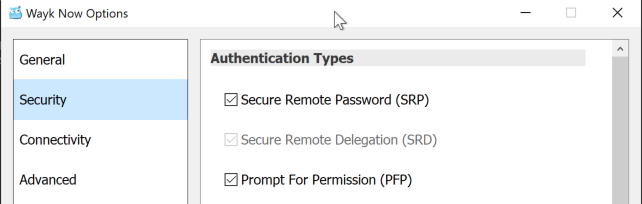
When I connect from my Mac, I can choose the authentication type I'd like to use:

Note the following restrictions, however:
- SRP and PFP will only be available if Wayk Now is running on the remote machine. This is what we call "attended" access - a user is logged into the remote machine and has Wayk Now running
- Accordingly, if Wayk Now is not running on the remote machine or a user is not even logged in, this is what we call "unattended" access and only SRD authentication will be available, regardless of what is enabled on the server options
So, if you wish to use SRP authentication, can you confirm the following:
- Is it enabled in the server settings?
- Is a user logged in, with the Wayk Now application running, on the server?
Thanks and kind regards,
Richard Markievicz
Screen Shot 2020-06-02 at 20.57.04.png
Screen Shot 2020-06-02 at 20.55.31.png
I am able to operate on the Mac and the PC. For the PC the security settings are exactly as you indicate. For the MAC I do not have the ability to change the settings. The drop down only indicates the SRD as being an available choice. I had been using the computer remold just an hour before I had the issue. I have not been able to check if something happened on the other side (the PC that I am attempting to control). I will check that this morning.
Hello
It does sound like Wayk Now is not running on the remote machine (i.e. the machine is "unattended" as per my earlier post). This means that SRD will be the only authentication choice available. Please let us know if that is not the case!
Thanks and kind regards,
Richard Markievicz
That is correct. It appears that the remote pc crashed and restarted. In the restart the Waky software did not automatically restart as can be expected. Being remote I was unaware that this had happened. I had been using, took a break for an hour, came back and I could no longer connect. I did not think anything happened on the other end.
thanks for your support.
Hello
Thanks for the confirmation, and sorry for any inconvenience. Can I assume the remote computer is configured to login automatically? The next release of Wayk Now has a fix related to automatically launching the client at login - I'll post back here once that is available.
Thanks and kind regards
Richard Markievicz