Wayk Den cannot be started?

Hi There,
We meet a problem when we install Wayk Den into our on-premise server. The server OS is windows server 2019, RAM is 16GB.
We follow the instructions listed in git project :https://github.com/Devolutions/WaykDen-ps
The docker has been running. then we follow the git(https://github.com/Devolutions/WaykDen-ps/blob/master/docs/getting-started-argo.adoc) to install Wayk Den:
1.Import-Module WaykDen
- mkdir !/den-test
- cd ~/den-test
- New-WaykDenconfig -Realm windjammer.local -ExtenalUrl http://localhost:4000
- Start-WaykDen
After we start the waykDen, the PowerShell pop out the error message: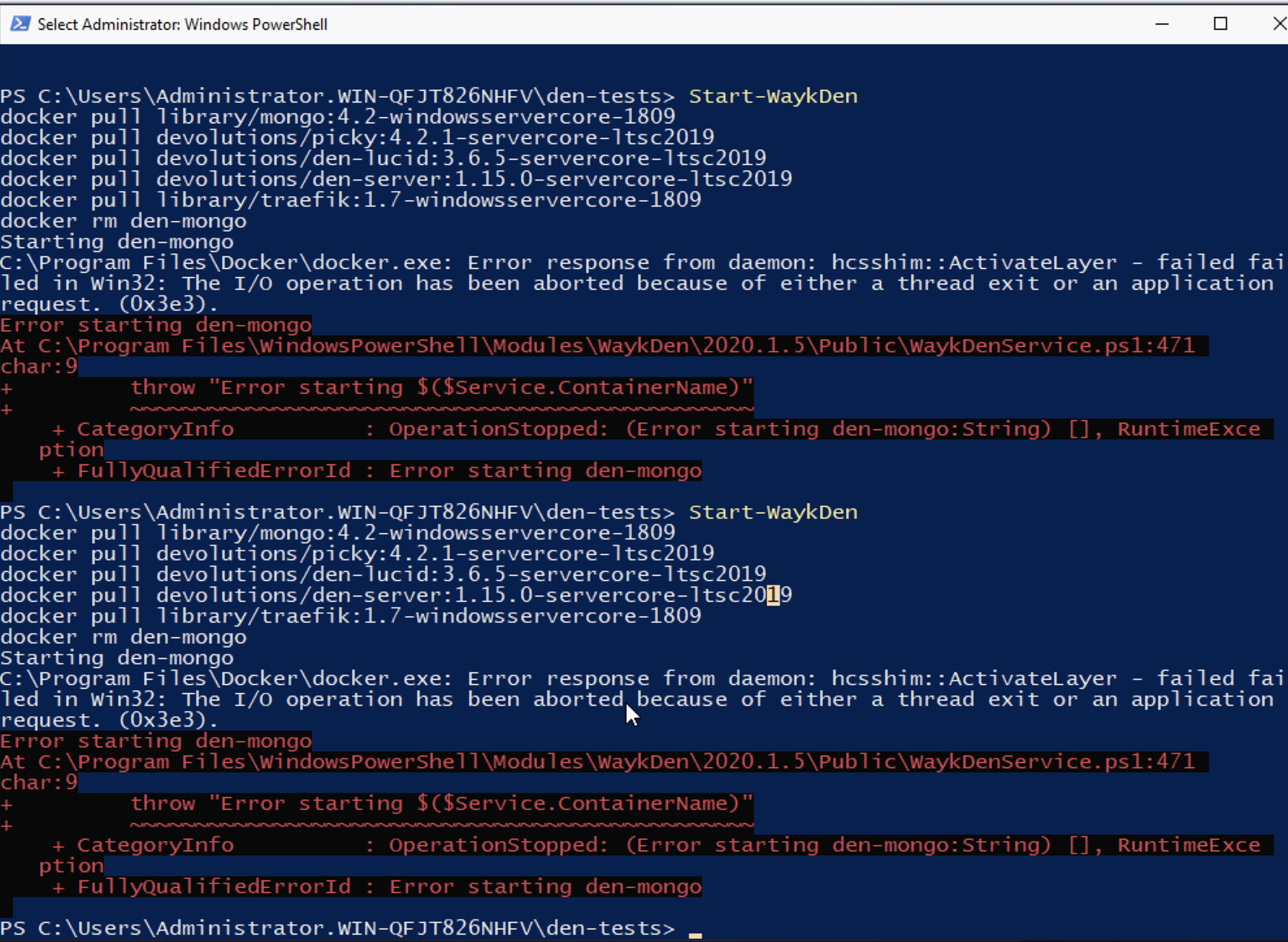
Kindly if you could help us with the issue.
thanks vm.
Best regards,
Shawn
2327 0807
Screen Shot 2020-04-01 at 11.10.11 PM.png
All Comments (31)
Hi Shawn,
This is odd, googling for "Error response from daemon: hcsshim::ActivateLayer - failed failed in Win32: the I/O operation has been aborted because of either a thread exit or an application request (0x3e3)" only yields an old issue dating from 2017 that seems unrelated. In all cases, the problem is with the MongoDB container specifically.
Windows containers take a lot of disk space, how much free space do you have on the host? You can extract the MongoDB container logs like this:
docker logs den-mongo > den-mongo.txt
And post the output here (there should be no sensitive info in there) or send them to wayk@devolutions.net
Other than that, which file system are you using on the host? I wonder if this could have an impact.
Best regards,
Marc-André Moreau
Thanks Marc,
There are at least more than 105GB free space in my C:\ disk. beside that I have nearly 280GB free space in another disk.
The file system we used on our host is NTFS.
I tried to start Wayk Den again, there is another error pop out: the devise is not ready.
When I try to start Wayk Den again, the system halted. let me output the log when system recovered.
Thanks.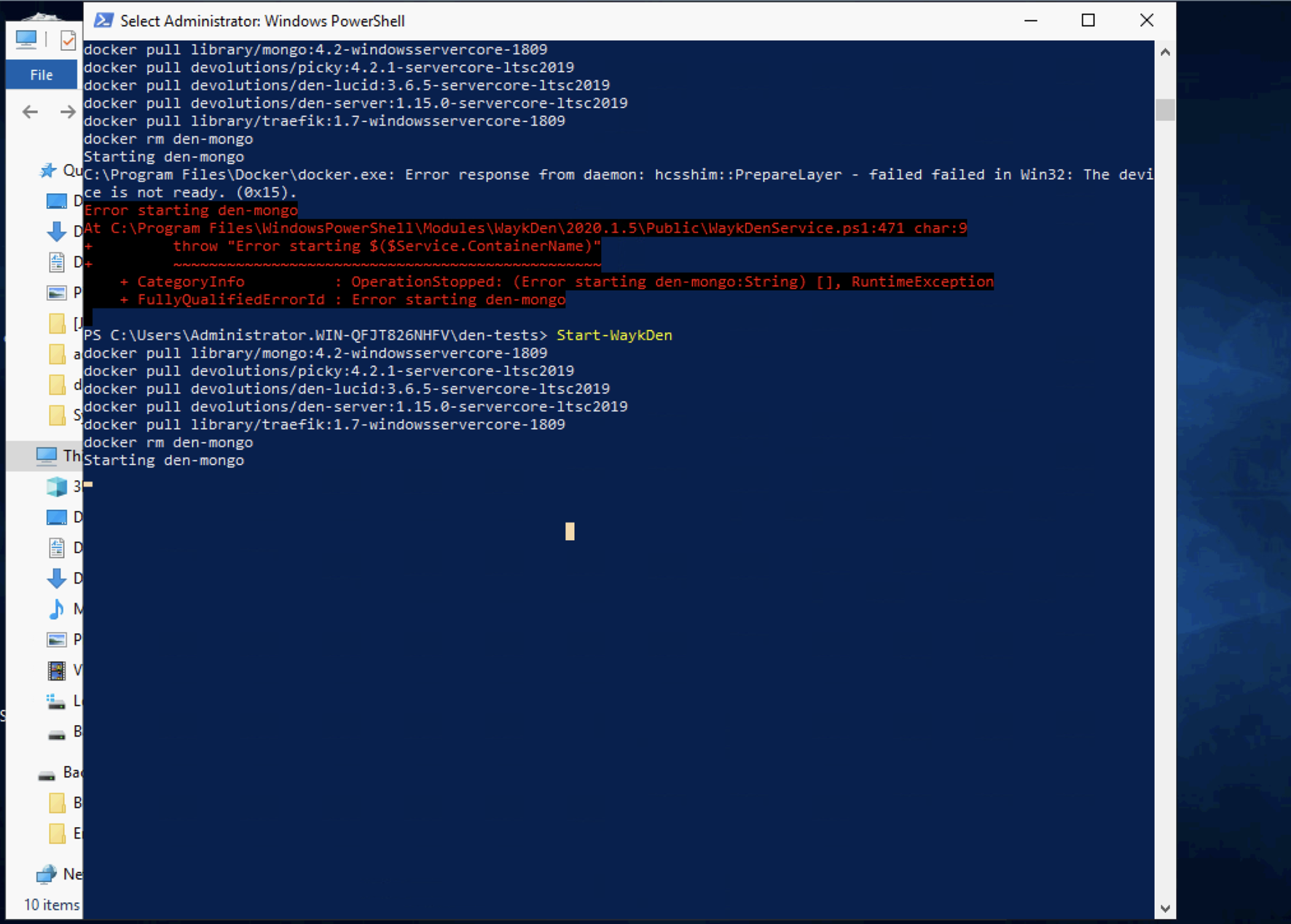
Screen Shot 2020-04-02 at 12.57.30 AM.png
This seems to be a problem with Docker for Windows, and I'm not sure which path would be the easiest to diagnose this issue.
Maybe start by providing the output of the "docker version" and "docker info" commands and paste them here, it may help to figure out if it's specific to a given version of Docker for Windows. Is this a physical host or a virtual machine? We launch the containers without Hyper-V isolation so as long as the host is Windows Server 2019 it should work without nested virtualization.
One thing that could be done is to install MongoDB "the old way" with the .msi installer on the Windows host, and avoid running MongoDB in a Windows container, since the issues only occur with the MongoDB container: https://github.com/devolutions/WaykDen-ps#data-persistence
Otherwise, if you're familiar with Linux, you could switch to a Linux virtual machine (Ubuntu 18.04 LTS is recommended) and avoid the problems associated with Docker for Windows entirely. As a bonus, the Linux containers are much smaller than the Windows containers.
Best regards,
Marc-André Moreau
Thanks Marc,
We had checked our docker version, the docker version is 19.03.5 build 2ee0c57608;
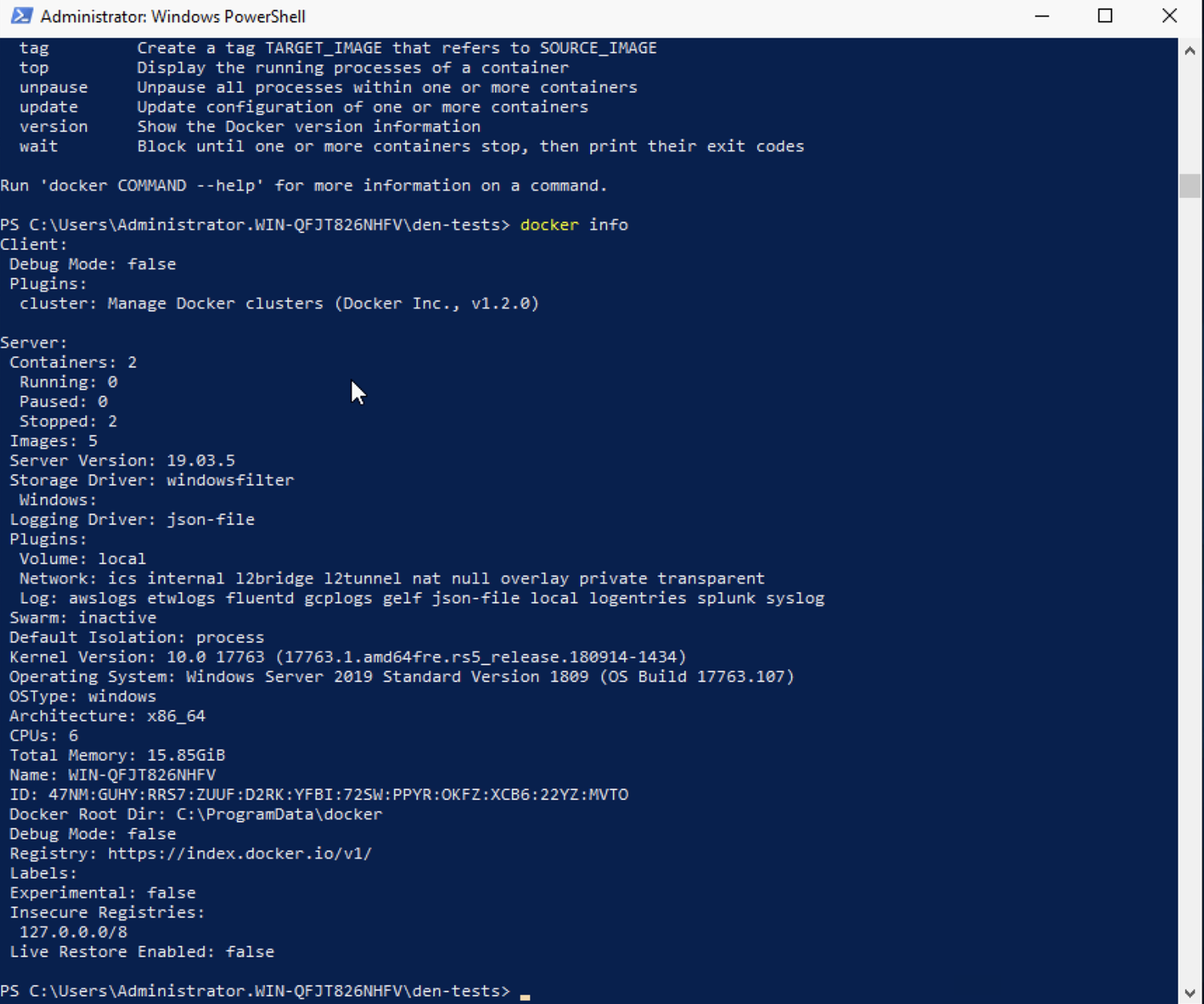
We are using physical host to install Wayk Den, more docker info please see my screenshot below: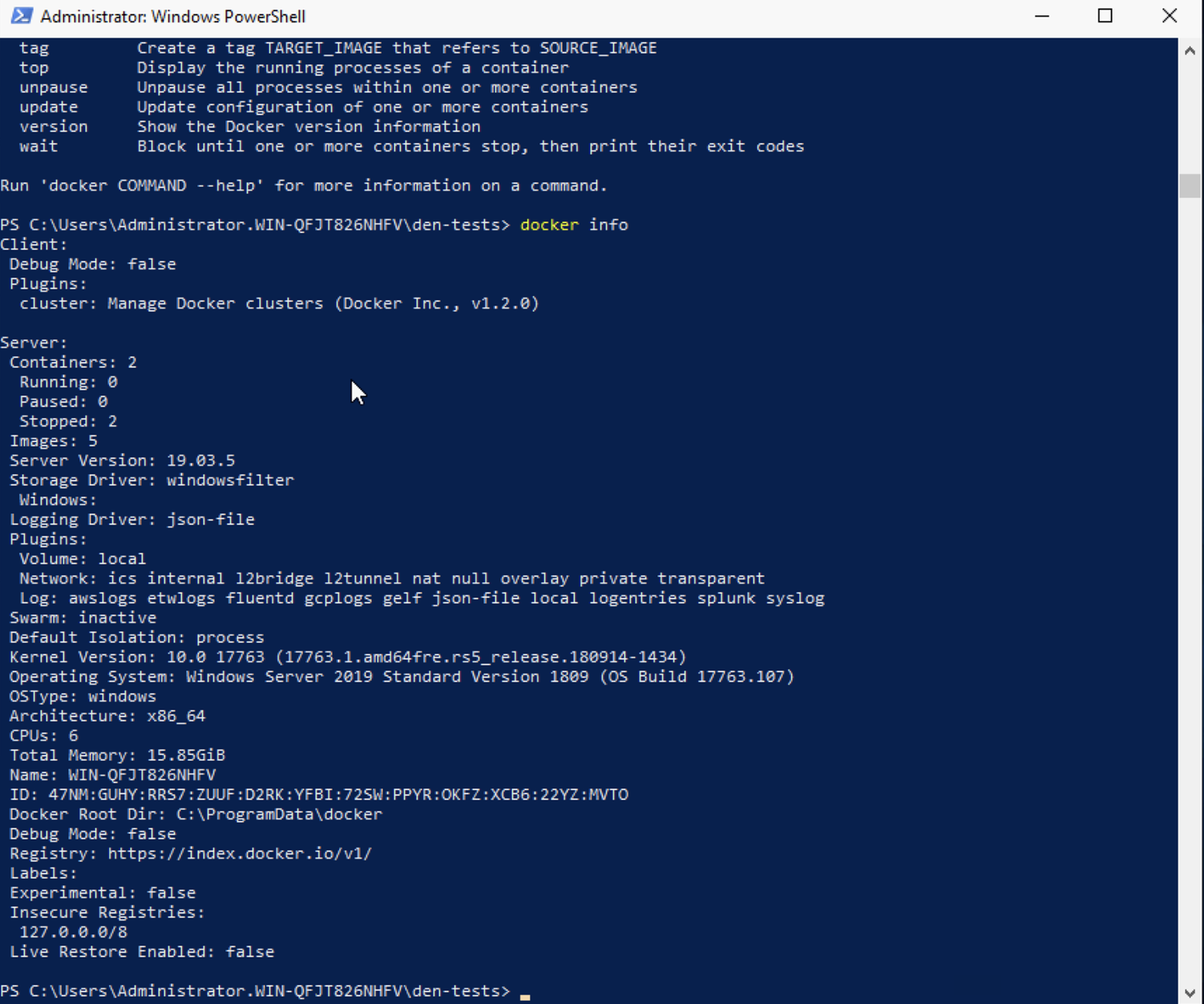
Well, we had server using windows 2019, we will investigate the linux wakyden version, but we still want to have a try on windows server.
Best regards,
Shawn
Screen Shot 2020-04-02 at 9.22.09 AM.png
Hi Shawn,
I originally thought that the problem was only with the MongoDB container, but it is the first container that we start, so we actually do not know if the problem is with all containers or just this one. Can you validate that "docker run hello-world" works?
docker run hello-world
Unable to find image 'hello-world:latest' locally
latest: Pulling from library/hello-world
8e709836e4dc: Pull complete
543ff0f9573f: Pull complete
f01167dd6121: Pull complete
Digest: sha256:f9dfddf63636d84ef479d645ab5885156ae030f611a56f3a7ac7f2fdd86d7e4e
Status: Downloaded newer image for hello-world:latest

Hello from Docker!
This message shows that your installation appears to be working correctly.

To generate this message, Docker took the following steps:
 1. The Docker client contacted the Docker daemon.
 2. The Docker daemon pulled the "hello-world" image from the Docker Hub.
    (windows-amd64, nanoserver-1809)
 3. The Docker daemon created a new container from that image which runs the
    executable that produces the output you are currently reading.
 4. The Docker daemon streamed that output to the Docker client, which sent it
    to your terminal.

To try something more ambitious, you can run a Windows Server container with:
 PS C:\> docker run -it mcr.microsoft.com/windows/servercore powershell

Share images, automate workflows, and more with a free Docker ID:
 https://hub.docker.com/

For more examples and ideas, visit:
 https://docs.docker.com/get-started/
Here is my docker version + docker info output, I am using an older version of docker.
docker version
Client: Docker Engine - Enterprise
 Version:           18.09.6
 API version:       1.39
 Go version:        go1.10.8
 Git commit:        1578dcadd2
 Built:             05/04/2019 02:34:11
 OS/Arch:           windows/amd64
 Experimental:      false

Server: Docker Engine - Enterprise
 Engine:
  Version:          18.09.6
  API version:      1.39 (minimum version 1.24)
  Go version:       go1.10.8
  Git commit:       1578dcadd2
  Built:            05/04/2019 02:32:24
  OS/Arch:          windows/amd64
  Experimental:     false
docker info
Containers: 6
 Running: 0
 Paused: 0
 Stopped: 6
Images: 15
Server Version: 18.09.6
Storage Driver: windowsfilter
 Windows:
Logging Driver: json-file
Plugins:
 Volume: local
 Network: ics l2bridge l2tunnel nat null overlay transparent
 Log: awslogs etwlogs fluentd gelf json-file local logentries splunk syslog
Swarm: inactive
Default Isolation: process
Kernel Version: 10.0 17763 (17763.1.amd64fre.rs5_release.180914-1434)
Operating System: Windows Server 2019 Standard Version 1809 (OS Build 17763.1098)
OSType: windows
Architecture: x86_64
CPUs: 2
Total Memory: 3.999GiB
Name: WIN-AFND6DVKBTK
ID: NNX6:OBV2:SDTK:PYW3:VKC6:I2RR:UJRO:JSU6:ZX5C:BAXF:UV62:PBEQ
Docker Root Dir: C:\ProgramData\docker
Debug Mode (client): false
Debug Mode (server): false
Username: mamoreau
Registry: https://index.docker.io/v1/
Labels:
Experimental: false
Insecure Registries:
 127.0.0.0/8
Live Restore Enabled: false
Marc-André Moreau
I connected to my Azure VM with the official Windows Server 2019 Core + Containers base image to extract the docker version + docker info, it looks close to what you have:
docker version
Client: Docker Engine - Enterprise
 Version:           19.03.5
 API version:       1.40
 Go version:        go1.12.12
 Git commit:        2ee0c57608
 Built:             11/13/2019 08:00:16
 OS/Arch:           windows/amd64
 Experimental:      false

Server: Docker Engine - Enterprise
 Engine:
  Version:          19.03.5
  API version:      1.40 (minimum version 1.24)
  Go version:       go1.12.12
  Git commit:       2ee0c57608
  Built:            11/13/2019 07:58:51
  OS/Arch:          windows/amd64
  Experimental:     false
docker info
Server:
 Containers: 6
  Running: 0
  Paused: 0
  Stopped: 6
 Images: 45
 Server Version: 19.03.5
 Storage Driver: windowsfilter
  Windows:
 Logging Driver: json-file
 Plugins:
  Volume: local
  Network: ics internal l2bridge l2tunnel nat null overlay private transparent
  Log: awslogs etwlogs fluentd gcplogs gelf json-file local logentries splunk syslog
 Swarm: inactive
 Default Isolation: process
 Kernel Version: 10.0 17763 (17763.1.amd64fre.rs5_release.180914-1434)
 Operating System: Windows Server 2019 Datacenter Version 1809 (OS Build 17763.1098)
 OSType: windows
 Architecture: x86_64
 CPUs: 2
 Total Memory: 8GiB
 Name: BuzzWordServer
 ID: MTE5:DHBW:BQNO:GX5J:HUQE:NNM5:UL3A:5DDF:MPSG:UBGG:AGBR:2EGI
 Docker Root Dir: C:\ProgramData\docker
 Debug Mode: false
 Registry: https://index.docker.io/v1/
 Labels:
 Experimental: false
 Insecure Registries:
  127.0.0.0/8
 Live Restore Enabled: false
Do you have an antivirus on the host? If so, it might be worth excluding the docker directories.
Best regards,
Marc-André Moreau
Thanks vm Marc,
we have the Symantec end point antivirus software installed on our server, it is running normally when we start WaykDen.
I tried to run the command "docker run hello-world", but in vain. command report the same error we seen before. Please check the output screenshot and our docker info image as below: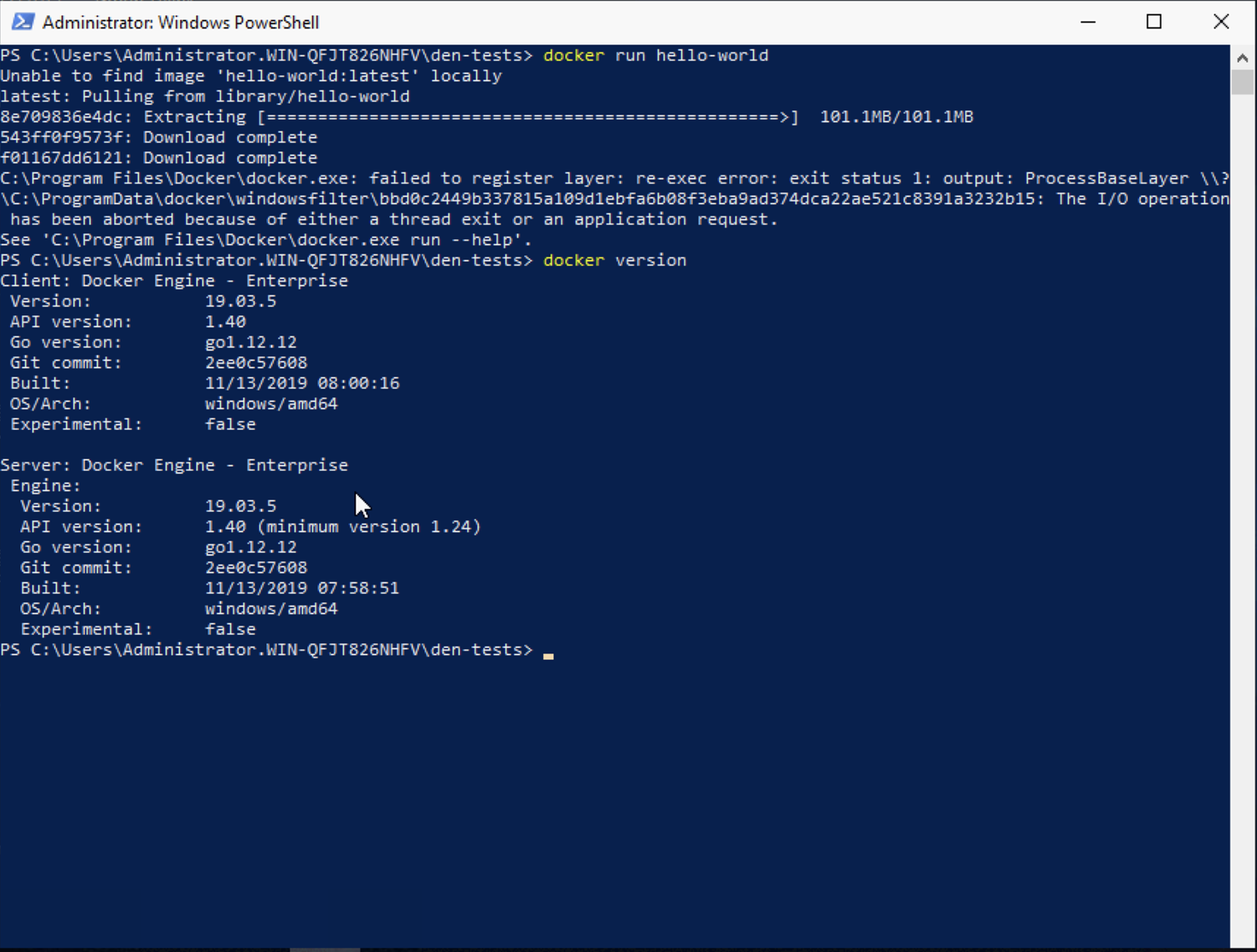
Thanks
Shawn
Screen Shot 2020-04-02 at 9.22.09 AM.png
Screen Shot 2020-04-02 at 10.14.38 PM.png
I am pretty positive that the issue is with Symantec Endpoint Protection (SEP), there are numerous threads saying it can break Docker for Windows in similar ways:
https://knowledge.broadcom.com/external/article?legacyId=TECH246815
https://mdaslam.wordpress.com/2017/05/23/docker-container-windows-2016-server-with-sep-symantec-endpoint-protection/
https://community.broadcom.com/symantecenterprise/communities/community-home/digestviewer/viewthread?MessageKey=31c387d6-9a1c-48de-999f-bfccd21f07c1&CommunityKey=1ecf5f55-9545-44d6-b0f4-4e4a7f5f5e68&tab=digestviewer#bm31c387d6-9a1c-48de-999f-bfccd21f07c1
In addition to the recommended solutions to make it work, I would highly recommend excluding the paths used by Docker (%ProgramData%\Docker) as recommended here:
https://docs.docker.com/engine/security/antivirus/
Having an antivirus fiddle with docker volumes and containers is never a good thing, and can oftentimes completely hang docker while the files are locked for scanning.
Please note that some people report having to fully uninstall SEP before they got it to work, not just disable it. It seems possible to get it working with SEP installed and enabled, but I didn't go that far except find threads that discuss the issue.
Best regards,
Marc-André Moreau
Thanks Marc,
When I tried to run docker run hello world again, the system hung.
I think you are right, the problem caused by SEP.
I would try the first solution : https://docs.docker.com/engine/security/antivirus/, if no work , then uninstall SEP.
Thanks
Shawn
Hi Marc,
Still a bit wired. When I follow the instructions https://docs.docker.com/engine/security/antivirus/, . Adding the path of docker into SEP antivirus exclusion list, but the system halted.
See my screenshot as below: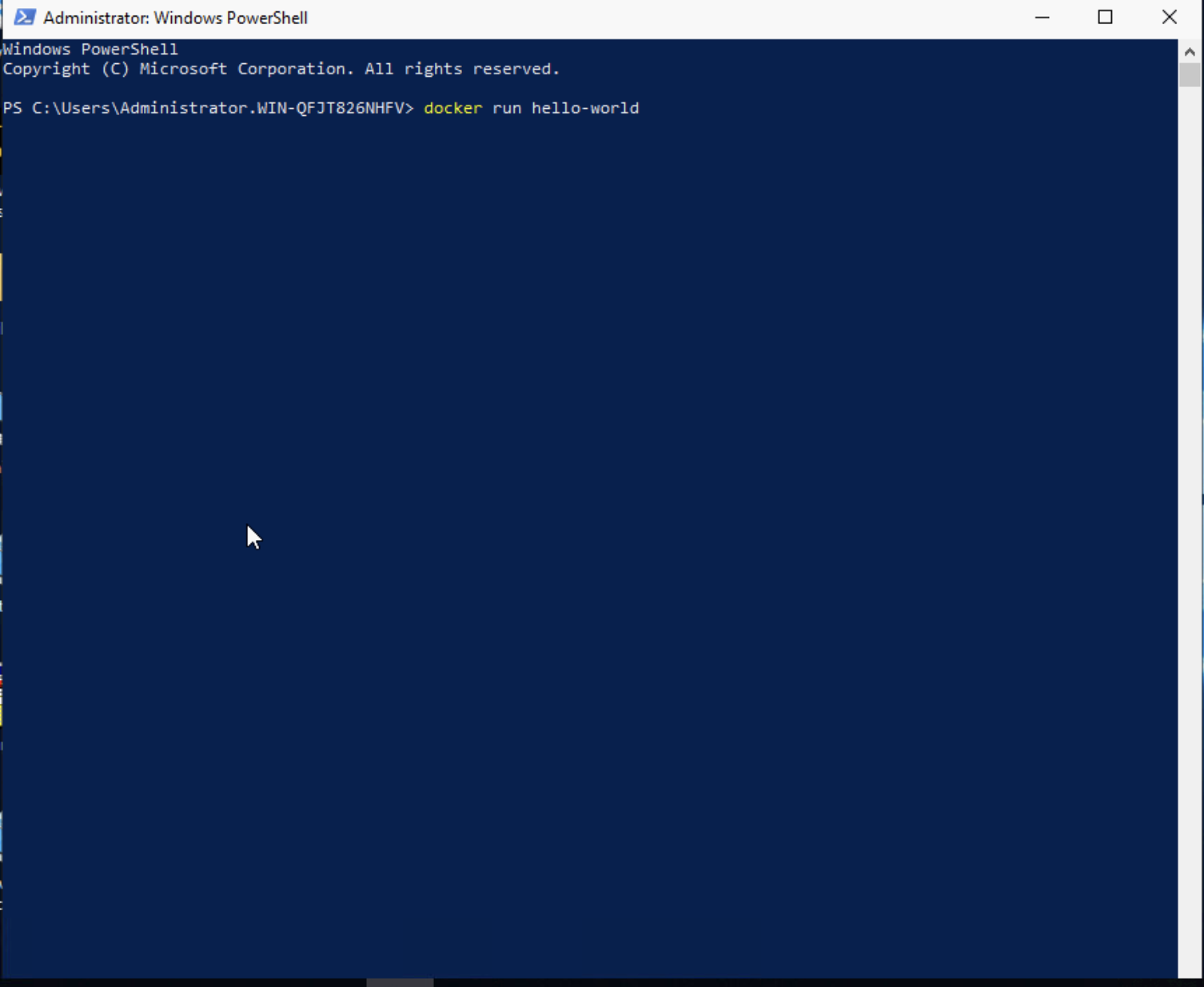
Screen Shot 2020-04-02 at 11.01.58 PM.png
Hi Shawn,
Adding %ProgramData%\Docker to the exclusion list would be insufficient, as this directory contains mostly files (containers, volumes, etc).
You need to disable specific SEP features that affect some processes on the host:
https://mdaslam.wordpress.com/2017/05/23/docker-container-windows-2016-server-with-sep-symantec-endpoint-protection/
Best regards,
Marc-André Moreau
Thanks Marc,
Just as you said it is SEP problem, docker run hello-world command is successful. So it means I could try to start waykden again ?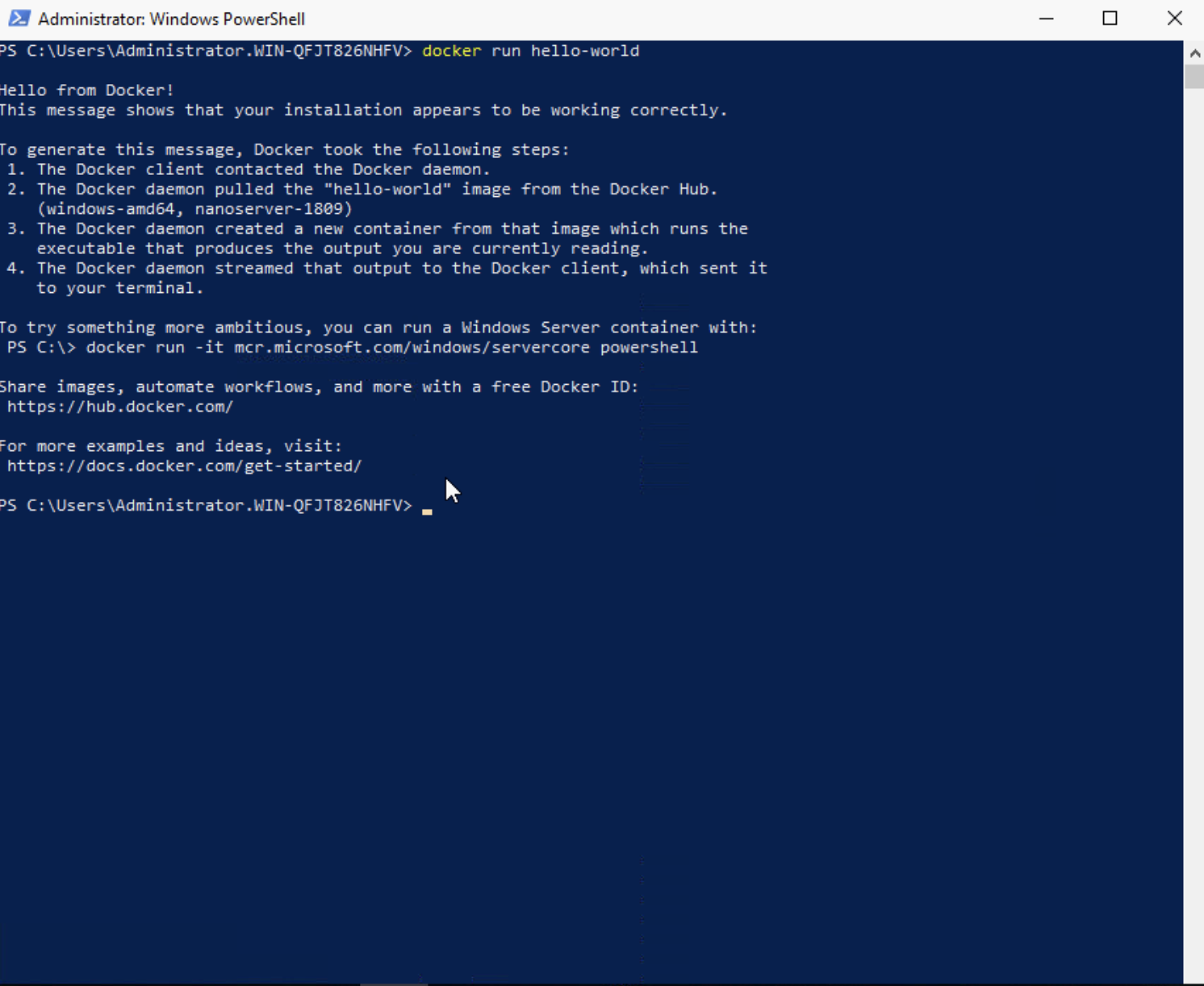
Best regards,
Shawn
2327 0807
Screen Shot 2020-04-02 at 11.34.45 PM.png
Hi Marc,
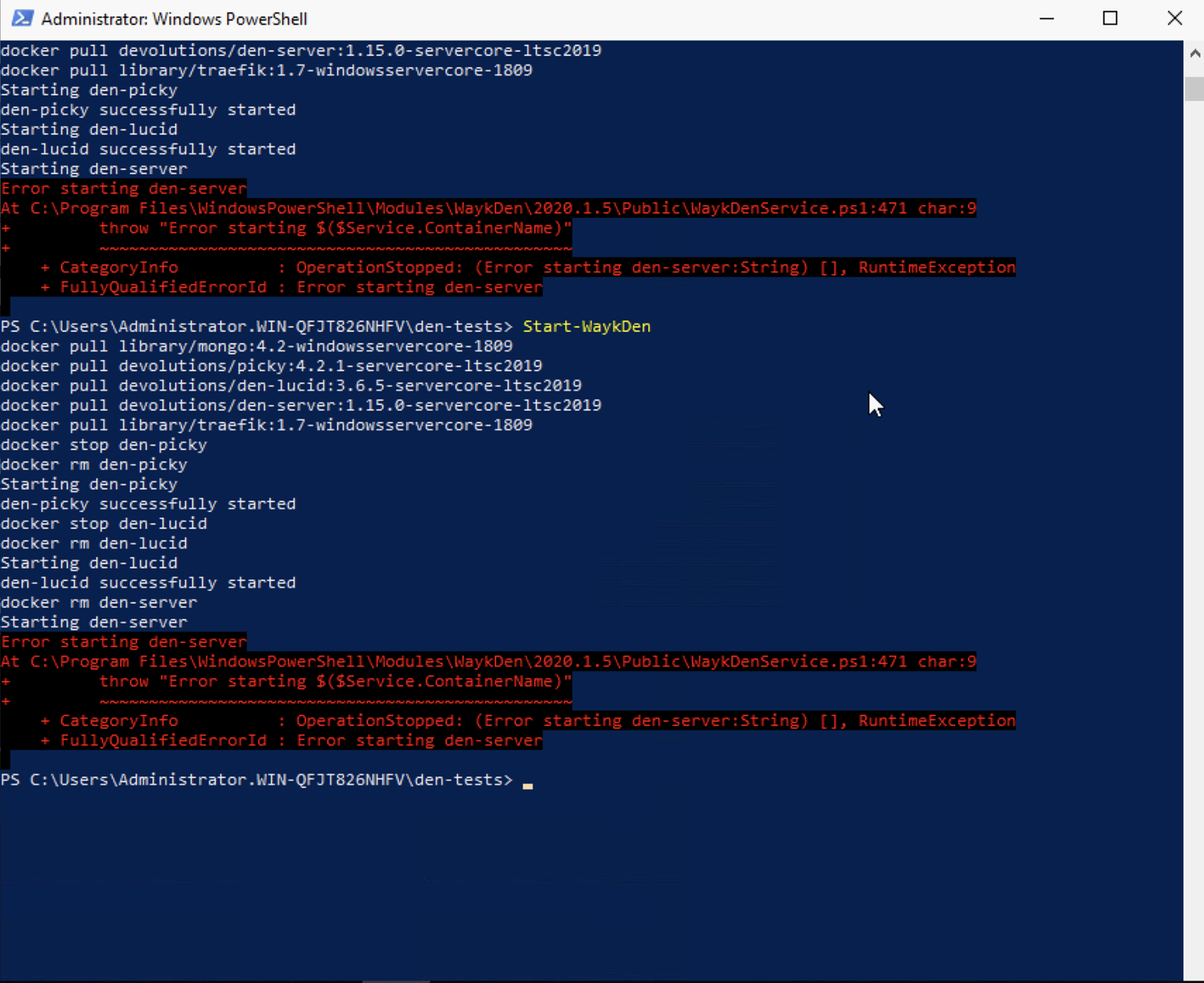
I tried to start waykDen again, luckily I could start some containers, but stopped at den-server step(see the screenshot below). Could you kindly help to resolve the issue?
Thanks vm.
Hi Shawn,
Adding %ProgramData%\Docker to the exclusion list would be insufficient, as this directory contains mostly files (containers, volumes, etc).
You need to disable specific SEP features that affect some processes on the host:
https://mdaslam.wordpress.com/2017/05/23/docker-container-windows-2016-server-with-sep-symantec-endpoint-protection/
Best regards,
Screen Shot 2020-04-02 at 11.46.05 PM.png
Hi Shawn,
Yes, please extract the den-server container logs like this and post them here:
docker logs den-server > den-server.txt
Best regards,
Marc-André Moreau
Hi Marc,
Here below please find my den-server.txt:
2020-04-02T23:45:52.628453100+08:00 INFO den_server::router::router - Redis is not configured. Cache in memory will be used.
2020-04-02T23:45:52.648452400+08:00 WARN den_server::router::router - Keen client not configured.
2020-04-02T23:45:52.648452400+08:00 INFO den_server::router::router - Nats is not configured.
2020-04-02T23:45:52.648452400+08:00 INFO den_server::router::router - Starting listeners on ws://0.0.0.0:4491
2020-04-02T23:45:52.650453400+08:00 DEBUG reqwest::connect - starting new connection: http://den-lucid:4242/
2020-04-02T23:45:53.919444200+08:00 ERROR den_server - Unable to initialize DenServer: "error sending request for url (http://den-lucid:4242/client): error trying to connect: dns error: No such host is known. (os error 11001)"
Best regards,
Shawn
Hi Shawn,
Yes, please extract the den-server container logs like this and post them here:
docker logs den-server > den-server.txt
Best regards,
Hi Shawn,
We've seen similar cases already (https://github.com/Devolutions/WaykDen-ps/issues/65#issuecomment-603934918). Is your host configured with a 127.0.0.1 DNS server address? By default Docker will use the DNS servers from the host, but 127.0.0.1 will not work because it is not the same 127.0.0.1 as in the internal docker network. Changing it to the full IP address on the host network should work.
Other than that, do you have a proxy server, VPN, etc?
Best regards,
Marc-André Moreau
Oh, I remember I install the mongo db.msi, but not change the mongodb url. so I think 127.0.0.1 is currently used by mongodb.
In this case, I do not want Wayk Den use the mongoose intalled in my server, how could deactivate the pointed-link?
The previous instructions listed on git page:
To point Wayk Den to an existing MongoDB server, you need to configure a database connection string, and set MongoDB as external to avoid launching a MongoDB container instance:
PS > Set-WaykDenConfig -MongoExternal $true -MongoUrl 'mongodb://mongo-server:27017'
I want to deactivate it, then waykden will use the mongo db installed in docker.
Hi Shawn,
We've seen similar cases already (https://github.com/Devolutions/WaykDen-ps/issues/65#issuecomment-603934918). Is your host configured with a 127.0.0.1 DNS server address? By default Docker will use the DNS servers from the host, but 127.0.0.1 will not work because it is not the same 127.0.0.1 as in the internal docker network. Changing it to the full IP address on the host network should work.
Other than that, do you have a proxy server, VPN, etc?
Best regards,
Hi Shawn,
I see what you are trying to do now, and we do not have a way to remove configuration settings from the cmdlet (we should definitely add that). Just edit the wayk-den.yml file and remove the lines that contain "mongo' in the name and it should revert it to the default.
Best regards,
Marc-André Moreau
Thanks Marc,
I think I had started warden successfully. see as attached:, but when I access http://localhost:4000, the error pop out :Bad Gateway. how could I solve it?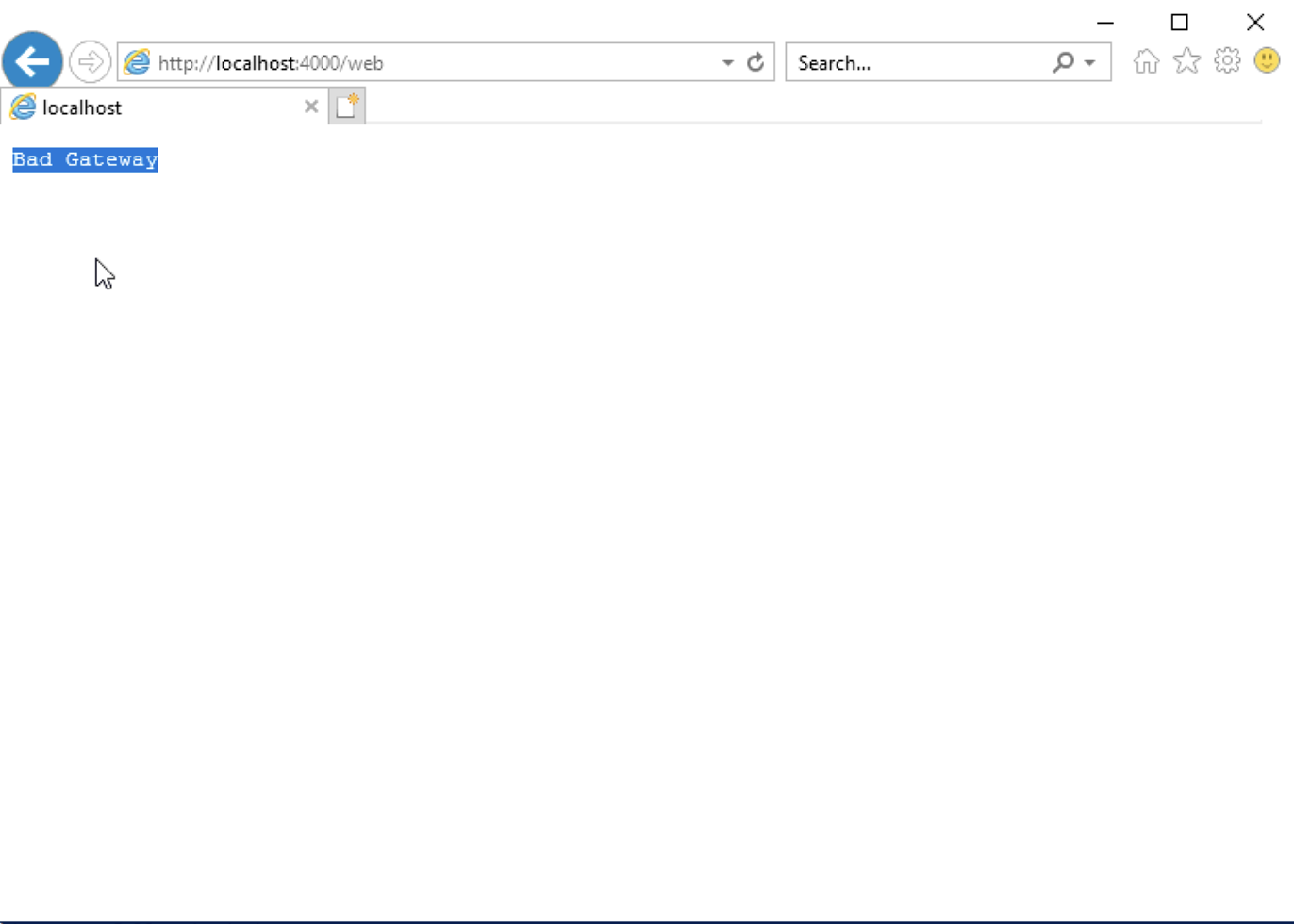
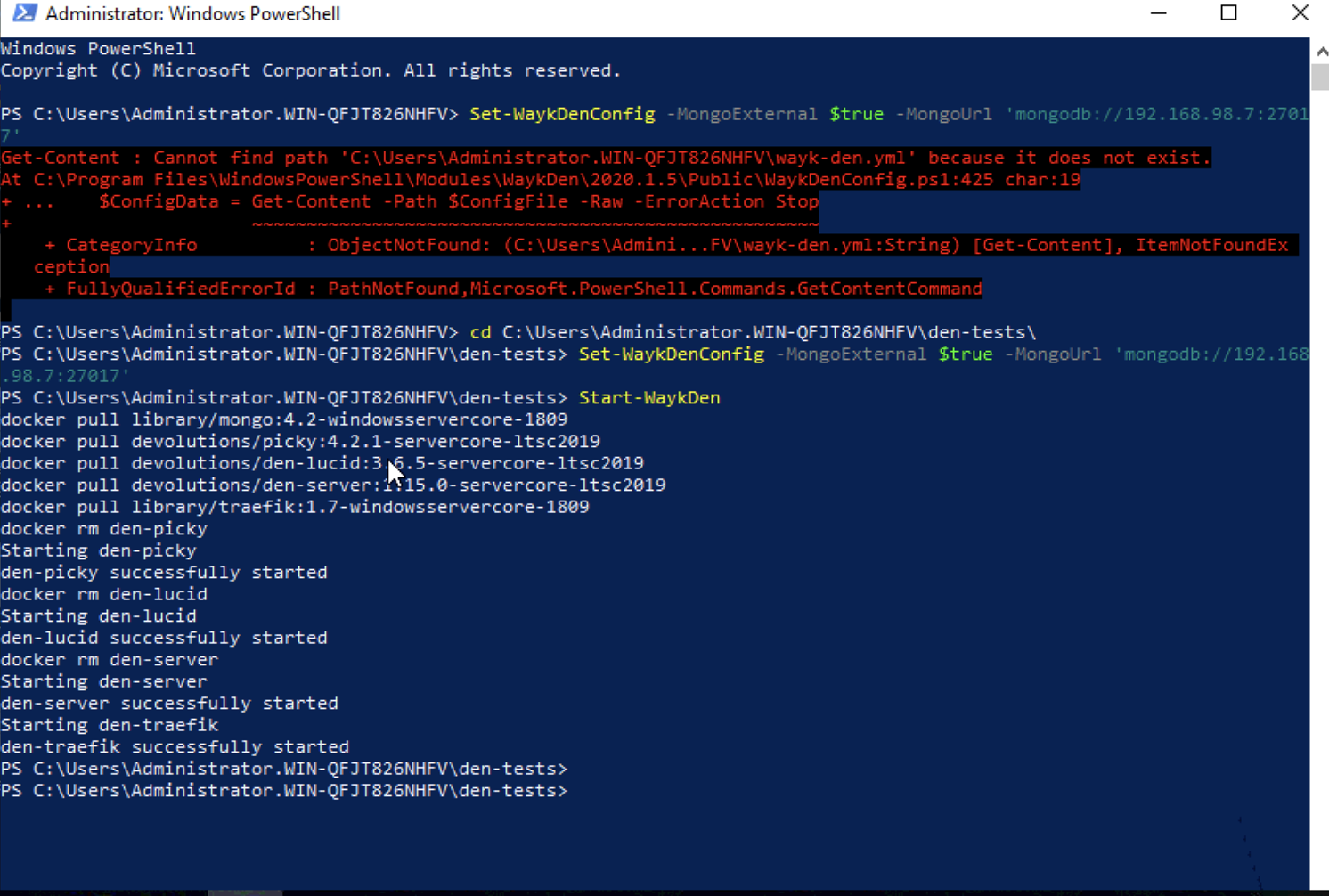
Screen Shot 2020-04-03 at 1.25.47 AM.png
Screen Shot 2020-04-03 at 1.25.41 AM.png
Hi Shawn,
If you want to try accessing it on http://localhost:4000, you should set both your ListenerUrl and ExternalUrl parameters to 'http://localhost:4000' like this:
Set-WaykDenConfig -ListenerUrl 'http://localhost:4000' -ExternalUrl 'http://localhost:4000'
We're planning on making it possible to access Wayk Den through both the listener and external URLs without reconfiguration, but the currently supported scenario is only access through the external URL due to external endpoint detection and other aspects of the software that require a known external endpoint.
If it still won't work after this, please extract the traefik logs like this:
docker logs den-traefik > den-traefik.txt
Best regards,
Marc-André Moreau
Hi Marc,
The problem still existed. please see my den-traefik record:
time="2020-04-03T01:42:46+08:00" level=info msg="Using TOML configuration file c:\\etc\\traefik\\traefik.toml"
time="2020-04-03T01:42:46+08:00" level=info msg="Traefik version v1.7.24 built on 2020-03-25_04:34:11PM"
time="2020-04-03T01:42:46+08:00" level=info msg="\nStats collection is disabled.\nHelp us improve Traefik by turning this feature on :)\nMore details on: https://docs.traefik.io/v1.7/basics/#collected-data\n"
time="2020-04-03T01:42:46+08:00" level=info msg="Preparing server http &{Address::4000 TLS:<nil> Redirect:0xc000598cc0 Auth:<nil> WhitelistSourceRange:[] WhiteList:<nil> Compress:false ProxyProtocol:<nil> ForwardedHeaders:0xc000956760} with readTimeout=0s writeTimeout=0s idleTimeout=3m0s"
time="2020-04-03T01:42:46+08:00" level=info msg="Starting provider configuration.ProviderAggregator {}"
time="2020-04-03T01:42:46+08:00" level=info msg="Starting server on :4000"
time="2020-04-03T01:42:46+08:00" level=info msg="Starting provider *file.Provider {\"Watch\":true,\"Filename\":\"\",\"Constraints\":null,\"Trace\":false,\"TemplateVersion\":0,\"DebugLogGeneratedTemplate\":false,\"Directory\":\"\",\"TraefikFile\":\"c:\\\\etc\\\\traefik\\\\traefik.toml\"}"
time="2020-04-03T01:42:46+08:00" level=info msg="Server configuration reloaded on :4000"
Best regard,
Shawn
2327 0807
Hi Marc,
Attach more images for investigation:
I check the docker ps -a, the result listed below.
some container seems exit? is that normal?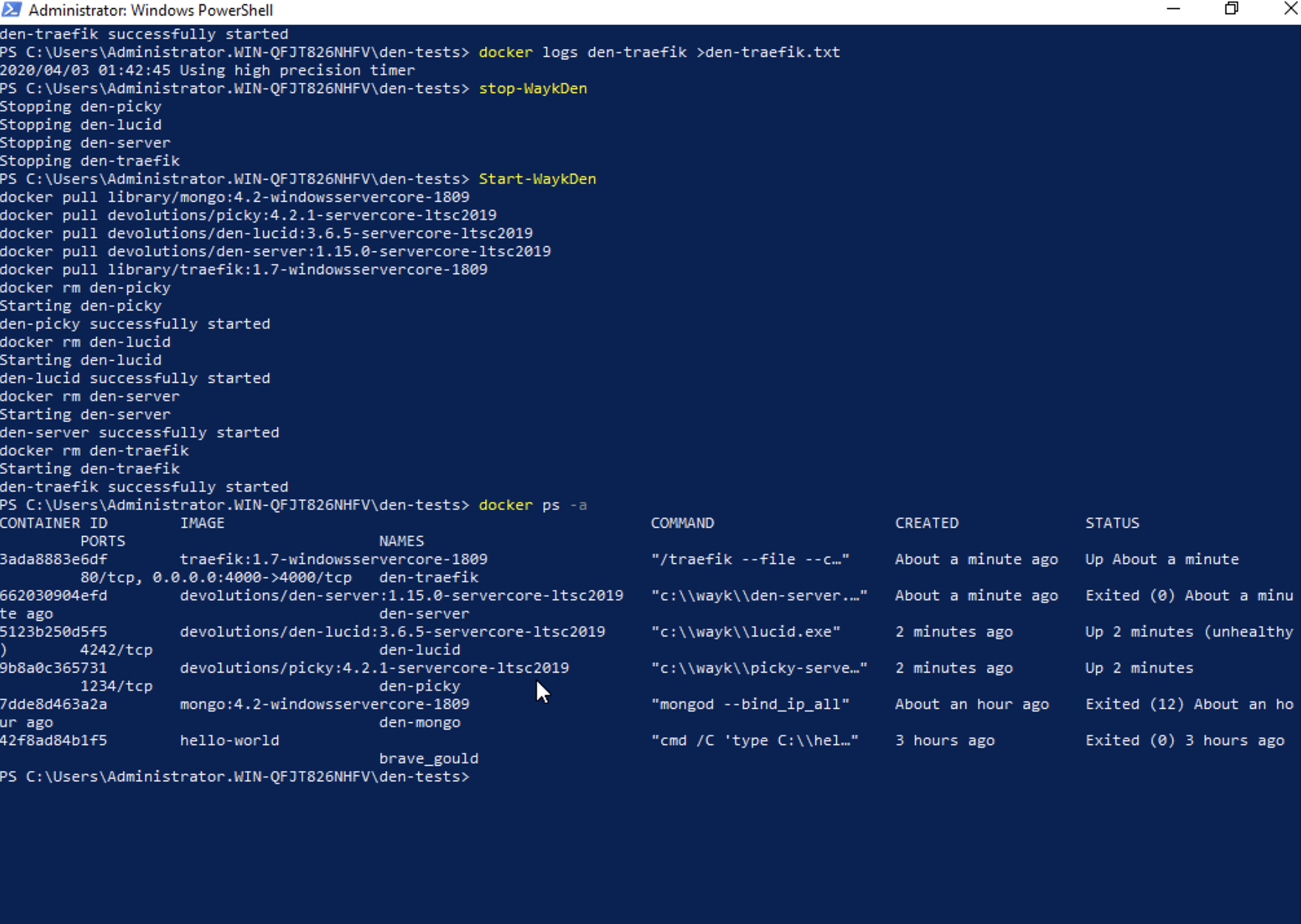
Best regards,
Shawn
Screen Shot 2020-04-03 at 2.11.30 AM.png
Hi Shawn,
No, it is not normal, this would explain the bad gateway (the services behind traefik having stopped).
I see that den-mongo is marked as having exited about an hour ago. I think the problem is that the mongo container is no longer started by Start-WaykDen. When you edited wayk-den.yml, did you also remove the line that corresponded to mongo_external? Otherwise you can force it again like this:
Set-WaykDenConfig -MongoExternal $false
Best regards,
Marc-André Moreau
Thanks Marc,
'
it works!! I did get the website running after edited Wayk-den.yml, deleting configs within the name "mongo".
I remove the DNS setting in my server, but forgot to edie the Wayk-den.yml.
Thanks again for the continuous support for me.
Best regards,
Shawn
Hi Shawn,
I'm glad that it is finally working! :) Have fun and don't hesitate to ask questions if you run into other issues.
Best regards,
P.S.: The initial default account username+password is wayk-admin // wayk-admin
Marc-André Moreau
Thank you, Mac.
Best regards,
Shawn
2327 0807
Hi Shawn,
For future reference, did you uninstall SEP, or did you disable some features to make it work with Docker?
I would have one favor to ask you: it doesn't look easy to get a hold of the SEP downloads to make just a simple installation. I would like to install it once just to test if I can quickly detect its presence in PowerShell, and then add a simple warning for users when launching Wayk Den. If you can find a direct download link, or upload the installer to something like firefox send (https://send.firefox.com/) and send it to me at wayk@devolutions.net, it would be greatly appreciated. I don't need a license, I just want to install it without using it, just to figure out a way to detect its presence on the system. If you don't have access to the SEP downloads, that's fine, but I thought I would ask.
Thanks!
Best regards,
Marc-André Moreau
Hi, here the Symantec SEP 14.2.2 Win 64 bit, English language, we use it at work
https://send.firefox.com/download/55da51cf23875bf2/#inMEeOHckZ5iVhkYwOtY5w
I hope you'll solve your problem with it.
Regards and thank for your job.
Bye from a quarantined covid-19 IT guy......
Hi Shawn,
For future reference, did you uninstall SEP, or did you disable some features to make it work with Docker?
I would have one favor to ask you: it doesn't look easy to get a hold of the SEP downloads to make just a simple installation. I would like to install it once just to test if I can quickly detect its presence in PowerShell, and then add a simple warning for users when launching Wayk Den. If you can find a direct download link, or upload the installer to something like firefox send (https://send.firefox.com/) and send it to me at wayk@devolutions.net, it would be greatly appreciated. I don't need a license, I just want to install it without using it, just to figure out a way to detect its presence on the system. If you don't have access to the SEP downloads, that's fine, but I thought I would ask.
Thanks!
Best regards,
Thanks a lot, I managed to install it, and I found a way to detect it :)
Get-ChildItem "HKLM:\SOFTWARE\Microsoft\Windows\CurrentVersion\Uninstall" | ForEach-Object { Get-ItemProperty $_.PSPath } | Where-Object { $_ -Match 'Symantec Endpoint Protection' }
Now 'docker run hello-world' just hangs, but at least I know why. I'll see if I can get it working without uninstalling SEP.
Best regards,
Marc-André Moreau
Quick follow up:
It works again after uninstalling the "Application and Device Control" (ADC) component + adding %ProgramData\docker to the scan exclusion list.
Thanks!
Marc-André Moreau
Hi Marc,
Sorry for my late reply, i am in self-quarantine in HK.
Actually, i did uninstall SEP software in my server, then it works. here below is SEP 14 we are using, maybe it still helpfu for you to verfiy your solution to solve the imcompatibilty of WAyk Den & SEP.
https://send.firefox.com/download/affa8a7f2bc5a6b6/#q0jU8JjVVBmQD6Qm6pkuvw
Best regards,
Shawn
2327 0807