Wayk now, not connect to de wayk gen

I have the active license, I installed the latest version 2020.14, and my wayk, I can't connect to the wayk gen, I already turned off the firewall and you still can't connect.
All Comments (11)
Hello
I'm sorry to hear about the trouble connecting to Wayk Den.
Assuming you are using Windows, did you install Wayk Now by running the .msi? Can you share the following file (either by attachment here, PM or to support@devolutions.net):
%programdata%\wayk\logs\NowService.log
Thanks and kind regards
Richard Markievicz
attachment
Hello
I'm sorry to hear about the trouble connecting to Wayk Den.
Assuming you are using Windows, did you install Wayk Now by running the .msi? Can you share the following file (either by attachment here, PM or to support@devolutions.net):
%programdata%\wayk\logs\NowService.log
Thanks and kind regards
NowService.zip
Hello
Thanks for the attachment - however, the file is empty. Did you install Wayk Now using the .msi? What is the result when running the following command from cmd.exe:
sc query wayknowservice
Thanks and kind regards,
Richard Markievicz
Hello
Thanks for the attachment - however, the file is empty. Did you install Wayk Now using the .msi? What is the result when running the following command from cmd.exe:
sc query wayknowservice
Thanks and kind regards,
NowService.zip
have you seen the last file I sent?
I sent the file "NowService.log" again
Then I did what you asked me on the command line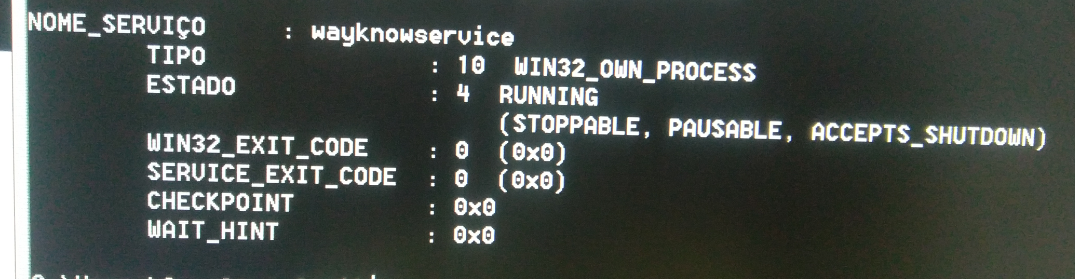
Screenshot_2020-03-30-15-05-11--1405898516.png
NowService.zip
Hello
Yes - we have received the file. We are taking a look into it and I will post back here once I have some more information.
Thanks and kind regards,
Richard Markievicz
Hello
Wayk Den is rejecting your computer because of the non-ASCII "a-with-tilde" character in the computer DNS name, "SOVELAECAPITÃO".
We are implementing the necessary changes in Wayk Den to resolve that issue, but a new version won't be deployed before next week. I will update this post once the new version is deployed.
In the meantime, a possible workaround is to adjust your machine name to include only ASCII characters (this change can be made from the "System" control panel, under the setting "Computer name, domain, and workgroup settings"), then rebooting your computer.
If you elect to wait for the new Den release instead of renaming your computer, I recommend uninstalling Wayk Now temporarily, otherwise it will continue attempting to connect and the log output may grow quite large.
I apologize for any inconvenience this may have caused. If you have further questions or feedback, please don't hesitate to post back here.
Thanks and kind regards,
Richard Markievicz
a very important change to a new version, is a serious security problem.
When the administrator defines the password, it must not appear visible next to the ID when opening the wayk now, because this makes this application outside the security parameters. You can install a teamviwer and see how it works, it would be good if the password defined by the user does not appear there, there appears an automatically generated password. It is possible?
Hello
The SRP password will be visible in the main window of the application; its purpose is to allow a user to grant "one off" access to their machine. Normally we would expect it to be left as automatically generated rather than user-defined. User defined passwords were more relevant in older versions of Wayk Now which did not support unattended access.
The current recommendation is:
- Leave the SRP password as automatically generated, and / or disable SRP authentication via Options > Security if it's not needed
- If a fixed password is desired, connect to the machine using known Windows credentials via SRD authentication
It is not intended as a mechanism for defining a permanent password to access the machine (and indeed, it won't work as such, unless the machine is left permanently logged in with the Wayk Now client running).
Thanks and kind regards,
Richard Markievicz
Hello
This is just to update you that the current version of Wayk Den contains a fix for this issue, and you should now be able to register your computer with original name "SOVELAECAPITÃO".
Please don't hesitate to post back here with further questions or comments
Thanks and kind regards,
Richard Markievicz