File transfer function suddenly greyed out

Hi,
although on client and server side there are the newest .msi versions of Wayk Now installed (2020 1.3), now since a few days, I cannot transfer any files anymore from the client to the server, although on both client and server side in the options menu the function "file transfer" is activated.
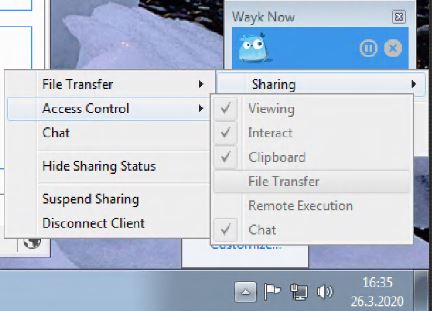
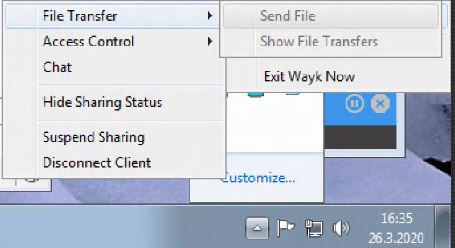
But on the client side, if I want to transfer a file, those functions are greyed out and it show also that file transfer is not checked. Client is a Windows 7, 32 bit system server is a windows 7, 64 bit system.
Rebooting the client system and also the server system did not bring any relief.
Do you have any idea how to get the file transfer working again?
Kind regards
Alexander
Capture_2.JPG
Capture_1.JPG
All Comments (9)
Hello Alexander
From the screenshot, it appears that the File Transfer permission is set to "Disabled" on the server system. Can you check that by opening the Wayk Now client on the server and checking File > Options > Access Control?
Thanks and kind regards,
Richard Markievicz
Hi Richard,
thanks for the quick answer!
Yes, it is checked in the options menu on server side, albeit also greyed out: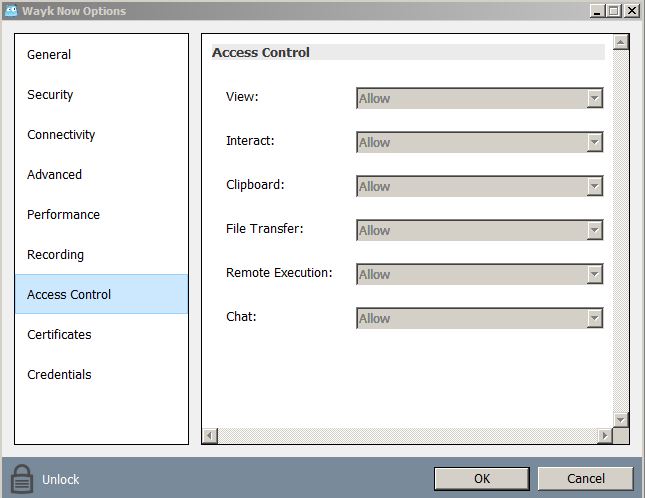
The same picture on the client side: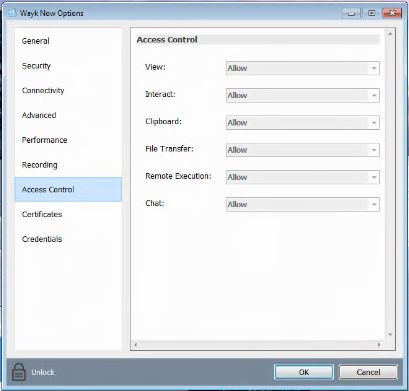
Kind regards
Alexander
Capture_4.JPG
Capture_3.JPG
Hi Alexander
That is strange indeed. Can you connect to the remote machine and retrieve the following files:
%programdata%\wayk\logs\NowService.log
%temp%\WaykHost.log
If possible, you can send them by attachment here or in a PM, or to support@devolutions.net, and I will take a more detailed look.
Thanks and kind regards,
Richard Markievicz
Hello Alexander
Thanks for sending the log files over. I am investigating the issue. Hopefully it's not too much trouble: can you also send the following files from the remote machine:
%programdata%\wayk\WaykNow.cfg (this one may or may not exist)
%appdata%\wayk\WaykNow.cfg
Thanks and kind regards,
Richard Markievicz
Hi Richard,
thank you for the hint!
I installed now version 2020.1.4 on both client and server side and cold-started both systems.
But the same error is showing up again, everything greyed out and no file transfer possible, while on both systems under options still all access controls are on "allow", but not in the pop-up window, after right-clicking on the task bar icon.
However on my 64 bit Windows7 system the program complained it could not install itself, as it was only 32 bit. Nevertheless in the "about"-section it is showing me 2020.1.4 as installed version.
Kind regards
Alexander
HI Alexander
I've managed to reproduce the issue locally, and we're working on identifying and resolving the underlying cause. I'll post back here once I have an update on that - in the meantime, thank you for your patience.
To be clear on the .msi - there are two separate downloads on our website, a x86 and a x64 installer. Make sure you take the right one for the right system:
https://cdn.devolutions.net/download/Wayk/2020.1.4.0/WaykNow-x64-2020.1.4.0.msi < For 64 bit systems
https://cdn.devolutions.net/download/Wayk/2020.1.4.0/WaykNow-x86-2020.1.4.0.msi < For 32 bit systems
Regardless, on your notebook (the machine you are connecting *from*) it should not matter if you use the installed version or the standalone executable. The latest executable may warn you if it detects a mismatched service component installed.
Thanks and kind regards,
Richard Markievicz
Hi Alexander
Thanks again for your patience on this.
We've released Wayk Now 2020.1.5 which contains a fix that I hope will address the problem. I invite you to install the latest version on the remote computer and please let me know if the problem persists. For your convenience, here are the links to the x64 and x86 installers.
Thanks again and kind regards,
Richard Markievicz
Hi Richard,
great job, thank you very much!
Sorry for my delay in answering, I only had time today to test the update.
The update is now installed on client and server side and it works fine, file transfer is now not greyed out anymore and I can easily transfer a file.
Wishing you a very nice week
Kind regards
Alexander
Hi Alexander
Good news indeed. Please let us know any further questions or problems.
Thanks again and kind regards,
Richard Markievicz