Bug in get_active_repository_entries function of python API-Manager
Hi, i'm testing the Python SDK and it works quite good until the "get_connections_by_name" function. It throws me an error.
My last function call:
connection = self.DVLS.get_connections_by_name("Customers")
My Output:
[INFO] [DvlsSDK.login] - Successful for a500112
[ERROR] [DvlsSDK.get_security_group_id] - Security Group 'Testgroup' not found, aborting get security group id
[INFO] [DvlsSDK.create_connection] - Successful for Testgroup
HERE <Response [405]>
[ERROR] [DvlsSDK.get_repository_entries_list] - Failed
[ERROR] [DvlsSDK.get_connections_by_name] - Failed for Customers
The first 3 logentries are for some connection creatsions, the point of "HERE" is from the "get_active_repository_entries" function where i included a print for debugging:
def get_active_repository_entries(self, verbose_override=None):
web_request = self._do_api_post_json(self.url_resolver.entries_tree_url(), "")
print("HERE", web_request)
return SDKResult(web_request.json())
It's strange that a get function uses a post-request. All other "get_" function uses "_do_api_get". I tested it with changing the call to "_do_api_get" and it responded with a 200, but then there were errors in the further code.
The Server Version is 2019.2.12.0
All Comments (23)
Hello,
We will soon update the DPS SDK on Github that contains some fixes like the one you are experiencing actually. The post-request will not be part of that call anymore and you should not get the 405 response anymore. I will notify you once it will be online.
Best regards,
Érica Poirier
Hi Erica and thanks for the update.
I think i found another bug. When i try to create a connection of the type database:
self.DVLS.create_connection(
ConnectionType.Database,
...
throws the error:
File "./dps_connector.py", line 145, in <module>
connector.database("XXX", "administrator", "bockwurst", 'Customers\\'+group, "hana", "t01", None, securityGroup)
File "./dps_connector.py", line 111, in database
UserName=user
File "/home/XXX/a500112/workspace/XXX/Connectors/dps-sdk-python/dvlssdk/__init__.py", line 1221, in create_connection
entry = self._generate_connection_entry(entry, entry_type, type_id, name, options)
File "/home/XXX/a500112/workspace/XXX/Connectors/dps-sdk-python/dvlssdk/__init__.py", line 2153, in _generate_connection_entry
data_model = init_model('generated', entry_type + 'Entry')
File "/home/XXX/a500112/workspace/XXX/Connectors/dps-sdk-python/dvlssdk/InitHelpers.py", line 34, in init_model
return init_type(folder + '.models', name)()
File "/home/XXX/a500112/workspace/XXX/Connectors/dps-sdk-python/dvlssdk/InitHelpers.py", line 28, in init_type
imported_module = importlib.import_module('.' + name, 'dvlssdk.' + folder)
File "/usr/lib/python3.6/importlib/__init__.py", line 126, in import_module
return _bootstrap._gcd_import(name[level:], package, level)
File "<frozen importlib._bootstrap>", line 994, in _gcd_import
File "<frozen importlib._bootstrap>", line 971, in _find_and_load
File "<frozen importlib._bootstrap>", line 953, in _find_and_load_unlocked
ModuleNotFoundError: No module named 'dvlssdk.generated.models.DatabaseEntry'
I've checked it, and there really is no DatabaseEntry file in the modules folder.
Could you confirm that this will be fixed in the upcoming SDK update too?
Hello,
Are you trying to create a Database session entry or a Database folder type? Right now, it is not possible to create Database session type from the DPS web interface and not sure if this impact also the SDK. I will have to verify this with a engineer.
Best regards,
Érica Poirier
Hi Erica,
i like to create a database connection, not the folder. Oh ok, i thaught it is supported because generated/enums/ConnectionType.py has an entry for Database. Would be nice to know if it is planned to implement this in the near future.
Do you approximate date when the SDK will be upgraded on github?
Hello,
The SDK has just been updated on GitHub!
I will get back to you once I will get any information about the Database session type.
Best regards,
Érica Poirier
Hi Erica,
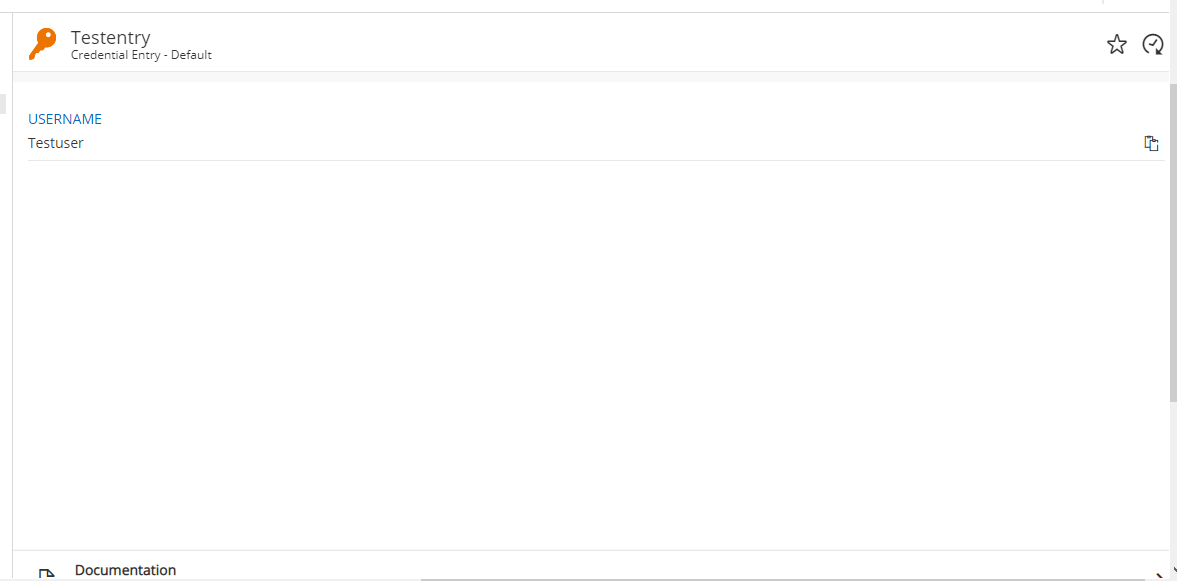
thank you for the update. The getter function for connections works now fine, but i found another problem.
The "create_credential_entry" function don't sets a password:
        self.DVLS.create_credential_entry(

            "Default",

            "Testentry",

            Group=folder,

            Password="Test123!!!",

            UserName="Testuser"

        )
And the Output when i get the entry with "get_credential_entries_by_name":
{
	'connectionSubType': 'Default',
	'connectionType': 26,
	'createdBy': 'XXX@XXX.systems',
	'createdDate': '2020-03-19T10:31:09',
	'data': {
		'credentialConnectionId': '',
		'passwordItem': {},
		'userName': 'Testuser'
	},
	'databaseId': '1A08F4AC-CD24-4EB6-BCAE-7D09097E8653',
	'description': '',
	'displayMode': 0,
	'domain': '',
	'group': 'Customers\\XXX',
	'groupName': '',
	'id': '60e001bd-40e6-4716-9e2d-ff45a8e5e82e',
	'imageBytes': '',
	'imageBytesUrl': 'ImageBytes.ashx?connectionType=26&connectionMasterSubType=&connectionSubType=Default&imageName=&imageSize=0',
	'imageName': '',
	'isViewPasswordEnabled': True,
	'keywords': '',
	'largeImageBytesUrl': 'ImageBytes.ashx?connectionType=26&connectionMasterSubType=&connectionSubType=Default&imageName=&imageSize=1',
	'modifiedDate': '',
	'name': 'Testentry',
	'originalGroup': 'Customers\\XXX\\Testentry',
	'originalName': 'Testentry',
	'partialConnections': [],
	'passwordTemplateId': '',
	'permissions': {
		'canAdd': True,
		'canCopyPassword': True,
		'canDelete': True,
		'canEdit': True,
		'canEditHandbook': True,
		'canEditSecurity': True,
		'canExecute': True,
		'canManageAttachments': True,
		'canView': True,
		'canViewAttachments': True,
		'canViewConnectionHistory': True,
		'canViewDeleted': True,
		'canViewHandbook': True,
		'canViewPassword': True,
		'canViewPasswordHistory': True,
		'canViewServerLogs': True
	},
	'resolvedPermissions': [{
			'resolvedStringValue': 'SecurityRoleOverride_Allowed'
		}, {
			'resolvedStringValue': 'SecurityRoleOverride_Allowed',
			'right': 2
		}, {
			'resolvedStringValue': 'SecurityRoleOverride_Allowed',
			'right': 4
		}, {
			'resolvedStringValue': 'SecurityRoleOverride_Allowed',
			'right': 3
		}, {
			'resolvedStringValue': 'SecurityRoleOverride_Disallowed',
			'right': 1
		}, {
			'resolvedStringValue': 'SecurityRoleOverride_Allowed',
			'right': 22
		}, {
			'resolvedStringValue': 'SecurityRoleOverride_Disallowed',
			'right': 7
		}, {
			'resolvedStringValue': 'SecurityRoleOverride_Disallowed',
			'right': 8
		}, {
			'resolvedStringValue': 'SecurityRoleOverride_Disallowed',
			'right': 9
		}, {
			'resolvedStringValue': 'SecurityRoleOverride_Allowed',
			'right': 11
		}, {
			'resolvedStringValue': 'SecurityRoleOverride_Allowed',
			'right': 12
		}, {
			'resolvedStringValue': 'SecurityRoleOverride_Allowed',
			'right': 15
		}, {
			'resolvedStringValue': 'SecurityRoleOverride_Allowed',
			'right': 16
		}, {
			'resolvedStringValue': 'SecurityRoleOverride_Allowed',
			'right': 10
		}, {
			'resolvedStringValue': 'SecurityRoleOverride_Allowed',
			'right': 13
		}
	],
	'repositoryId': '00000000-0000-0000-0000-000000000000',
	'resolvedTimeBasedUsageSettings': {
		'timeBasedUsageDays': 0,
		'timeBasedUsageHours': 0
	},
	'security': {
		'timeBasedUsageDays': 0,
		'timeBasedUsageHours': 0
	},
	'securityGroupId': '',
	'securityGroupName': '',
	'statusLockedBy': '',
	'statusMessage': '',
	'statusMessages': [{
			'defaultMessageLabelKey': ''
		}, {
			'connectionStatusBehavior': 1,
			'defaultMessageLabelKey': 'ThisEntryIsLockedAndCantBeOpened'
		}, {
			'connectionStatusBehavior': 2,
			'defaultMessageLabelKey': 'ThisEntryIsDsabledAndCantBeOpened'
		}, {
			'connectionStatusBehavior': 3,
			'defaultMessageLabelKey': 'ThisEntryHasAWarningMessage'
		}, {
			'connectionStatusBehavior': 4,
			'defaultMessageLabelKey': 'ThisEntryIsExpired'
		}
	],
	'templateGroup': [],
	'timeBasedUsageSettings': {
		'timeBasedUsageDays': 0,
		'timeBasedUsageHours': 0
	},
	'typeDescription': 'Username / Password',
	'typeId': 'CredentialDefaultDefault',
	'userName': 'Testuser'
}
2020-03-19 11_35_45-opsphvc006.scheer.systems - Remotedesktopverbindung.png
Hello,
It is not possible to update the password of an entry using the Python SDK no matter which entry type you are creating. This is a known issue and we do not have any ETA when a fix will be available. The engineering team s also working on a new version of the API but no ETA on this one too.
Best regards,
Érica Poirier
So what types are working anyway? I used the create_... function, so it's not an update but an include. I mean the scenario is included in "SDK_tests.py".Or is there a alternative to credential to store normal non ssh or rdp passwords that works with the SDK? I like to store a database password and the database type is not available too.
I can understand that you can't tell an exact date when this will be fixed, but a rough estimate would be really nice. Are we talking about weeks or months? One of the main reasony our company decided to use DPS was that you offer a SDK and that would be a quite critical showstopper for a running project.
Hello,
You can use the DPS Command Line Interface to set passwords on any entry types. Please see the following online help page about it.
https://helpserver.devolutions.net/supportresources_knowledgebase_commandlineinterface.html
The DPS SDK v2 should be available next June.
Best regards,
Érica Poirier
Hello Erica, isn't the command line interface a local only tool? We use the SDK to manage the DPS remotely. CLI request would only work when they are done on the local DPS server or not?
Hello,
The CLI works remotely as you have to provide the URL to connect on the DPS instance. See the Config section on the online help page.
https://kb.devolutions.net/dps_command_line_interface.html
Best regards,
Érica Poirier
Hello,
I'm facing the same issue with the password not being set with the SDK.
You said, 5 months ago, that the DPS SDK v2 should be available next June, but i don't see it on github ...
Do you have any new date to fix this blocking problem ?
Thanks a lot
Best regards
Hello,
With the DPS CLI, you can fetch and update credential entries easily. Please see this following knowledge base article about it.
https://kb.devolutions.net/dps_command_line_interface.html
Sadly, there is no update yet about fixing this issue in the DPS Python SDK.
Best regards,
Érica Poirier
Thanks Erica, unfortunately we need to automate from a Linux system and the DPS CLI is only for Windows...
May i understand that the DPS Python SDK will never been updated ?
That can't be an option. On of the criteria why we bought the product because of its python sdk capability. Now after some work with it we must resumee, that the sdk is mostly buggy or main features are not implemented, so we are looking for a larger minor update. We have the year 2020 and a password server without a web api is not acceptable from our side.
Hello,
2019 and 2020 involved changes that made compliance requirements, either for us, or for our customers, a higher priority. Privilege Access Management was as the forefront of our efforts up until now. I say until now because we will be releasing v2020.3 in a few weeks and it contains a good feature set.
The Python SDK, although toted as a most pressing feature to implement in a customer survey a few years ago, was an abysmal failure when you look at user adoption.. In retrospect it was a really a poor investment in regards with our ultimate goal, which is to add VALUE for our customer base.
That being said, we have begun creating a series of new endpoints that are better aligned with being consumed as a public API. Indeed our current implementation was much too aligned with RDM as a client. It makes matters a little too complex for customers used to calling REST Apis that follow industry practices.
The objective is to publish a Postman collection, as well as a swagger documentation. The former makes testing and calling the API extremely easy, the latter can be used to generate a client in a multitude of languages, Python being one. This is a much better investment of engineering time on our end. The approach will be incremental, meaning we will add a few endpoints in every release.
On the personal note, I have created these endpoints myself in my free time, and I have to wait for the pull request to be integrated. The pipeline is full, and the features that I had assigned to the staff are of a higher priority. I understand your frustration, but be assured that I am waiting anxiously to move forward with this project.
Best regards,
Maurice
Thank's a lot Maurice,
If you can push the password changing requests in top priority, it will be perfect. Actually we can do everything else with the SDK (except viewing logs, but i succeeded by adding few lines of code)
Maybe you can send us the Postman collection ?
We wait for this impatiently.

Disabled
When I access the following url ($dvls_uri/api/connections/partial/tree/$id) form the get_active_repository_entries, then I get the response that that directory doesn't exist.
What could be the reason for that?
the original URL looks like:
https://************/Projects/api/connections/partial/tree/6db73b8c-******-******-acc858f23583
I upgraded my program because of the upgrade form the server.
currently we have version:2019.1.20.0 running on the server.
And Python version is: 3.8.5
Thank you in advance.
Best regards,
Koen.
Hello,
The only thing I could think of is to be sure that you have switch to that repository before trying to get the tree structure.
Are you using the DVLS Python SDK or you have made your own script?
As Maurice has mentioned few months ago in this thread, we are not improving anymore the Python SDK anymore. Instead, we are working on a PowerShell module you will find on this Git repository. Let me know if you have any questions about this module.
https://github.com/Devolutions/devolutions-server
Best regards,
Érica Poirier
Disabled
Hi Erica,
Thank you for the quick reply.
I'm using the DVLS Python SDK.
And I'm sure I that I'm in the correct repository because when I do the get_repository_id request, I got a proper answer.
And also the logger reports a successful action.
sorry to hear that the Python SDK isn't support anymore. It was and is a very useful and powerful peace of tooling.
Best regards,
Koen
Hello,
The only thing I could think of is to be sure that you have switch to that repository before trying to get the tree structure.
Are you using the DVLS Python SDK or you have made your own script?
As Maurice has mentioned few months ago in this thread, we are not improving anymore the Python SDK anymore. Instead, we are working on a PowerShell module you will find on this Git repository. Let me know if you have any questions about this module.
https://github.com/Devolutions/devolutions-server
Best regards,
Hi Erica,
so do i understand you right that the bug in the python sdk won't be fixed at all and the Python SDK is completely unsupported now?
On the other side, the Powershell module seems like a very early pre-Alpha state, right? Without any documentation? Or did i maybe only overlooked the docs?
So what's the roadmap for the Powershell API? When will be there a state that can be declared stable for productive usage?
Hi Koen,
Could you please send me in a private message your Python script? I will have a look on it to see if I can troubleshoot it and find the problem.
@sandrolukaszczyk that's right that bugs in the Python SDK won't be fixed and is no longer supported. About the PowerShell module, the documentation is what you will find in the file directly for now. It's our goal to improve and document this module.
Best regards,
Érica Poirier
Hi Koen,
Sadly I get a similar behaviour with the latest DVLS version through the Python SDK. As we do not maintain it anymore, there is nothing we can do other than using the new PowerShell module. Sorry that I cannot go any further on this issue.
Best regards,
Érica Poirier