Password server update 6.1.3.0 to 2019.1.14.0 - No 2FA settings any more

Hello,
I updated our server from 6.1.3.0 to 2019.1.14.0. Duo authentication for users no longer works giving a popup on their client after they type in username and password saying "Unable to connect to Duo. Please check you Duo Settings".
Upon trying to find the duo settings in the console I can't find them to check them, where'd they go (and all the other settings)?
I have restored our installation back to the older version so people can use keep using it.
Cheers,
Craig
2019.1.14.0.jpg
6.1.3.0.jpg
error.jpg
All Comments (13)
I've found it in the web interface on the older version. If that's the same in the new version my issue is, if its only in the web interface, when duo isn't working I can't login with my domain administrator account that has duo enabled.
Then using the local admin account I use on the console, that is not Duo enabled so the webpage tells me to enroll the local account. I can't do that it's not a domain account (we're only allowed domain accounts in Duo for security reasons).
Also Im pretty sure there was nothing wrong with the duo settings. As a test when I rolled back, I only reverted the front end files, not the database and the Duo authentication works.
Hello,
Like you mention, the Password Server settings are available from the web interface. Here is the online documentation about it.
https://helpserver.devolutions.net/webinterface_serversettings.htm
About the Duo 2FA issue, what is the setting of the 2FA Usage in Administration - Two Factor? Is it set to Required or Optional per user?
About the database, if you don't restore it to its previous state before the upgrade, you may obtain some unwanted behavior or data inconsistency. We highly recommend to use the right database version that belongs to Password Server version 6.1.3. I would the highly recommend you to restore the database.
I will check that tomorrow morning and will keep you posted.
As this post is about Password Server, I will move this thread in the Password Server forum's section.
Best regards,
Érica Poirier
2FA usage is set to Required.
Noted about the database, only didn't restore it as a test. Have restored it now.
Hi Folks,
Any news on this one?
Craig
Hello,
The issue has been fixed internally and the next DPS version 2019.1.17 will contain the fix for the Duo issue. We should release it soon but cannot give you an exact release date.
Let me know if you want to test that version in a staging environment.
Best regards,
Érica Poirier
Hi Again,
I've tried going to 2019.1.17 still having issues although a different issue.
Now when a user goes to login it does all the duo stuff and they accept the push it says can not connect to datasource.
It also emails me the following errors, not sure what the difference as to each one i get.
I've had to roll it back again.
The bottom of the upgrade install says this the app pool is called RDMS
Hello,
Could you please follow the instruction on this forum thread? This should resolve your issue for the authentication.
https://forum.devolutions.net/topic32154-upgrade--to--problem.aspx
About the App Pool Name, in which folder the DPS web application is installed? Is it installed in the same folder as the Default Web Site in IIS?
Best regards,
Érica Poirier
Hi Erica,
I've run that sql query now, there was 1 null entry. Haven't tried the upgrade again yet.
Website is in its own RDMS Site not Default Website (files are in c:\devolutionserver), in the bindings it is using a host header for the fqdn and only bound to 443. That could be a problem if its using something like a localhost call to the site?
Thanks,
Craig
Hello,
If you are running DPS at the root of your RDMS site, not as a web application, the DPS instance may have some problems to read the web.config file.
Just to be sure, do you have something similar in IIS where all Devolutions Password Server folders are located directly under RDMS web site?
Best regards,
Érica Poirier
Oh i see what you're asking, no i don't have the dps app there. I don't ever recall seeing it either is it new to the newer versions?
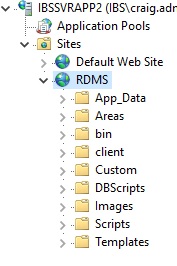
1.jpg
Hello,
Thank you for the screen shot.
The installation you have is the good one. It depends only on how you have configured your web site. It's not related to the newest version. So you can ignore the The application pool name must be between 1 and 64 characters warning. Upgrading to latest DPS version 2019.1.17 should work. We have upgraded an instance on the same environment and it works perfectly.
Best regards,
Érica Poirier
Hi Erica,
Appreciate the help on this but still having problems.
Tried to do the update again and it said it completed.
In testing both 14.1.3.0 & 2019.1.25.0 clients after user/pass duo accept the client now goes not responding. Eventually it comes back with the login to the repository screen again, then does the same thing if you try again.
I had to roll back again so people can use it.
No longer getting any error popups or error emails so I don't have anything else to report for you.
Hello,
Thank you for your feedback and sorry that you still experiencing an issue after upgrading DPS.
If you are interested into it, please send us an email to ticket@devolutions.net to book an appointment for an upgrade remote session. We will help you to troubleshoot this issue.
Best regards,
Érica Poirier