How to set password in Domain Group

Hi.
I try create new Domain Group with data like in attached picture.
I can set domain name, domain user:
$s = New-RDMSession -Type "Group" -Name "PROD"
$s.GroupDetails.GroupType = "Domain"
$s.GroupDetails.Domain = "PROD"
$s.ActiveDirectoryConsole.UserName = "Administrator"
Is it possible to set domain password using ActiveDirectoryConsole.SafePassword property ?
I try use secure string variable with password but with no luck.
$password = "myPassword100%" | ConvertTo-SecureString -asPlainText -Force
$s.ActiveDirectoryConsole.SafePassword = $password
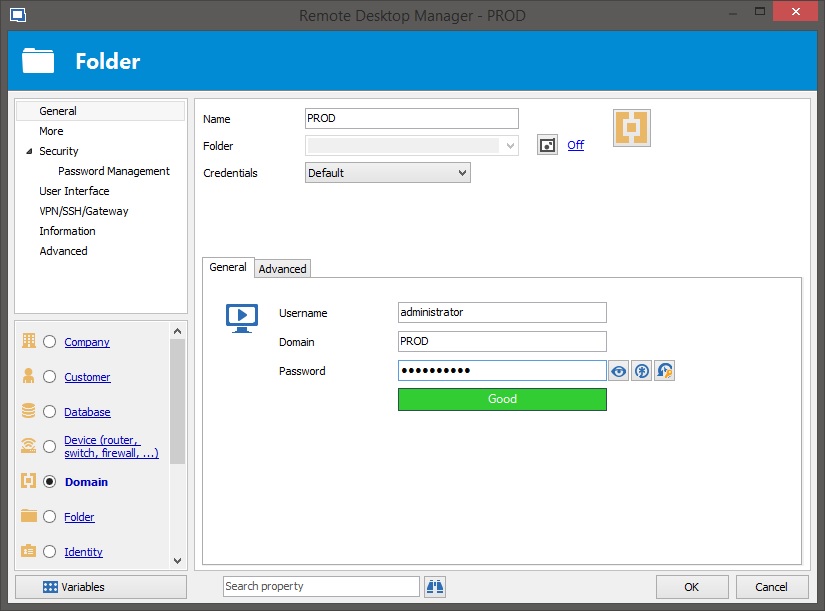
RDM-folder.jpg
All Comments (2)
Hello,
It is possible to set a password on any entry type using the Set-RDMSessionPassword cmdlet. Be sure that the entry is properly saved in the data source before saving a password.[i]$s = New-RDMSession -Type "Group" -Name "PROD"# Set all you properties here except the password[/i][i]Set-RDMSession -Session $s -Refresh[/i][i]Update-RDMUI[/i][i]$pwd = ConvertTo-SecureString "YourPasswordHere" -AsPlainText -ForceSet-RDMSessionPassword -Session $s -Password $pwd -Refresh[/i]
Best regards,
Érica Poirier
Hi.
Thank you for help and instruction.
But your sample code doesn't work.
Last line of code give me error:
Set-RDMSessionPassword : Parameter set cannot be resolved using the specified named parameters.
I found that -Refresh parameter couldn't be used with -Session parameter.
But still this sample code not work properly when I remove -Refresh parameter .
After a few attempts I found that session ID after Set-RDMSession command is changed.
So when I run:
$s = New-RDMSession -Type "Group" -Name "PROD"
# Set all you properties here except the password
Set-RDMSession -Session $s -Refresh
$s.ID
$s2 = Get-RDMSession -Name "PROD"
$s2.ID
I see that:
$s.ID <> $s2.ID
So I modified sample code to:
$s = New-RDMSession -Type "Group" -Name "PROD"
# Set all you properties here except the password
Set-RDMSession -Session $s -Refresh
Update-RDMUI
$s = Get-RDMSession -Name "PROD"
$pwd = ConvertTo-SecureString "YourPasswordHere" -AsPlainText -Force
Set-RDMSessionPassword -Session $s -Password $pwd
But this still don't change password for Folder :)
I think that this is kind of bug because I tried the second version of Set-RDMSession command with -ID parameter:
$s = New-RDMSession -Type "Group" -Name "PROD"
# Set all you properties here except the password
Set-RDMSession -Session $s -Refresh
$pwd = ConvertTo-SecureString "YourPasswordHere" -AsPlainText -Force
$s = Get-RDMSession -Name "PROD"
Set-RDMSessionPassword -ID $s.ID -Password $pwd -Refresh
Update-RDMUI
And this code works ! When I check PROD folder properties Reveal Password option shows me: YourPasswordHere
Please:
1) check why Set-RDMSession -Session command couldn't change password
2) add some note to Set-RDMSession help page that this command should be use afterSet-RDMSession command.
Regards
Dariusz