Is there a way with PowerShell to log off all users that are logged with Devolution
Is there a way with PowerShell to log off all users that are logged with Devolution

Hello,
We have worldwide customer service reps remotely logging into servers. Can I create a PowerShell script to logout all connected users?
Thank you
Doug
All Comments (7)
Hello,
Sorry, but not sure to understand your question.
You want to disconnect your users from what exactly? From the data source? If it's from the data source, what type of data source are you using?
Best regards,
Jeff Dagenais
Sorry, just learning your product.
The person who has deployed this wants an automated way to detect what users have logged in with your Remote Desktop Manager, and then log them off.
Thanks
Hello,
You want to log them off what? RDP sessions, SSH Sessions, the data source?
You would need to provide us more information on what you want to achieve exactly so that we can help you properly.
Best regards,
Jeff Dagenais
Log them off from their RDP session.
Hello,
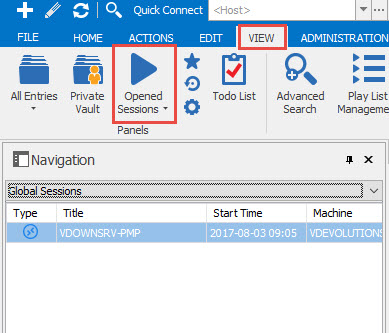
It's possible to see which sessions are opened by clicking on the View -> Opened Sessions -> Global Sessions.
Then, it will be possible for the administrator to advice the users to disconnect the unused sessions.
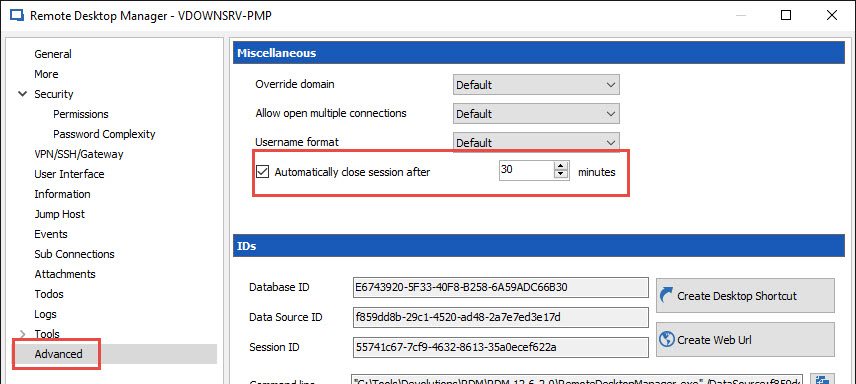
The other solution that I can propose is to enable the Automatically close session after XX minutes option in the Advanced section of your entries.
Best regards,
Jeff Dagenais
2017-08-03_10-12-30.jpg
2017-08-03_10-08-25.jpg
Great, is there a way, in PowerShell, to get a list of open sessions, and then pipe that to a PowerShell function that disconnects them?
Is there a way to do this in PowerShell `Get-OpenSession | Close-RDMSession`, that's optimal, I don't see functions like that in the PowerShell offering that you have. Perhaps there are other PS functions that I can use to script this?
Hello,
You can use these two cmdlets from our PowerShell module to get the opened sessions and close them. But this will work only on the session that are opened from your local Remote Desktop Manager application.
https://help.remotedesktopmanager.com/get-rdmopenedsession.htm
https://help.remotedesktopmanager.com/close-rdmsession.htm
We do not support to get the opened sessions from other users that are connected to the same data source as yours.
Best regards,
Érica Poirier
