Authentification in progress...

Hello,
since we use devolutions server 3.2.0.0, we loose connectivity to the Active Directory. The only thing we can do is rebooting the server. Did there change anything? Can I downgrade to 3.1.0.0 easily or is this not recommended?
Regards,
Georg
All Comments (45)
Hello,
Could you please check when you edit a user from the DVLS console if the Authentication type is grayed out or not?
If it is not grayed out and you can edit the Authentication type, please do not change it and just click on the Ok button. It will save the Authentication type and you should be able to log in with this user.
Best regards,

Érica Poirier
2016-05-13_8-44-35.png
Hello,
You can also consult our Online Help about Upgrading to Devolutions Server 3.2 for further information about authentication issues after the upgrade.
Best regards,
Érica Poirier
I can authenticate, but it looses its connection. Only a reboot resolved this. With 3.1.0.0, I can authenticate and the connection stays up.
is the downgrade possible ? or does it crash everything? we need the RDM work next week properly...
Hello,
It is possible to downgrade only if you have made a full backup of you SQL database before upgrading to version 3.2 of DVLS as explained on our Online Help about Upgrading Devolutions Server.
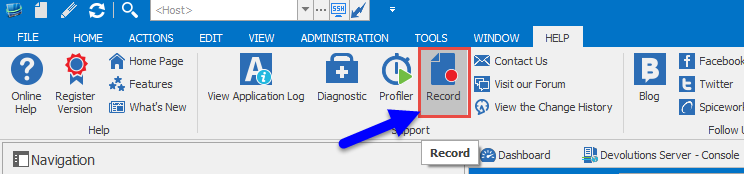
What is the behavior of loosing the connections? Are you talking about the Offline mode? Could you please post a print screen or a short video of this behavior? Please go in the Help menu and click on the Record button.
Best regards,
Érica Poirier
2016-05-13_13-25-45.png
Hi Erica,
I did not look what happened.
I left RDME open for some time.
Then suddenly, the applicaton is "not responding" and than it tries to connect. The message I get is "Authentication in progress...". After this, I looked at the Server Machine and opened RDME as administrator, There, also, same behavior.
Regards,
Georg
... so I cannot tell you when it happened again. Maybe every two hours, I did not look at the watch...
And I could only send you a screenshot of the application, but you will not see very much. I can send you the logs...
oh oh ... I see many errors now. Please have a look at the Logs I sent.
Regards,
Georg
Hello,
Yes please send us the application logs and we will check it.
Have you any of the footer pane activated in your RDM? If yes, please close all of your footer pane to see if this resolve the issue.
Could you please check in File->Background Services if there is any synchronizers?
Best regards,
Érica Poirier
Hello,
RDM is trying to update your offline cache file but another software, like an antivirus, is accessing the cache file in the same time.Info: ClearCache - C:\Users\...\AppData\Local\Devolutions\RemoteDesktopManager\da18dada-d7ed-4bde-b309-3907bcf30ca1\offline.mcdfError Silent: System.IO.IOException: The process cannot access the file 'C:\Users\...\AppData\Local\Devolutions\RemoteDesktopManager\da18dada-d7ed-4bde-b309-3907bcf30ca1\offline.mcdf' because it is being used by another process.Could you please check if you have an antivirus on your machine? If yes, could you please configure your antivirus to not scanning the folder %localappdata%\Devolutions\RemoteDesktopManager?
Best regards,
Érica Poirier
I'm having this issue as well on DVLS 3.2.0.0. This happens on both RDM 11.1.0.0 and 11.5.0.0 clients which previously had no issues on DVLS 3.1.0.0. I tried adding that directory to the AV white list but that did not help.
Hello,
Are you running multiple instances of RDM?
If not, could you please check with the Microsoft/SysInternals Process Explorer if you can find which application or user has locked the cache file?
Best regards,
Érica Poirier
I am not. I experienced this issue over the weekend with two Windows 7 computers running RDM 11.1.0.0 against DVLS 3.2.0.0 which was previously working perfectly fine against DVLS 3.1.0.0. The other computer I experienced this on at the same time was a Windows 10 computer running RDM 11.5.0.0.
No changes were made on the client side so I'm not sure why this would be a file locking issue when only the server was upgraded.
Hello,
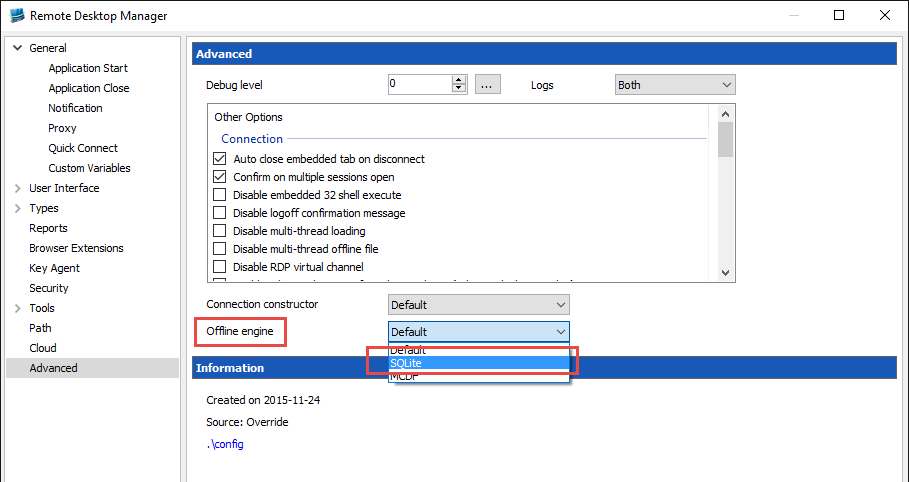
For one of these users, could you please try to change the Offline engine to SQLite? You can modify it in File->Options->Advanced->Offline engine.
Best regards,
Érica Poirier
2016-05-16_15-57-15.png
Seems to work for me ... how long? We will see.
OK, now I lost the connection again. Same issue as before...
On the devolutions Server, there is no antivirus software running...
... any news about a workaround or a fix for this issue? I don't want to restart IIS every 2 hours...
Hello,
You seem to have unique issues what no other users have reported. Is there anything particular about your environment?
When these types of issues occur, we recommend starting with a SFC /scannow
The second step is to run the .net repair tool. https://www.microsoft.com/en-ca/download/details.aspx?id=30135
This thread doest mention if this happens to any of your colleagues as well. That would be useful to know.
thank you,
Maurice
Hi,
yes, everybody has cannot login with the RDM Client when this happens.
And no, I think I am not the only one. Mark Dragon (look a few posts before) has this issue, too.
Or is it solved in the meanvhile?
Regards,
Georg
Hello,
M. Dragon had the issue where the AuthenticationType was not specified in the user account.
You have multiple topics opened and we are trying to understand why you have so many issues.
Maurice
on the server side, sfc does not bring up any problems. There, the Client has the same issue with the authentification... so I guess it is a server problem. With the old version of the server, we did not see these issues.
have you user account been modified to specify the authentication type?
Maurice
Maurice, I have had multiple issues with DVLS 3.2.0.0. They are listed in the current email thread that support has.
Regarding this particular issue, yes, I have it as well. I saw this thread after upgrading but before the issue occurred in my environment. Once this issue occurred Saturday morning and I confirmed all of my clients were unable to connect I decided that this version broke more than it fixed in my environment so I rolled back to 3.1.0.0.
It looks like Georg is also using AD. Perhaps it is related to the new code that was introduced for that? Are there perhaps more tables in the DB that need to be manually touched to make this version work?
In my case, yes I confirmed a value was set for all of my users and the issue still occurred.
I connected with a customer yesterday and patching the users was the only step that was necessary.
Georg has way more than issues with authentication. The CTO has worked on the case for a long time and we are trying to understand why he has experienced issues like that. It is NOT limited to DVLS 3.2.
As for your own case @Mark, since you have reverted we cannot know if patching the users would have been sufficient. You are entitled to premium support so just let us know if you'd like a session.
Maurice
The AuthenticationType of my users had a value of 3 which I verified before leaving Friday night. This issue then occurred Saturday morning. I'm hesitant to leave this particular issue in production since we are a 24/7 shop.
While Georg may have more outstanding issues I am not privy to, it appears we share this one after upgrading to 3.2.0.0.
With that said, Georg tried the SQLite change and I tried the AV exclusion change. I can upgrade again and let it break, but I can't have it down for hours at a time waiting for time zones to align for a session. We can certainly attempt to get a session going so you can see it in action, but perhaps a simple log gather at the time it occurs may be more realistic?
I only can tell you again, I only experienced this specific issue with 3.2. It did not occur before and we were running our environment 1 week. With all other issues we can live because we can connect. This issue here is for us now the most important one.
I cannot go back to 3.1 as I forgot to make a db backup...
Regards,
Georg
For the user accounts: where and what do I have to modify?
The manual fix is described in
http://helpserver.devolutions.net/upgrade_dvls32.htm
Best regards,
Maurice
OK Sorry my fault.
You meant this. I did this already and I did this today again for each user. Some authentication types are greyed out and some not. I did this for each user and acknowledged with OK.
Now I will see what happens tomorrow and how long it runs. I restarted IIS before half an hour so I think tomorrow in the morning it will occur again (if it is not solved).
Regards,
Georg
P.S.: All users (except one) are set to the authentication type "Domain".
And I forgot another thing: the problem occurred even on computers authenticating with a Database-User.
If you are able to authenticate against your domain at all, then you shouldn't need to modify anything else. The issue was that after upgrading to 3.2.0.0 the AuthenticationType was not set correctly and no user at all could log in.
Good morning everybody,
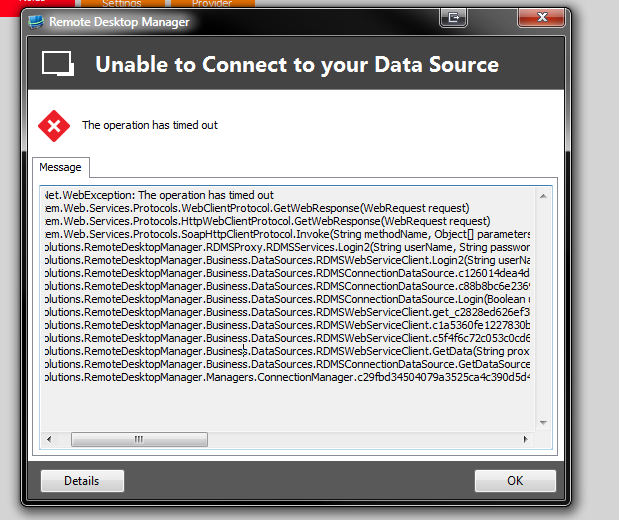
it happened again. The first thing I saw when I came to my computer this day:
Changing the authentication type did not change anything.
And I don't think that this is an Antivirus Issue as on the server there is no AV installed. Another thing is, that on a client I did not change anything. I tried this with Version 11.1 and 11.5, even with the betas before this never happened.
The Windows Server 2012 R2, where the Devolutions Server is running, is not a very old installation.
So I REALLY think this is a new bug.
Regards,
Georg
18-05-2016 08-46-29.png
I think this happens every 1:10. I restarted IIS at 13:20, I think it will crash again 14:30 pm. I checked the network connectivity and power settings, everything seems to be alright and does not go to standby.
ok, about 1h, already broken.
Could you please tell me what I could do? Or do you need some logs, event log, TeamViewer Sessions? I just thinking about to switch back to the sql standard db but this seems not to be the solution we want.
BTW, when RDME tries to establish the connection, the application runs into a timeout and does not react anymore (whole window greyed out). Makes a really unstable impression. I would prefere to have a cancel button, when the server is not available any more.
A refresh, even if the DVLS is available again, does not help. The application has to be restarted. I would expect, if the server is available again, it regenerates again in the background or refresh-button works...
As per your logsIOException - Unable to read data from the transport connection: An existing connection was forcibly closed by the remote host.at System.Net.Sockets.NetworkStream.Read(Byte[] buffer, Int32 offset, Int32 size)at System.Net.PooledStream.Read(Byte[] buffer, Int32 offset, Int32 size)at System.Net.Connection.SyncRead(HttpWebRequest request, Boolean userRetrievedStream, Boolean probeRead)------------------------------------------SocketException - An existing connection was forcibly closed by the remote hostat System.Net.Sockets.Socket.Receive(Byte[] buffer, Int32 offset, Int32 size, SocketFlags socketFlags)at System.Net.Sockets.NetworkStream.Read(Byte[] buffer, Int32 offset, Int32 size)
We are researching this and will keep you posted
Maurice
OK, as a workaround I implemented a scheduled task which runs iisreset /restart.
Not really nice but maybe helpful for some time...
Hi there
I have the same problem since DVLS 3.2.0.0.
Out of nowhere i get the "Authentification in progress" window, or RDM is just unresponsive.
The error message after a few minutes:
But we don't use AD-integration, simply the RDM integrated user management,.
do you have an auto-refresh timer set by any chance?
Its in the data source registration settings
Maurice
Nope:
2016-05-19_15-24-57.png
on the application pool, please edit the Recycling settings (right hand Actions panel)
In the first screen of the wizard, there is only the default 1740 Fixed Interval, when you press next you will see event logging. Please enable all checkboxes and press finish. From then on, all application pool recycling events will appear in the Windows Event log, this will show us if and when it has been recycled.
thank you
Maurice
Ok i did that, i will take a look into eventlog if the problem occurs again.
This workaround works since yesterday....
Here, we have a 30 sec refresh interval defined.
Maurice, you mean in the IIS config? I did that, too, but I have to wait until the evening and nobody stays here... :) Then I can switch my scheduled task off.
Tomorrow I will stick back and see what it brings.
Regards,
Georg
Update:
This issue never happens again since then... "knock on wood".