how to update currently selected session

Disabled
I think this my be an easy question but I am just not seeing it. What I want to do is update the currently selected session.
In detail: I am running a script to produce a filtered list of services running on the remote server and I want to take the output which is assigned to variable and update the description field with it. I cant seem to figure out work with the current session (think it is just getting the session ID of the currently selected session)
All Comments (13)
Hello,
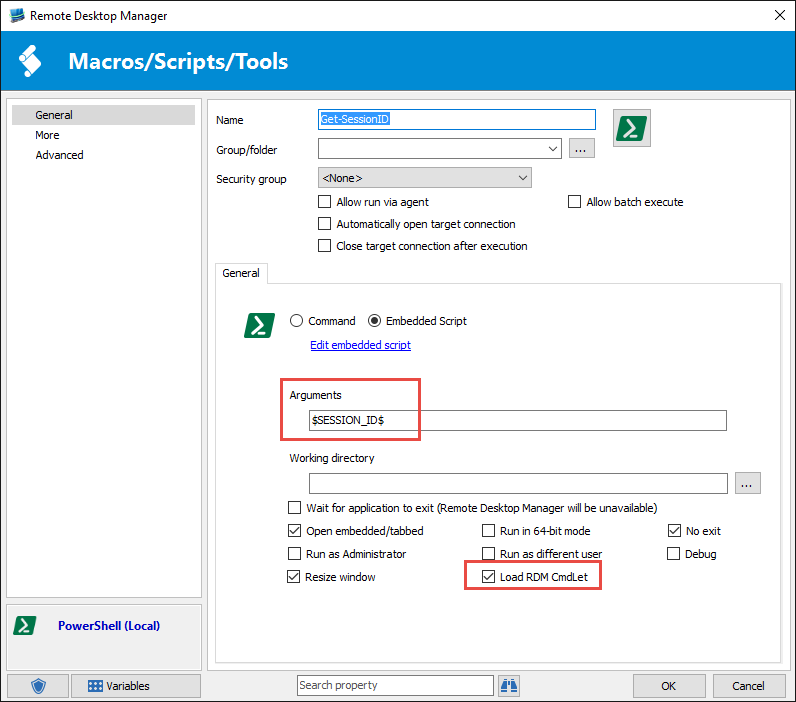
If you want to update the description of the current session, you have to pass the ID of the session as an argument to your PowerShell script. You can use the RDM variable $SESSION_ID$. Also, you have to enable the Load RDM CmdLet option in the PowerShell entry's properties.
Finally, you have to use the Set-RDMSessionProperty to update the description.[CmdletBinding()]Param( [Parameter(Mandatory=$True,Position=1)] [string]$sessionID)Update-RDMUI$newDescription = "New Description"Set-RDMSessionProperty -ID $sessionID -Property "Description" -Value $newDescriptionPlease note that you should probably use the Update-RDMUI for refreshing the actual Data Source because sometime the current Data Source isn't correctly updated within the PowerShell script.
Best regards,
Érica Poirier
2016-05-09_14-32-21.png
is this doable with a Powershell(Remote). doesnt seem to have that option. Here is the actual script (obviously will be making changes to send the output to a variable.
Get-WmiObject Win32_service |Where-Object {$_.Startmode -eq "Auto" -and $_.startname -ne "NT AUTHORITY\LocalService" -and $_.startname -ne "LocalSystem" -and $_.startname -ne "NT Authority\NetworkService"}|Group-Object -Property StartName | Format-Table Name, Count -auto
The intent of this is get a list of some of the services from the remote PC and have it saved to the description
2016-05-09_1504.png
Hello,
I forgot to mention that you cannot use the Remote PowerShell entry to modify the selected session. You have to manage the remote connection inside a Local PowerShell entry in order to retrieve the result of the service list and save it in the description of the selected session.
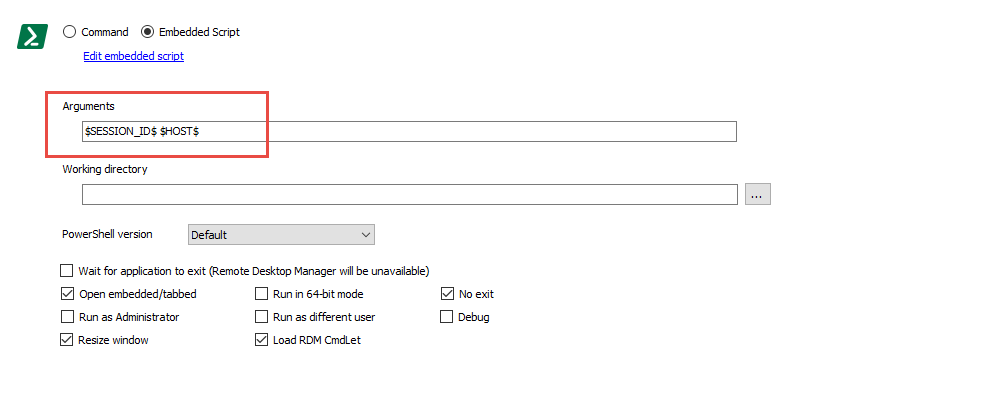
Here is an example of this script :[CmdletBinding()]Param( [Parameter(Mandatory=$True,Position=1)] [string]$sessionID, [Parameter(Mandatory=$True,Position=2)] [string]$hostName )$script = {Get-WmiObject Win32_service | Where-Object {$_.Startmode -eq "Auto" -and $_.startname -ne "NT AUTHORITY\LocalService" -and $_.startname -ne "LocalSystem" -and $_.startname -ne "NT Authority\NetworkService"} | Group-Object -Property StartName | Format-Table Name, Count -auto | Out-String}$psSession = New-PSSession -ComputerName $hostName[string]$newDescription = Invoke-Command -Session $psSession -ScriptBlock $scriptRemove-PSSession -Session $psSessionUpdate-RDMUISet-RDMSessionProperty -ID $sessionID -Property "Description" -Value $newDescriptionAnd don't forget to add the $HOST$ variable in the argument field of the Local PowerShell entry!
Best regards,
Érica Poirier
2016-05-10_10-05-03.png
The script provided previously worked well for a while but now I am getting an error when running it.
The version of RDM I am running is Enterprise 12.5.0.0
The version of .NET on the servers I am connecting to is 4.0
Error message:
Resize PowerShell buffer and window size
Loading RDM CmdLet (Module)
Set-RDMCurrentDataSource : The underlying connection was closed: An unexpected error occurred on a send.
At line:6 char:1
+ Set-RDMCurrentDataSource -ID "f18aa609-88af-44da-aa04-923d818ccb76";
+ ~~~~~~~~~~~~~~~~~~~~~~~~~~~~~~~~~~~~~~~~~~~~~~~~~~~~~~~~~~~~~~~~~~~
+ CategoryInfo : NotSpecified: (:) [Set-RDMCurrentDataSource], WebException
+ FullyQualifiedErrorId : System.Net.WebException,RemoteDesktopManager.PowerShellModule.SetRDMCurrentDatasourceCommand
Update-RDMUI : The underlying connection was closed: An unexpected error occurred on a send.
At C:\Users\mye6437\AppData\Local\Temp\RDM\cf8c6c9c-0589-45a2-b2b3-a7580c414ba5.ps1:12 char:1
+ Update-RDMUI
+ ~~~~~~~~~~~~
+ CategoryInfo : NotSpecified: (:) [Update-RDMUI], WebException
+ FullyQualifiedErrorId : System.Net.WebException,RemoteDesktopManager.PowerShellModule.UpdateRDMUICommand
WARNING: Connection not found.
PS C:\Program Files (x86)\Devolutions\Remote Desktop Manager>
The script was modified a little when I put it in so I have included it below:
[CmdletBinding()]
Param(
[Parameter(Mandatory=$True,Position=1)]
[string]$sessionID,
[Parameter(Mandatory=$True,Position=2)]
[string]$hostName
)
$script = {Get-WmiObject Win32_service | Where-Object {$_.Startmode -eq "Auto" -and $_.startname -ne "NT AUTHORITY\LocalService" -and $_.startname -ne "LocalSystem" -and $_.startname -ne "NT Authority\NetworkService"} | Group-Object -Property Name | Format-Table Name | Out-String}
$psSession = New-PSSession -ComputerName $hostName
[string]$newDescription = Invoke-Command -Session $psSession -ScriptBlock $script
Remove-PSSession -Session $psSession
Update-RDMUI
Set-RDMSessionProperty -ID $sessionID -Property "Description" -Value $newDescription
Hello,
Could you please try to refresh your local cache file in RDM with CTRL+F5 to see if that will help to solve your issue?
This is quite an old post and an old RDM version. I am wondering if a major update occurs on your machine since then. Do you have all required permissions on the following folder?
C:\Users\mye6437\AppData\Local\Temp\RDM
Best regards,
Érica Poirier
I tried the refresh, it had no change.
I have full permission on that folder.
I did discover something interesting, my datasource is Devolutions online drive. However I have a duplicate of that datasource that is local (XML) and the script works fine.
Hello,
Thank you for your feedback.
Are you able to load the sessions of your Devolutions Online Drive in RDM?
I am unable to reproduce that behaviour locally with RDM 12.5.4.0. Could you please try that version?
You can download it here.
https://cdn.devolutions.net/download/Setup.RemoteDesktopManager.12.5.4.0.exe
Best regards,
Érica Poirier
Same behavior. Works fine on my local data source but gives the previous error message when running from the Devolutions Online Drive.
A few extra steps that I took after this.
Exported Devolutions Online Drive datasource to an RDM file
Created a new XML datasource and imported file.
Tested and was able to successfully execute PS script.
Deleted entire contents of Devolutions Online Drive datasource
Imported from RDM file.
Tested and was not able to execute PS script properly.
Hello,
When connected to your DOD, could you please try the following simple steps to see if it's a problem with the PowerShell module?
1- Go in Tools and click on PowerShell (RDM CmdLet) to open the PowerShell window. This will also load the PowerShell module and your DOD data source.
2- If there is no error, please try to list all sessions with Get-RDMSession.
Let me know how it goes.
Best regards,
Érica Poirier
I do get an error.
Set-RDMCurrentDataSource : The underlying connection was closed: An unexpected error occurred on a send.
At line:6 char:1
+ Set-RDMCurrentDataSource -ID "f18aa609-88af-44da-aa04-923d818ccb76";
+ ~~~~~~~~~~~~~~~~~~~~~~~~~~~~~~~~~~~~~~~~~~~~~~~~~~~~~~~~~~~~~~~~~~~
+ CategoryInfo : NotSpecified: (:) [Set-RDMCurrentDataSource], WebException
+ FullyQualifiedErrorId : System.Net.WebException,RemoteDesktopManager.PowerShellModule.SetRDMCurrentDatasourceCommand
Hello,
We are still unable to reproduce the issue.
Is it possible for you to upgrade your RDM to the latest version? If you don't want to overwrite your current installation, you can install the latest version as a portable version. Please follow these instructions about it.
https://help.remotedesktopmanager.com/installation_portableusb.html
Best regards,
Érica Poirier
Sorry it has taken me so long to reply. I have uninstalled my current instal and attempted to install the current version but it will not let me run it. I have not maintained my yearly support so it will not run :/
Hello,
Thank you for your feedback and sorry that you cannot try the latest version.
Here is a link to download RDM version 12.5.4.0.
https://cdn.devolutions.net/download/Setup.RemoteDesktopManager.12.5.4.0.exe
Best regards,
Érica Poirier