2FA not working with Google Authenticator

I'm trying to get 2FA working with Google Authenticator (GA). I have the policy set to 'optional' and configured a user for 2FA. I want to implement this by requiring the user to set connect their own device so I checked the 'configure later by user' box. Now the next time the user logs in he correctly gets a screen asking him to configure GA. I scan the QR code, enter the code given after scanning and press submit. Nothing happens. If I enter a wrong code and press submit, nothing happens either. If I enter no code it says 'please enter a validation code'. This happens on Edge, IE11 and Firefox.
If I try to immediately set the user's GA code in RDM instead of using the check box, the RDM form says 'invalid code' both for codes that should be correct as for codes that are incorrect.
If I try to enter the information manually instead of scanning the QR code the GA app won't let me enter the key stating 'invalid key'. I've checked with two different keys and copy pasted the username (looks like a GUID).
Any ideas?
All Comments (8)
Hello,
What version of RDM are you running?
What version of DVLS are you running?
Are you using Web Services or Web API?
Best regards,
Maurice
RDM 11.0.18.0
DVLS 3.0.8.0
How can I tell the difference between Web Services and Web API?
The first procedure I described was using the website (https://hostname/DVLS) from a workstation, the second procedure I described was being logged on as an admin using RDM on the server itself and editing user properties for the user I was configuring for 2FA. RDM was connected to http://127.0.0.1/DVLS using a Devolutions Server datasource.
I've now also tried to login with this user using RDM on a remote computer. There I can successfully validate GA by scanning but after that I cannot login using these new GA codes. There is a small difference on both GA connections: but the username is now a lowercase GUID instead of the uppercase GUIDs I got earlier.
Hello,
Advanced tab of your data source definition. (File - Data sources, select data source)
Default currently isWeb Services, in our next major release it should be switched to the Web API.
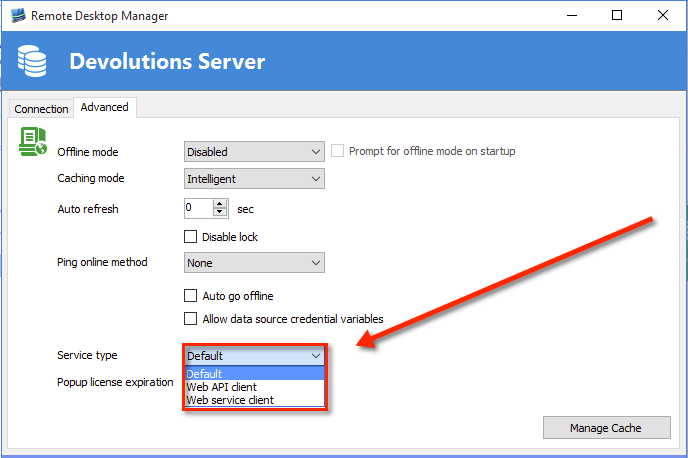
Maurice
dvls_adv.png
Ok, I switched both the RDM on the server and the RDM on the workstation from Default to Web API. This didn't change anything (codes where still not accepted from RDM on the workstation).
I've reset the user on the server. I get the same symptoms as earlier:
- As an admin user I can't configure GA ('Invalid Google Authenticator code')
Using 'configure later by user':
- Web interface: submit button still doesn't do anything
- RDM client on workstation: code is accepted when registering GA but when logging in it's invalid (even the same code that hadn't timed out!)
Also same difference between admin user and normal user in GA username (caps for admin user, lowercase for normal user).
ok, I'll assign this to a dev for investigation.
Maurice
Hello,
I have been able to reproduce your issue.
This happen when the time of the workstation, the server or the network (NTP) and the GA are not synchronized.
Could you verify the time of the computers that did not work.
Best regards,
Érica Poirier
I checked the time earlier because I thought it might be a factor and it was 'approximately ok'. Because you so specifically mentioned it (and because GA has such a short refresh interval) I looked at the time at the server and it was (only) 31 seconds off (ahead) with an online clock. I forced a clock sync and checked it was now only milliseconds off.
After this I reset GA and it works! Apparently 31 seconds was already too much.
Thanks!
P.S. I rechecked Web API / Web service setting, it now works on both settings so that doesn't appear to be a factor.