Creating Sessions with PowerShell

Hello everyone,
I got a little bit trouble with a script in PowerShell.
Here's the script:
$session1 = New-RDM-Session -Kind "Group" -Name "Gruppe" -Group "Gruppe"
Set-RDMSession $session1
$session2 = New-RDM-Session -Name "Eintrag" -Host "myServer" -Kind "RDPConfigured"
Set-RDMSession $session2
$session3 = New-RDM-Session -Name "Eintrag in Gruppe" -Host "myServer" -Kind "RDPConfigured"
$session3.group="Gruppe"
Set-RDMSession $session3
Everytime I try to run it in PowerShell I get the following errors:
Set-RDMSession : Cannot bind argument to parameter 'Session' because it is null.
At line:2 char:16
+ Set-RDMSession $session1
+ ~~~~~~~~~
+ CategoryInfo : InvalidData: ( [Set-RDMSession], ParameterBindingValidation
Exception
+ FullyQualifiedErrorId : ParameterArgumentValidationErrorNullNotAllowed,Devolutions.Re
moteDesktopManager.Business.PS.Commands.SetRDMSessionCommand
Set-RDMSession : Cannot bind argument to parameter 'Session' because it is null.
At line:4 char:16
+ Set-RDMSession $session2
+ ~~~~~~~~~
+ CategoryInfo : InvalidData: ( [Set-RDMSession], ParameterBindingValidation
Exception
+ FullyQualifiedErrorId : ParameterArgumentValidationErrorNullNotAllowed,Devolutions.Re
moteDesktopManager.Business.PS.Commands.SetRDMSessionCommand
The property 'group' cannot be found on this object. Verify that the property exists and
can be set.
At line:6 char:1
+ $session3.group="Gruppe"
+ ~~~~~~~~~~~~~~~~~~~~~~~~
+ CategoryInfo : InvalidOperation: ( [], RuntimeException
+ FullyQualifiedErrorId : PropertyNotFound
Set-RDMSession : Cannot bind argument to parameter 'Session' because it is null.
At line:7 char:16
+ Set-RDMSession $session3
+ ~~~~~~~~~
+ CategoryInfo : InvalidData: ( [Set-RDMSession], ParameterBindingValidation
Exception
+ FullyQualifiedErrorId : ParameterArgumentValidationErrorNullNotAllowed,Devolutions.Re
moteDesktopManager.Business.PS.Commands.SetRDMSessionCommand
It does work in the PowerShell in RemoteDesktopManage, but otherwise not. :c
Some tutorials or examples told me to use Set-RDMSession, other to use Set-RDM-Session. Where is the difference?
I have already imported and loaded the SnapIn...
Marvin Klar
All Comments (13)
Hello Marvin,
are you sure that the snapin is loaded in your external powershell? I created a powershell profile that I am sure it is loaded automatically and I only use the x86 version of powershell for RDM:
In C:\Windows\SysWOW64\WindowsPowerShell\v1.0 create a file named profile.ps1 with this content:
Then be sure to use the x86 version of powershell from here:
C:\Windows\SysWOW64\WindowsPowerShell\v1.0\powershell.exe
Best regards,
Andy
Ohh and only use the commandlets like Set-RDMSession - without the second dash. The commandlets with 2 dashes are old - the new ones are much more performant.
@andybandy - thank you for replying, this thread had fallen between the cracks (we missed it)
@marvin - if you need more assistance please let us know
Best regards,
Stéfane Lavergne
That was my message... :D
..just forgot to login.
I am pretty sure, there is anything wron with my New-RDM-Session, cause I tryed to set it and it was still NULL. So the Session can't be set....
Commands:
set-variable -name session -value (New-RDM-Session -Name Testgroup -Kind Group)
get-variable session
Output:
Name Value
---- ----
session
Is there anything wrong?
If I finally try to set set the Session, it says the argument ($session) is NULL.
Command: set-rdmsession -Session $session
Hello,
Is it possible that the variable is cleared between invokes??
could you try with one invoke which runs all these commands
Maurice
just in case you need a full script to test$computerName = "wind10";$theusername = "david";$thedomain = "windjammer";$thepassword = "123456";$session = New-RDM-Session -Host $computerName -Kind "RDPConfigured" -Name $computerName;Set-RDM-Session -Session $session -NoRefresh;Set-RDM-Username -ID $session.ID $theusername;Set-RDM-Domain -ID $session.ID $thedomain;$pass = ConvertTo-SecureString $thepassword -asplaintext -force;Set-RDM-Password -ID $session.ID -Password $pass -NoRefresh;
Maurice
I may have identified an issue, it may depend on the data source type. We will have to perform more tests, but it looks like the Set-RDMSession call is asynchronous and returns before the new session is available for further commands.
By adding a Update-RDMUI call I never get the error
I discovered this when porting the sample script to use the newer cmdlets...
Here is the script that doesnt experience the issue$computerName = "wind10";$theusername = "david";$thedomain = "windjammer";$thepassword = "123456";$session = New-RDMSession -Host $computerName -Kind "RDPConfigured" -Name $computerName;Set-RDMSession -Session $session -Refresh;Update-RDMUI;Set-RDMSessionUsername -ID $session.ID $theusername;Set-RDMSessionDomain -ID $session.ID $thedomain;$pass = ConvertTo-SecureString $thepassword -asplaintext -force;Set-RDMSessionPassword -ID $session.ID -Password $pass;
Maurice
Ok, I didn't forgot to log in, it just logged me out automatically...
Does anyone know how to fix this issue, or have just an idea..?
Do you have the C++ runtime 64-bit installed?
Does RDM 64-bit work?
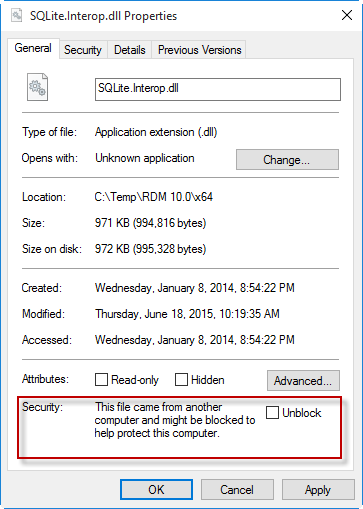
Are the files "blocked"? In windows explorer, open to the ""C:\Program Files (x86)\Devolutions\Remote Desktop Manager\x64\" path, right-click -> properties
Stéfane Lavergne
12-22-2015 10-38-38 AM.png
Hello,
We will look into the null ID, but most likely it will be fixed only after the holiday break.
Best regards,
Maurice
Hello,
nice to hear! Can't wait for it :D
The C++ Runtime is installed. It doesn't work in any bit version. And I don't even have the opportunity to block/unblock the files.
SQLite.Interop.dll