2FA Duo Not Working Devolutions Server

I'm trying out DLVS server and want to test Duo.
I have AD authentication configured and working.
My local data source points to my DLVS server, username is configured as %userdomain%\%username%, and password is set to "always ask".
Everything at this point works great. It prompts for my password, and my AD username is displayed as the user. Login works, groups/roles work as expected etc.
Now I tried to configure Duo.
I appear to have setup Duo correctly on my Server, with the keys and api blah blah. I set 2FA as optional per user (for testing). And I go to my own account and configure Duo 2FA. I click Send Push, and I get the push notification. So far so good.
Here comes the problem; now, when I attempt to log in to my DVLS Data Source from RDM, I'm prompted for my password like normal, I then click OK. But now it says username and password failed.
I disable duo on my account and authentication works again...
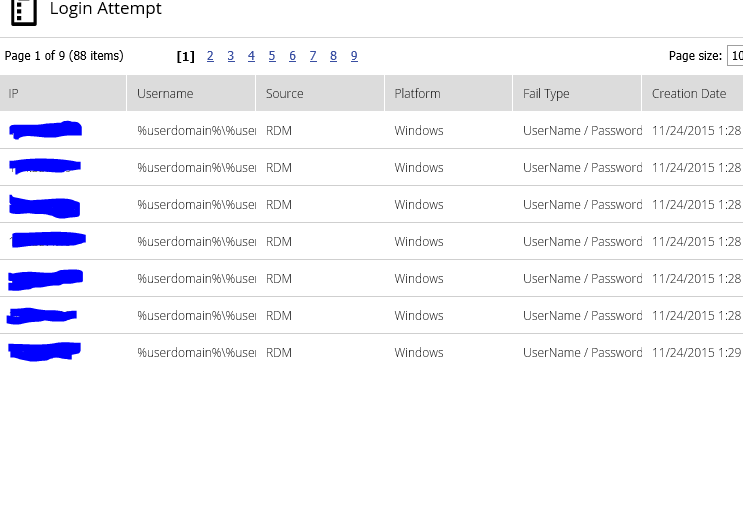
Here's the funny thing; if I go into the website and look at login attempts, I see it actually tried to login with the username "%userdomain%\%username%" and wasn't substituting for domain username.
Even if I hard code my Data Source to my domain username, it still fails but leaves the username column empty in the logon attempts report.
I attached an image for you. (doesn't include my hard code attempts after my discovery)
Capture.PNG
All Comments (1)
Hello,
I want to let you known that I have been working to fix the problem and it will be part of the next release of RDM. Meantime you may uncheck the "always ask" password and username.
Best regards