Active Directory Integration by AD-Groups is not recognized

Hi
To create a role from an AD-Group is no problem. It works without a Problem.
But when a user logs in (who is in that Group). His account is created but not linked to that role.
What am I doing wrong? I thought this is the normal way to do this.
Thanks
Michael
All Comments (7)
Hello,
Do you use DVLS or a SQL Server data source? The AD-Group are not supported in SQL Server data source.
David Hervieux
Hi
It is DVLS (Devolutions Server right?).
Newest Version.
Michael
Ok,
I will assign this to our support team for a diagnostic.
David Hervieux
Hello,
When you say that the account is not linked to the role, I just want to make sure that you are not looking for a checkbox to appear beside the role.
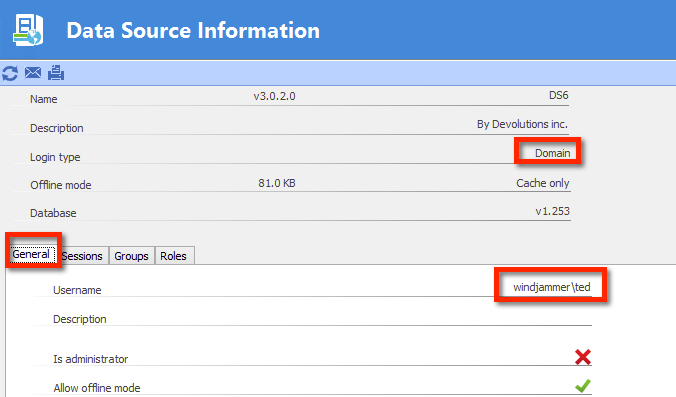
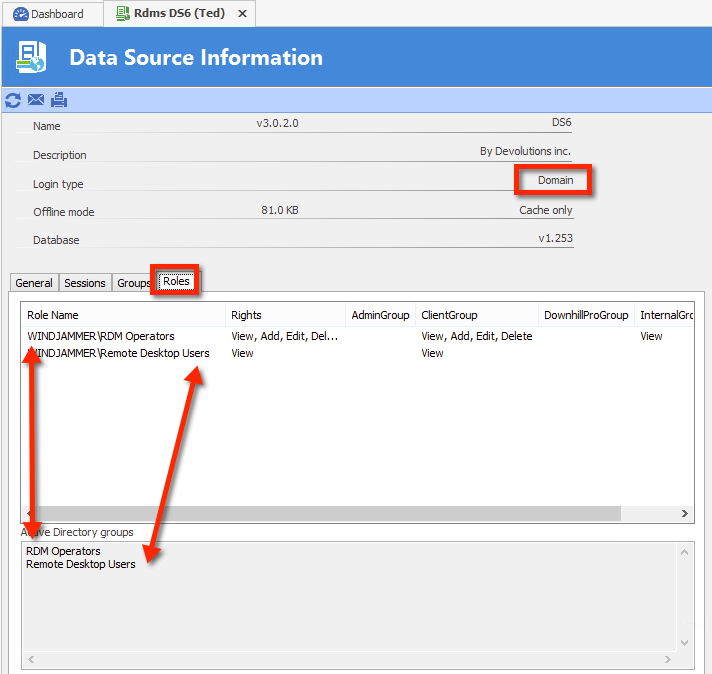
Under DLVS/ AD Integration, the only way to see the roles that a user is a member of, is by asking him to run File - My Data Source Information
First confirm that domain authentication is used, and that the username matches with what you expect
then go in the Rolestab, you will see the roles he belongs to, and the permissions he has gotten through that. Note that in the current version the names of the groups must match
Maurice
dvls2.png
dvls1.png
Hi
Now I have seen the Problem. If the user logs in with "username" then the Login type is sqlserver.
If he logs in with "Domain\username" then it is Domain and it works.
But how can this be handled in practice? many users will Login with just "username". A normal user cannot know.
Regards
Michael
Hello,
This will be improved in a coming release (a few weeks)
We overhauled our handling of domain users and this will be put to use.
Best regards,
Maurice
Ho to use "Trusted Domain", I want to add other domains so that the users from that domain can access the datasource.
2016-10-17 14_25_12-Citrix POC - Desktop Viewer.png